

varnish3.0安装及配置教程
发布时间:2012-11-28 09:46:46 作者:佚名  我要评论
我要评论
我要评论本文将详细介绍varnish3.0安装及配置,现在内网的vps上安装Varnish的最新版3.0来用做测试
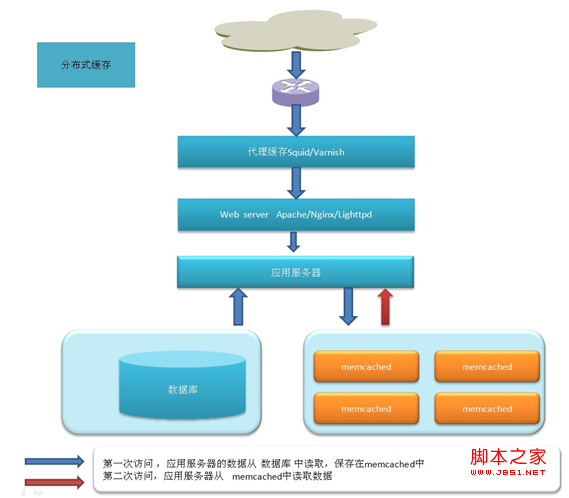
在内网的vps上安装Varnish的最新版3.0来用做测试
Varnish有centos下的rpm和ubuntu下的deb二进制包下载,但我选择的是源码编译安装
先下载 varnish-3.0.0_jb51.rar
yum install gcc
yum install gcc-c++ libstdc++-devel
yum install -y httpd-devel pcre perl pcre-devel zlib zlib-devel GeoIP GeoIP-devel
Varnish需要pcre支持,如果服务器没有安装pcre-devel会提示需要指定prce目录。
Centos服务器上使用yum install pcre-devel安装
解压varnish进行编译安装
cd varnish-3.0.0
./autogen.sh
./configure --prefix=/usr/local/varnish PKG_CONFIG_PATH=/usr/lib/pkgconfig
make
make install
安装成功后,安装的目录是
cd /usr/local/varnish/sbin
./varnishd -V
查看版本,看是否安装成功
测试varnish
先编辑配置文件
vi /usr/local/varnish/etc/varnish/default.vcl
复制代码
代码如下:# This is a basic VCL configuration file for varnish. See the vcl(7)
# man page for details on VCL syntax and semantics.
#
# Default backend definition. Set this to point to your content
# server.
#
backend default {
.host = "192.168.88.156";
.port = "80";
###下面三行为新加配
.connect_timeout = 1s;
.first_byte_timeout = 5s;
.between_bytes_timeout = 2s;
}
#
# Below is a commented-out copy of the default VCL logic. If you
# redefine any of these subroutines, the built-in logic will be
# appended to your code.
sub vcl_recv {
if (req.restarts == 0) {
if (req.http.x-forwarded-for) {
set req.http.X-Forwarded-For =
req.http.X-Forwarded-For + ", " + client.ip;
} else {
set req.http.X-Forwarded-For = client.ip;
}
}
if (req.request != "GET" &&
req.request != "HEAD" &&
req.request != "PUT" &&
req.request != "POST" &&
req.request != "TRACE" &&
req.request != "OPTIONS" &&
req.request != "DELETE") {
/* Non-RFC2616 or CONNECT which is weird. */
return (pipe);
}
if (req.request != "GET" && req.request != "HEAD") {
/* We only deal with GET and HEAD by default */
return (pass);
}
if (req.http.Authorization || req.http.Cookie) {
/* Not cacheable by default */
return (pass);
}
return (lookup);
}
#
sub vcl_pipe {
# # Note that only the first request to the backend will have
# # X-Forwarded-For set. If you use X-Forwarded-For and want to
# # have it set for all requests, make sure to have:
# # set bereq.http.connection = "close";
# # here. It is not set by default as it might break some broken web
# # applications, like IIS with NTLM authentication.
return (pipe);
}
#
sub vcl_pass {
return (pass);
}
#
sub vcl_hash {
hash_data(req.url);
if (req.http.host) {
hash_data(req.http.host);
} else {
hash_data(server.ip);
}
return (hash);
}
#
sub vcl_hit {
return (deliver);
}
#
sub vcl_miss {
return (fetch);
}
#
sub vcl_fetch {
if (beresp.ttl <= 0s ||
beresp.http.Set-Cookie ||
beresp.http.Vary == "*") {
/*
* Mark as "Hit-For-Pass" for the next 2 minutes
*/
set beresp.ttl = 120 s;
return (hit_for_pass);
}
return (deliver);
}
#
sub vcl_deliver {
return (deliver);
}
#
# sub vcl_error {
# set obj.http.Content-Type = "text/html; charset=utf-8";
# set obj.http.Retry-After = "5";
# synthetic {"
# <?xml version="1.0" encoding="utf-8"?>
# <!DOCTYPE html PUBLIC "-//W3C//DTD XHTML 1.0 Strict//EN"
# "http://www.w3.org/TR/xhtml1/DTD/xhtml1-strict.dtd">
# <html>
# <head>
# <title>"} + obj.status + " " + obj.response + {"</title>
# </head>
# <body>
# <h1>Error "} + obj.status + " " + obj.response + {"</h1>
# <p>"} + obj.response + {"</p>
# <h3>Guru Meditation:</h3>
# <p>XID: "} + req.xid + {"</p>
# <hr>
# <p>Varnish cache server</p>
# </body>
# </html>
# "};
# return (deliver);
# }
#
sub vcl_init {
return (ok);
}
#
sub vcl_fini {
return (ok);
}
/usr/local/varnish/sbin/varnishd -f /usr/local/varnish/etc/varnish/default.vcl -s malloc,1024m -T 127.0.0.1:200 -a 0.0.0.0:80
现在可以打开varnish了
http://192.168.88.1/ (开启varnish的端口号)
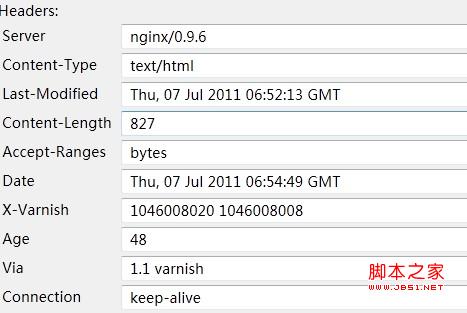
戴图显示,nginx 为177上运行的web服务器,出现了varnish字样,表示缓存架设成功,已正常工作了。
启动varnishncsa用来将Varnish访问日志写入日志文件:
复制代码
代码如下:/usr/local/varnish/bin/varnishncsa -n /var/vcache -w /var/logs/varnish.log &
配置开机自动启动Varnish
复制代码
代码如下:vi /etc/rc.local
在末尾增加以下内容:
引用
ulimit -SHn 51200
/usr/local/varnish/sbin/varnishd -n /var/vcache -f /usr/local/varnish/vcl.conf -a 0.0.0.0:80 -s file,/var/vcache/varnish_cache.data,1G -g www -u www -w 30000,51200,10 -T 127.0.0.1:3500 -p client_http11=on
/usr/local/varnish/bin/varnishncsa -n /var/vcache -w /var/logs/youvideo.log &
优化Linux内核参数
复制代码
代码如下:vi /etc/sysctl.conf
在末尾增加以下内容:
引用
net.ipv4.tcp_fin_timeout = 30
net.ipv4.tcp_keepalive_time = 300
net.ipv4.tcp_syncookies = 1
net.ipv4.tcp_tw_reuse = 1
net.ipv4.tcp_tw_recycle = 1
net.ipv4.ip_local_port_range = 5000 65000
查看Varnish服务器连接数与命中率
/usr/local/varnish/bin/varnishstat
配置启动脚本:
mkdir /cache/varnish/V -p
vi /usr/local/varnish/sbin/start.sh
#!/bin/sh
#file:start.sh
date -u
/usr/local/varnish/sbin/varnishd -a 0.0.0.0:80 -s file,/cache/varnish/V,1024m -f /usr/local/varnish/etc/varnish/default.vcl -p thread_pool_max=1500 -p thread_pools=5 -p listen_depth=512
chmod 777 start.sh
运行:
/usr/local/varnish/sbin/start.sh
相关文章

Fedora Linux 42 稳定版发布: 带来大量新功能和软件更新
Fedora 42昨日发布,这是 Red Hat 赞助开发的杰出前沿 Linux 发行版的最新版,包含大量新功能和软件更新,使其成为 2025 年上半年发布的一款出色的 Linux 操作系统之一,内2025-04-16
如何在Linux查看硬盘信息? 查看Linux硬盘大小类型和硬件信息的5种方法
使用Linux系统的过程中,查看和了解硬盘信息是非常重要的工作,尤其是对于系统管理员而言,那么在Linux系统中如何查看硬盘信息?以下是具体内容介绍2025-03-12如何在 Linux 中查看 CPU 详细信息? 3招轻松查看CPU型号、核心数和温度
在日常运维工作中,获取 CPU 信息是系统运维管理员常见的工作内容,无论是为了性能调优、硬件升级还是仅仅满足好奇心2025-03-11
什么是 Arch Linux? 独树一帜的Arch Linux发行版分析
Arch Linux是为简化,优化,现代化,实用主义,用户中心和多功能性而创建Linux发行版,究竟是什么让 Arch 与众不同?下面我们就来简要解读2025-02-19- 一直用的linux办公,想要将笔记本电脑从 Linux 系统切换回 Windows 11,我们可以制作一个win11装机u盘,详细如下2025-02-17
Rsnapshot怎么用? 基于Rsync的强大Linux备份工具使用指南
Rsnapshot 不仅可以备份本地文件,还能通过 SSH 备份远程文件,接下来详细介绍如何安装、配置和使用 Rsnapshot,包括创建每小时、每天、每周和每月的本地备份,以及如何进2025-02-06
Linux Kernel 6.13发布:附更新内容及新特性解读
Linux 内核 6.13 正式发布,新版本引入了惰性抢占支持,简化内核抢占逻辑,通过减少与调度器相关的调用次数,让内核在运行时表现更优,从而提高效率2025-01-23
五大特性引领创新! 深度操作系统 deepin 25 Preview预览版发布
今日,深度操作系统正式推出deepin 25 Preview版本,该版本集成了五大核心特性:磐石系统、全新DDE、Treeland窗口合成器、AI For OS以及Distrobox子系统2025-01-18
Linux Mint Xia 22.1重磅发布: 重要更新一览
Beta 版 Linux Mint“Xia” 22.1 发布,新版本基于 Ubuntu 24.04,内核版本为 Linux 6.8,这次更新带来了诸多优化和改进,进一步巩固了 Mint 在 Linux 桌面操作系统领域的2025-01-16
LinuxMint怎么安装? Linux Mint22下载安装图文教程
Linux Mint22发布以后,有很多新功能,很多朋友想要下载并安装,该怎么操作呢?下面我们就来看看详细安装指南2025-01-16
最新评论