

Bootstrap下拉菜单样式
更新时间:2017年02月07日 15:13:24 作者:轻扰时光
这篇文章主要为大家详细介绍了Bootstrap下拉菜单样式,具有一定的参考价值,感兴趣的小伙伴们可以参考一下
本文实例为大家分享了Bootstrap下拉菜单的具体代码,供大家参考,具体内容如下
<!doctype html>
<html>
<head>
  <meta charset="utf-8">
  <meta http-equiv="X-UA-Compatible" content="IE=edge">
  <meta name="viewport" content="width=device-width, initial-scale=1">
  <title>Bootstrap</title>
  <link rel="stylesheet" href="css/bootstrap.css" />
</head>
<!--第1步:添加一个dropdown父级;
第2步:给button添加一个data-toggle="dropdown"属性;
第3步:给ul添加一个class="dropdown-menu”.
 最好再给button添加一个dropdown-toggle的class属性
-->
<body>
  <div class="container" style="margin-top:5px">
    <div class="row">
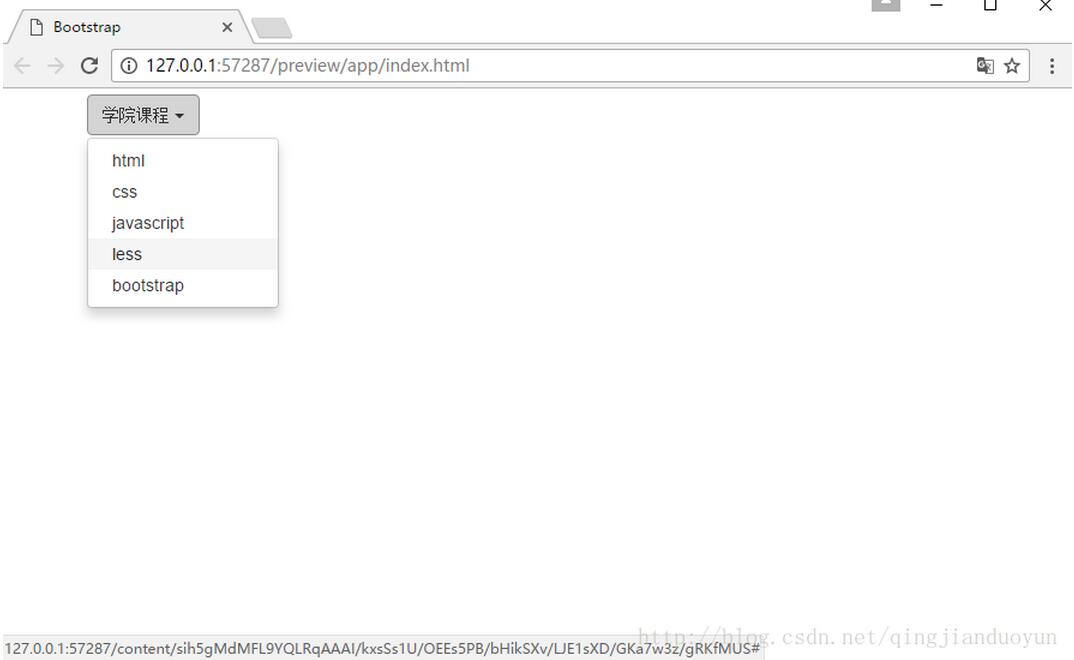
      <div class="dropdown">
        <button class="btn btn-default dropdown-toggle" data-toggle="dropdown">学院课程 <span class="caret"></span></button><!--btn-default默认颜色-->
        <ul class="dropdown-menu">
          <li><a href="#">html</a></li>
          <li><a href="#">css</a></li>
          <li><a href="#">javascript</a></li>
          <li><a href="#">less</a></li>
          <li><a href="#">bootstrap</a></li>
        </ul>
      </div>

    </div>
  </div>
  <script src="js/jquery-2.1.0.js"></script>
  <script src="js/bootstrap.js"></script>
</body>
</html>
效果图:
Bootstrap下拉菜单的样式:
<!doctype html>
<html>
<head>
 <meta charset="utf-8">
 <meta http-equiv="X-UA-Compatible" content="IE=edge">
 <meta name="viewport" content="width=device-width, initial-scale=1">
 <title>Bootstrap</title>
 <link rel="stylesheet" href="css/bootstrap.css" rel="external nofollow" />
</head>
<body>
 <div class="container" style="margin-top:5px">
 <div class="row">
  <div class="col-lg-4">
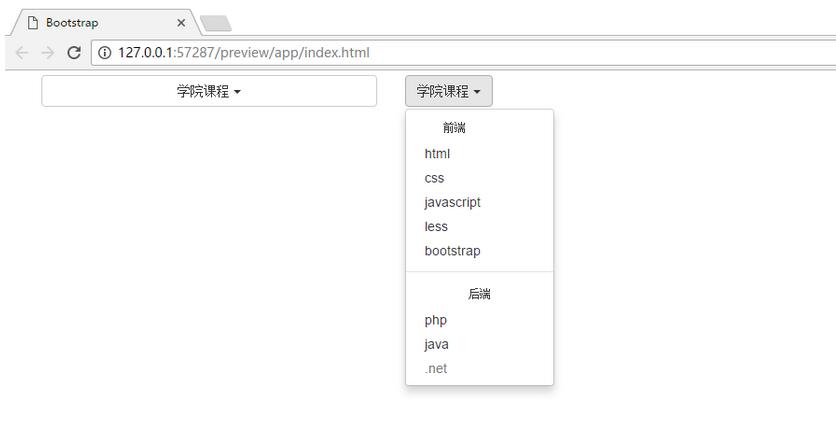
  <div class="dropdown"> <!--在dropdown后面加上open使下拉列表默认展开;而pull-right使其右浮动并右对齐,改为dropup使箭头朝上并向上展开-->
   <button class="btn btn-default dropdown-toggle btn-block" data-toggle="dropdown">学院课程 <span class="caret"></span></button><!--btn-block使按钮撑满整个父级-->
   <ul class="dropdown-menu">
   <li><a href="#" rel="external nofollow" rel="external nofollow" rel="external nofollow" rel="external nofollow" rel="external nofollow" rel="external nofollow" rel="external nofollow" rel="external nofollow" rel="external nofollow" rel="external nofollow" rel="external nofollow" rel="external nofollow" rel="external nofollow" rel="external nofollow" rel="external nofollow" rel="external nofollow" >html</a></li>
   <li><a href="#" rel="external nofollow" rel="external nofollow" rel="external nofollow" rel="external nofollow" rel="external nofollow" rel="external nofollow" rel="external nofollow" rel="external nofollow" rel="external nofollow" rel="external nofollow" rel="external nofollow" rel="external nofollow" rel="external nofollow" rel="external nofollow" rel="external nofollow" rel="external nofollow" >css</a></li>
   <li><a href="#" rel="external nofollow" rel="external nofollow" rel="external nofollow" rel="external nofollow" rel="external nofollow" rel="external nofollow" rel="external nofollow" rel="external nofollow" rel="external nofollow" rel="external nofollow" rel="external nofollow" rel="external nofollow" rel="external nofollow" rel="external nofollow" rel="external nofollow" rel="external nofollow" >javascript</a></li>
   <li><a href="#" rel="external nofollow" rel="external nofollow" rel="external nofollow" rel="external nofollow" rel="external nofollow" rel="external nofollow" rel="external nofollow" rel="external nofollow" rel="external nofollow" rel="external nofollow" rel="external nofollow" rel="external nofollow" rel="external nofollow" rel="external nofollow" rel="external nofollow" rel="external nofollow" >less</a></li>
   <li><a href="#" rel="external nofollow" rel="external nofollow" rel="external nofollow" rel="external nofollow" rel="external nofollow" rel="external nofollow" rel="external nofollow" rel="external nofollow" rel="external nofollow" rel="external nofollow" rel="external nofollow" rel="external nofollow" rel="external nofollow" rel="external nofollow" rel="external nofollow" rel="external nofollow" >bootstrap</a></li>
   </ul>
  </div>
  </div>
  <div class="col-lg-4">
  <div class="dropdown">
   <button class="btn btn-default dropdown-toggle" data-toggle="dropdown">学院课程 <span class="caret"></span></button>
   <ul class="dropdown-menu">
   <li class="dropdown-header"><a href="#" rel="external nofollow" rel="external nofollow" rel="external nofollow" rel="external nofollow" rel="external nofollow" rel="external nofollow" rel="external nofollow" rel="external nofollow" rel="external nofollow" rel="external nofollow" rel="external nofollow" rel="external nofollow" rel="external nofollow" rel="external nofollow" rel="external nofollow" rel="external nofollow" >前端</a></li><!--dropdown-header是菜单里的标题,给li添加-->
   <li><a href="#" rel="external nofollow" rel="external nofollow" rel="external nofollow" rel="external nofollow" rel="external nofollow" rel="external nofollow" rel="external nofollow" rel="external nofollow" rel="external nofollow" rel="external nofollow" rel="external nofollow" rel="external nofollow" rel="external nofollow" rel="external nofollow" rel="external nofollow" rel="external nofollow" >html</a></li>
   <li><a href="#" rel="external nofollow" rel="external nofollow" rel="external nofollow" rel="external nofollow" rel="external nofollow" rel="external nofollow" rel="external nofollow" rel="external nofollow" rel="external nofollow" rel="external nofollow" rel="external nofollow" rel="external nofollow" rel="external nofollow" rel="external nofollow" rel="external nofollow" rel="external nofollow" >css</a></li>
   <li><a href="#" rel="external nofollow" rel="external nofollow" rel="external nofollow" rel="external nofollow" rel="external nofollow" rel="external nofollow" rel="external nofollow" rel="external nofollow" rel="external nofollow" rel="external nofollow" rel="external nofollow" rel="external nofollow" rel="external nofollow" rel="external nofollow" rel="external nofollow" rel="external nofollow" >javascript</a></li>
   <li><a href="#" rel="external nofollow" rel="external nofollow" rel="external nofollow" rel="external nofollow" rel="external nofollow" rel="external nofollow" rel="external nofollow" rel="external nofollow" rel="external nofollow" rel="external nofollow" rel="external nofollow" rel="external nofollow" rel="external nofollow" rel="external nofollow" rel="external nofollow" rel="external nofollow" >less</a></li>
   <li><a href="#" rel="external nofollow" rel="external nofollow" rel="external nofollow" rel="external nofollow" rel="external nofollow" rel="external nofollow" rel="external nofollow" rel="external nofollow" rel="external nofollow" rel="external nofollow" rel="external nofollow" rel="external nofollow" rel="external nofollow" rel="external nofollow" rel="external nofollow" rel="external nofollow" >bootstrap</a></li>
   <li class="divider"><a href="#" rel="external nofollow" rel="external nofollow" rel="external nofollow" rel="external nofollow" rel="external nofollow" rel="external nofollow" rel="external nofollow" rel="external nofollow" rel="external nofollow" rel="external nofollow" rel="external nofollow" rel="external nofollow" rel="external nofollow" rel="external nofollow" rel="external nofollow" rel="external nofollow" >html</a></li><!--divider是分隔线,给li添加-->
   <li class="dropdown-header text-center"><a href="#" rel="external nofollow" rel="external nofollow" rel="external nofollow" rel="external nofollow" rel="external nofollow" rel="external nofollow" rel="external nofollow" rel="external nofollow" rel="external nofollow" rel="external nofollow" rel="external nofollow" rel="external nofollow" rel="external nofollow" rel="external nofollow" rel="external nofollow" rel="external nofollow" >后端</a></li><!--text-center让内容居中-->
   <li><a href="#" rel="external nofollow" rel="external nofollow" rel="external nofollow" rel="external nofollow" rel="external nofollow" rel="external nofollow" rel="external nofollow" rel="external nofollow" rel="external nofollow" rel="external nofollow" rel="external nofollow" rel="external nofollow" rel="external nofollow" rel="external nofollow" rel="external nofollow" rel="external nofollow" >php</a></li>
   <li><a href="#" rel="external nofollow" rel="external nofollow" rel="external nofollow" rel="external nofollow" rel="external nofollow" rel="external nofollow" rel="external nofollow" rel="external nofollow" rel="external nofollow" rel="external nofollow" rel="external nofollow" rel="external nofollow" rel="external nofollow" rel="external nofollow" rel="external nofollow" rel="external nofollow" >java</a></li>
   <li class="disabled"><a href="#" rel="external nofollow" rel="external nofollow" rel="external nofollow" rel="external nofollow" rel="external nofollow" rel="external nofollow" rel="external nofollow" rel="external nofollow" rel="external nofollow" rel="external nofollow" rel="external nofollow" rel="external nofollow" rel="external nofollow" rel="external nofollow" rel="external nofollow" rel="external nofollow" >.net</a></li><!--disabled使菜单不可选-->
   </ul>
  </div>
  </div>
 </div>
 </div>
 <script src="js/jquery-2.1.0.js"></script>
 <script src="js/bootstrap.js"></script>
</body>
</html>
效果图:
以上就是本文的全部内容,希望对大家的学习有所帮助,也希望大家多多支持脚本之家。
相关文章
 这篇文章主要介绍了JS中的防抖与节流及作用详解,本文通过文字说明加示例代码的形式给大家介绍的非常详细,具有一定的参考借鉴价值,需要的朋友可以参考下2021-10-10
 严格模式是 ECMAScript 5 引入的一种运行模式,可以让 JavaScript 在更加严格的条件下运行,本文主要为大家详细介绍了JavaScript中严格模式的使用,需要的可以参考下2023-11-11
 这篇文章主要介绍了bootstrap可视化布局入门教程的相关资料,本文介绍的非常详细,具有参考借鉴价值,感兴趣的朋友一起看看吧2016-09-09
 有时候我们希望弹出层能够实现延迟关闭,并且鼠标在弹出层区域移动的时候能够保持显现,下面是具体的实现代码。2010-04-04
 这篇文章主要介绍了微信小程序iBeacon测距及稳定程序的实现解析,文中通过示例代码介绍的非常详细,对大家的学习或者工作具有一定的参考学习价值,需要的朋友可以参考下2019-07-07
 这篇文章主要为大家详细介绍了利用js编写网页进度条效果,具有一定的参考价值,感兴趣的小伙伴们可以参考一下2017-10-10
 这篇文章主要介绍了微信小程序 弹窗输入组件的实现解析,文中通过示例代码介绍的非常详细,对大家的学习或者工作具有一定的参考学习价值,需要的朋友可以参考下2019-08-08
 BMI指数计算器相信大家都用过,那用JavaScript怎么实现呢?其实很简单,这篇文章给出了实例代码,有需要的可以参考学习。2016-08-08
 下面小编就为大家带来一篇js中删除数组中的某一元素实例(无下标时)。小编觉得挺不错的,现在就分享给大家,也给大家做个参考。一起跟随小编过来看看吧2017-02-02
基于JavaScript实现高德地图和百度地图提取行政区边界经纬度坐标
本文给大家介绍javascript实现高德地图和百度地图提取行政区边界经纬度坐标的相关知识,本文实用性非常高,代码简单易懂,需要的朋友参考下吧2016-01-01
最新评论