

Bootstrap笔记—折叠实例代码
更新时间:2017年03月13日 17:07:59 作者:erdouzhang
本篇文章主要介绍了Bootstrap笔记—折叠实例代码,详细的介绍了折叠效果实例,包括一组多组等,非常具有实用价值,需要的朋友可以参考下。
1. 基础折叠
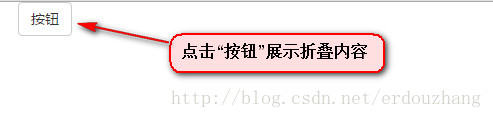
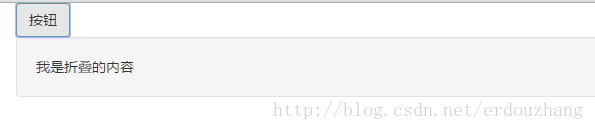
展示如下:
<body>
  <div class="container">
    <!-- 按钮 -->
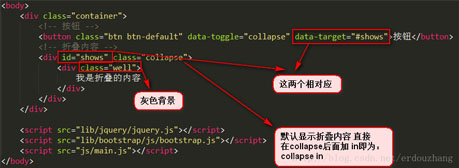
    <button class="btn btn-default" data-toggle="collapse" data-target="#shows">按钮</button>
    <!-- 折叠内容 -->
    <div id="shows" class="collapse">
      <div class="well">
        我是折叠的内容
      </div>
    </div>
  </div>
</body>
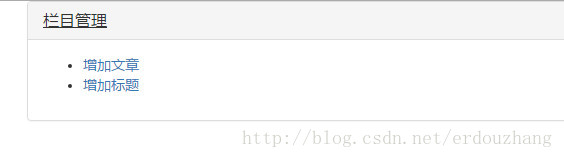
2. 折叠一组
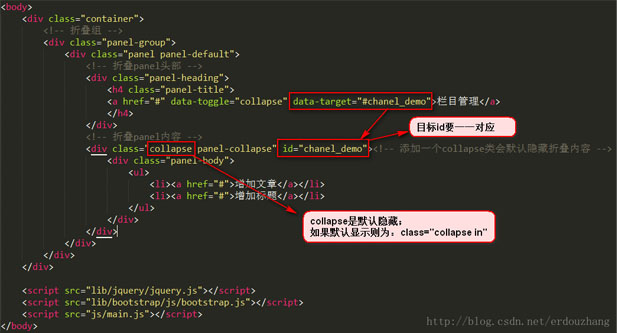
<body>
  <div class="container">
    <!-- 折叠组 -->
    <div class="panel-group">
      <div class="panel panel-default">
        <!-- 折叠panel头部 -->
        <div class="panel-heading">
          <h4 class="panel-title">
          <a href="#" rel="external nofollow" rel="external nofollow" rel="external nofollow" rel="external nofollow" rel="external nofollow" rel="external nofollow" rel="external nofollow" rel="external nofollow" rel="external nofollow" rel="external nofollow" rel="external nofollow" rel="external nofollow" rel="external nofollow" rel="external nofollow" rel="external nofollow" rel="external nofollow" rel="external nofollow" rel="external nofollow" rel="external nofollow" data-toggle="collapse" data-target="#chanel_demo">栏目管理</a>
          </h4>
        </div>
        <!-- 折叠panel内容 -->
        <div class="collapse panel-collapse" id="chanel_demo"><!-- 添加一个collapse类会默认隐藏折叠内容 -->
          <div class="panel-body">
            <ul>
              <li><a href="#" rel="external nofollow" rel="external nofollow" rel="external nofollow" rel="external nofollow" rel="external nofollow" rel="external nofollow" rel="external nofollow" rel="external nofollow" rel="external nofollow" rel="external nofollow" rel="external nofollow" rel="external nofollow" rel="external nofollow" rel="external nofollow" rel="external nofollow" rel="external nofollow" rel="external nofollow" rel="external nofollow" rel="external nofollow" >增加文章</a></li>
              <li><a href="#" rel="external nofollow" rel="external nofollow" rel="external nofollow" rel="external nofollow" rel="external nofollow" rel="external nofollow" rel="external nofollow" rel="external nofollow" rel="external nofollow" rel="external nofollow" rel="external nofollow" rel="external nofollow" rel="external nofollow" rel="external nofollow" rel="external nofollow" rel="external nofollow" rel="external nofollow" rel="external nofollow" rel="external nofollow" >增加标题</a></li>
            </ul>
          </div>
        </div>
      </div>
    </div>
  </div>
</body>
3.折叠多组
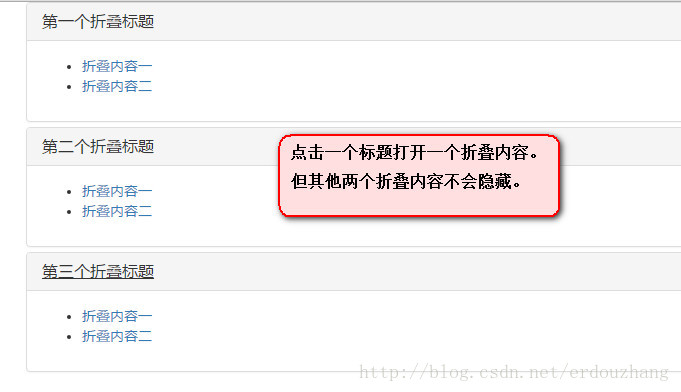
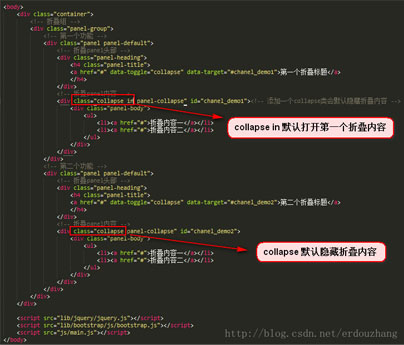
<body>
  <div class="container">
    <!-- 折叠组 -->
    <div class="panel-group">
      <!-- 第一个功能 -->
      <div class="panel panel-default">
        <!-- 折叠panel头部 -->
        <div class="panel-heading">
          <h4 class="panel-title">
          <a href="#" rel="external nofollow" rel="external nofollow" rel="external nofollow" rel="external nofollow" rel="external nofollow" rel="external nofollow" rel="external nofollow" rel="external nofollow" rel="external nofollow" rel="external nofollow" rel="external nofollow" rel="external nofollow" rel="external nofollow" rel="external nofollow" rel="external nofollow" rel="external nofollow" rel="external nofollow" rel="external nofollow" rel="external nofollow" data-toggle="collapse" data-target="#chanel_demo1">第一个折叠标题</a>
          </h4>
        </div>
        <!-- 折叠panel内容 -->
        <div class="collapse in panel-collapse" id="chanel_demo1"><!-- 添加一个collapse类会默认隐藏折叠内容 -->
          <div class="panel-body">
            <ul>
              <li><a href="#" rel="external nofollow" rel="external nofollow" rel="external nofollow" rel="external nofollow" rel="external nofollow" rel="external nofollow" rel="external nofollow" rel="external nofollow" rel="external nofollow" rel="external nofollow" rel="external nofollow" rel="external nofollow" rel="external nofollow" rel="external nofollow" rel="external nofollow" rel="external nofollow" rel="external nofollow" rel="external nofollow" rel="external nofollow" >折叠内容一</a></li>
              <li><a href="#" rel="external nofollow" rel="external nofollow" rel="external nofollow" rel="external nofollow" rel="external nofollow" rel="external nofollow" rel="external nofollow" rel="external nofollow" rel="external nofollow" rel="external nofollow" rel="external nofollow" rel="external nofollow" rel="external nofollow" rel="external nofollow" rel="external nofollow" rel="external nofollow" rel="external nofollow" rel="external nofollow" rel="external nofollow" >折叠内容二</a></li>
            </ul>
          </div>
        </div>
      </div>
      <!-- 第二个功能 -->
      <div class="panel panel-default">
        <!-- 折叠panel头部 -->
        <div class="panel-heading">
          <h4 class="panel-title">
          <a href="#" rel="external nofollow" rel="external nofollow" rel="external nofollow" rel="external nofollow" rel="external nofollow" rel="external nofollow" rel="external nofollow" rel="external nofollow" rel="external nofollow" rel="external nofollow" rel="external nofollow" rel="external nofollow" rel="external nofollow" rel="external nofollow" rel="external nofollow" rel="external nofollow" rel="external nofollow" rel="external nofollow" rel="external nofollow" data-toggle="collapse" data-target="#chanel_demo2">第二个折叠标题</a>
          </h4>
        </div>
        <!-- 折叠panel内容 -->
        <div class="collapse panel-collapse" id="chanel_demo2">
          <div class="panel-body">
            <ul>
              <li><a href="#" rel="external nofollow" rel="external nofollow" rel="external nofollow" rel="external nofollow" rel="external nofollow" rel="external nofollow" rel="external nofollow" rel="external nofollow" rel="external nofollow" rel="external nofollow" rel="external nofollow" rel="external nofollow" rel="external nofollow" rel="external nofollow" rel="external nofollow" rel="external nofollow" rel="external nofollow" rel="external nofollow" rel="external nofollow" >折叠内容一</a></li>
              <li><a href="#" rel="external nofollow" rel="external nofollow" rel="external nofollow" rel="external nofollow" rel="external nofollow" rel="external nofollow" rel="external nofollow" rel="external nofollow" rel="external nofollow" rel="external nofollow" rel="external nofollow" rel="external nofollow" rel="external nofollow" rel="external nofollow" rel="external nofollow" rel="external nofollow" rel="external nofollow" rel="external nofollow" rel="external nofollow" >折叠内容二</a></li>
            </ul>
          </div>
        </div>
      </div>
    </div>
  </div>
</body>
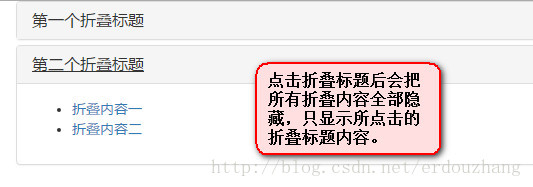
4. 折叠多组 只显示一组折叠内容
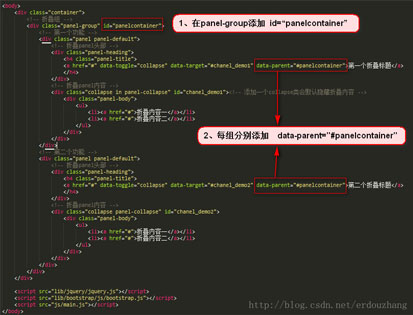
<body>
  <div class="container">
    <!-- 折叠组 -->
    <div class="panel-group" id="panelcontainer">
      <!-- 第一个功能 -->
      <div class="panel panel-default">
        <!-- 折叠panel头部 -->
        <div class="panel-heading">
          <h4 class="panel-title">
          <a href="#" rel="external nofollow" rel="external nofollow" rel="external nofollow" rel="external nofollow" rel="external nofollow" rel="external nofollow" rel="external nofollow" rel="external nofollow" rel="external nofollow" rel="external nofollow" rel="external nofollow" rel="external nofollow" rel="external nofollow" rel="external nofollow" rel="external nofollow" rel="external nofollow" rel="external nofollow" rel="external nofollow" rel="external nofollow" data-toggle="collapse" data-target="#chanel_demo1" data-parent="#panelcontainer">第一个折叠标题</a>
          </h4>
        </div>
        <!-- 折叠panel内容 -->
        <div class="collapse in panel-collapse" id="chanel_demo1"><!-- 添加一个collapse类会默认隐藏折叠内容 -->
          <div class="panel-body">
            <ul>
              <li><a href="#" rel="external nofollow" rel="external nofollow" rel="external nofollow" rel="external nofollow" rel="external nofollow" rel="external nofollow" rel="external nofollow" rel="external nofollow" rel="external nofollow" rel="external nofollow" rel="external nofollow" rel="external nofollow" rel="external nofollow" rel="external nofollow" rel="external nofollow" rel="external nofollow" rel="external nofollow" rel="external nofollow" rel="external nofollow" >折叠内容一</a></li>
              <li><a href="#" rel="external nofollow" rel="external nofollow" rel="external nofollow" rel="external nofollow" rel="external nofollow" rel="external nofollow" rel="external nofollow" rel="external nofollow" rel="external nofollow" rel="external nofollow" rel="external nofollow" rel="external nofollow" rel="external nofollow" rel="external nofollow" rel="external nofollow" rel="external nofollow" rel="external nofollow" rel="external nofollow" rel="external nofollow" >折叠内容二</a></li>
            </ul>
          </div>
        </div>
      </div>
      <!-- 第二个功能 -->
      <div class="panel panel-default">
        <!-- 折叠panel头部 -->
        <div class="panel-heading">
          <h4 class="panel-title">
          <a href="#" rel="external nofollow" rel="external nofollow" rel="external nofollow" rel="external nofollow" rel="external nofollow" rel="external nofollow" rel="external nofollow" rel="external nofollow" rel="external nofollow" rel="external nofollow" rel="external nofollow" rel="external nofollow" rel="external nofollow" rel="external nofollow" rel="external nofollow" rel="external nofollow" rel="external nofollow" rel="external nofollow" rel="external nofollow" data-toggle="collapse" data-target="#chanel_demo2" data-parent="#panelcontainer">第二个折叠标题</a>
          </h4>
        </div>
        <!-- 折叠panel内容 -->
        <div class="collapse panel-collapse" id="chanel_demo2">
          <div class="panel-body">
            <ul>
              <li><a href="#" rel="external nofollow" rel="external nofollow" rel="external nofollow" rel="external nofollow" rel="external nofollow" rel="external nofollow" rel="external nofollow" rel="external nofollow" rel="external nofollow" rel="external nofollow" rel="external nofollow" rel="external nofollow" rel="external nofollow" rel="external nofollow" rel="external nofollow" rel="external nofollow" rel="external nofollow" rel="external nofollow" rel="external nofollow" >折叠内容一</a></li>
              <li><a href="#" rel="external nofollow" rel="external nofollow" rel="external nofollow" rel="external nofollow" rel="external nofollow" rel="external nofollow" rel="external nofollow" rel="external nofollow" rel="external nofollow" rel="external nofollow" rel="external nofollow" rel="external nofollow" rel="external nofollow" rel="external nofollow" rel="external nofollow" rel="external nofollow" rel="external nofollow" rel="external nofollow" rel="external nofollow" >折叠内容二</a></li>
            </ul>
          </div>
        </div>
      </div>
    </div>
  </div>
</body>
5. 折叠–下拉菜单

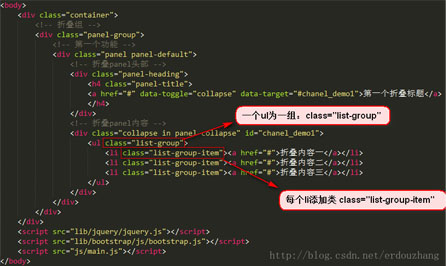
<body>
  <div class="container">
    <!-- 折叠组 -->
    <div class="panel-group">
      <!-- 第一个功能 -->
      <div class="panel panel-default">
        <!-- 折叠panel头部 -->
        <div class="panel-heading">
          <h4 class="panel-title">
          <a href="#" rel="external nofollow" rel="external nofollow" rel="external nofollow" rel="external nofollow" rel="external nofollow" rel="external nofollow" rel="external nofollow" rel="external nofollow" rel="external nofollow" rel="external nofollow" rel="external nofollow" rel="external nofollow" rel="external nofollow" rel="external nofollow" rel="external nofollow" rel="external nofollow" rel="external nofollow" rel="external nofollow" rel="external nofollow" data-toggle="collapse" data-target="#chanel_demo1">第一个折叠标题</a>
          </h4>
        </div>
        <!-- 折叠panel内容 -->
        <div class="collapse in panel-collapse" id="chanel_demo1">
          <ul class="list-group">
            <li class="list-group-item"><a href="#" rel="external nofollow" rel="external nofollow" rel="external nofollow" rel="external nofollow" rel="external nofollow" rel="external nofollow" rel="external nofollow" rel="external nofollow" rel="external nofollow" rel="external nofollow" rel="external nofollow" rel="external nofollow" rel="external nofollow" rel="external nofollow" rel="external nofollow" rel="external nofollow" rel="external nofollow" rel="external nofollow" rel="external nofollow" >折叠内容一</a></li>
            <li class="list-group-item"><a href="#" rel="external nofollow" rel="external nofollow" rel="external nofollow" rel="external nofollow" rel="external nofollow" rel="external nofollow" rel="external nofollow" rel="external nofollow" rel="external nofollow" rel="external nofollow" rel="external nofollow" rel="external nofollow" rel="external nofollow" rel="external nofollow" rel="external nofollow" rel="external nofollow" rel="external nofollow" rel="external nofollow" rel="external nofollow" >折叠内容二</a></li>
            <li class="list-group-item"><a href="#" rel="external nofollow" rel="external nofollow" rel="external nofollow" rel="external nofollow" rel="external nofollow" rel="external nofollow" rel="external nofollow" rel="external nofollow" rel="external nofollow" rel="external nofollow" rel="external nofollow" rel="external nofollow" rel="external nofollow" rel="external nofollow" rel="external nofollow" rel="external nofollow" rel="external nofollow" rel="external nofollow" rel="external nofollow" >折叠内容三</a></li>
          </ul>
        </div>
      </div>
    </div>
  </div>
</body>
以上就是本文的全部内容,希望对大家的学习有所帮助,也希望大家多多支持脚本之家。
相关文章
 下面小编就为大家带来一篇JS实现回到页面顶部动画效果的简单实例。小编觉得挺不错的,现在分享给大家,也给大家做个参考。一起跟随小编过来看看吧2016-05-05
 这篇文章主要介绍了20个JS简写技巧提升工作效率,本文特点以言简意赅为主,围绕JS简写技巧的话题展开全文,具有一定的查看价值 ,需要的小伙伴可以参考一下2021-12-12
 这篇文章主要针对bootstrap基础知识为大家整理了详细的学习笔记,具有一定的参考价值,感兴趣的小伙伴们可以参考一下2016-11-11
 Echarts可以帮助我们快速构建柱状图、饼图、条形图,这对于多图形化展示数据来说尤其方便,可帮助我们快速开发,下面这篇文章主要给大家介绍了关于Echarts中legend属性使用的相关资料,需要的朋友可以参考下2022-04-04
javascript中setAttribute兼容性用法分析
这篇文章主要介绍了javascript中setAttribute兼容性用法,结合实例形式分析了javascript使用setAttribute进行属性设置操作的相关使用技巧,需要的朋友可以参考下2016-12-12 这篇文章主要介绍了如何在JavaScript中实现私有属性的写类方式。需要的朋友可以过来参考下,希望对大家有所帮助2013-12-12
 大家都知道Promise解决了回调地狱的问题,“回调地狱”所说的嵌套其实是指异步的嵌套,它带来了两个问题:可读性的问题和信任问题,下面这篇文章主要给大家介绍了关于JS中promise特点与信任问题解决的相关资料,需要的朋友可以参考下2022-06-06
 js 回车提交一些新手朋友还是比较陌生的,本文介绍两种实现方法:jQuery方法、JavaScript方法,感兴趣的朋友可以研究下2012-12-12
 这篇文章主要给大家介绍了关于async/await地狱该如何避免的相关资料,文中通过示例代码介绍的非常详细,对大家的学习或者工作具有一定的参考学习价值,需要的朋友们下面随着小编来一起学习学习吧。2018-05-05
 这篇文章主要介绍了使用RN Animated做一个“添加购物车”动画的方法,小编觉得挺不错的,现在分享给大家,也给大家做个参考。一起跟随小编过来看看吧2018-09-09
最新评论