

从零开始学习Node.js系列教程之设置HTTP头的方法示例
本文实例讲述了Node.js设置HTTP头的方法。分享给大家供大家参考,具体如下:
server.js
//basic server的配置文件
var port = 3000;
var server = require('./basicserver').createServer();
server.useFavIcon("localhost", "./docroot/favicon.png");
server.addContainer(".*", "/l/(.*)$", require('./redirector'), {})
server.docroot("localhost", "/", "./docroot");
//server.useFavIcon("127.0.0.1", "./docroot/favicon.png");
//server.docroot("127.0.0.1", "/", "./docroot");
server.listen(port);
basicserver.js
Response Header 服务器发送到客户端
文件扩展名不足以完全恰当的标识文件类型,而且文件扩展名没有标准,于是,人们设计了Content-Type头和整个MIME类型标准来作为数据类型的表示系统。
对于某些应用,特别是一些处理固定数据的小型应用,我们可以精准的知道该使用哪一种Content-Type头,因为应用发送的数据是特定已知的。然而staticHandler能发送任何文件,通常不知道该使用哪种Content-Type。通过匹配文件扩展名列表和Content-Type可以解决这个问题,但是这个方案不完美。最好的实践方案是使用一个外部的配置文件,它通常由操作系统提供。
MIME npm包使用了Apache项目的mime.types文件,该文件包含超过600个Content-Type的有关数据,如果有需要,mime模块也支持添加自定义的MIME类型。
npm install mime
var mime = require('mime');
var mimeType = mime.lookup('image.gif'); //==> image/gif
res.setHeader('Content-Type', mimeType);
一些相关的HTTP头:
Content-Encoding 数据被编码时使用,例如gzip
Content-Language 内容中使用的语言
Content-Length 字节数
Content-Location 能取到数据的一个候补位置
Content-MD5 内容主题的MD5校验和
HTTP协议是无状态的,意味着web服务器不能辨认不同的请求发送端。现在普遍的做法是,服务器发送cookie到客户端浏览器,cookie中定义了登陆用户的身份,对于每一次请求,web浏览器都会发送对应所访问网站的cookie。
发送cookie时,我们应以如下方式为Set-Cookie或Set-Cookie2头设一个值:
res.setHeader('Set-Cookie2', ..cookie value..);
/*
 Basic Server的核心模块会创建一个HTTP服务器对象,附加Basic Server上用于检查请求,然后给予适当响应的功能
 Basic Server可以通过判断Host头部匹配的容器对象响应来自多个域名的请求
 */
var http = require('http');
var url = require('url');
exports.createServer = function(){
  var htserver = http.createServer(function(req, res){
    req.basicServer = {urlparsed: url.parse(req.url, true)};
    processHeaders(req, res);
    dispatchToContainer(htserver, req, res);
  });
  htserver.basicServer = {containers: []};
  htserver.addContainer = function(host, path, module, options){
    if (lookupContainer(htserver, host, path) != undefined){
      throw new Error("Already mapped " + host + "/" + path);
    }
    htserver.basicServer.containers.push({host: host, path: path, module: module, options: options});
    return this;
  }
  htserver.useFavIcon = function(host, path){
    return this.addContainer(host, "/favicon.ico", require('./faviconHandler'), {iconPath: path});
  }
  htserver.docroot = function(host, path, rootPath){
    return this.addContainer(host, path, require('./staticHandler'), {docroot: rootPath});
  }
  return htserver;
}
var lookupContainer = function(htserver, host, path){
  for (var i = 0; i < htserver.basicServer.containers.length; i++){
    var container = htserver.basicServer.containers[i];
    var hostMatches = host.toLowerCase().match(container.host);
    var pathMatches = path.match(container.path);
    if (hostMatches !== null && pathMatches !== null){
      return {container: container, host: hostMatches, path: pathMatches};
    }
  }
  return undefined;
}
//用于搜索req.headers数组以查找cookie和host头部,因为这两个字段对请求的分派都很重要
//这个函数在每一个HTTP请求到达时都会被调用
//还有很多其他的HTTP头部字段(Accept Accept-Encoding Accept-Language User-Agent)
var processHeaders = function(req, res){
  req.basicServer.cookies = [];
  var keys = Object.keys(req.headers);
  for (var i = 0; i < keys.length; i++){
    var hname = keys[i];
    var hval = req.headers[hname];
    if (hname.toLowerCase() === "host"){
      req.basicServer.host = hval;
    }
    //提取浏览器发送的cookie
    if (hname.toLowerCase() === "cookie"){
      req.basicServer.cookies.push(hval);
    }
  }
}
//查找匹配的容器,分派请求到对应的容器中
//这个函数在每一个HTTP请求到达时都会被调用
var dispatchToContainer = function(htserver, req, res){
  var container = lookupContainer(htserver, req.basicServer.host, req.basicServer.urlparsed.pathname);
  if (container !== undefined){
    req.basicServer.hostMatches = container.host;
    req.basicServer.pathMatches = container.path;
    req.basicServer.container = container.container;
    container.container.module.handle(req, res);
  }else {
    res.writeHead(404, {'Content-Type': 'text/plain'});
    res.end("no handler found for " + req.basicServer.host + "/" + req.basicServer.urlparsed);
  }
}
staticHandler.js
//用于处理文件系统内的文件,docroot选项指被存放文件所在文件夹的路径,读取该目录下的指定文件
var fs = require('fs');
var mime = require('mime');
var sys = require('sys');
exports.handle = function(req, res){
  if (req.method !== "GET"){
    res.writeHead(404, {'Content-Type': 'text/plain'});
    res.end("invalid method " + req.method);
  } else {
    var fname = req.basicServer.container.options.docroot + req.basicServer.urlparsed.pathname;
    if (fname.match(/\/$/)) fname += "index.html"; //如果URL以/结尾
    fs.stat(fname, function(err, stats){
      if (err){
        res.writeHead(500, {'Content-Type': 'text/plain'});
        res.end("file " + fname + " not found " + err);
      } else {
        fs.readFile(fname, function(err, buf){
          if (err){
            res.writeHead(500, {'Content-Type': 'text/plain'});
            res.end("file " + fname + " not readable " + err);
          } else {
            res.writeHead(200, {'Content-Type': mime.lookup(fname),
              'Content-Length': buf.length});
            res.end(buf);
          }
        });
      }
    });
  }
}
faviconHandler.js
//这个处理函数处理对favicon.ico的请求
//MIME模块根据给出的图标文件确定正确的MIME类型,网站图标favicon可以是任何类型的图片,但是我们必须要告诉浏览器是哪个类型
//MIME模块,用于生成正确的Content-Type头
var fs = require('fs');
var mime = require('mime');
exports.handle = function(req, res){
  if (req.method !== "GET"){
    res.writeHead(404, {'Content-Type': 'text/plain'});
    res.end("invalid method " + req.method);
  } else if (req.basicServer.container.options.iconPath !== undefined){
    fs.readFile(req.basicServer.container.options.iconPath, function(err, buf){
      if (err){
        res.writeHead(500, {'Content-Type': 'text/plain'});
        res.end(req.basicServer.container.options.iconPath + "not found");
      } else {
        res.writeHead(200, {'Content-Type': mime.lookup(req.basicServer.container.options.iconPath),
        'Content-Length': buf.length});
        res.end(buf);
      }
    });
  } else {
    res.writeHead(404, {'Content-Type': 'text/plain'});
    res.end("no favicon");
  }
}
redirector.js
/*
 把一个域的请求重定向到另一个上,例如将www.example.com重定向到example.com上,或者使用简短的URL跳转到较长的URL
 实现这两种情况,我们需要在HTTP响应中发送301(永久移除)或者302(临时移除)状态码,并且指定location头信息。有了这个组合
 信号,web浏览器就知道要跳转到另一个web位置了
 */
//地址http://localhost:3000/l/ex1 会跳转到http://example1.com
var util = require('util');
var code2url = {'ex1': 'http://example1.com', 'ex2': "http://example2.com"};
var notFound = function(req, res){
  res.writeHead(404, {'Content-Type': 'text/plain'});
  res.end("no matching redirect code found for " + req.basicServer.host + "/" + req.basicServer.urlparsed.pathname);
}
exports.handle = function(req, res){
  if (req.basicServer.pathMatches[1]){
    var code = req.basicServer.pathMatches[1];
    if (code2url[code]){
      var url = code2url[code];
      res.writeHead(302, {'Location': url});
      res.end();
    } else {
      notFound(req, res);
    }
  } else {
    notFound(req, res);
  }
}
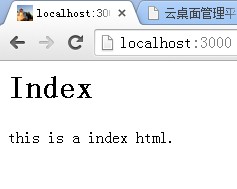
docroot目录下:有favicon.png
index.html
<html>
<head>
</head>
<body>
  <h1>Index</h1>
  <p>this is a index html.</p>
</body>
</html>
希望本文所述对大家nodejs程序设计有所帮助。
相关文章
 这篇文章主要介绍了Node.js Webpack常见的模式,Webpack的另一个核心是Plugin ,Plugin是可以用于执行更加广泛的任务如打包优化资源管理 环境变量注入等,需要的朋友可以参考下2022-10-10
 在本篇文章里小编给大家整理的是关于node创建Vue项目步骤详解内容,需要的朋友们可以学习下。2020-03-03
node跨域转发 express+http-proxy-middleware的使用
这篇文章主要介绍了node跨域转发 express+http-proxy-middleware的使用,小编觉得挺不错的,现在分享给大家,也给大家做个参考。一起跟随小编过来看看吧2018-05-05
Node.JS 循环递归复制文件夹目录及其子文件夹下的所有文件
在Node.js中,要实现目录文件夹的循环递归复制也非常简单,使用fs模块即可,仅需几行,而且性能也不错,我们先来实现文件的复制,需要的朋友可以参考下2017-09-09 WebSocket持久连接使得服务器可以主动向客户端推送数据,而不需要等待客户端的请求,是一种专门设计用于实现持久连接的协议,WebSocket的持久连接特性使其成为实时性要求高的应用的理想选择,如在线聊天、实时游戏、数据监控等2023-12-12
 本文给大家介绍了nodejs 连接Mysql相关操作的示例代码,主要用到的是sql语句,都是比较基础的。2017-05-05
 这篇文章主要介绍了在NPM发布自己造的轮子的方法步骤,小编觉得挺不错的,现在分享给大家,也给大家做个参考。一起跟随小编过来看看吧2019-03-03
 Node.js是一个事件驱动I/O服务端JavaScript环境,由于其拥有异步非阻塞、环境搭建简单、实践应用快等特性,使得其在新一代编程开发中更为流行,下面这篇文章主要给大家介绍了关于Node.Js环境搭建步骤记录的相关资料,需要的朋友可以参考下2023-03-03
 这篇文章主要给大家介绍了关于如何使用Node.js实现一个多人游戏服务器引擎的相关资料,文中通过示例代码介绍的非常详细,对大家的学习或者使用Node.js具有一定的参考学习价值,需要的朋友们下面来一起学习学习吧2019-03-03
 这篇文章主要介绍了Node.js之IP地址和端口号问题,具有很好的参考价值,希望对大家有所帮助。如有错误或未考虑完全的地方,望不吝赐教2022-11-11
最新评论