

MVVM模式下WPF动态绑定展示图片
更新时间:2017年06月30日 11:57:12 作者:Jugg书生
这篇文章主要为大家详细介绍了MVVM模式下WPF动态绑定展示图片的相关资料,具有一定的参考价值,感兴趣的小伙伴们可以参考一下
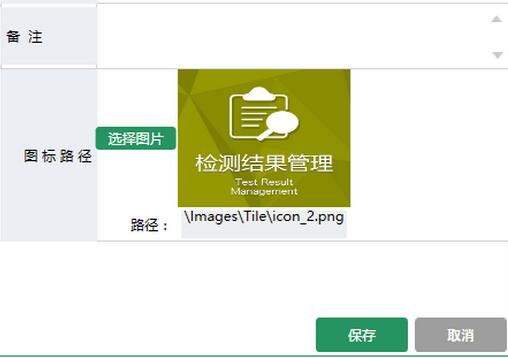
MVVM模式下WPF动态展示图片,界面选择图标,复制到项目中固定目录下面,保存到数据库的是相对路径,再次读取的时候是根据数据库的相对路径去获取项目中绝对路径的图片展示。
首先在ViewModel中
//属性定义
    BitmapImage _ImageSource;
    /// <summary>
    /// 显示的图标
    /// </summary>
    public BitmapImage ImageSource
    {
      get { return _ImageSource; }
      set
      {
        _ImageSource = value;
        NotifyOfPropertyChange("ImageSource");
      }
    }

    string _ImagePath;
    /// <summary>
    /// 显示的图标路径
    /// </summary>
    public string ImagePath
    {
      get { return _ImagePath; }
      set
      {
        _ImagePath = value;
        NotifyOfPropertyChange("ImagePath");
      }
    }
//初始化数据
//编辑的时候绑定数据
public GroupInfoViewModel(sys_Right_Group groupInfo, OperType type)
    {
      if (type == OperType.Edit || type == OperType.Show)
      {
        IsAdd = false;
        TitleName = "编辑分组";
        RightGroup = groupInfo;
        ImagePath = groupInfo.ImagePath;
        GetImgData(groupInfo.ImagePath);
      }
    }
    /// <summary>
    /// 获取图片数据
    /// </summary>
    /// <param name="imgPath">相对路径</param>
    private void GetImgData(string imgPath)
    {
      if (string.IsNullOrEmpty(imgPath)) return;
      try
      {

        string fileName = System.Environment.CurrentDirectory + imgPath; //获取文件的绝对路径
        byte[] buf;
        if (!PathToByte(fileName, out buf))
        {
          MessageHelper.ShowAutoCloseWarning("获取图标失败");
          return;
        }
        ImageSource =ByteToImage(buf);
      }
      catch (Exception ex)
      {
        throw ex;
      }
    }
//界面选择图片按钮事件
   /// <summary>
    /// 修改图片
    /// </summary>
    public void ChangedIcon()
    {
      try
      {
        OpenFileDialog open = new OpenFileDialog();
        open.Filter = string.Format("照片|*.jpg;*.jpeg;*.png;*.gif;*.bmp");
        if (open.ShowDialog() == true)
        {
          var path = open.FileName;
          //检查图标目录,绝对路径下面
          string NewPath = System.Environment.CurrentDirectory + @"\Images\Tile\Group\";
          string newFile = NewPath + Path.GetFileName(path);
          if (!System.IO.Directory.Exists(NewPath))
          {
            System.IO.Directory.CreateDirectory(NewPath);
          }
          File.Copy(path, newFile, true); //复制文件到目录绝对路径文件夹
          FileInfo info = new FileInfo(newFile); //新文件
          if (info.Length > MenuViewModel.UserImageMaxLength)
          {
            MessageHelper.ShowAutoCloseWarning(string.Format("图标不能大于{0}M",
              MenuViewModel.UserImageMaxLength / 1024 / 1024));
            return;
          }
          byte[] buf;
          if (!PathToByte(path, out buf))
          {
            MessageHelper.ShowAutoCloseWarning("修改失败");
            return;
          }
          ImageSource = ByteToImage(buf);
          ImagePath = @"\Images\Tile\Group\" + Path.GetFileName(path); //显示相对路径

        }
      }
      catch (Exception ex)
      {

        throw ex;
      }
    }
点击保存的时候再把相对路径保存到数据库RightGroup.ImagePath = ImagePath;
//公共帮助方法

//把图片文件转换为byte数组
 public static bool PathToByte(string path, out byte[] buffer)
    {
      FileStream fs = new FileStream(path, FileMode.Open, FileAccess.Read);
      try
      {
        buffer = new byte[fs.Length];
        fs.Read(buffer, 0, (int)fs.Length);
        return true;
      }
      catch (Exception ex)
      {
        buffer = null;
        return false;
      }
      finally
      {
        if (fs != null)
        {
          //关闭资源
          fs.Close();
        }
      }

    }

//把byte数组转化为BitmapImage
    public static BitmapImage ByteToImage(byte[] buf)
    {
      BitmapImage bmp = new BitmapImage();
      bmp.BeginInit();
      bmp.StreamSource = new MemoryStream(buf);
      bmp.EndInit();

      return bmp;
    }
View 界面绑定代码:
<Button Grid.Row="0" Grid.Column="0" Content="选择图片" cm:Message.Attach="[Click]=[ChangedIcon()]" Style="{StaticResource BtnOperationStyle}" Height="20" Width="70"></Button>
          <Grid Grid.Row="0" Grid.Column="1" Background="LightGray">
            <Image Height="120" Width="150" Stretch="Fill" Source="{Binding ImageSource,Mode=TwoWay, UpdateSourceTrigger=PropertyChanged}"></Image>
    </Grid>
   <Label Grid.Row="1" Grid.Column="0" Style="{StaticResource GridColumnLabelStyle}" Content="路径:"></Label>
<TextBox Grid.Row="1" Grid.Column="1" Style="{StaticResource StyleForTextBox}" Text="{Binding ImagePath,Mode=TwoWay,UpdateSourceTrigger=PropertyChanged}" Height="30" TextAlignment="Center" IsReadOnly="True"></TextBox>
界面效果:
以上就是本文的全部内容,希望对大家的学习有所帮助,也希望大家多多支持脚本之家。
相关文章
 上一次把基本框架搭建起来了,这次开始整Web部分,终于可以看到界面了小激动一下,web项目部分从用户功能开始,基本有注册,登录、注销、查找、查看、删除等涉及Member区域和Manage区域,供大家参考,具体内容如下2015-09-09
 这篇文章介绍了IIS 浏览aspx页面出现无法显示XML页的解决方法,有需要的朋友可以参考一下2013-11-11
 COM组件中的接口是一组由组件实现的,提供给客户使用的函数,这篇文章主要介绍了.NET中的 COM 组件,需要的朋友可以参考下2022-10-10
MVC+EasyUI+三层新闻网站建立 主页布局的方法(五)
这篇文章主要为大家详细介绍了MVC+EasyUI+三层新闻网站建立的第五篇,教大家如何进行主页布局,具有一定的参考价值,感兴趣的小伙伴们可以参考一下2017-07-07 这篇文章主要给大家介绍了关于asp.net core下给网站做安全设置的相关资料,文章通过示例代码介绍的非常详细,对大家的学习或者工作具有一定的参考学习价值,需要的朋友们下面随着小编来一起学习学习吧2018-07-07
让aspx页面自主控制调用记录的数量,类型,随时更改,不用重新编译的实现方法
我们经常会做一些企业站点,为了数据调用,我们伤透脑筋,我们想方设法让数据显示变得简单,又易于维护,这使得我们创造诸于模板之类的东东去搞企业站,门户等,2011-08-08
.NET Core利用swagger进行API接口文档管理的方法详解
这篇文章主要给大家介绍了关于.NET Core利用swagger进行API接口文档管理的相关资料,文中通过示例代码介绍的非常详细,对大家的学习或者工作具有一定的参考学习价值,需要的朋友们下面随着小编来一起学习学习吧。2018-03-03
ASP.NET Core Project.json文件(5)
这篇文章主要为大家详细介绍了ASP.NET Core Project.json文件,具有一定的参考价值,感兴趣的小伙伴们可以参考一下2017-06-06
FileUpload使用Javascript检查扩展名是否有效实现思路
在JavaScript获取FileUpload控件的文件路径,并取得路径中的文件扩展名,再与阵列中的扩展名比较,如果存在,说明上传的文件是有效的,反之无效,感兴趣的朋友可以了解下,或许对你有所帮助2013-02-02
Asp.net 获取指定目录下的后缀名为".doc" 的所有文件名和文件路径
Asp.net 获取指定目录下的后缀名为“.doc” 的所有文件名和文件路径,帮写一个方法2011-07-07
最新评论