

bootstrap3-dialog-master模态框使用详解
更新时间:2017年08月22日 14:05:08 作者:javanbme
这篇文章主要为大家详细介绍了bootstrap3-dialog-master模态框的使用方法,具有一定的参考价值,感兴趣的小伙伴们可以参考一下
bootstrap3-dialog-master是一款高效,灵活的模态框,此处为基本知识!
1、源码地址
https://github.com/nakupanda/bootstrap3-dialog
2、效果展示
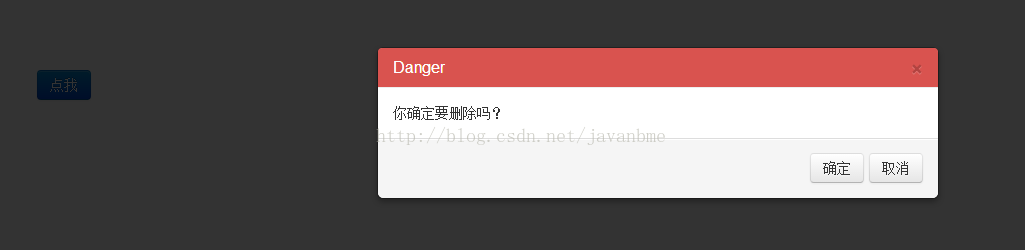
3、示例代码
所需引入的js和css
<link rel="stylesheet" type="text/css" href="css/bootstrap-dialog.css" rel="external nofollow" >
    <link rel="stylesheet" type="text/css" href="css/bootstrap.css" rel="external nofollow" >
    <script type="text/javascript" src="js/jquery-1.11.3.js"></script>
    <script type="text/javascript" src="js/bootstrap.js"></script>
    <script type="text/javascript" src="js/bootstrap-dialog.js"></script>
初始化
<button type="button" id="tm" class="btn btn-primary" style="margin: 100px;">
<span class="glyphicon glyphicon-remove" aria-hidden="true">
</span>点我</button>
js实现代码
<script >
    $(function(){

      $('#tm').on('click',function(){

            BootstrapDialog.show({
              type : BootstrapDialog.TYPE_DANGER,
              message: '你确定要删除吗?',
              size : BootstrapDialog.SIZE_NORMAL,
              buttons: [{
              label: '确定',
              action: function(dialog) {
              dialog.close();
              }
              }, {
              label: '取消',
              action: function(dialog) {
              dialog.close();
              }
              }]
            });
        })
     })
</script>
以上就是本文的全部内容,希望对大家的学习有所帮助,也希望大家多多支持脚本之家。
相关文章
 这篇文章主要介绍了JS实现的排列组合算法,结合完整实例形式详细分析了排列组合算法的原理与javascript相关实现技巧,需要的朋友可以参考下2019-07-07
 这篇文章主要介绍了微信小程序防止多次点击跳转问题(函数节流),本文给大家介绍的非常详细,具有一定的参考借鉴价值,需要的朋友可以参考下2019-09-09
Radio 单选JS动态添加的选项onchange事件无效的解决方法
radio 单选JS动态添加的选项,onchange事件无效。使用delegate()函数可以解决该问题,具体解决方案大家通过本文详细了解下2016-12-12 这篇文章主要介绍了JS实现带阴历的日历功能,结合实例形式分析了js阴历算法及实现带阴历的日历相关操作技巧,需要的朋友可以参考下2019-01-01
 最近做了个项目是要求实现99乘法表隔行变色,本文给大家分享通过多种方式实现js 99 乘法表,感兴趣的朋友一起看看吧2016-02-02
 这篇文章主要为大家详细介绍了JavaScript计算出两个数的差值,文中示例代码介绍的非常详细,具有一定的参考价值,感兴趣的小伙伴们可以参考一下2020-03-03
 斐波那契是自然界与社会中存在的一种数学规律,下面这篇文章主要给大家介绍了关于如何用typescript类型来推算斐波那契的相关资料,文中通过实例代码介绍的非常详细,需要的朋友可以参考下2022-01-01
 图片自定义滚动条3.0(Duma“自动渲染版”,也许世间万物都会变,但是真挚的爱,却永远留存在心中!)2009-07-07
通过event对象的fromElement属性解决热区设置主实体的一个bug
后台的热区管理中,如果鼠标移到热区上,会显示一个提示框,提示框里“设为主实体”、“删除”和“合并”等超链接,点击这些超链接可以进行各种操作。2008-12-12 这篇文章主要介绍了JS 实现获取验证码 倒计时功能,非常不错,具有一定的参考借鉴价值,需要的朋友可以参考下2018-10-10
最新评论