

微信小程序实现手势图案锁屏功能
更新时间:2018年01月30日 16:45:11 作者:Rattenking
这篇文章主要为大家详细介绍了微信小程序实现手势图案锁屏功能,具有一定的参考价值,感兴趣的小伙伴们可以参考一下
本文实例为大家分享了微信小程序手势图案锁屏的具体代码,供大家参考,具体内容如下
参考
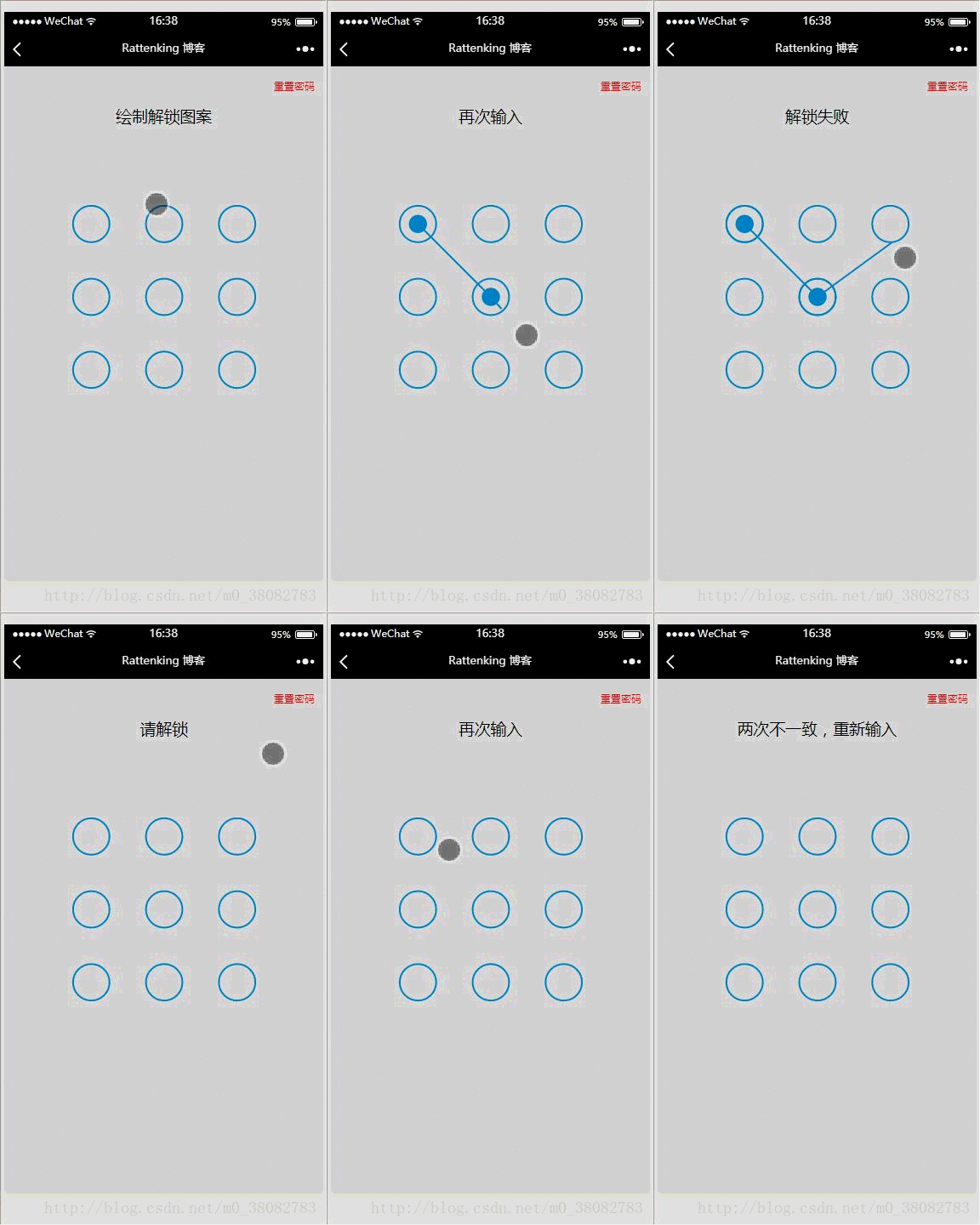
效果图
WXML
<view class="container">
  <view class="reset" bindtap="resetPwd">重置密码</view>
  <view class="title">{{title}}</view>
  <canvas canvas-id="canvas" class="canvas" bindtouchend="onTouchEnd"
   bindtouchstart="onTouchStart" bindtouchmove="onTouchMove"></canvas>
</view>
JS
var Locker = class {
 constructor(page,opt){
  var obj = opt || {};

  this.page = page;
  this.width = obj.width || 300;
  this.height = obj.height || 300;
  this.canvasId = obj.id || 'canvas';
  this.cleColor = obj.cleColor || '#CFE6FF';
  this.cleCenterColor = obj.cleCenterColor || '#CFE6FF';

  var chooseType = obj.chooseType || 3;
  // 判断是否缓存有chooseType,有就用缓存,没有就用传入的值
  this.chooseType = Number(wx.getStorageSync('chooseType')) || chooseType;

  this.init();
 }
 init(){
  this.pswObj = wx.getStorageSync('passwordxx') ? {
   step: 2,
   spassword: JSON.parse(wx.getStorageSync('passwordxx'))
  } : {};

  this.makeState();
  // 创建 canvas 绘图上下文(指定 canvasId)
  this.ctx = wx.createCanvasContext(this.canvasId,this);
  this.touchFlag = false;
  this.lastPoint = [];

  // 绘制圆
  this.createCircle();
  // canvas绑定事件
  this.bindEvent();
 }
 makeState() {
  if (this.pswObj.step == 2) {
   this.page.setData({ title:'请解锁'});
  } else if (this.pswObj.step == 1) {
   // pass
  } else {
   // pass
  }
 }
 // 画圆方法
 drawCle(x,y){
  // 设置边框颜色。
  this.ctx.setStrokeStyle(this.cleColor); // 注意用set
  // 设置线条的宽度。
  this.ctx.setLineWidth(2); // 注意用set
  // 开始创建一个路径,需要调用fill或者stroke才会使用路径进行填充或描边。
  this.ctx.beginPath();
  // 画一条弧线。
  this.ctx.arc(x, y, this.r, 0, Math.PI * 2, true);
  // 关闭一个路径
  this.ctx.closePath();
  // 画出当前路径的边框。默认颜色色为黑色。
  this.ctx.stroke();
  // 将之前在绘图上下文中的描述(路径、变形、样式)画到 canvas 中。
  this.ctx.draw(true);
 }

 // 计算两点之间的距离的方法
 getDis(a, b) {
  return Math.sqrt(Math.pow(a.x - b.x, 2) + Math.pow(a.y - b.y, 2));
 }

 // 创建解锁点的坐标,根据canvas的大小(默认300px)来平均分配半径
 createCircle() {
  var n = this.chooseType;
  var count = 0;
  // 计算圆半径
  this.r = this.width / (2 + 4 * n);
  this.arr = [];
  this.restPoint = [];
  var r = this.r;
  // 获取圆心坐标,以及当前圆所代表的数
  for (var i = 0; i < n; i++) {
   for (var j = 0; j < n; j++) {
    count++;
    var obj = {
     x: j * 4 * r + 3 * r,
     y: i * 4 * r + 3 * r,
     index: count
    };
    this.arr.push(obj);
    this.restPoint.push(obj);
   }
  }
  // 清空画布
  this.ctx.clearRect(0, 0, this.width, this.height);

  // 绘制所有的圆
  this.arr.forEach(current => {this.drawCle(current.x, current.y);});
 }


 // 设置密码绘制
 getPosition(e) { // 获取touch点相对于canvas的坐标
  var po = {
   x: e.touches[0].x,
   y: e.touches[0].y
  };
  return po;
 }
 precisePosition(po){
  var arr = this.restPoint.filter(current => Math.abs(po.x - current.x) < this.r && Math.abs(po.y - current.y) < this.r);
  return arr[0];
 }
 drawPoint(obj) { // 初始化圆心

  for (var i = 0; i < this.lastPoint.length; i++) {
   this.ctx.setFillStyle(this.cleCenterColor); // 注意用set方法
   this.ctx.beginPath();
   this.ctx.arc(this.lastPoint[i].x, this.lastPoint[i].y, this.r / 2, 0, Math.PI * 2, true);
   this.ctx.closePath();
   this.ctx.fill();
   this.ctx.draw(true);
  }
 }
 drawLine(po) {// 解锁轨迹
  this.ctx.beginPath();
  this.ctx.lineWidth = 3;
  this.ctx.moveTo(this.lastPoint[0].x,this.lastPoint[0].y);

  for (var i = 1; i < this.lastPoint.length; i++) {
   this.ctx.lineTo(this.lastPoint[i].x, this.lastPoint[i].y);
  }
  this.ctx.lineTo(po.x, po.y);
  this.ctx.stroke();
  this.ctx.closePath();
  this.ctx.draw(true);
 }
 pickPoints(fromPt, toPt) {
  var lineLength = this.getDis(fromPt, toPt);
  var dir = toPt.index > fromPt.index ? 1 : -1;

  var len = this.restPoint.length;
  var i = dir === 1 ? 0 : (len - 1);
  var limit = dir === 1 ? len : -1;

  while (i !== limit) {
   var pt = this.restPoint[i];

   if (this.getDis(pt, fromPt) + this.getDis(pt, toPt) === lineLength) {
    this.drawPoint(pt.x, pt.y);
    this.lastPoint.push(pt);
    this.restPoint.splice(i, 1);
    if (limit > 0) {
     i--;
     limit--;
    }
   }

   i += dir;
  }
 }
 update(po) {// 核心变换方法在touchmove时候调用
  this.ctx.clearRect(0, 0, this.width, this.height);

  for (var i = 0; i < this.arr.length; i++) { // 每帧先把面板画出来
   this.drawCle(this.arr[i].x, this.arr[i].y);
  }

  this.drawPoint(this.lastPoint);// 每帧花轨迹
  this.drawLine(po, this.lastPoint);// 每帧画圆心

  for (var i = 0; i < this.restPoint.length; i++) {
   var pt = this.restPoint[i];

   if (Math.abs(po.x - pt.x) < this.r && Math.abs(po.y - pt.y) < this.r) {
    this.drawPoint(pt.x, pt.y);
    this.pickPoints(this.lastPoint[this.lastPoint.length - 1], pt);
    break;
   }
  }
 }
 checkPass(psw1, psw2) {// 检测密码
  var p1 = '',
   p2 = '';
  for (var i = 0; i < psw1.length; i++) {
   p1 += psw1[i].index + psw1[i].index;
  }
  for (var i = 0; i < psw2.length; i++) {
   p2 += psw2[i].index + psw2[i].index;
  }
  return p1 === p2;
 }
 storePass(psw) {// touchend结束之后对密码和状态的处理
  if (this.pswObj.step == 1) {
   if (this.checkPass(this.pswObj.fpassword, psw)) {
    this.pswObj.step = 2;
    this.pswObj.spassword = psw;

    this.page.setData({title:'密码保存成功'});

    this.drawStatusPoint('#2CFF26');
    wx.setStorageSync('passwordxx', JSON.stringify(this.pswObj.spassword));
    wx.setStorageSync('chooseType', this.chooseType);
   } else {
    this.page.setData({ title: '两次不一致,重新输入' });
    this.drawStatusPoint('red');
    delete this.pswObj.step;
   }
  } else if (this.pswObj.step == 2) {
   if (this.checkPass(this.pswObj.spassword, psw)) {
    this.page.setData({ title: '解锁成功' });
    this.drawStatusPoint('#2CFF26');
   } else {
    this.drawStatusPoint('red');
    this.page.setData({ title: '解锁失败' });
   }
  } else {
   this.pswObj.step = 1;
   this.pswObj.fpassword = psw;
   this.page.setData({ title: '再次输入' });
  }
 }
 drawStatusPoint(type) { // 初始化状态线条
  for (var i = 0; i < this.lastPoint.length; i++) {
   this.ctx.strokeStyle = type;
   this.ctx.beginPath();
   this.ctx.arc(this.lastPoint[i].x, this.lastPoint[i].y, this.r, 0, Math.PI * 2, true);
   this.ctx.closePath();
   this.ctx.stroke();
   this.ctx.draw(true);
  }
 }

 updatePassword() {
  wx.removeStorageSync('passwordxx');
  wx.removeStorageSync('chooseType');
  this.pswObj = {};
  this.page.setData({ title: '绘制解锁图案' });
  this.reset();
 }
 reset() {
  this.makeState();
  this.createCircle();
 }
 bindEvent(){
  var self = this;
  this.page.onTouchStart = function(e){
   var po = self.getPosition(e);
   self.lastPoint = [];
   for (var i = 0; i < self.arr.length; i++) {
    if (Math.abs(po.x - self.arr[i].x) < self.r && Math.abs(po.y - self.arr[i].y) < self.r) {

     self.touchFlag = true;
     self.drawPoint(self.arr[i].x, self.arr[i].y);
     self.lastPoint.push(self.arr[i]);
     self.restPoint.splice(i, 1);
     break;
    }
   }
  }

  this.page.onTouchMove = function(e){
   if (self.touchFlag) {
    self.update(self.getPosition(e));
   }
  }

  this.page.onTouchEnd = function(e){
   if (self.touchFlag) {
    self.touchFlag = false;
    self.storePass(self.lastPoint);
    setTimeout(function () {
     self.reset();
    }, 300);
   }
  }
 }
}
module.exports = Locker;
DEMO下载
以上就是本文的全部内容,希望对大家的学习有所帮助,也希望大家多多支持脚本之家。
相关文章
 这篇文章主要介绍了JavaScript构建自己的模板小引擎,结合实例形式分析了javascript自定义模板引擎的实现与使用方法,需要的朋友可以参考下2018-12-12
 在实际业务中有的时候要取出数组中的最大值或最小值。但在数组中并没有提供arr.max()和arr.min()这样的方法。那么是不是可以通过别的方式实现类似这样的方法呢?那么今天我们就来整理取出数组中最大值和最小值的一些方法,需要的朋友一起学习吧2016-03-03
 文件上传,可以说是我们在项目中最常用的功能之一,文件上传一般有两种形式:点击上传和拖拽上传,而上传的内容,又大体包括:文件和文件夹,本文给大家介绍了JavaScript实现文件的拖拽上传功能的方法,需要的朋友可以参考下2024-02-02
 Bootstrap 是基于 HTML、CSS、JAVASCRIPT 的,用于开发响应式布局、移动设备优先的 WEB 项目。接下来通过本文给大家分享Bootstrap一款超好用的前端框架,感兴趣的朋友一起看看吧2017-09-09
 这篇文章主要介绍了微信小程序在text文本实现多种字体样式,文中通过示例代码介绍的非常详细,对大家的学习或者工作具有一定的参考学习价值,需要的朋友可以参考下2019-11-11
 for循环中我们使用continue;终止本次循环计入下一个循环,使用break终止整个循环。下面小编通过本文给大家分享JS中跳出循环的示例代码,需要的朋友参考下吧2017-09-09
 这篇文章主要介绍了js原型和继承,文中通过示例代码介绍的非常详细,对大家的学习或者工作具有一定的参考学习价值,需要的朋友们下面随着小编来一起学习学习吧2019-04-04
 今天小编就为大家分享一篇layui框架table 数据表格的方法级渲染详解,具有很好的参考价值,希望对大家有所帮助。一起跟随小编过来看看吧2018-08-08
 这篇文章主要介绍了JS+canvas实现的五子棋游戏,是采用比较强的AI实现的人机大战版游戏,涉及javascript结合HTML5实现图形绘制与人工智能相关操作技巧,需要的朋友可以参考下2017-07-07
 这篇文章主要为大家详细介绍了微信小程序云开发实现分页刷新获取数据,文中示例代码介绍的非常详细,具有一定的参考价值,感兴趣的小伙伴们可以参考一下2022-08-08
最新评论