

PHP 5.0创建图形的实用方法完整篇第2/3页
更新时间:2008年01月26日 19:26:30 作者:
PHP 5.0创建图形的实用方法完整篇
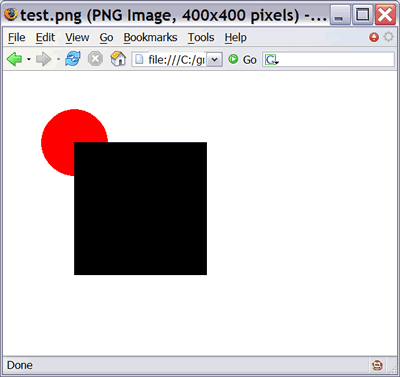
在运行这个程序时,test.png 文件应该如图 5 所示。
图5. 红圆在黑方框之后
现在修改下面的代码:
$gobjs []= new Oval( 200, "red", 50, 50, 150, 150 ); $gobjs []= new Rectangle( 100, "black", 100, 100, 300, 300 ); |
再次运行这个代码,突然这个椭圆就在这个方框上面了,如图 6 所示。
图6. 红圆现在在黑方框上面了
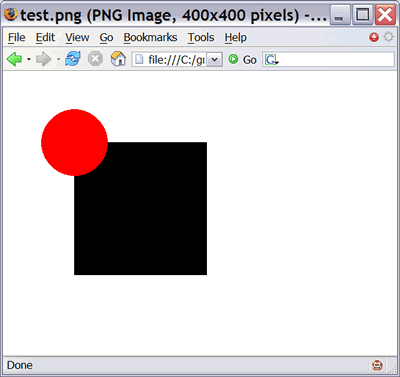
红圆现在就出现在黑方框上面了,尽管它是先创建的,也是首先添加到数组中的。这就是 z 值的实际价值:您可以按照任何顺序来创建对象,并可以通过调整每个对象的 z 值来调整彼此之间的相对位置。
在这段代码中,z 值排序是在这个库之外实现的。让我们通过创建一个新容器对象 Group 来实现这种功能,其中保存了一组 GraphicsObject 对象。Group 对象然后再处理排序的问题。
Group 类的代码如清单 5 所示。
清单 5. Group 类
function zsort( $a, $b )
{
 if ( $a->z() < $b->z() ) return -1;
 if ( $a->z() > $b->z() ) return 1;
 return 0;
}
class Group extends GraphicsObject
{
 private $z;
 protected $members = array();
 public function __construct( $z )
 {
 $this->z = $z;
 }
 public function add( $member )
 {
 $this->members []= $member;
 }
 public function render( $ge )
 {
 usort( $this->members, "zsort" );
 foreach( $this->members as $gobj )
 {
  $gobj->render( $ge );
 }
 }
 public function z() { return $this->z; }
}
|
Group 对象的任务是保持一个对象数组,然后在画图时,逐个对对象zo进行排序和画图。
更新后的测试代码如清单 6 所示。
清单 6. 更新后的测试代码
<?php require_once( "glib.php" ); $ge = new GraphicsEnvironment( 400, 400 ); $ge->addColor( "black", 0, 0, 0 ); $ge->addColor( "red", 255, 0, 0 ); $ge->addColor( "green", 0, 255, 0 ); $ge->addColor( "blue", 0, 0, 255 ); $g1 = new Group( 0 ); $g1->add( new Oval( 200, "red", 50, 50, 150, 150 ) ); $g1->add( new Rectangle( 100, "black", 100, 100, 300, 300 ) ); $g1->render( $ge ); $ge->saveAsPng( "test.png" ); ?> |
现在所有的客户机需要做的是创建一个 Group 对象。它会处理排序和其他操作。
[NextPage]
创建 viewport
viewport 是一个人造的坐标系统,可以转换成图像的物理坐标系统。viewport 的扩展可以是您希望的任何东西。例如,x 和 y 轴的起点和终点可以是 -2 和 2,这样 viewport 坐标平面的中心就是 0, 0。这对于三角图形(例如 sin 和 cosine)来说是很好的一个 viewport。或者,这个 viewport 也可以是不对称的,其中 y 值的范围从 -1 到 1,x 值的范围是从 0 到 10,000,这取决于您的需要。
这个 viewport 的其他值可以确保构建一个 400X400 的图像所采用的逻辑与构建一个 4000X2000 的图像所采用的逻辑是相同的。代码负责向这个 viewport 中写入数据,然后这个 viewport 自动实现到图像的物理尺寸的自动映射。
要让您的 viewport 正常工作,您需要将这个 viewport 的范围从 0,0 修改为 1,1,这可以让图形对象回调图形环境,从而将 viewport 的坐标转换成物理坐标。您可以将所有的代码都放到 BoxObject 基类中进行简化。
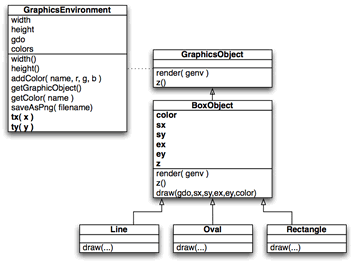
图 7 显示了有关新添加的代码的两个内容。首先是添加的 tx 和 ty 方法,这会将 x 和 y 坐标从 viewport 转换成物理图像的坐标。第二个是对 BoxObject 增加了 draw 方法,它的派生类应该用来进行制图。BoxObject 在 render 方法中实现 viewport 的转换,并使用物理坐标来调用 draw 方法。使用这种方法,Line、Oval 和 Rectangle 类都可以利用 viewport 坐标,而不需要担心坐标转换的问题。
图 7. 所添加的图形环境 viewport 转换
这个新库的代码如清单 7 所示:
清单 7. 具有 viewport 支持的图形库
<?php
class GraphicsEnvironment
{
 public $width;
 public $height;
 public $gdo;
 public $colors = array();
 public function __construct( $width, $height )
 {
 $this->width = $width;
 $this->height = $height;
 $this->gdo = imagecreatetruecolor( $width, $height );
 $this->addColor( "white", 255, 255, 255 );
 imagefilledrectangle( $this->gdo, 0, 0,
  $width, $height,
  $this->getColor( "white" ) );
 }
 public function width() { return $this->width; }
 public function height() { return $this->height; }
 public function addColor( $name, $r, $g, $b )
 {
 $this->colors[ $name ] = imagecolorallocate(
  $this->gdo,
  $r, $g, $b );
 }
 public function getGraphicObject()
 {
 return $this->gdo;
 }
 public function getColor( $name )
 {
 return $this->colors[ $name ];
 }
 public function saveAsPng( $filename )
 {
 imagepng( $this->gdo, $filename );
 }
 public function tx( $x )
 {
 return $x * $this->width;
 }
 public function ty( $y )
 {
 return $y * $this->height;
 }
}
abstract class GraphicsObject
{
 abstract public function render( $ge );
 abstract public function z();
}
function zsort( $a, $b )
{
 if ( $a->z() < $b->z() ) return -1;
 if ( $a->z() > $b->z() ) return 1;
 return 0;
}
class Group extends GraphicsObject
{
 private $z;
 protected $members = array();
 public function __construct( $z )
 {
 $this->z = $z;
 }
 public function add( $member )
 {
 $this->members []= $member;
 }
 public function render( $ge )
 {
 usort( $this->members, "zsort" );
 foreach( $this->members as $gobj )
 {
  $gobj->render( $ge );
 }
 }
 public function z() { return $this->z; }
}
abstract class BoxObject extends GraphicsObject
{
 protected $color;
 protected $sx;
 protected $sy;
 protected $ex;
 protected $ey;
 protected $z;
 public function __construct( $z, $color, $sx, $sy, $ex, $ey )
 {
 $this->z = $z;
 $this->color = $color;
 $this->sx = $sx;
 $this->sy = $sy;
 $this->ex = $ex;
 $this->ey = $ey;
 }
 public function render( $ge )
 {
 $rsx = $ge->tx( $this->sx );
 $rsy = $ge->ty( $this->sy );
 $rex = $ge->tx( $this->ex );
 $rey = $ge->ty( $this->ey );
 $this->draw( $rsx, $rsy, $rex, $rey,
   $ge->getGraphicObject(),
   $ge->getColor( $this->color ) );
 }
 abstract public function draw( $sx, $sy,
 $ex, $ey, $gobj, $color );
 public function z() { return $this->z; }
}
class Line extends BoxObject
{
 public function draw( $sx, $sy, $ex, $ey,
 $gobj, $color )
 {
 imageline( $gobj, $sx, $sy, $ex, $ey,
  $color );
 }
}
class Rectangle extends BoxObject
{
 public function draw( $sx, $sy, $ex, $ey,
 $gobj, $color )
 {
 imagefilledrectangle( $gobj, $sx, $sy,
  $ex, $ey, $color );
 }
}
class Oval extends BoxObject
{
 public function draw( $sx, $sy, $ex, $ey,
 $gobj, $color )
 {
 $w = $ex - $sx;
 $h = $ey - $sy;
 imagefilledellipse( $gobj,
  $sx + ( $w / 2 ), $sy + ( $h / 2 ),
  $w, $h, $color );
 }
}
?>
|
GraphicsEnvironment 类中的 viewport 转换代码是高亮显示的,正如 GraphicsObject 中的 render 代码一样,这会回调图形环境来进行坐标转换的工作。
相关文章

PHP 在5.1.* 和5.2.*之间 PDO数据库操作中的不同之处小结
今天发现php5.1.*和php5.2.*在数据库预编译代码执行的时候出现差异2012-03-03 今天发一下能够直接用的ping函数,希望对大家有所帮助,还需要说明的一点是现在的ping并不是像以前那么管用了2012-02-02
 这篇文章主要介绍了php+Mysqli利用事务处理转账问题的方法,实例分析了php+mysqli处理事务的提交与回滚的技巧,需要的朋友可以参考下2015-02-02
 php下获取当前访问的文件名的代码小结,大家可以根据需要选择。2010-02-02
 这篇文章主要为大家介绍了PHP提供下载功能实现案例,有需要的朋友可以借鉴参考下,希望能够有所帮助,祝大家多多进步,早日升职加薪2023-12-12
 这篇文章主要介绍了PHP动态生成指定大小随机图片的方法,涉及PHP根据传入参数动态生成图片的相关技巧,需要的朋友可以参考下2016-03-03
 这篇文章主要介绍了PHP中echo和print的区别,针对二者使用中常见的用法区别进行了较为深入的总结与分析,需要的朋友可以参考下2014-08-08
PHP实现表单提交数据的验证处理功能【防SQL注入和XSS攻击等】
这篇文章主要介绍了PHP实现表单提交数据的验证处理功能,可实现防SQL注入和XSS攻击等,涉及php字符处理、编码转换相关操作技巧,需要的朋友可以参考下2017-07-07
PHP中unset,array_splice删除数组中元素的区别
php中删除数组元素是非常的简单的,但有时删除数组需要对索引进行一些排序要求我们会使用到相关的函数,这里我们来介绍使用unset,array_splice删除数组中的元素区别吧2014-07-07 这篇文章主要介绍了PHP生成各种随机验证码的方法,结合具体实例形式总结分析了php常用的生成验证码操作相关技巧,并附带demo源码供读者下载参考,需要的朋友可以参考下2017-06-06
最新评论