

python3+PyQt5实现文档打印功能
更新时间:2018年04月24日 09:46:47 作者:basisworker
这篇文章主要为大家详细介绍了python3+PyQt5实现文档打印功能,具有一定的参考价值,感兴趣的小伙伴们可以参考一下
本文通过Python3+PyQt5实现《python Qt Gui 快速编程》这本书13章文档打印功能。本文共通过三种方式:
1、使用HTML和QTextDOcument打印文档
2、使用QTextCusor和QTextDocument打印文档
3、使用QPainter打印文档
使用Qpainter打印文档比QTextDocument需要更操心和复杂的计算,但是QPainter确实能够对输出赋予完全控制。
#!/usr/bin/env python3
import math
import sys
import html
from PyQt5.QtPrintSupport import QPrinter,QPrintDialog
from PyQt5.QtCore import (QDate, QRectF, Qt)
from PyQt5.QtWidgets import (QApplication,QDialog,
 QHBoxLayout,QPushButton, QTableWidget, QTableWidgetItem,QVBoxLayout)
from PyQt5.QtGui import (QFont,QFontMetrics,QPainter,QTextCharFormat,
  QTextCursor, QTextDocument, QTextFormat,
  QTextOption, QTextTableFormat,
  QPixmap,QTextBlockFormat)
import qrc_resources


from PyQt5.QtPrintSupport import QPrinter,QPrintDialog
from PyQt5.QtCore import (QDate, QRectF, Qt)
from PyQt5.QtWidgets import (QApplication,QDialog,
 QHBoxLayout,QPushButton, QTableWidget, QTableWidgetItem,QVBoxLayout)
from PyQt5.QtGui import (QFont,QFontMetrics,QPainter,QTextCharFormat,
  QTextCursor, QTextDocument, QTextFormat,
  QTextOption, QTextTableFormat,
  QPixmap,QTextBlockFormat)
import qrc_resources
DATE_FORMAT = "MMM d, yyyy"


class Statement(object):

 def __init__(self, company, contact, address):
 self.company = company
 self.contact = contact
 self.address = address
 self.transactions = [] # List of (QDate, float) two-tuples


 def balance(self):
 return sum([amount for date, amount in self.transactions])


class Form(QDialog):

 def __init__(self, parent=None):
 super(Form, self).__init__(parent)

 self.printer = QPrinter()
 self.printer.setPageSize(QPrinter.Letter)
 self.generateFakeStatements()
 self.table = QTableWidget()
 self.populateTable()

 cursorButton = QPushButton("Print via Q&Cursor")
 htmlButton = QPushButton("Print via &HTML")
 painterButton = QPushButton("Print via Q&Painter")
 quitButton = QPushButton("&Quit")

 buttonLayout = QHBoxLayout()
 buttonLayout.addWidget(cursorButton)
 buttonLayout.addWidget(htmlButton)
 buttonLayout.addWidget(painterButton)
 buttonLayout.addStretch()
 buttonLayout.addWidget(quitButton)
 layout = QVBoxLayout()
 layout.addWidget(self.table)
 layout.addLayout(buttonLayout)
 self.setLayout(layout)

 cursorButton.clicked.connect(self.printViaQCursor)
 htmlButton.clicked.connect(self.printViaHtml)
 painterButton.clicked.connect(self.printViaQPainter)
 quitButton.clicked.connect(self.accept)

 self.setWindowTitle("Printing")


 def generateFakeStatements(self):
 self.statements = []
 statement = Statement("Consality", "Ms S. Royal",
 "234 Rue Saint Hyacinthe, 750201, Paris")
 statement.transactions.append((QDate(2007, 8, 11), 2342))
 statement.transactions.append((QDate(2007, 9, 10), 2342))
 statement.transactions.append((QDate(2007, 10, 9), 2352))
 statement.transactions.append((QDate(2007, 10, 17), -1500))
 statement.transactions.append((QDate(2007, 11, 12), 2352))
 statement.transactions.append((QDate(2007, 12, 10), 2352))
 statement.transactions.append((QDate(2007, 12, 20), -7500))
 statement.transactions.append((QDate(2007, 12, 20), 250))
 statement.transactions.append((QDate(2008, 1, 10), 2362))
 self.statements.append(statement)

 statement = Statement("Demamitur Plc", "Mr G. Brown",
 "14 Tall Towers, Tower Hamlets, London, WC1 3BX")
 statement.transactions.append((QDate(2007, 5, 21), 871))
 statement.transactions.append((QDate(2007, 6, 20), 542))
 statement.transactions.append((QDate(2007, 7, 20), 1123))
 statement.transactions.append((QDate(2007, 7, 20), -1928))
 statement.transactions.append((QDate(2007, 8, 13), -214))
 statement.transactions.append((QDate(2007, 9, 15), -3924))
 statement.transactions.append((QDate(2007, 9, 15), 2712))
 statement.transactions.append((QDate(2007, 9, 15), -273))
 #statement.transactions.append((QDate(2007, 11, 8), -728))
 #statement.transactions.append((QDate(2008, 2, 7), 228))
 #statement.transactions.append((QDate(2008, 3, 13), -508))
 #statement.transactions.append((QDate(2008, 3, 22), -2481))
 #statement.transactions.append((QDate(2008, 4, 5), 195))
 self.statements.append(statement)


 def populateTable(self):
 headers = ["Company", "Contact", "Address", "Balance"]
 self.table.setColumnCount(len(headers))
 self.table.setHorizontalHeaderLabels(headers)
 self.table.setRowCount(len(self.statements))
 for row, statement in enumerate(self.statements):
 self.table.setItem(row, 0, QTableWidgetItem(statement.company))
 self.table.setItem(row, 1, QTableWidgetItem(statement.contact))
 self.table.setItem(row, 2, QTableWidgetItem(statement.address))
 item = QTableWidgetItem("$ {0:,.2f}".format(float(statement.balance())))
 item.setTextAlignment(Qt.AlignRight|Qt.AlignVCenter)
 self.table.setItem(row, 3, item)
 self.table.resizeColumnsToContents()


 def printViaHtml(self):
 htmltext = ""
 for statement in self.statements:
 date = QDate.currentDate().toString(DATE_FORMAT)
 address = html.escape(statement.address).replace(
  ",", "<br>")
 contact = html.escape(statement.contact)
 balance = statement.balance()
 htmltext += ("<p align=right><img src=':/logo.png'></p>"
  "<p align=right>Greasy Hands Ltd."
  "<br>New Lombard Street"
  "<br>London<br>WC13 4PX<br>{0}</p>"
  "<p>{1}</p><p>Dear {2},</p>"
  "<p>The balance of your account is $ {3:,.2f}.").format(
  date, address, contact, float(balance))
 if balance < 0:
 htmltext += (" <p><font color=red><b>Please remit the "
  "amount owing immediately.</b></font>")
 else:
 htmltext += (" We are delighted to have done business "
  "with you.")
 htmltext += ("</p><p> </p><p>"
  "<table border=1 cellpadding=2 "
  "cellspacing=2><tr><td colspan=3>"
  "Transactions</td></tr>")
 for date, amount in statement.transactions:
 color, status = "black", "Credit"
 if amount < 0:
  color, status = "red", "Debit"
 htmltext += ("<tr><td align=right>{0}</td>"
  "<td>{1}</td><td align=right>"
  "<font color={2}>$ {3:,.2f}</font></td></tr>".format(
  date.toString(DATE_FORMAT), status, color,float(abs(amount))))
 htmltext += ("</table></p><p style='page-break-after:always;'>"
  "We hope to continue doing "
  "business with you,<br>Yours sincerely,"
  "<br><br>K. Longrey, Manager</p>")
 dialog = QPrintDialog(self.printer, self)
 if dialog.exec_():
 document = QTextDocument()
 document.setHtml(htmltext)
 document.print_(self.printer)

 def printViaQCursor(self):
 dialog = QPrintDialog(self.printer, self)
 if not dialog.exec_():
 return
 logo = QPixmap(":/logo.png")
 headFormat = QTextBlockFormat()
 headFormat.setAlignment(Qt.AlignLeft)
 headFormat.setTextIndent(
 self.printer.pageRect().width() - logo.width() - 216)
 bodyFormat = QTextBlockFormat()
 bodyFormat.setAlignment(Qt.AlignJustify)
 lastParaBodyFormat = QTextBlockFormat(bodyFormat)
 lastParaBodyFormat.setPageBreakPolicy(
 QTextFormat.PageBreak_AlwaysAfter)
 rightBodyFormat = QTextBlockFormat()
 rightBodyFormat.setAlignment(Qt.AlignRight)
 headCharFormat = QTextCharFormat()
 headCharFormat.setFont(QFont("Helvetica", 10))
 bodyCharFormat = QTextCharFormat()
 bodyCharFormat.setFont(QFont("Times", 11))
 redBodyCharFormat = QTextCharFormat(bodyCharFormat)
 redBodyCharFormat.setForeground(Qt.red)
 tableFormat = QTextTableFormat()
 tableFormat.setBorder(1)
 tableFormat.setCellPadding(2)

 document = QTextDocument()
 cursor = QTextCursor(document)
 mainFrame = cursor.currentFrame()
 page = 1
 for statement in self.statements:
 cursor.insertBlock(headFormat, headCharFormat)
 cursor.insertImage(":/logo.png")
 for text in ("Greasy Hands Ltd.", "New Lombard Street",
  "London", "WC13 4PX",
  QDate.currentDate().toString(DATE_FORMAT)):
 cursor.insertBlock(headFormat, headCharFormat)
 cursor.insertText(text)
 for line in statement.address.split(", "):
 cursor.insertBlock(bodyFormat, bodyCharFormat)
 cursor.insertText(line)
 cursor.insertBlock(bodyFormat)
 cursor.insertBlock(bodyFormat, bodyCharFormat)
 cursor.insertText("Dear {0},".format(statement.contact))
 cursor.insertBlock(bodyFormat)
 cursor.insertBlock(bodyFormat, bodyCharFormat)
 balance = statement.balance()
 cursor.insertText("The balance of your account is $ {0:,.2f}.".format(float(balance)))
 if balance < 0:
 cursor.insertBlock(bodyFormat, redBodyCharFormat)
 cursor.insertText("Please remit the amount owing "
   "immediately.")
 else:
 cursor.insertBlock(bodyFormat, bodyCharFormat)
 cursor.insertText("We are delighted to have done "
   "business with you.")
 cursor.insertBlock(bodyFormat, bodyCharFormat)
 cursor.insertText("Transactions:")
 table = cursor.insertTable(len(statement.transactions), 3,
   tableFormat)
 row = 0
 for date, amount in statement.transactions:
 cellCursor = table.cellAt(row, 0).firstCursorPosition()
 cellCursor.setBlockFormat(rightBodyFormat)
 cellCursor.insertText(date.toString(DATE_FORMAT),
   bodyCharFormat)
 cellCursor = table.cellAt(row, 1).firstCursorPosition()
 if amount > 0:
  cellCursor.insertText("Credit", bodyCharFormat)
 else:
  cellCursor.insertText("Debit", bodyCharFormat)
 cellCursor = table.cellAt(row, 2).firstCursorPosition()
 cellCursor.setBlockFormat(rightBodyFormat)
 format = bodyCharFormat
 if amount < 0:
  format = redBodyCharFormat
 cellCursor.insertText("$ {0:,.2f}".format(float(amount)), format)
 row += 1
 cursor.setPosition(mainFrame.lastPosition())
 cursor.insertBlock(bodyFormat, bodyCharFormat)
 cursor.insertText("We hope to continue doing business "
  "with you,")
 cursor.insertBlock(bodyFormat, bodyCharFormat)
 cursor.insertText("Yours sincerely")
 cursor.insertBlock(bodyFormat)
 if page == len(self.statements):
 cursor.insertBlock(bodyFormat, bodyCharFormat)
 else:
 cursor.insertBlock(lastParaBodyFormat, bodyCharFormat)
 cursor.insertText("K. Longrey, Manager")
 page += 1
 document.print_(self.printer)


 def printViaQPainter(self):
 dialog = QPrintDialog(self.printer, self)
 if not dialog.exec_():
 return
 LeftMargin = 72
 sansFont = QFont("Helvetica", 10)
 sansLineHeight = QFontMetrics(sansFont).height()
 serifFont = QFont("Times", 11)
 fm = QFontMetrics(serifFont)
 DateWidth = fm.width(" September 99, 2999 ")
 CreditWidth = fm.width(" Credit ")
 AmountWidth = fm.width(" W999999.99 ")
 serifLineHeight = fm.height()
 logo = QPixmap(":/logo.png")
 painter = QPainter(self.printer)
 pageRect = self.printer.pageRect()
 page = 1
 for statement in self.statements:
 painter.save()
 y = 0
 x = pageRect.width() - logo.width() - LeftMargin
 painter.drawPixmap(x, 0, logo)
 y += logo.height() + sansLineHeight
 painter.setFont(sansFont)
 painter.drawText(x, y, "Greasy Hands Ltd.")
 y += sansLineHeight
 painter.drawText(x, y, "New Lombard Street")
 y += sansLineHeight
 painter.drawText(x, y, "London")
 y += sansLineHeight
 painter.drawText(x, y, "WC13 4PX")
 y += sansLineHeight
 painter.drawText(x, y,
  QDate.currentDate().toString(DATE_FORMAT))
 y += sansLineHeight
 painter.setFont(serifFont)
 x = LeftMargin
 for line in statement.address.split(", "):
 painter.drawText(x, y, line)
 y += serifLineHeight
 y += serifLineHeight
 painter.drawText(x, y, "Dear {0},".format(statement.contact))
 y += serifLineHeight

 balance = statement.balance()
 painter.drawText(x, y, "The balance of your account is $ {0:,.2f}".format(float(balance)))
 y += serifLineHeight
 if balance < 0:
 painter.setPen(Qt.red)
 text = "Please remit the amount owing immediately."
 else:
 text = ("We are delighted to have done business "
  "with you.")
 painter.drawText(x, y, text)
 painter.setPen(Qt.black)
 y += int(serifLineHeight * 1.5)
 painter.drawText(x, y, "Transactions:")
 y += serifLineHeight

 option = QTextOption(Qt.AlignRight|Qt.AlignVCenter)
 for date, amount in statement.transactions:
 x = LeftMargin
 h = int(fm.height() * 1.3)
 painter.drawRect(x, y, DateWidth, h)
 painter.drawText(
  QRectF(x + 3, y + 3, DateWidth - 6, h - 6),
  date.toString(DATE_FORMAT), option)
 x += DateWidth
 painter.drawRect(x, y, CreditWidth, h)
 text = "Credit"
 if amount < 0:
  text = "Debit"
 painter.drawText(
  QRectF(x + 3, y + 3, CreditWidth - 6, h - 6),
  text, option)
 x += CreditWidth
 painter.drawRect(x, y, AmountWidth, h)
 if amount < 0:
  painter.setPen(Qt.red)
 painter.drawText(
  QRectF(x + 3, y + 3, AmountWidth - 6, h - 6),
  "$ {0:,.2f}".format(float(amount)),
  option)
 painter.setPen(Qt.black)
 y += h
 y += serifLineHeight
 x = LeftMargin
 painter.drawText(x, y, "We hope to continue doing "
   "business with you,")
 y += serifLineHeight
 painter.drawText(x, y, "Yours sincerely")
 y += serifLineHeight * 3
 painter.drawText(x, y, "K. Longrey, Manager")
 x = LeftMargin
 y = pageRect.height() - 72
 painter.drawLine(x, y, pageRect.width() - LeftMargin, y)
 y += 2
 font = QFont("Helvetica", 9)
 font.setItalic(True)
 painter.setFont(font)
 option = QTextOption(Qt.AlignCenter)
 option.setWrapMode(QTextOption.WordWrap)
 painter.drawText(
  QRectF(x, y, pageRect.width() - 2 * LeftMargin, 31),
  "The contents of this letter are for information "
  "only and do not form part of any contract.",
  option)
 page += 1
 if page <= len(self.statements):
 self.printer.newPage()
 painter.restore()


if __name__ == "__main__":
 app = QApplication(sys.argv)
 form = Form()
 form.show()
 app.exec_()
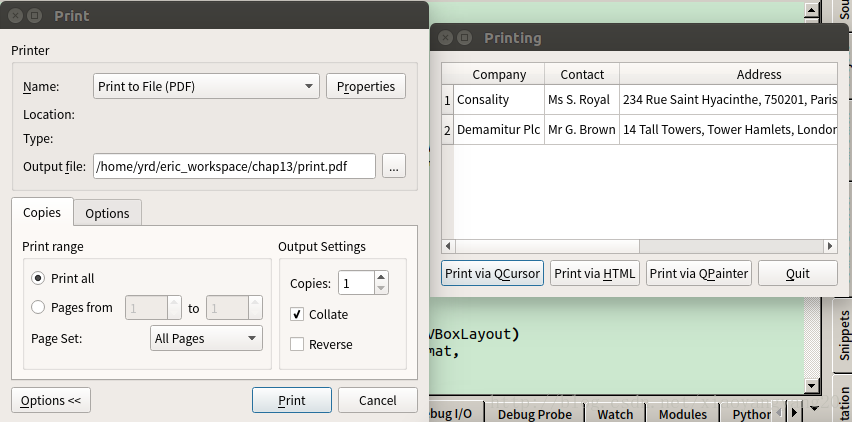
运行结果:
以上就是本文的全部内容,希望对大家的学习有所帮助,也希望大家多多支持脚本之家。
您可能感兴趣的文章:
- python GUI库图形界面开发之PyQt5状态栏控件QStatusBar详细使用方法实例
- python GUI库图形界面开发之PyQt5计数器控件QSpinBox详细使用方法与实例
- python GUI库图形界面开发之PyQt5切换按钮控件QPushButton详细使用方法与实例
- python GUI库图形界面开发之PyQt5多行文本框控件QTextEdit详细使用方法实例
- python GUI库图形界面开发之PyQt5单选按钮控件QRadioButton详细使用方法与实例
- python GUI库图形界面开发之PyQt5复选框控件QCheckBox详细使用方法与实例
- python GUI库图形界面开发之PyQt5滑块条控件QSlider详细使用方法与实例
- python GUI库图形界面开发之PyQt5工具栏控件QToolBar的详细使用方法与实例
- python GUI库图形界面开发之PyQt5菜单栏控件QMenuBar的详细使用方法与实例
- python GUI库图形界面开发之PyQt5日期时间控件QDateTimeEdit详细使用方法与实例
- python GUI库图形界面开发之PyQt5下拉列表框控件QComboBox详细使用方法与实例
- python GUI库图形界面开发之PyQt5访问系统剪切板QClipboard类详细使用方法与实例
- python GUI库图形界面开发之PyQt5控件数据拖曳Drag与Drop详细使用方法与实例
- python GUI库图形界面开发之PyQt5图片显示控件QPixmap详细使用方法与实例
- python GUI库图形界面开发之PyQt5打开保存对话框QFileDialog详细使用方法与实例
- python GUI库图形界面开发之PyQt5输入对话框QInputDialog详细使用方法与实例
- python GUI库图形界面开发之PyQt5单行文本框控件QLineEdit详细使用方法与实例
- python GUI库图形界面开发之PyQt5窗口布局控件QStackedWidget详细使用方法
- python GUI库图形界面开发之PyQt5打印控件QPrinter详细使用方法与实例
相关文章
 这篇文章主要介绍了Python pandas RFM模型应用,结合实例形式详细分析了pandas RFM模型的概念、原理、应用及相关操作注意事项,需要的朋友可以参考下2019-11-11
 这篇文章主要来和大家分享Python基于docker部署的Mysql备份查询的脚本,文中的示例代码讲解详细,有需要的小伙伴可以跟随小编一起了解下2024-04-04
 这篇文章主要介绍了Python性能分析工具Profile使用实例,文中通过示例代码介绍的非常详细,对大家的学习或者工作具有一定的参考学习价值,需要的朋友可以参考下2019-11-11
 这篇文章主要介绍了Python Numpy库datetime类型的处理详解,Python中自带的处理时间的模块就有time 、datetime、calendar,另外还有扩展的第三方库,如dateutil等等。。当我们用NumPy库做数据分析时,如何转换时间呢?需要的朋友可以参考下2019-07-07
 下面小编就为大家带来一篇深入理解python try异常处理机制。小编觉得挺不错的,现在就分享给大家,也给大家做个参考。一起跟随小编过来看看吧2016-06-06
 今天小编就为大家分享一篇Python小工具之消耗系统指定大小内存的方法,具有很好的参考价值,希望对大家有所帮助。一起跟随小编过来看看吧2018-12-12
python中的break、continue、exit()、pass全面解析
下面小编就为大家带来一篇python中的break、continue、exit()、pass全面解析。小编觉得挺不错的,现在就分享给大家,也给大家做个参考。一起跟随小编过来看看吧2017-08-08 在文本处理的时候,我们时常会遇到需要处理重复字样的情况,Python提供了很多方法来处理这种情况,下面就来详细的介绍几种方法,感兴趣的可以了解一下2024-02-02
 这篇文章主要介绍了Python 分享10个PyCharm技巧,今天要跟大家分享几个PyCharm小技巧,帮助大家提升工作效率!,需要的朋友可以参考下2019-07-07
 手机上突然收到了某银行的短信提示,看了一下手机的位数,正好是11位,我一想,这不就是标准的手机号码吗?于是想用python的库实现查询手机号码归属地查询自由,所以本文给大家介绍了如何用python实现手机号归属地查询功能,需要的朋友可以参考下2024-03-03
最新评论