

.Net Core Api 使用版本控制详解
更新时间:2018年10月08日 11:10:28 作者:Akgu
Api的版本控制是Api开发中经常遇到的问题, 在大部分中大型项目都需要使用到Api的版本控制,这篇文章主要介绍了.Net Core Api 使用版本控制详解,感兴趣的小伙伴们可以参考一下
Api的版本控制是Api开发中经常遇到的问题, 在大部分中大型项目都需要使用到Api的版本控制
在本篇博客中,我们将说明一下如何在.Net Core Api项目中使用Api版本控制。
本篇博客中测试项目的开发环境:
- Visual Studio 2017
- .Net Core 2.1 SDK
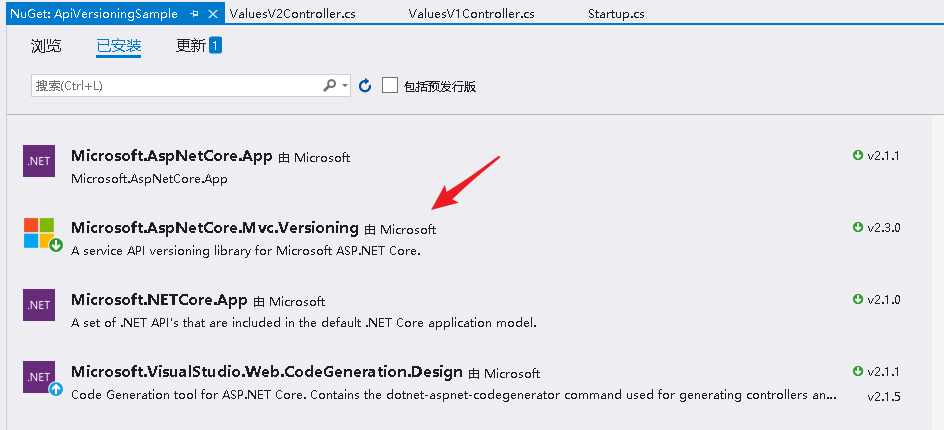
1,安装Microsoft.AspNetCore.Mvc.Versioning
NET Core Mvc中,微软官方提供了一个可用的Api版本控制库Microsoft.AspNetCore.Mvc.Versioning。
2,修改Startup类
这里我们需要在Startup类的ConfigureService方法中添加以下代码。
// This method gets called by the runtime. Use this method to add services to the container.
    public void ConfigureServices(IServiceCollection services)
    {
      services.AddMvc().SetCompatibilityVersion(CompatibilityVersion.Version_2_1);
      services.AddApiVersioning(o =>
      {
        o.ReportApiVersions = true;
        o.AssumeDefaultVersionWhenUnspecified = true;
        o.DefaultApiVersion = new ApiVersion(1, 0);
        //o.ApiVersionReader = new HeaderApiVersionReader("x-api-version");
      });
    }
3,代码
//版本1控制器
  [ApiVersion("1.0", Deprecated = true)]
  [Route("api/values")]
  [ApiController]
  public class ValuesV1Controller : ControllerBase
  {
    [HttpGet]
    public IEnumerable<string> Get()
    {
      return new string[] { "这是版本1.0返回的——数据1", "这是版本1.0返回的——数据2" };
    }
  }
//版本2控制器
  [ApiVersion("2.0")]
  [Route("api/values")]
  [ApiController]
  public class ValuesV2Controller : ControllerBase
  {
    [HttpGet]
    public IEnumerable<string> Get()
    {
      return new string[] { "这是版本2.0返回的——数据1", "这是版本2.0返回的——数据2" };
    }
  }
4,访问
https://localhost:44319/api/values

https://localhost:44319/api/values?api-version=1.0

https://localhost:44319/api/values?api-version=2.0

以上就是本文的全部内容,希望对大家的学习有所帮助,也希望大家多多支持脚本之家。
相关文章
 这篇文章主要介绍了ASP.Net中利用CSS实现多界面的两种方法,包括动态加载css样式与动态设置页面同类控件的方法来实现该功能,是非常具有实用价值的技巧,需要的朋友可以参考下2014-12-12
 这篇文章主要给大家介绍了关于asp.net使用原生控件实现自定义列导出功能的相关资料,文中通过实例代码介绍的非常详细,对大家的学习或者工作具有一定的参考学习价值,需要的朋友可以参考下2022-01-01
 这篇文章主要介绍了Automation服务器不能创建对象的多种解决办法,文中通过示例代码介绍的非常详细,对大家的学习或者工作具有一定的参考学习价值,需要的朋友们下面随着小编来一起学习学习吧2020-01-01
 这篇文章主要为大家详细介绍了.net core使用MD5加密解密字符串,具有一定的参考价值,感兴趣的小伙伴们可以参考一下2018-10-10
 这篇文章主要介绍了asp.net如何调用飞信免费发短信,记得要开通飞信把对方加为好友才能发,需要的朋友可以参考下2014-05-05
 ASP.NET数据库编程之处理文件访问许可...2006-09-09
Asp.net MVC使用swupload实现多图片上传功能
这篇文章主要为大家详细介绍了Asp.net MVC使用swupload实现多图片上传功能,具有一定的参考价值,感兴趣的小伙伴们可以参考一下2017-07-07
Asp.net 获取指定目录下的后缀名为".doc" 的所有文件名和文件路径
Asp.net 获取指定目录下的后缀名为“.doc” 的所有文件名和文件路径,帮写一个方法2011-07-07
ASP.NET用SignalR建立浏览器和服务器的持久连接详解
这篇文章主要给大家介绍了ASP.NET用SignalR如何建立浏览器和服务器的持久连接,文章先给大家简单介绍了配置环境,而后通过实战来给大家详细的介绍了实现的过程,文中通过一步步的步骤介绍的很详细,感兴趣的朋友们可以参考借鉴,下面来一起看看吧。2016-12-12 这篇文章主要为大家详细介绍了asp.net uploadify实现多附件上传功能,具有一定的参考价值,感兴趣的小伙伴们可以参考一下2016-11-11
最新评论