

Python关于excel和shp的使用在matplotlib
更新时间:2019年01月03日 11:29:54 作者:staHuri
今天小编就为大家分享一篇关于Python关于excel和shp的使用在matplotlib,小编觉得内容挺不错的,现在分享给大家,具有很好的参考价值,需要的朋友一起跟随小编来看看吧
关于excel和shp的使用在matplotlib
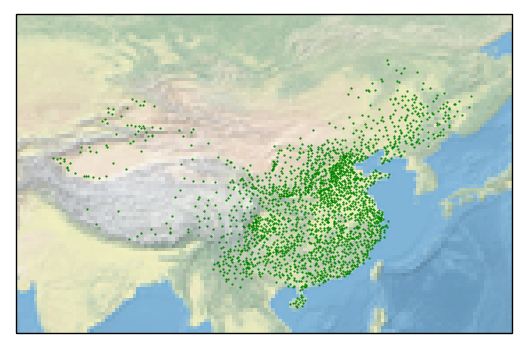
- 使用pandas 对excel进行简单操作
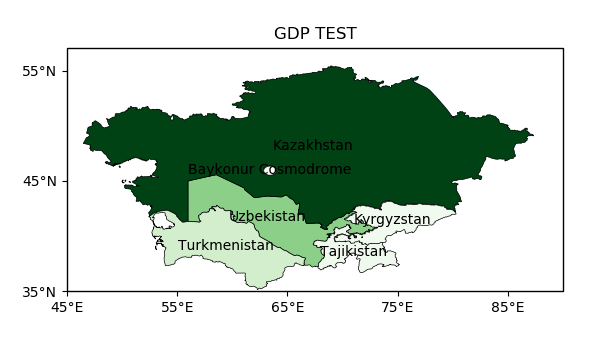
- 使用cartopy 读取shpfile 展示到matplotlib中
- 利用shpfile文件中的一些字段进行一些着色处理
#!/usr/bin/env python
# -*- coding: utf-8 -*-
# @File : map02.py
# @Author: huifer
# @Date : 2018/6/28
import folium
import pandas as pd
import requests
import matplotlib.pyplot as plt
import cartopy.crs as ccrs
import zipfile
import cartopy.io.shapereader as shaperead
from matplotlib import cm
from cartopy.mpl.ticker import LongitudeFormatter, LatitudeFormatter
import os
dataurl = "http://image.data.cma.cn/static/doc/A/A.0012.0001/SURF_CHN_MUL_HOR_STATION.xlsx"
shpurl = "http://www.naturalearthdata.com/http//www.naturalearthdata.com/download/10m/cultural/ne_10m_admin_0_countries.zip"
def download_file(url):
  """
  根据url下载文件
  :param url: str
  """
  r = requests.get(url, allow_redirects=True)
  try:
    open(url.split('/')[-1], 'wb').write(r.content)
  except Exception as e:
    print(e)
def degree_conversion_decimal(x):
  """
  度分转换成十进制
  :param x: float
  :return: integer float
  """
  integer = int(x)
  integer = integer + (x - integer) * 1.66666667
  return integer
def unzip(zip_path, out_path):
  """
  解压zip
  :param zip_path:str
  :param out_path: str
  :return:
  """
  zip_ref = zipfile.ZipFile(zip_path, 'r')
  zip_ref.extractall(out_path)
  zip_ref.close()
def get_record(shp, key, value):
  countries = shp.records()
  result = [country for country in countries if country.attributes[key] == value]
  countries = shp.records()
  return result
def read_excel(path):
  data = pd.read_excel(path)
  # print(data.head(10)) # 获取几行
  # print(data.ix[data['省份']=='浙江',:].shape[0]) # 计数工具
  # print(data.sort_values('观测场拔海高度(米)',ascending=False).head(10))# 根据值排序
  # 判断经纬度是什么格式(度分 、 十进制) 判断依据 %0.2f 是否大于60
  # print(data['经度'].apply(lambda x:x-int(x)).sort_values(ascending=False).head()) # 结果判断为度分保存
  # 坐标处理
  data['经度'] = data['经度'].apply(degree_conversion_decimal)
  data['纬度'] = data['纬度'].apply(degree_conversion_decimal)
  ax = plt.axes(projection=ccrs.PlateCarree())
  ax.set_extent([70, 140, 15, 55])
  ax.stock_img()
  ax.scatter(data['经度'], data['纬度'], s=0.3, c='g')
  # shp = shaperead.Reader('ne_10m_admin_0_countries/ne_10m_admin_0_countries.shp')
  # # 抽取函数 州:国家
  # city_list = [country for country in countries if country.attributes['ADMIN'] == 'China']
  # countries = shp.records()
  plt.savefig('test.png')
  plt.show()
def gdp(shp_path):
  """
  GDP 着色图
  :return:
  """
  shp = shaperead.Reader(shp_path)
  cas = get_record(shp, 'SUBREGION', 'Central Asia')
  gdp = [r.attributes['GDP_MD_EST'] for r in cas]
  gdp_min = min(gdp)
  gdp_max = max(gdp)
  ax = plt.axes(projection=ccrs.PlateCarree())
  ax.set_extent([45, 90, 35, 55])
  for r in cas:
    color = cm.Greens((r.attributes['GDP_MD_EST'] - gdp_min) / (gdp_max - gdp_min))
    ax.add_geometries(r.geometry, ccrs.PlateCarree(),
             facecolor=color, edgecolor='black', linewidth=0.5)
    ax.text(r.geometry.centroid.x, r.geometry.centroid.y, r.attributes['ADMIN'],
        horizontalalignment='center',
        verticalalignment='center',
        transform=ccrs.Geodetic())
  ax.set_xticks([45, 55, 65, 75, 85], crs=ccrs.PlateCarree()) # x坐标标注
  ax.set_yticks([35, 45, 55], crs=ccrs.PlateCarree()) # y 坐标标注
  lon_formatter = LongitudeFormatter(zero_direction_label=True)
  lat_formatter = LatitudeFormatter()
  ax.xaxis.set_major_formatter(lon_formatter)
  ax.yaxis.set_major_formatter(lat_formatter)
  plt.title('GDP TEST')
  plt.savefig("gdb.png")
  plt.show()
def run_excel():
  if os.path.exists("SURF_CHN_MUL_HOR_STATION.xlsx"):
    read_excel("SURF_CHN_MUL_HOR_STATION.xlsx")
  else:
    download_file(dataurl)
    read_excel("SURF_CHN_MUL_HOR_STATION.xlsx")
def run_shp():
  if os.path.exists("ne_10m_admin_0_countries"):
    gdp("ne_10m_admin_0_countries/ne_10m_admin_0_countries.shp")
  else:
    download_file(shpurl)
    unzip('ne_10m_admin_0_countries.zip', "ne_10m_admin_0_countries")
    gdp("ne_10m_admin_0_countries/ne_10m_admin_0_countries.shp")
if __name__ == '__main__':
  # download_file(dataurl)
  # download_file(shpurl)
  # cas = get_record('SUBREGION', 'Central Asia')
  # print([r.attributes['ADMIN'] for r in cas])
  # read_excel('SURF_CHN_MUL_HOR_STATION.xlsx')
  # gdp()
  run_excel()
  run_shp()
总结
以上就是这篇文章的全部内容了,希望本文的内容对大家的学习或者工作具有一定的参考学习价值,谢谢大家对脚本之家的支持。如果你想了解更多相关内容请查看下面相关链接
相关文章
 这篇文章主要介绍了Python数据分析之Pandas Series对象,文章基于python的相关资料展开详细内容介绍,具有一定的参考价值,需要的小伙伴可以参考一下2022-05-05
 今天小编就为大家分享一篇Python numpy实现二维数组和一维数组拼接的方法,具有很好的参考价值,希望对大家有所帮助。一起跟随小编过来看看吧2018-06-06
 在本篇文章里小编给大家整理的是一篇关于python3将变量输入的简单实例内容,有需要的朋友们可以参考下。2020-08-08
 这篇文章主要给大家pycharm安装及配置的相关资料,pycharm是编辑python很好使用的工具,文中通过图文介绍的非常详细,对大家学习或者使用pycharm具有一定的参考借鉴价值,需要的朋友可以参考下2023-12-12
 这篇文章主要介绍了Python的词法分析(Lexical Analysis)与 语法分析(Syntactic Analysis),需要的朋友可以参考下2013-05-05
 这篇文章主要介绍了python解析mdf或mf4文件利器之asammdf用法,具有很好的参考价值,希望对大家有所帮助,如有错误或未考虑完全的地方,望不吝赐教2024-06-06
 最近在写的程序频繁地与文件操作打交道,这块比较弱,还好在百度上找到一篇不错的文章,这是原文传送门,我对原文稍做了些改动2014-07-07
 本文主要介绍了全网非常详细的pytest配置文件,pytest的主配置文件,可以改变pytest的默认行为,有很多可配置的选项,感兴趣的可以了解一下2022-07-07
 这篇文章主要介绍了Python标准库json模块和pickle模块使用详解,文中通过示例代码介绍的非常详细,对大家的学习或者工作具有一定的参考学习价值,需要的朋友可以参考下2020-03-03
 下面小编就为大家带来一篇浅谈python中set使用。小编觉得挺不错的,现在就分享给大家,也给大家做个参考。一起跟随小编过来看看吧2016-06-06
最新评论