

Python多线程同步---文件读写控制方法
更新时间:2019年02月12日 09:05:46 作者:爱橙子的OK绷
今天小编就为大家分享一篇Python多线程同步---文件读写控制方法,具有很好的参考价值,希望对大家有所帮助。一起跟随小编过来看看吧
1、实现文件读写的文件ltz_schedule_times.py
#! /usr/bin/env python
#coding=utf-8
import os

def ReadTimes():
 res = []
 if os.path.exists('schedule_times.txt'):
  fp = open('schedule_times.txt', 'r')
 else:
  os.system('touch schedule_times.txt')
  fp = open('schedule_times.txt', 'r')
 try:
  line = fp.read()
  if line == None or len(line)==0:
   fp.close()
   return 0
  tmp = line.split()
  print 'tmp: ', tmp
  schedule_times = int(tmp[-1])
 finally:
  fp.close()
 #print schedule_times
 return schedule_times

def WriteTimes(schedule_times):
 if schedule_times <= 10:
  fp = open('schedule_times.txt', 'a+')#10以内追加进去
 else:
  fp = open('schedule_times.txt', 'w')#10以外重新写入
  schedule_times = 1
 print 'write schedule_times start!'
 try:

  fp.write(str(schedule_times)+'\n')
 finally:
  fp.close()
  print 'write schedule_times finish!'

if __name__ == '__main__':

 schedule_times = ReadTimes()
 #if schedule_times > 10:
 # schedule_times = 0
 print schedule_times
 schedule_times = schedule_times + 1
 WriteTimes(schedule_times)
2.1、不加锁对文件进行多线程读写。
file_lock.py
#! /usr/bin/env python
#coding=utf-8

from threading import Thread
import threading
import time
from ltz_schedule_times import *

#1、不加锁
def lock_test():
 time.sleep(0.1)
 schedule_times = ReadTimes()
 print schedule_times
 schedule_times = schedule_times + 1
 WriteTimes(schedule_times)


if __name__ == '__main__':

 for i in range(5):
  Thread(target = lock_test, args=()).start()
得到结果:
0
write schedule_times start!
write schedule_times finish!
tmp: tmp: tmp: tmp:  [[[['1''1''1''1']]]]


11

1
 1
write schedule_times start!write schedule_times start!

write schedule_times start!write schedule_times start!

write schedule_times finish!
write schedule_times finish!
write schedule_times finish!write schedule_times finish!
文件写入结果:
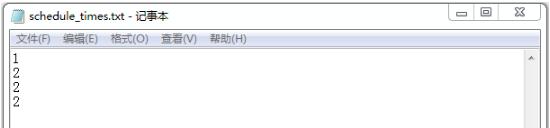
以上结果可以看出,不加锁多线程读写文件会出现错误。
2.2、加锁对文件进行多线程读写。
file_lock.py
#! /usr/bin/env python
#coding=utf-8

from threading import Thread
import threading
import time
from ltz_schedule_times import *

#2、加锁
mu = threading.Lock() #1、创建一个锁
def lock_test():
 #time.sleep(0.1)
 if mu.acquire(True): #2、获取锁状态,一个线程有锁时,别的线程只能在外面等着
  schedule_times = ReadTimes()
  print schedule_times
  schedule_times = schedule_times + 1
  WriteTimes(schedule_times)
  mu.release() #3、释放锁

if __name__ == '__main__':

 for i in range(5):
  Thread(target = lock_test, args=()).start()
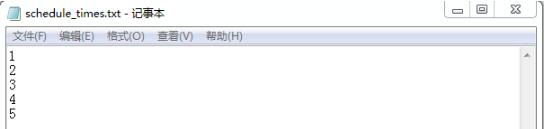
结果:
0
write schedule_times start!
write schedule_times finish!
tmp: ['1']
1
write schedule_times start!
write schedule_times finish!
tmp: ['1', '2']
2
write schedule_times start!
write schedule_times finish!
tmp: ['1', '2', '3']
3
write schedule_times start!
write schedule_times finish!
tmp: ['1', '2', '3', '4']
4
write schedule_times start!
write schedule_times finish!
文件写入结果:
以上这篇Python多线程同步---文件读写控制方法就是小编分享给大家的全部内容了,希望能给大家一个参考,也希望大家多多支持脚本之家。
相关文章
 今天小编就为大家分享一篇python 读取文件并替换字段的实例,具有很好的参考价值,希望对大家有所帮助。一起跟随小编过来看看吧2018-07-07
 在数据展示中使用图表来分享自己的见解,是个非常常见的方法。这也是Tableau、Power BI这类商业智能仪表盘持续流行的原因之一。本文主主要介绍了一个用Python制作可视化报表的案例,感兴趣的可以学习一下2022-02-02
 这篇文章主要给大家分享的是Python单元测试常见的几个技巧,文章会讲解requests的一些细节实现以及pytest的使用等,感兴趣的小伙伴不妨和小编一起阅读下面文章 的具体内容吧2021-09-09
在 Windows 下搭建高效的 django 开发环境的详细教程
这篇文章主要介绍了如何在 Windows 下搭建高效的 django 开发环境,本文通过一篇详细教程实例代码相结合给大家讲解的非常详细,对大家的学习或工作具有一定的参考借鉴价值,需要的朋友可以参考下2020-07-07 这篇文章主要介绍了CentOS7安装Python3的教程,非常不错,具有一定的参考借鉴价值 ,需要的朋友可以参考下2019-04-04
 这篇文章主要为大家详细介绍了Python+OpenCV人脸检测原理及示例,文中示例代码介绍的非常详细,具有一定的参考价值,感兴趣的小伙伴们可以参考一下2017-12-12
在linux系统下安装python librtmp包的实现方法
今天小编就为大家分享一篇在linux系统下安装python librtmp包的实现方法,具有很好的参考价值,希望对大家有所帮助。一起跟随小编过来看看吧2019-07-07 一个变量的名称除了可以代表不同的东西以外,也表示“哪里可以使用”这个变量,这篇文章将会介绍全局变量和局部变量的用法和差异,感兴趣的可以了解下2021-06-06
Django代码性能优化与Pycharm Profile使用详解
本文通过一个简单的实例一步一步引导读者对其进行全方位的性能优化,这篇文章主要给大家介绍了关于Django代码性能优化与Pycharm Profile使用的相关资料,文中通过示例代码介绍的非常详细,需要的朋友可以参考下2018-08-08 这篇文章主要介绍了解决anaconda安装pytorch报错找不到包的问题,本文给大家介绍的非常详细,对大家的学习或工作具有一定的参考借鉴价值,需要的朋友可以参考下2023-03-03
最新评论