

Python Pandas 箱线图的实现
更新时间:2019年07月23日 10:36:17 作者:智能先行者
这篇文章主要介绍了Python Pandas 箱线图的实现,文中通过示例代码介绍的非常详细,对大家的学习或者工作具有一定的参考学习价值,需要的朋友们下面随着小编来一起学习学习吧
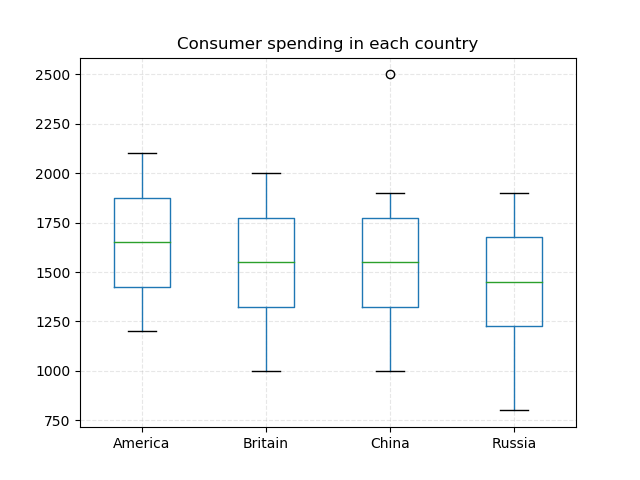
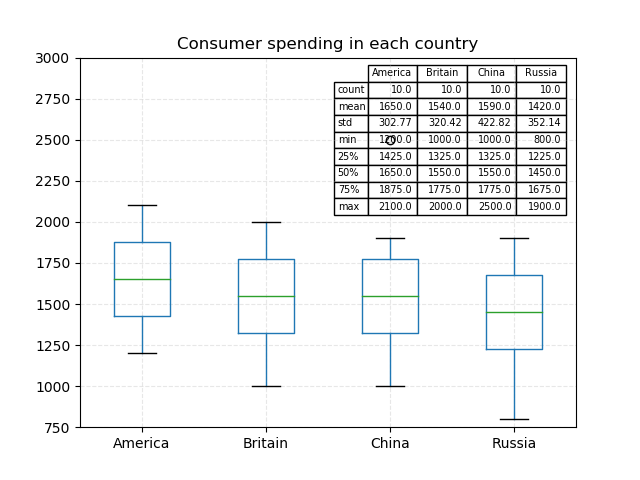
各国家用户消费分布
import numpy as np

import pandas as pd

import matplotlib.pyplot as plt


data = {

  'China': [1000, 1200, 1300, 1400, 1500, 1600, 1700, 1800, 1900, 2500],

  'America': [1200, 1300, 1400, 1500, 1600, 1700, 1800, 1900, 2000, 2100],

  'Britain': [1000, 1200, 1300, 1400, 1500, 1600, 1700, 1800, 1900, 2000],

  "Russia": [800, 1000, 1200, 1300, 1400, 1500, 1600, 1700, 1800, 1900]

}

df = pd.DataFrame(data)


# df.plot.box(title="Consumer spending in each country", vert=False)

df.plot.box(title="Consumer spending in each country")


plt.grid(linestyle="--", alpha=0.3)

plt.show()
import numpy as np

import pandas as pd

import matplotlib.pyplot as plt


data = {

  'China': [1000, 1200, 1300, 1400, 1500, 1600, 1700, 1800, 1900, 2500],

  'America': [1200, 1300, 1400, 1500, 1600, 1700, 1800, 1900, 2000, 2100],

  'Britain': [1000, 1200, 1300, 1400, 1500, 1600, 1700, 1800, 1900, 2000],

  "Russia": [800, 1000, 1200, 1300, 1400, 1500, 1600, 1700, 1800, 1900]

}

df = pd.DataFrame(data)


from pandas.plotting import table


fig, ax = plt.subplots(1, 1)


table(ax, np.round(df.describe(), 2),

   loc='upper right',

   colWidths=[0.1, 0.1, 0.1, 0.1]

   )


# df.plot.box(title="Consumer spending in each country", vert=False)

df.plot.box(title="Consumer spending in each country",

      ax=ax,

      ylim=(750, 3000))


plt.grid(linestyle="--", alpha=0.3)

plt.show()
import numpy as np

import pandas as pd

import matplotlib.pyplot as plt


data = {"gender": [1, 0, 1, 0, 1, 0, 1, 0, 1, 0],

    'China': [1000, 1200, 1300, 1400, 1500, 1600, 1700, 1800, 1900, 2500],

    'America': [1200, 1300, 1400, 1500, 1600, 1700, 1800, 1900, 2000, 2100]

    }

df = pd.DataFrame(data)


# df.boxplot(column=["China", "America"], by="gender",vert=False)

df.boxplot(column=["China", "America"], by="gender")


plt.grid(linestyle="--", alpha=0.3)

plt.show()

以上就是本文的全部内容,希望对大家的学习有所帮助,也希望大家多多支持脚本之家。
相关文章

解决Vscode中jupyter出现kernel dead问题
遇到VSCode中Jupyter Kernel Dead时,可通过Anaconda Prompt安装ipykernel解决,首先使用jupyter kernelspec list命令查看内核,若发现缺少ipykernel,激活相应虚拟环境,使用conda install ipykernel命令安装,操作后,VSCode中Jupyter应能正常运行2024-09-09 今天小编就为大家分享一篇python实现对csv文件的列的内容读取,具有很好的参考价值,希望对大家有所帮助。一起跟随小编过来看看吧2018-07-07
 这篇文章主要介绍了python Dataframe 合并与去重详情,文章围绕主题展开详细的内容介绍,具有一定参考价值,需要的朋友可以参考一下2022-08-08
 这篇文章主要为大家详细介绍了Python如何基于随机采样一至性实现拟合椭圆,文中的示例代码讲解详细,具有一定的借鉴价值,感兴趣的可以了解一下2022-11-11
 这篇文章主要介绍了python实现报表自动化详解,涉及python读,写excel—xlwt常用功能,xlutils 常用功能,xlwt写Excel时公式的应用等相关内容,具有一定参考价值,需要的朋友可以了解下。2017-11-11
 今天小编就为大家分享一篇python 列表降维的实例讲解,具有很好的参考价值,希望对大家有所帮助。一起跟随小编过来看看吧2018-06-06
 今天给大家介绍Python中的pathlib库的操作方法,pathlib 是Python内置库,pathlib库对于目录路径的操作更简洁也更贴近 Pythonic(Python代码风格的),对Python pathlib库相关知识感兴趣的朋友一起看看吧2022-05-05
 这篇文章主要为大家详细介绍了python使用正则筛选信用卡,具有一定的参考价值,感兴趣的小伙伴们可以参考一下2019-01-01
 这篇文章主要介绍了Keras实现支持masking的Flatten层代码,具有很好的参考价值,希望对大家有所帮助。一起跟随小编过来看看吧2020-06-06
 这篇文章主要介绍了pyqt5 QListWidget的用法解析,具有很好的参考价值,希望对大家有所帮助。一起跟随小编过来看看吧2021-03-03
最新评论