

Python Django 页面上展示固定的页码数实现代码
更新时间:2019年08月21日 10:40:25 作者:Sch01aR#
这篇文章主要介绍了Python Django 页面上展示固定的页码数实现代码,文中通过示例代码介绍的非常详细,对大家的学习或者工作具有一定的参考学习价值,需要的朋友可以参考下
如果页数太多的话,全部显示在页面上就会显得很冗杂
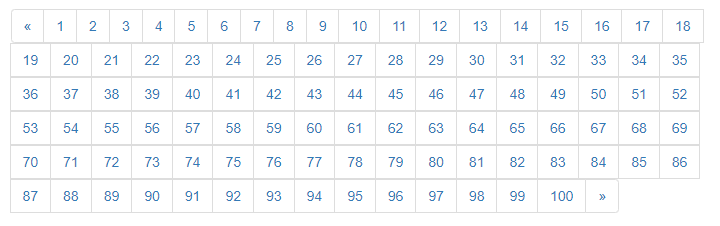
可以在页面中显示规定的页码数
例如:

book_list.html:
<!DOCTYPE html>
<html lang="en">
<head>
  <meta charset="UTF-8">
  <title>书籍列表</title>
  <link rel="stylesheet" href="/static/bootstrap/css/bootstrap.min.css" rel="external nofollow" >
</head>
<body>

<div class="container">

  <table class="table table-bordered">
    <thead>
    <tr>
      <th>序号</th>
      <th>id</th>
      <th>书名</th>
    </tr>
    </thead>
    <tbody>
    {% for book in books %}
      <tr>
        <td>{{ forloop.counter }}</td>
        <td>{{ book.id }}</td>
        <td>{{ book.title }}</td>
      </tr>
    {% endfor %}

    </tbody>
  </table>
  <nav aria-label="Page navigation">
    <ul class="pagination">
      <li>
        <a href="#" rel="external nofollow" rel="external nofollow" aria-label="Previous">
          <span aria-hidden="true">«</span>
        </a>
      </li>
      <li>
        {{ page_html|safe }}
      </li>
      <li>
        <a href="#" rel="external nofollow" rel="external nofollow" aria-label="Next">
          <span aria-hidden="true">»</span>
        </a>
      </li>
    </ul>
  </nav>
</div>
</body>
</html>
views.py:
from django.shortcuts import render
from app01 import models
def book_list(request):
  # 从 URL 中取参数
  page_num = request.GET.get("page")
  print(page_num, type(page_num))
  page_num = int(page_num)

  # 定义两个变量保存数据从哪儿取到哪儿
  data_start = (page_num-1)*10
  data_end = page_num*10

  # 书籍总数
  total_count = models.Book.objects.all().count()

  # 每一页显示多少条数据
  per_page = 10

  # 总共需要多少页码来显示
  total_page, m = divmod(total_count, per_page)

  # 页面上最多展示的页码
  max_page = 11
  half_max_page = max_page // 2

  # 页面上展示的页码的开始页
  page_start = page_num - half_max_page
  # 页面上展示的页码的结束页
  page_end = page_num + half_max_page

  # 如果当前页减一半比 1 小
  if page_start <= 1:
    page_start = 1
    page_end = max_page
  # 如果当前页加一半比总页码还大
  if page_end > total_page:
    page_end = total_page
    page_start = total_page - max_page + 1

  # 如果还有数据
  if m:
    total_page += 1

  all_book = models.Book.objects.all()[data_start:data_end]

  # 拼接 html 的分页代码
  html_list = []
  for i in range(page_start, page_end+1):
    tmp = '<li><a href="/book_list/?page={0}" rel="external nofollow" >{0}</a></li>'.format(i)
    html_list.append(tmp)

  page_html = "".join(html_list)

  return render(request, "book_list.html", {"books": all_book, "page_html": page_html})
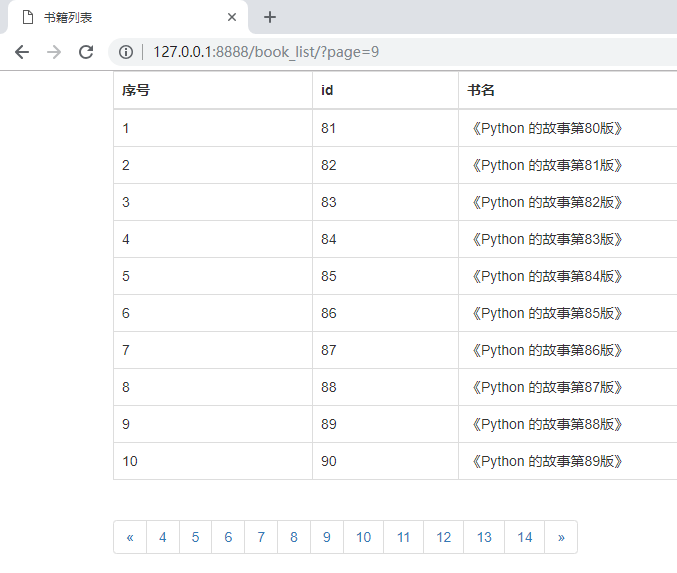
运行结果:
以上就是本文的全部内容,希望对大家的学习有所帮助,也希望大家多多支持脚本之家。
相关文章

Django restful framework生成API文档过程详解
这篇文章主要介绍了Django restful framework生成API文档过程详解,文中通过示例代码介绍的非常详细,对大家的学习或者工作具有一定的参考学习价值,需要的朋友可以参考下2020-11-11 PC摄像机扫描二维码的应用场景很广泛,可以应用于各种需要快速扫描、识别和管理的场景,本文就来具体讲讲如何用Python实现这一功能吧2023-05-05
Python3.5内置模块之shelve模块、xml模块、configparser模块、hashlib、hmac模块用法
这篇文章主要介绍了Python3.5内置模块之shelve模块、xml模块、configparser模块、hashlib、hmac模块,结合实例形式较为详细的分析了shelve、xml、configparser、hashlib、hmac等模块的功能及使用方法,需要的朋友可以参考下2019-04-04 在当今这个人手一个 Web 服务的年代,GUI 程序还是没有 Web 服务来的香啊。所以本文将用Python制作一个简单的股票K线图网站,感兴趣的可以了解一下2022-09-09
Python常用模块logging——日志输出功能(示例代码)
logging模块是Python的内置模块,主要用于输出运行日志,可以灵活配置输出日志的各项信息。这篇文章主要介绍了Python常用模块logging——日志输出的实例代码,需要的朋友可以参考下2019-11-11 这篇文章主要介绍了python使用thrift教程的方法示例,文中通过示例代码介绍的非常详细,对大家的学习或者工作具有一定的参考学习价值,需要的朋友们下面随着小编来一起学习学习吧2019-03-03
 这篇文章主要介绍了Keras-多输入多输出实例(多任务),具有很好的参考价值,希望对大家有所帮助。一起跟随小编过来看看吧2020-06-06
利用Python实现Windows下的鼠标键盘模拟的实例代码
本篇文章主要介绍了利用Python实现Windows下的鼠标键盘模拟的实例代码,具有一定的参考价值,有兴趣的可以了解一下2017-07-07 小编就为大家分享一篇python利用有道翻译实现"语言翻译器"的功能实例。具有比较好的参考价值,希望对大家有所帮助。一起跟随小编过来看看吧2017-11-11
 这篇文章主要为大家详细介绍了Python中命令行参数argparse的一些常用命令,文中的示例代码讲解详细,具有一定的学习价值,需要的可以了解一下2023-01-01
最新评论