

javascript getBoundingClientRect() 来获取页面元素的位置的代码[修正版]第1/2页
更新时间:2009年05月22日 00:00:59 作者:
该方法已经不再是IE Only了,FF3.0+和Opera9.5+已经支持了该方法,可以说在获得页面元素位置上效率能有很大的提高,在以前版本的Opera和Firefox中必须通过循环来获得元素在页面中的绝对位置。
document.documentElement.getBoundingClientRect
下面这是MSDN的解释:
Syntax
oRect = object.getBoundingClientRect()Return Value
Returns a TextRectangle object. Each rectangle has four integer properties (top, left, right, and bottom) that represent a coordinate of the rectangle, in pixels.
Remarks
This method retrieves an object that exposes the left, top, right, and bottom coordinates of the union of rectangles relative to the client's upper-left corner. In Microsoft Internet Explorer 5, the window's upper-left is at 2,2 (pixels) with respect to the true client.
还是实际解释下,该方法获得页面中某个元素的左,上,右和下分别相对浏览器视窗的位置。也不好理解,下面用图说明下。
该方法已经不再是IE Only了,FF3.0+和Opera9.5+已经支持了该方法,可以说在获得页面元素位置上效率能有很大的提高,在以前版本的Opera和Firefox中必须通过循环来获得元素在页面中的绝对位置。
[Ctrl+A 全选 注:引入外部Js需再刷新一下页面才能执行]
有了这个方法,获取页面元素的位置就简单多了,
var X= this.getBoundingClientRect().left+document.documentElement.scrollLeft;
var Y =this.getBoundingClientRect().top+document.documentElement.scrollTop;
下面这是MSDN的解释:
Syntax
oRect = object.getBoundingClientRect()Return Value
Returns a TextRectangle object. Each rectangle has four integer properties (top, left, right, and bottom) that represent a coordinate of the rectangle, in pixels.
Remarks
This method retrieves an object that exposes the left, top, right, and bottom coordinates of the union of rectangles relative to the client's upper-left corner. In Microsoft Internet Explorer 5, the window's upper-left is at 2,2 (pixels) with respect to the true client.
还是实际解释下,该方法获得页面中某个元素的左,上,右和下分别相对浏览器视窗的位置。也不好理解,下面用图说明下。
该方法已经不再是IE Only了,FF3.0+和Opera9.5+已经支持了该方法,可以说在获得页面元素位置上效率能有很大的提高,在以前版本的Opera和Firefox中必须通过循环来获得元素在页面中的绝对位置。
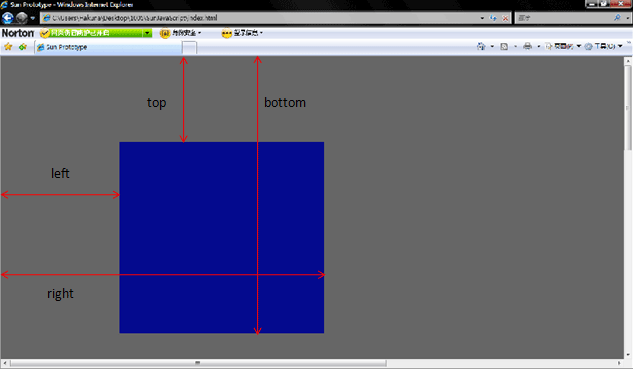
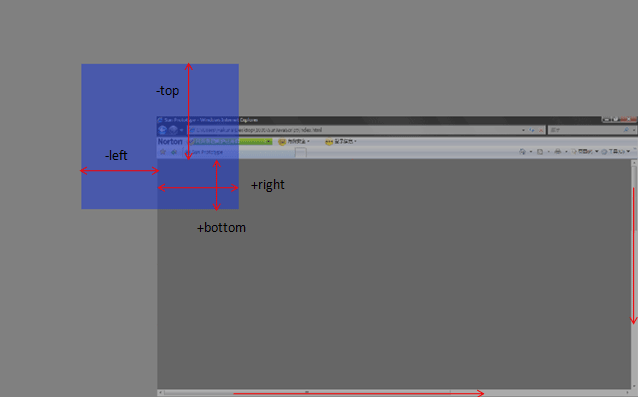
下面的代码举了个简单的例子,可以滚动滚动条之后点红色区域看各个值的变化。
[Ctrl+A 全选 注:引入外部Js需再刷新一下页面才能执行]
有了这个方法,获取页面元素的位置就简单多了,
var X= this.getBoundingClientRect().left+document.documentElement.scrollLeft;
var Y =this.getBoundingClientRect().top+document.documentElement.scrollTop;
相关文章

javascript中Date()函数在各浏览器中的显示效果
本文给大家分享的是javascript中Date()函数在各浏览器中的显示效果,由于各大浏览器的兼容性问题,本文做了这个测试,希望有需要的小伙伴可以少走些弯路2015-06-06
javascript从image转换为base64位编码的String
选择webview把image以base64位编码的方式传给本地应用,就不需要再取一次图片文件了,从而提高了速度2014-07-07 javascript中 location用于获取或设置窗体的URL,并且可以用于解析URL,是BOM中最重要的对象之一,下面我们就来详细探讨下Location对象的使用。2015-05-05
 这篇文章主要给大家介绍了关于echarts中tooltip添加点击事件的相关资料,echarts tooltip点击事件是指当用户点击图表中的提示框(tooltip)时触发的事件,需要的朋友可以参考下2023-07-07
 下面小编就为大家带来一篇JS之相等操作符详解。小编觉得挺不错的,现在就分享给大家,也给大家做个参考。一起跟随小编过来看看吧2016-09-09
typescript环境安装并开启VSCode自动监视编译ts文件为js文件
这篇文章主要介绍了安装typescript环境并开启VSCode自动监视编译ts文件为js文件,本文教大家最基础的安装和配置自动监视ts文件编译成js文件,需要的朋友可以参考下2022-06-06 性能优化:简而言之,就是在不影响系统运行正确性的前提下,使之运行地更快,完成特定功能所需的时间更短,本篇文章给大家介绍js性能优化技巧,需要的朋友参考下2015-11-11
 这篇文章主要介绍了js模拟淘宝网的多级选择菜单实现方法,涉及javascript针对页面元素结点的遍历与设置等操作技巧,具有一定参考借鉴价值,需要的朋友可以参考下2015-08-08
 这篇文章主要为大家介绍了js评分组件的使用方法,具有一定的参考价值,感兴趣的小伙伴们可以参考一下2017-06-06
 动态添加、删除行想必大家并不陌生,下面为大家介绍通过js是如何实现的,有此需求的朋友可不要错过了哈2013-08-08
最新评论