

微信小程序实现手指拖动选项排序
更新时间:2020年04月22日 09:19:02 作者:小程序星座社交
这篇文章主要介绍了微信小程序实现手指拖动选项排序,文中示例代码介绍的非常详细,具有一定的参考价值,感兴趣的小伙伴们可以参考一下
本文实例为大家分享了微信小程序实现手指拖动选项排序的具体代码,供大家参考,具体内容如下
效果:
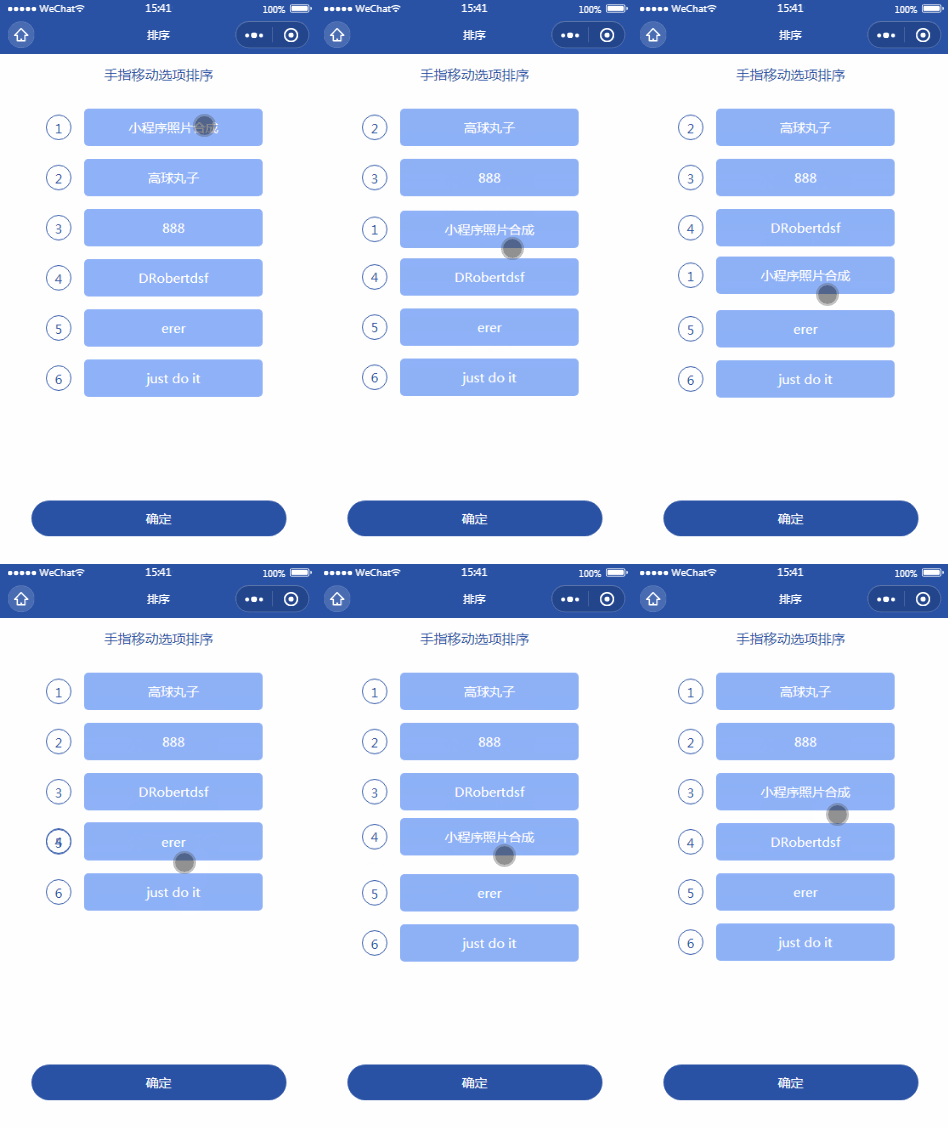
wxml:
<view>
 <view class="dileititle">手指移动选项排序</view>
 <view style="width:740rpx;height:80vh;overflow-y:auto;padding:0 90rpx;margin:auto;" id="movebox">
 <block wx:for="{{list}}" wx:key="index">
 <view catchtouchmove="listitemmove" catchtouchend="listitemmove" data-index="{{index}}" class="flex1 dileiitemlist" id="movelist{{index}}" style="left:0;right:0;{{nowmoveindex==index?('position:absolute;top:'+movetop+'px;height:'+itemheight+'px;'):''}}">
 <view class="{{moveoutindex==index?'changemovenow':''}}" style="height:0;transition: height 0.2s;"></view>
 <view class="ranknum">{{index+1}}</view>
 <view class="flex1" style="border-radius:10rpx;width:440rpx;position:relative;color:#fff;">
 <view style="flex:1;text-align: center;margin-right: 20rpx;padding: 20rpx 20rpx;background:#8eb1f7;border-radius:10rpx;">{{item.member.nickname}}</view>
 </view>
 </view>
 </block>
 </view>
</view>
<button class='tijiao' catchtap="lastsubmit">确定</button>
js:
let app = getApp()
app.unitgameinfo = {"members":[{"member":{"nickname":"小程序照片合成","job":"ckext"},},{"member":{"nickname":"高球丸子"},},{"member":{"nickname":"DRobertdsf","job":"黄金"},},{"member":{"nickname":"erer","job":"ckext"},},{"member":{"nickname":"just do it","job":"黄金"},},{"member":{"nickname":"888"},}],};
Page({
 data: {
 },
 onLoad: function (options) {
 var info = app.unitgameinfo,list;
 list = info.members;
 this.setData({options,info,list});
 this.getwxmlcode("#movebox",(resp)=>{
 this.setData({movebox:resp})
 setTimeout(()=>{this.getwxmlcode("#movelist0",(res)=>{
 this.setData({movelist0:res})
 var jiange = res.top-resp.top;
 var yiban = res.bottom - res.top + jiange;
 this.setData({
  itemheight:res.bottom - res.top,
  jiange:yiban, //两条中间到另一条的距离
  jianqu:resp.top-(res.bottom - res.top)/2, //位置要减去距离
 })
 })},300)
 })

 },
 getwxmlcode(str,cal){
 const query1 = wx.createSelectorQuery()
 query1.select(str).boundingClientRect()
 query1.selectViewport().scrollOffset()
 query1.exec((res) => {
 if(cal) cal(res[0])
 })
 },
 listitemmove(e){
 // console.log(e)
 if(e.type=="touchmove"){
 var movetop = e.touches[0].pageY-this.data.itemheight;
 var moveoutindex = parseInt((movetop-this.data.jianqu)/this.data.jiange);
 if(e.currentTarget.dataset.index<=moveoutindex) moveoutindex++;
 this.moveoutindex = moveoutindex;
 this.setData({nowmoveindex:e.currentTarget.dataset.index,movetop,moveoutindex})
 }else{
 let index = e.currentTarget.dataset.index,score = this.data.list;
 let data = {...score[index]};
 score.splice(index,1);
 if(index<=this.moveoutindex-1) this.moveoutindex--;
 score.splice(this.moveoutindex,0,data);
 this.setData({list:score,moveoutindex:-1,nowmoveindex:-1});
 }
 },
 onShow: function(){
 },
 lastsubmit(){
 console.log(this.data.list)
 },

})
wxss:
page{background-color: #fff;font-size:30rpx;text-align: center;color: #2952a5;}
.tijiao{
 color: #fff;font-size: 30rpx;line-height: 2.8;
 margin: 20rpx auto 20rpx;width:80vw;position: fixed;bottom: 50rpx;left: 10vw;
 background-color: #2952a5;border-radius:50rpx;
}
.dileiitemlist{justify-content: center;padding-top:30rpx;flex-wrap: wrap;}
.dileititle{font-size: 32rpx;line-height: 100rpx;}
.ranknum{width:60rpx;height: 60rpx;line-height: 60rpx;text-align: center;border-radius:50%;border:1rpx solid #2952a5;margin-right:30rpx;}
.changemovenow{width:100%;height:60px!important;}
.flex1{display:flex;align-items:center;}
以上就是本文的全部内容,希望对大家的学习有所帮助,也希望大家多多支持脚本之家。
相关文章
 在Web开发过程中,编写JavaScript程序时或多或少会遇到各种各样的错误,有语法错误,逻辑错误。如果是一小段代码,可以通过仔细检查来排除错误,但如果程序稍微复杂点,调试JS便成为一个令Web开发者很头痛的问题。2010-08-08
bootstrap自定义样式之bootstrap实现侧边导航栏功能
bootstrap自带的响应式导航栏是向下滑动的,有时满足不了个性化的需求,需要做一个类似于android drawerLayout 侧滑的菜单,这就是我要实现的bootstrap自定义侧滑菜单。接下来通过本文给大家介绍bootstrap实现侧边导航栏功能,感兴趣的朋友一起看看吧2018-09-09 javascript中的自执行匿名函数可以用它创建命名空间,只要把自己所有的代码都写在这个特殊的函数包装内,那么外部就不能访问,除非你允许2014-09-09
 这篇文章主要介为大家详细绍了Bootstrap CSS布局之图像的相关资料,具有一定的参考价值,感兴趣的小伙伴们可以参考一下2016-12-12
 本篇文章主要介绍了js动态调用css属性的小规律及实例说明。需要的朋友可以过来参考下,希望对大家有所帮助2013-12-12
 这篇文章主要介绍了用html+css+js实现的一个简单的图片切换特效,需要的朋友可以参考下2014-05-05
 这篇文章主要为大家详细介绍了Bootstrap表单的简单实现代码,具有一定的参考价值,感兴趣的小伙伴们可以参考一下2017-03-03
 小程序地理定位是指通过小程序开发平台提供的 API,来获取用户的地理位置信息,用户在使用小程序时,可以授权小程序获取自己的地理位置信息,下面通过本文给大家分享微信小程序地理定位功能实现,感兴趣的朋友一起看看吧2024-05-05
 我们都知道localStorage不主动删除,永远不会销毁,那么如何设置localStorage的过期时间呢?下面这篇文章主要给大家介绍了关于如何给localStorage设置一个过期时间的相关资料,需要的朋友可以参考下2018-11-11
 这篇文章主要介绍了Javascript原型链和原型的一个误区,需要的朋友可以参考下2014-10-10
最新评论