

python爬虫---requests库的用法详解
requests是python实现的简单易用的HTTP库,使用起来比urllib简洁很多
因为是第三方库,所以使用前需要cmd安装
pip install requests
安装完成后import一下,正常则说明可以开始使用了。
基本用法:
requests.get()用于请求目标网站,类型是一个HTTPresponse类型
import requestsresponse = requests.get('http://www.baidu.com')
print(response.status_code) # 打印状态码
print(response.url) # 打印请求url
print(response.headers) # 打印头信息
print(response.cookies) # 打印cookie信息
print(response.text) #以文本形式打印网页源码
print(response.content) #以字节流形式打印
运行结果:
状态码:200
url:www.baidu.com
headers信息

各种请求方式:
import requests

requests.get('http://httpbin.org/get')
requests.post('http://httpbin.org/post')
requests.put('http://httpbin.org/put')
requests.delete('http://httpbin.org/delete')
requests.head('http://httpbin.org/get')
requests.options('http://httpbin.org/get')
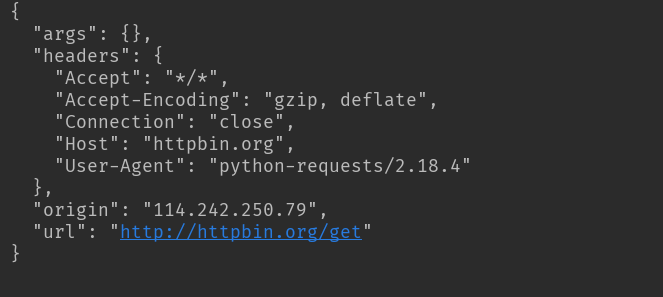
基本的get请求
import requests

response = requests.get('http://httpbin.org/get')
print(response.text)
结果
带参数的GET请求:
第一种直接将参数放在url内
import requests

response = requests.get(http://httpbin.org/get?name=gemey&age=22)
print(response.text)
结果

另一种先将参数填写在dict中,发起请求时params参数指定为dict
import requests

data = {
  'name': 'tom',
  'age': 20
}

response = requests.get('http://httpbin.org/get', params=data)
print(response.text)
结果同上
解析json
import requests

response = requests.get('http://httpbin.org/get')
print(response.text)
print(response.json()) #response.json()方法同json.loads(response.text)
print(type(response.json()))
结果

简单保存一个二进制文件
二进制内容为response.content
import requests

response = requests.get('http://img.ivsky.com/img/tupian/pre/201708/30/kekeersitao-002.jpg')
b = response.content
with open('F://fengjing.jpg','wb') as f:
  f.write(b)
为你的请求添加头信息
import requests
heads = {}
heads['User-Agent'] = 'Mozilla/5.0 ' \
             '(Macintosh; U; Intel Mac OS X 10_6_8; en-us) AppleWebKit/534.50 ' \
             '(KHTML, like Gecko) Version/5.1 Safari/534.50'
 response = requests.get('http://www.baidu.com',headers=headers)
使用代理
同添加headers方法,代理参数也要是一个dict
这里使用requests库爬取了IP代理网站的IP与端口和类型
因为是免费的,使用的代理地址很快就失效了。
import requests
import re

def get_html(url):
  proxy = {
    'http': '120.25.253.234:812',
    'https' '163.125.222.244:8123'
  }
  heads = {}
  heads['User-Agent'] = 'Mozilla/5.0 (Windows NT 10.0; WOW64) AppleWebKit/537.36 (KHTML, like Gecko) Chrome/49.0.2623.221 Safari/537.36 SE 2.X MetaSr 1.0'
  req = requests.get(url, headers=heads,proxies=proxy)
  html = req.text
  return html

def get_ipport(html):
  regex = r'<td data-title="IP">(.+)</td>'
  iplist = re.findall(regex, html)
  regex2 = '<td data-title="PORT">(.+)</td>'
  portlist = re.findall(regex2, html)
  regex3 = r'<td data-title="类型">(.+)</td>'
  typelist = re.findall(regex3, html)
  sumray = []
  for i in iplist:
    for p in portlist:
      for t in typelist:
        pass
      pass
    a = t+','+i + ':' + p
    sumray.append(a)
  print('高匿代理')
  print(sumray)


if __name__ == '__main__':
  url = 'http://www.kuaidaili.com/free/'
  get_ipport(get_html(url))
结果:

基本POST请求:
import requests

data = {'name':'tom','age':'22'}

response = requests.post('http://httpbin.org/post', data=data)

获取cookie
#获取cookie
import requests

response = requests.get('http://www.baidu.com')
print(response.cookies)
print(type(response.cookies))
for k,v in response.cookies.items():
  print(k+':'+v)
结果:

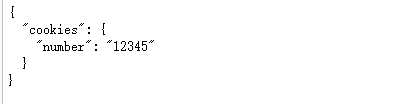
会话维持
import requests

session = requests.Session()
session.get('http://httpbin.org/cookies/set/number/12345')
response = session.get('http://httpbin.org/cookies')
print(response.text)
结果:
证书验证设置
import requests
from requests.packages import urllib3

urllib3.disable_warnings() #从urllib3中消除警告
response = requests.get('https://www.12306.cn',verify=False) #证书验证设为FALSE
print(response.status_code)打印结果:200
超时异常捕获
import requests
from requests.exceptions import ReadTimeout

try:
  res = requests.get('http://httpbin.org', timeout=0.1)
  print(res.status_code)
except ReadTimeout:
  print(timeout)
异常处理
在你不确定会发生什么错误时,尽量使用try...except来捕获异常
所有的requests exception:
Exceptions
import requests
from requests.exceptions import ReadTimeout,HTTPError,RequestException

try:
  response = requests.get('http://www.baidu.com',timeout=0.5)
  print(response.status_code)
except ReadTimeout:
  print('timeout')
except HTTPError:
  print('httperror')
except RequestException:
  print('reqerror')
25行代码带你爬取4399小游戏数据
import requests
import parsel
import csv
f = open('4399游戏.csv', mode='a', encoding='utf-8-sig', newline='')

csv_writer = csv.DictWriter(f, fieldnames=['游戏地址', '游戏名字'])
csv_writer.writeheader()
for page in range(1, 106):
  url = 'http://www.4399.com/flash_fl/5_{}.htm'.format(page)
  headers = {
    'User-Agent': 'Mozilla/5.0 (Windows NT 10.0; WOW64) AppleWebKit/537.36 (KHTML, like Gecko) Chrome/81.0.4044.138 Safari/537.36'
  }
  response = requests.get(url=url, headers=headers)
  response.encoding = response.apparent_encoding
  selector = parsel.Selector(response.text)
  lis = selector.css('#classic li')
  for li in lis:
    dit ={}
    data_url = li.css('a::attr(href)').get()
    new_url = 'http://www.4399.com' + data_url.replace('http://', '/')
    dit['游戏地址'] = new_url
    title = li.css('img::attr(alt)').get()
    dit['游戏名字'] = title
    print(new_url, title)
    csv_writer.writerow(dit)
f.close()
到此这篇关于python爬虫---requests库的用法详解的文章就介绍到这了,更多相关python requests库内容请搜索脚本之家以前的文章或继续浏览下面的相关文章希望大家以后多多支持脚本之家!
相关文章
 这篇文章主要分享一些非常实用的Python小技巧,助力你在Python学习的道路上一帆风顺,接下来就一起来学习一下吧2023-03-03
 这篇文章主要介绍了解决pycharm不能自动补全第三方库的函数和属性问题,具有很好的参考价值,希望对大家有所帮助。一起跟随小编过来看看吧2020-03-03
 numpy是Python中常用的科学计算库,其中也包含了一些随机数生成函数,本文主要介绍了numpy中几种随机数生成函数的用法,具有一定的参考价值,感兴趣的可以了解一下2023-11-11
 这篇文章主要介绍了Python 找出出现次数超过数组长度一半的元素实例,具有很好的参考价值,希望对大家有所帮助。一起跟随小编过来看看吧2020-05-05
 数据分析过程中,需要对获取到的数据进行分析,往往第一步就是导入数据。导入数据有很多方式,不同的数据文件需要用到不同的导入方式,相同的文件也会有几种不同的导入方式。下面总结几种常用的文件导入方法2022-11-11
 很多pdf文件文字识别软件都会收费,免费的网页版可能会带来信息泄露,所以本文为大家介绍了如何利用Python中的cnocr库完成中文扫描pdf文件的文字识别,需要的可以参考下2024-12-12
 Python中常用于时间的模块有time、datetime 和 calendar,顾名思义 time 是表示时间(时、分、秒、毫秒)等,calendar 是表示日历时间的,本章先讨论 datetime 模块,需要的朋友可以参考下2022-06-06
 本文详细介绍了Python的requests库的安装与使用,包括HTTP请求方法、请求头、请求体的基本概念,以及发送GET和POST请求的基本用法,同时,探讨了会话对象、处理重定向、超时设置、代理支持等高级功能,帮助读者更高效地处理复杂的HTTP请求场景,需要的朋友可以参考下2024-10-10
 这篇文章主要介绍了使用python检测主机存活端口及检查存活主机的相关资料,需要的朋友可以参考下2015-10-10
 这篇文章主要介绍了经验丰富程序员才知道的8种高级Python技巧,本文通过实例代码给大家介绍的非常详细,对大家的学习或工作具有一定的参考借鉴价值,需要的朋友可以参考下2020-07-07
最新评论