

小程序实现左滑删除的效果的实例代码
前言:实现小程序滑动删除有几种方式,文章会简单列举两种实现,先看效果。
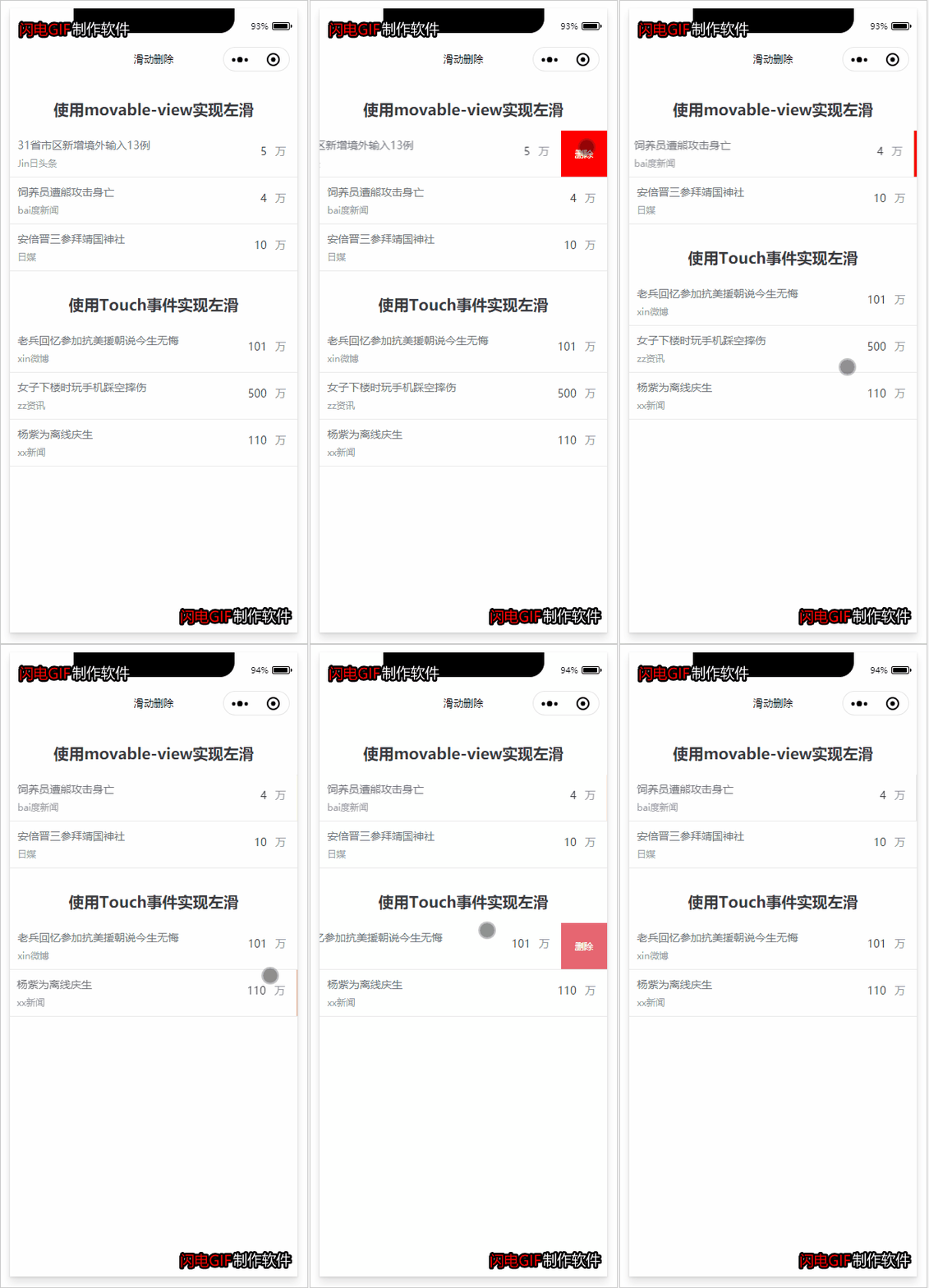
一、使用movable-view实现滑动
先看官方文档
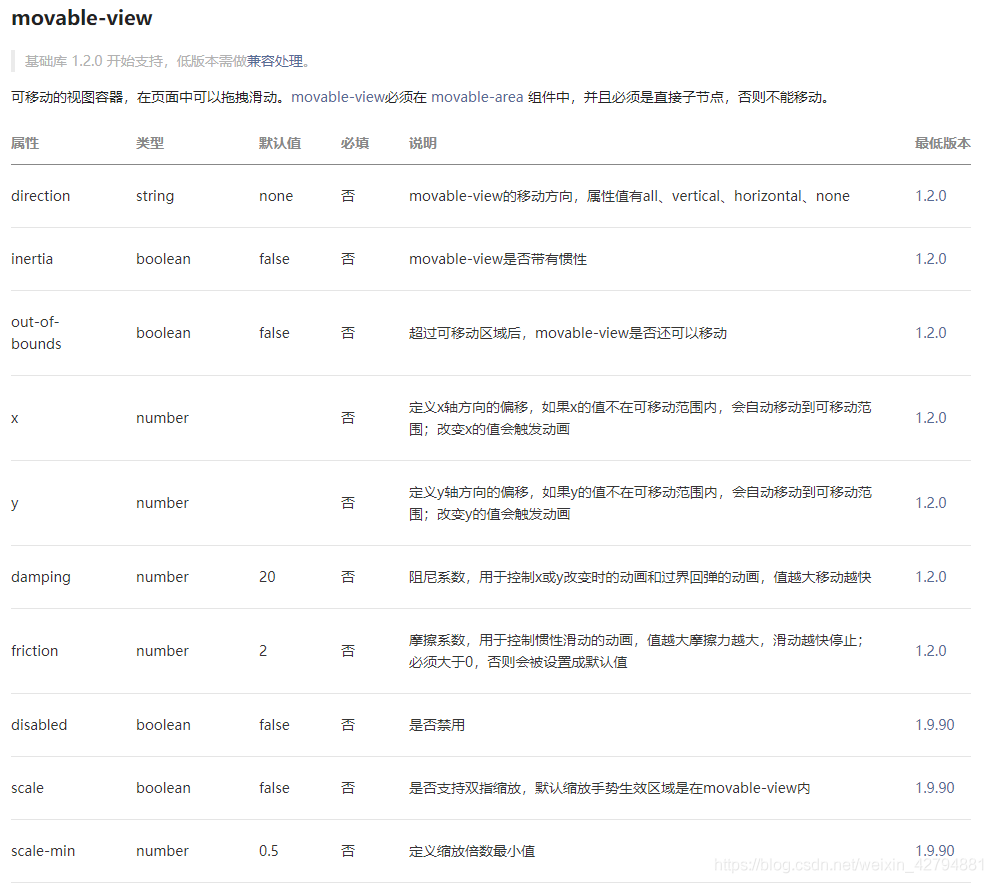
简单解读一下movable-area标签的基本概念。movable-area标签就是定义了一个可移动的视图容器,支持在页面中拖拽滑动,跟普通的view容器是一样的,但是也有不同之处,movable-area必须设置width和height属性,不设置默认为10px;movable-view 默认为绝对定位,top和left属性为0px。
 <movable-area>
  <movable-view out-of-bounds="true" direction="horizontal" inertia="true">
  </movable-view>
  </movable-area>
我们需要用的一些属性out-of-bounds,给他定义true,让我们的容器超过可移动区域后,movable-view还可以移动,direction属性是定义我们滑动的方向,vertical是垂直滑动,horizontal是水平滑动。
二、使用Touch事件实现滑动
1.bindtouchstart 函数,手指触摸动作开始
2.bindtouchmove 函数,手指触摸后移动
3.bindtouchend 函数,手指触摸动作结束
实现思路:
1.页面上的容器分为上下两层,上面一层显示正常加载无动作的内容,下面一层显示容器触发事件后展示的内容,例如删除、置顶、标为未读等按钮。
2.每个容器上面那一层容器我们通过css使用定位来固定,通过操纵事件来实现向需要移动的方向移动。
3.通过官方文档提供的API来实现容器随着方向移动。
完整代码如下
1.wxml
<view class="">
 <view class="containerTitle">使用movable-view实现左滑</view>
 <view class="list">
 <view class="product-item" wx:for="{{productList}}" wx:for-index="index" wx:key="{{item.id}}" >
  <movable-area>
  <movable-view out-of-bounds="true" direction="horizontal" x="{{item.xmove}}"
   inertia="true"
   data-productIndex="{{index}}"
   bindtouchstart="handleTouchStart"
   bindtouchend="handleTouchEnd"
   bindchange="handleMovableChange">
   <view class="product-item-wrap">
   <view class="product-movable-item">
    <view class="product-movable-item-name">{{item.name}}</view>
    <view class="product-movable-item-code">{{item.code}}</view>
   </view>
   <view class="product-movable-item product-movable-item-amount">
    <text class="amount">{{item.amount}}</text>
    <text class="unit">万</text>
   </view>
   </view>
  </movable-view>
  </movable-area>
  <view class="delete-btn" data-id="{{item.id}}" bindtap="handleDeleteProduct">删除</view>
 </view>
 </view>
 <view class="containerTitle">使用Touch事件实现左滑</view>
 <view class="list">
 <view class="product-item" wx:for="{{slideProductList}}" wx:for-index="index" wx:key="{{item.id}}">
  <slide-delete pid="{{item.id}}" bindaction="handleSlideDelete" wx:key="{{item.id}}">
  <view class="product-item-wrap">
   <view class="product-movable-item">
   <view class="product-movable-item-name">{{item.name}}</view>
   <view class="product-movable-item-code">{{item.code}}</view>
   </view>
   <view class="product-movable-item product-movable-item-amount">
   <text class="amount">{{item.amount}}</text>
   <text class="unit">万</text>
   </view>
  </view>
  </slide-delete>
 </view>
 </view>
</view>
2.wxss
.containerTitle {
 margin: 60rpx 0 30rpx;
 font-size: 40rpx;
 text-align: center;
 font-weight: bold;
 color: #383A3D;
}

.list .product-item {
 position: relative;
 width: 100vw;
 border-bottom: 2rpx solid #E9E9E9;
 box-sizing: border-box;
 background: #fff;
 z-index: 999;
}

.slide-product-list .slide-product-item {
 position: relative;
 width: 100vw;
 border-bottom: 2rpx solid #E9E9E9;
 box-sizing: border-box;
 background: #fff;
 z-index: 999;
}

.list .product-item movable-area {
 height: 120rpx;
 width: calc(100vw - 120rpx);
}

.list .product-item movable-view {
 height: 120rpx;
 width: 100vw;
 background: #fff;
 z-index: 999;
}

.list .product-item .delete-btn {
 position: absolute;
 top: 0;
 bottom: 0;
 right: 0;
 width: 120rpx;
 font-family: PingFangSC-Regular;
 font-size: 24rpx;
 color: #FFFFFF;
 line-height: 120rpx;
 z-index: 1;
 background: red;
 text-align: center;
}

.list .product-item-wrap {
 position: relative;
 display: flex;
 align-items: center;
 padding: 8rpx 0 20rpx 20rpx;
 box-sizing: border-box;
}

.list .product-item-wrap .product-movable-item {
 flex: 1;
 overflow: hidden;
}

.list .product-item-wrap .product-movable-item-name {
 font-family: PingFangSC-Regular;
 font-size: 28rpx;
 color: #71747A;
 line-height: 60rpx;
 margin-right: 10rpx;
 overflow: hidden;
 white-space: nowrap;
 text-overflow: ellipsis;
}

.list .product-item-wrap .product-movable-item-code {
 font-family: PingFangSC-Regular;
 font-size: 24rpx;
 color: #969AA3;
}

.list .product-item-wrap .product-movable-item-amount {
 flex: 0 0 auto;
 padding-right: 80rpx;
 position: relative;
}

.list .product-item-wrap .product-movable-item-amount .amount {
 width: 120rpx;
 font-size: 28rpx;
 color: #383A3D;
 line-height: 60rpx;
}

.list .product-item-wrap .product-movable-item-amount .unit {
 position: absolute;
 top: 0;
 right: 30rpx;
 font-size: 28rpx;
 color: #969AA3;
 line-height: 60rpx;
}
3.js代码
//获取应用实例
const app = getApp()

Page({
 data: {
 productList: [
  {
  id: 1,
  name: '31省市区新增境外输入13例',
  code: 'Jin日头条',
  amount: 5
  },
  {
  id: 2,
  name: '饲养员遭熊攻击身亡',
  code: 'bai度新闻',
  amount: 4
  },
  {
  id: 3,
  name: '安倍晋三参拜靖国神社',
  code: '日媒',
  amount: 10
  }
 ],
 slideProductList: [
  {
  id: 4,
  name: '老兵回忆参加抗美援朝说今生无悔',
  code: 'xin微博',
  amount: 101
  },
  {
  id: 5,
  name: '女子下楼时玩手机踩空摔伤',
  code: 'zz资讯',
  amount: 500
  },
  {
  id: 6,
  name: '杨紫为离线庆生',
  code: 'xx新闻',
  amount: 110
  }
 ]
 },

 onLoad: function () {

 },

 /**
 * 显示删除按钮
 */
 showDeleteButton: function (e) {
 let productIndex = e.currentTarget.dataset.productindex
 this.setXmove(productIndex, -65)
 },

 /**
 * 隐藏删除按钮
 */
 hideDeleteButton: function (e) {
 let productIndex = e.currentTarget.dataset.productindex

 this.setXmove(productIndex, 0)
 },

 /**
 * 设置movable-view位移
 */
 setXmove: function (productIndex, xmove) {
 let productList = this.data.productList
 productList[productIndex].xmove = xmove

 this.setData({
  productList: productList
 })
 },

 /**
 * 处理movable-view移动事件
 */
 handleMovableChange: function (e) {
 if (e.detail.source === 'friction') {
  if (e.detail.x < -30) {
  this.showDeleteButton(e)
  } else {
  this.hideDeleteButton(e)
  }
 } else if (e.detail.source === 'out-of-bounds' && e.detail.x === 0) {
  this.hideDeleteButton(e)
 }
 },

 /**
 * 处理touchstart事件
 */
 handleTouchStart(e) {
 this.startX = e.touches[0].pageX
 },

 /**
 * 处理touchend事件
 */
 handleTouchEnd(e) {
 if(e.changedTouches[0].pageX < this.startX && e.changedTouches[0].pageX - this.startX <= -30) {
  this.showDeleteButton(e)
 } else if(e.changedTouches[0].pageX > this.startX && e.changedTouches[0].pageX - this.startX < 30) {
  this.showDeleteButton(e)
 } else {
  this.hideDeleteButton(e)
 }
 },

 /**
 * 删除产品
 */
 handleDeleteProduct: function ({ currentTarget: { dataset: { id } } }) {
 let productList = this.data.productList
 let productIndex = productList.findIndex(item => item.id === id)
 productList.splice(productIndex, 1)
 this.setData({
  productList
 })
 if (productList[productIndex]) {
  this.setXmove(productIndex, 0)
 }
 },

 /**
 * slide-delete 删除产品
 */
 handleSlideDelete({ detail: { id } }) {
 let slideProductList = this.data.slideProductList
 let productIndex = slideProductList.findIndex(item => item.id === id)
 slideProductList.splice(productIndex, 1)
 this.setData({
  slideProductList
 })
 }
})
总结
到此这篇关于小程序实现左滑删除的效果的文章就介绍到这了,更多相关小程序左滑删除内容请搜索脚本之家以前的文章或继续浏览下面的相关文章希望大家以后多多支持脚本之家!
相关文章
 如果我们希望在页面引入图片。当我们基于webpack进行开发时,引入图片会遇到一些问题,这篇文章主要介绍了webpack之引入图片的实现及问题,非常具有实用价值,需要的朋友可以参考下2018-10-10
 这ES6允许为函数参数设置默认值,即直接写在参数定义后面。下面篇文章主要介绍了ES6中参数默认值语法的相关资料,对大家具有一定的参考价值,需要的朋友下面来一起看看吧。2017-05-05
 这篇文章主要介绍了js实现可得到不同颜色值的颜色选择器,实例分析了javascript颜色操作技巧,具有一定参考借鉴价值,需要的朋友可以参考下2015-02-02
 这篇文章主要给大家介绍了关于Webpack打包详细流程及代码的相关资料,Webpack是一款非常流行的打包工具,它的主要作用是将项目中的各个模块打包成静态资源,以便于在浏览器中加载和运行,需要的朋友可以参考下2024-01-01
js中的preventDefault与stopPropagation详解
本篇文章主要是对js中的preventDefault与stopPropagation进行了介绍,需要的朋友可以过来参考下,希望对大家有所帮助2014-01-01
解决火狐浏览器下JS setTimeout函数不兼容失效不执行的方法
今天检查自己用JQuery+AJAX+PHP做的网站后台登录检测,爱其他浏览器中兼容性还不错 结果到了火狐(FireFox)浏览器下setTimeout这个JS内置函数不执行了,本文将提供详细的解决方法2012-11-11
理解javascript中try...catch...finally
这篇文章主要帮助大家理解javascript中try...catch...finally,从浅入深,一步步掌握javascript中try...catch...finally的使用方法,感兴趣的小伙伴们可以参考一下2015-12-12 本篇文章主要介绍了详解webpack进阶之loader篇,小编觉得挺不错的,现在分享给大家,也给大家做个参考。一起跟随小编过来看看吧2017-08-08
 这篇文章主要为大家介绍了JS 加载性能Tree Shaking优化详解,有需要的朋友可以借鉴参考下,希望能够有所帮助,祝大家多多进步,早日升职加薪2022-11-11
 下面小编就为大家带来一篇js 获取元素的具体样式信息getcss(实例讲解)。小编觉得挺不错的,现在就分享给大家,也给大家做个参考。一起跟随小编过来看看吧2017-07-07
最新评论