

Python根据URL地址下载文件并保存至对应目录的实现
引言
在编程中经常会遇到图片等数据集将图片等数据以URL形式存储在txt文档中,为便于后续的分析,需要将其下载下来,并按照文件夹分类存储。本文以Github中Alexander Kim提供的图片分类数据集为例,下载其提供的图片样本并分类保存
Python 3.6.5,Anaconda, VSCode
1. 下载数据集文件
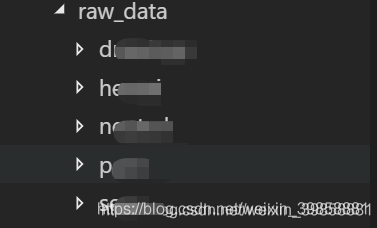
建立项目文件夹,下载上述Github项目中的raw_data文件夹,并保存至项目目录中。
2. 获取样本文件位置
编写get_doc_path.py,根据根目录位置,获取目录及其子目录所有数据集文件
import os


def get_file(root_path, all_files={}):
  '''
  递归函数,遍历该文档目录和子目录下的所有文件,获取其path
  '''
  files = os.listdir(root_path)
  for file in files:
    if not os.path.isdir(root_path + '/' + file):  # not a dir
      all_files[file] = root_path + '/' + file
    else: # is a dir
      get_file((root_path+'/'+file), all_files)
  return all_files


if __name__ == '__main__':
  path = './raw_data'
  print(get_file(path))
3. 下载文件
3.1 读取url列表并
for filename, path in paths.items():
    print('reading file: {}'.format(filename))
    with open(path, 'r') as f:
      lines = f.readlines()
      url_list = []
      for line in lines:
        url_list.append(line.strip('\n'))
      print(url_list)
3.2 创建文件夹
foldername = "./picture_get_by_url/pic_download/{}".format(filename.split('.')[0])
if not os.path.exists(folder_path):
    print("Selected folder not exist, try to create it.")
    os.makedirs(folder_path)
3.3 下载图片
def get_pic_by_url(folder_path, lists):
  if not os.path.exists(folder_path):
    print("Selected folder not exist, try to create it.")
    os.makedirs(folder_path)
  for url in lists:
    print("Try downloading file: {}".format(url))
    filename = url.split('/')[-1]
    filepath = folder_path + '/' + filename
    if os.path.exists(filepath):
      print("File have already exist. skip")
    else:
      try:
        urllib.request.urlretrieve(url, filename=filepath)
      except Exception as e:
        print("Error occurred when downloading file, error message:")
        print(e)
4. 完整源码
4.1 get_doc_path.py
import os


def get_file(root_path, all_files={}):
  '''
  递归函数,遍历该文档目录和子目录下的所有文件,获取其path
  '''
  files = os.listdir(root_path)
  for file in files:
    if not os.path.isdir(root_path + '/' + file):  # not a dir
      all_files[file] = root_path + '/' + file
    else: # is a dir
      get_file((root_path+'/'+file), all_files)
  return all_files


if __name__ == '__main__':
  path = './raw_data'
  print(get_file(path))
4.2 get_pic.py
import get_doc_path
import os
import urllib.request


def get_pic_by_url(folder_path, lists):
  if not os.path.exists(folder_path):
    print("Selected folder not exist, try to create it.")
    os.makedirs(folder_path)
  for url in lists:
    print("Try downloading file: {}".format(url))
    filename = url.split('/')[-1]
    filepath = folder_path + '/' + filename
    if os.path.exists(filepath):
      print("File have already exist. skip")
    else:
      try:
        urllib.request.urlretrieve(url, filename=filepath)
      except Exception as e:
        print("Error occurred when downloading file, error message:")
        print(e)


if __name__ == "__main__":
  root_path = './picture_get_by_url/raw_data'
  paths = get_doc_path.get_file(root_path)
  print(paths)
  for filename, path in paths.items():
    print('reading file: {}'.format(filename))
    with open(path, 'r') as f:
      lines = f.readlines()
      url_list = []
      for line in lines:
        url_list.append(line.strip('\n'))
      foldername = "./picture_get_by_url/pic_download/{}".format(filename.split('.')[0])
      get_pic_by_url(foldername, url_list)
4.3 运行结果
执行get_pic.py
当程序意外停止或再次执行时,程序会自动跳过文件夹中已下载的文件,继续下载未下载的内容
{‘urls_drawings.txt': ‘./picture_get_by_url/raw_data/drawings/urls_drawings.txt', ‘urls_hentai.txt': ‘./picture_get_by_url/raw_data/hentai/urls_hentai.txt', ‘urls_neutral.txt': ‘./picture_get_by_url/raw_data/neutral/urls_neutral.txt', ‘urls_porn.txt': ‘./picture_get_by_url/raw_data/porn/urls_porn.txt', ‘urls_sexy.txt': ‘./picture_get_by_url/raw_data/sexy/urls_sexy.txt'}
reading file: urls_drawings.txt
Try downloading file: http://41.media.tumblr.com/xxxxxx.jpg
Try downloading file: http://41.media.tumblr.com/xxxxxx.jpg
Try downloading file: http://ak1.polyvoreimg.com/cgi/img-thing/size/l/tid/xxxxxx.jpg
Error occurred when downloading file, error message:
HTTP Error 502: No data received from server or forwarder
Try downloading file: http://akicocotte.weblike.jp/gaugau/xxxxxx.jpg
Try downloading file: http://animewriter.files.wordpress.com/2009/01/nagisa-xxxxxx-xxxxxx.jpg
Try downloading file: http://cdn.awwni.me/xxxxxx.jpg
Try downloading file: http://cdn.awwni.me/xxxxxx.jpg
Try downloading file: http://cdn.awwni.me/xxxxxx.jpg
Try downloading file: http://cdn.awwni.me/xxxxxx.jpg
Try downloading file: http://cdn.awwni.me/xxxxxx.jpg
Try downloading file: http://cdn.awwni.me/xxxxxx.jpg
Try downloading file: http://cdn.awwni.me/xxxxxx.jpg
Try downloading file: http://cdn.awwni.me/xxxxxx.jpg
Try downloading file: http://cdn.awwni.me/xxxxxx.jpg
Try downloading file: http://cdn.awwni.me/xxxxxx.jpg
Try downloading file: http://cdn.awwni.me/xxxxxx.jpg
Try downloading file: http://cdn.awwni.me/xxxxxx.jpg
Try downloading file: http://cdn.awwni.me/xxxxxx.jpg
Try downloading file: http://cdn.awwni.me/xxxxxx.jpg
Try downloading file: http://cdn.awwni.me/xxxxxx.jpg
Try downloading file: http://cdn.awwni.me/xxxxxx.jpg
Try downloading file: http://cdn.awwni.me/xxxxxx.jpg
后注:由于样本数据集内容的问题,上述地址以xxxxx代替具体地址,案例项目也已经失效,但是方法仍然可以借鉴
20.9.23更新:数据集地址:https://github.com/ZQ-Qi/nsfw_data_scrapper,单纯为了学习和实践本文代码的可以下载该数据集进行尝试
到此这篇关于Python根据URL地址下载文件并保存至对应目录的实现的文章就介绍到这了,更多相关Python URL下载文件内容请搜索脚本之家以前的文章或继续浏览下面的相关文章希望大家以后多多支持脚本之家!
相关文章
![如何解决Python:报错[Errno 2]No such file or directory问题](//img.jbzj.com/images/xgimg/bcimg0.png)
如何解决Python:报错[Errno 2]No such file or&nb
介绍了Python文件读取操作时常见的错误原因及解决方法,主要错误原因包括路径拼写错误、工作目录与相对路径不匹配以及文件不存在,解决方法有使用绝对路径和动态获取脚本路径,其他注意事项包括验证文件路径与名称、理解工作目录与相对路径2025-02-02 今天小编就为大家分享一篇浅谈pytorch、cuda、python的版本对齐问题,具有很好的参考价值,希望对大家有所帮助。一起跟随小编过来看看吧2020-01-01
 这篇文章主要为大家详细介绍了python多进程下实现日志记录按时间分割,具有一定的参考价值,感兴趣的小伙伴们可以参考一下2019-07-07
 这篇文章主要介绍了python3.8下载及安装步骤详解,本文图文并茂给大家介绍的非常详细,具有一定的参考借鉴价值,需要的朋友可以参考下2020-01-01
 这篇文章主要介绍了django框架使用orm实现批量更新数据的方法,结合实例形式简单分析了Django基于orm操作数据库更新数据的相关实现技巧,需要的朋友可以参考下2019-06-06
 这篇文章主要介绍了Django Admin 管理工具的实现,文中通过示例代码介绍的非常详细,对大家的学习或者工作具有一定的参考学习价值,需要的朋友们下面随着小编来一起学习学习吧2021-05-05
 在本篇文章里小编给大家整理了一篇关于python函数存储在模块的优点及用法相关内容,有兴趣的朋友们可以跟着学习下。2021-10-10
 这篇文章主要介绍了Python自动打印被调用函数的变量名及对应的值,文章围绕主题展开详细的内容介绍,具有一定的参考价,需要的朋友可以参考一下2022-07-07
 这篇文章主要介绍了利用python实时刷新基金估值(摸鱼小工具),本文通过实例代码给大家介绍的非常详细,对大家的学习或工作具有一定的参考借鉴价值,需要的朋友可以参考下2021-09-09
 今天小编就为大家分享一篇python科学计算之numpy——ufunc函数用法,具有很好的参考价值,希望对大家有所帮助。一起跟随小编过来看看吧2019-11-11
![如何解决Python:报错[Errno 2]No such file or directory问题](http://img.jbzj.com/images/xgimg/bcimg0.png)
最新评论