

小程序实现tab标签页
更新时间:2020年11月16日 09:30:33 作者:路痴不脸盲
这篇文章主要为大家详细介绍了小程序实现tab标签页,可点击切换,滑动切换页面,文中示例代码介绍的非常详细,具有一定的参考价值,感兴趣的小伙伴们可以参考一下
本文实例为大家分享了小程序实现tab标签页的具体代码,供大家参考,具体内容如下
页面效果:
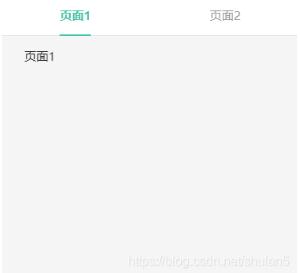
HTML:
<view wx:if="{{userType==0}}" style="height:100%">
 <view class="tab_box" style="width: 100%">
 <view class="tabs_v">
 <block wx:for="{{tabs}}" wx:for-item="item" wx:key="index">
  <view class="tab_v {{index<1?'tab_nature':'tab_course'}}" bindtap='changeCurrentTab_' data-index='{{index}}'
  data-current='{{index}}'>
  <text class="tab_txt {{currentTab==index? 'tab_v_active' : ''}}">{{item.label}}</text>
  </view>
 </block>
 </view>
 </view>
 <!-- tab 容器 -->
 <view class="tabWrap">
 <swiper class="" current="{{currentTab}}" duration="300" bindchange="swiperTab" style="width:100%;height:100%;">
 <!-- 页面1 -->
 <block>
  <swiper-item style="width:100%;height:100%;">
  <view class="" style="width:100%;height:100%;">
  <scroll-view style="width:100%;height:100%;" scroll-y="true" bindscrolltolower='scrollToLower'
  bindscrolltoupper='scrollToUpper' lower-threshold='30' upper-threshold='30'>
  <view style="width:100%;height:auto;">
   页面1
  </view>
  </scroll-view>
  </view>
  </swiper-item>
 </block>
 <!-- 页面2 -->
 <block>
  <swiper-item style="width:100%;height:100%;">
  <view class="" style="width:100%;height:100%;">
  <scroll-view style="width:100%;height:100%;" scroll-y="true" bindscrolltolower='scrollToLower'
  bindscrolltoupper='scrollToUpper' lower-threshold='30' upper-threshold='30'>
  <view style="width:100%;height:auto;">
   页面2
  </view>
  </scroll-view>
  </view>
  </swiper-item>
 </block>
 </swiper>
 </view>
</view>
CSS:
/* tab */
.tab_box{
 height: 50px;
 display: flex;
 flex-direction: row;
 background-color: #fff;
 border-bottom: 1px solid #E5E5E5;
 margin-bottom: 15px;
}
.tabs_v{
 width: 100%;
 display: flex;
 flex-direction: row;
 justify-content: space-between;
 align-items: center;
}
.tab_v{
 width: 50%;
 text-align: center;
}
.tab_txt{
 border-bottom: 2px solid transparent;
 padding-bottom: 14px;
 color: #999999;
}
.tab_v_active{
 border-bottom: 2px solid #00C6AC;
 color: #00C6AC;
 font-weight: bold;
}
/* 容器 */
.tabWrap{
 width: 100%;
 height: calc(100% - 67px);
 position: relative;
 border-bottom: 1px solid #e6e6e6;
}
JS:
Page({

 /**
 * 页面的初始数据
 */
 data: {
 tabs: [
 {label:'访客', index: 0},
 {label:'工作人员', index: 1}
 ],
 currentTab:0
 },
 /**
 * 生命周期函数--监听页面加载
 */
 onLoad: function (options) {
 },

 /**
 * 生命周期函数--监听页面初次渲染完成
 */
 onReady: function () {

 },

 /**
 * 生命周期函数--监听页面显示
 */
 onShow: function () {

 },

 // tab切换
 changeCurrentTab_(e){
 let that = this
 if (that.data.currentTab === e.currentTarget.dataset.current){
 return false
 }else{
 that.setData({
 currentTab: e.currentTarget.dataset.current
 })
 }
 },
 //滑动切换
 swiperTab: function (e) {
 var that = this;
 that.setData({
 currentTab: e.detail.current
 });
 }
})
为大家推荐现在关注度比较高的微信小程序教程一篇:《微信小程序开发教程》小编为大家精心整理的,希望喜欢。
以上就是本文的全部内容,希望对大家的学习有所帮助,也希望大家多多支持脚本之家。
您可能感兴趣的文章:
- 微信小程序实现动态改变view标签宽度和高度的方法【附demo源码下载】
- 微信小程序实现点击按钮修改view标签背景颜色功能示例【附demo源码下载】
- 微信小程序使用scroll-view标签实现自动滑动到底部功能的实例代码
- 微信小程序 <swiper-item>标签传入数据
- 微信小程序基于slider组件动态修改标签透明度的方法示例
- 微信小程序实现点击按钮移动view标签的位置功能示例【附demo源码下载】
- 微信小程序button标签open-type属性原理解析
- 微信小程序 基础知识css样式media标签
- 如何去除富文本中的html标签及vue、react、微信小程序中的过滤器
- 微信小程序中input标签详解及简单实例
相关文章

javascript实现的图片预览和上传功能示例【兼容IE 9】
这篇文章主要介绍了javascript实现的图片预览和上传功能,结合实例形式分析了javascrpt图片预览和上传功能相关实现技巧与操作注意事项,需要的朋友可以参考下2020-05-05 这篇文章主要给大家介绍了关于如何在微信小程序中使用less(最优方式)的相关资料,文中通过示例代码介绍的非常详细,对大家的学习或者工作具有一定的参考学习价值,需要的朋友们下面随着小编来一起学习学习吧2021-03-03
JAVASCRIPT车架号识别/验证函数代码 汽车车架号验证程序
偶然中在CSDN里找到C#版的验证程序,因此改编了一版JS版本,相信会对大家有用2012-01-01 这篇文章主要介绍了javascript正则表达式之search()用法,实例分析了search()的使用技巧,需要的朋友可以参考下2015-01-01
 这篇文章主要为大家详细介绍了基于JavaScript实现留言板功能,文中示例代码介绍的非常详细,具有一定的参考价值,感兴趣的小伙伴们可以参考一下2020-03-03
 这篇文章主要为大家详细介绍了解决JavaScript实现省市联动过程中的bug,文中示例代码介绍的非常详细,具有一定的参考价值,感兴趣的小伙伴们可以参考一下2017-12-12
JavaScript设计模式之原型模式(Object.create与prototype)介绍
这篇文章主要介绍了JavaScript设计模式之原型模式(Object.create与prototype)介绍,原型模式指使用原型实例来拷贝、创建新的可定制的对象,新建的对象,不需要知道原对象创建的具体过程,需要的朋友可以参考下2014-12-12 这篇文章主要介绍了如何在项目中使用log4.js的方法步骤,文中通过示例代码介绍的非常详细,对大家的学习或者工作具有一定的参考学习价值,需要的朋友们下面随着小编来一起学习学习吧2019-07-07
 本文给大家汇总介绍了3种javascript函数自动执行的常用方法,非常的简单实用,有需要的小伙伴可以参考下2016-03-03
 做BS开发就难免会用到javascript,而每个浏览器对javascript的支持有不同。这就需要我们程序员去兼容他们下面是兼容IE和FF的js脚本做法和分解(部分选自网上,经本人整理),希望对大家有帮助。2010-12-12
最新评论