

Golang使用第三方包viper读取yaml配置信息操作
Golang有很多第三方包,其中的 viper 支持读取多种配置文件信息。本文只是做一个小小demo,用来学习入门用的。
1、安装
go get github.com/spf13/viper
2、编写一个yaml的配置文件,config.yaml
database:
 host: 127.0.0.1
 user: root
 dbname: test
 pwd: 123456
3、编写学习脚本main.go,读取config.yaml配置信息
package main
import (
 "fmt"
 "os"
 "github.com/spf13/viper"
)

func main() {
 //获取项目的执行路径
 path, err := os.Getwd()
 if err != nil {
 panic(err)
 }

 config := viper.New()
 config.AddConfigPath(path)  //设置读取的文件路径
 config.SetConfigName("config") //设置读取的文件名
 config.SetConfigType("yaml") //设置文件的类型
 //尝试进行配置读取
 if err := config.ReadInConfig(); err != nil {
 panic(err)
 }

 //打印文件读取出来的内容:
 fmt.Println(config.Get("database.host"))
 fmt.Println(config.Get("database.user"))
 fmt.Println(config.Get("database.dbname"))
 fmt.Println(config.Get("database.pwd"))
}
4、执行go run main.go
输出:
127.0.0.1
root
test
123456
ok!
补充:go基于viper实现配置文件热更新及其源码分析
go第三方库 github.com/spf13/viper 实现了对配置文件的读取并注入到结构中,好用方便。
其中以
viperInstance := viper.New() // viper实例
viperInstance.WatchConfig()
viperInstance.OnConfigChange(func(e fsnotify.Event) {
 log.Print("Config file updated.")
 viperLoadConf(viperInstance) // 加载配置的方法
})
可实现配置的热更新,不用重启项目新配置即可生效(实现热加载的方法也不止这一种,比如以文件的上次修改时间来判断等)。
为什么这么写?这样写为什么就能立即生效?基于这两个问题一起来看看viper是怎样实现热更新的。
上面代码的核心一共两处:WatchConfig()方法、OnConfigChange()方法。WatchConfig()方法用来开启事件监听,确定用户操作文件后该文件是否可正常读取,并将内容注入到viper实例的config字段,先来看看WatchConfig()方法:
func (v *Viper) WatchConfig() {
 go func() {
   // 建立新的监视处理程序,开启一个协程开始等待事件
   // 从I/O完成端口读取,将事件注入到Event对象中:Watcher.Events
 watcher, err := fsnotify.NewWatcher()
 if err != nil {
 log.Fatal(err)
 }
 defer watcher.Close()

 // we have to watch the entire directory to pick up renames/atomic saves in a cross-platform way
 filename, err := v.getConfigFile()
 if err != nil {
 log.Println("error:", err)
 return
 }

 configFile := filepath.Clean(filename)  //配置文件E:\etc\bizsvc\config.yml
 configDir, _ := filepath.Split(configFile) // E:\etc\bizsvc\

 done := make(chan bool)
 go func() {
 for {
 select {
    // 读取的event对象有两个属性,Name为E:\etc\bizsvc\config.yml,Op为write(对文件的操作)
 case event := <-watcher.Events:
 // 清除内部的..和他前面的元素,清除当前路径.,用来判断操作的文件是否是configFile
  if filepath.Clean(event.Name) == configFile {
    // 如果对该文件进行了创建操作或写操作
  if event.Op&fsnotify.Write == fsnotify.Write || event.Op&fsnotify.Create == fsnotify.Create {
  err := v.ReadInConfig()
  if err != nil {
  log.Println("error:", err)
  }
  v.onConfigChange(event)
  }
  }
 case err := <-watcher.Errors:
     // 有错误将打印
  log.Println("error:", err)
 }
 }
 }()
 watcher.Add(configDir)
 <-done
 }()
}
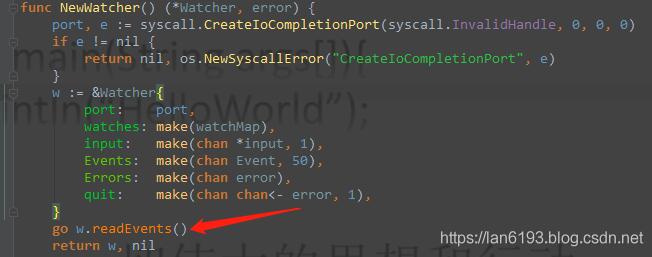
其中,fsnotify是用来监控目录及文件的第三方库; watcher, err := fsnotify.NewWatcher() 用来建立新的监视处理程序,它会开启一个协程开始等待读取事件,完成 从I / O完成端口读取任务,将事件注入到Event对象中,即Watcher.Events;
执行v.ReadInConfig()后配置文件的内容将重新读取到viper实例中,如下图:
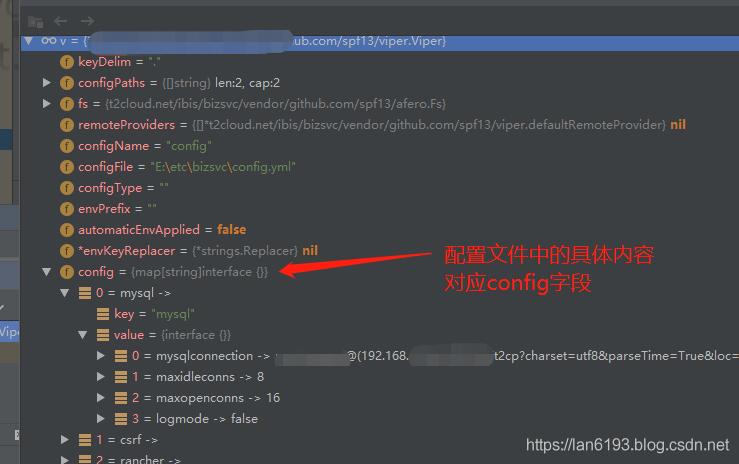
执行完v.ReadInConfig()后,config字段的内容已经是用户修改的最新内容了;
其中这行v.onConfigChange(event)的onConfigChange是核心结构体Viper的一个属性,类型是func:
type Viper struct {
 // Delimiter that separates a list of keys
 // used to access a nested value in one go
 keyDelim string

 // A set of paths to look for the config file in
 configPaths []string

 // The filesystem to read config from.
 fs afero.Fs

 // A set of remote providers to search for the configuration
 remoteProviders []*defaultRemoteProvider

 // Name of file to look for inside the path
 configName string
 configFile string
 configType string
 envPrefix string

 automaticEnvApplied bool
 envKeyReplacer  *strings.Replacer

 config   map[string]interface{}
 override  map[string]interface{}
 defaults  map[string]interface{}
 kvstore  map[string]interface{}
 pflags   map[string]FlagValue
 env   map[string]string
 aliases  map[string]string
 typeByDefValue bool

 // Store read properties on the object so that we can write back in order with comments.
 // This will only be used if the configuration read is a properties file.
 properties *properties.Properties

 onConfigChange func(fsnotify.Event)
}
它用来传入本次event来执行你写的函数。为什么修改会立即生效?相信第二个疑问已经得到解决了。
接下来看看OnConfigChange(func(e fsnotify.Event) {...... })的运行情况:
func (v *Viper) OnConfigChange(run func(in fsnotify.Event)) {
 v.onConfigChange = run
}
方法参数为一个函数,类型为func(in fsnotify.Event)) {},这就意味着开发者需要把你自己的执行逻辑放到这个func里面,在监听到event时就会执行你写的函数,所以就可以这样写:
 viperInstance.OnConfigChange(func(e fsnotify.Event) {
 log.Print("Config file updated.")
 viperLoadConf(viperInstance) // viperLoadConf函数就是将最新配置注入到自定义结构体对象的逻辑
 })
而OnConfigChange方法的参数会赋值给形参run并传到viper实例的onConfigChange属性,以WatchConfig()方法中的v.onConfigChange(event)来执行这个函数。
到此,第一个疑问也就解决了。
以上为个人经验,希望能给大家一个参考,也希望大家多多支持脚本之家。如有错误或未考虑完全的地方,望不吝赐教。
相关文章

GoFrame gmap遍历hashmap listmap treemap使用技巧
这篇文章主要为大家介绍了GoFrame gmap遍历hashmap listmap treemap使用技巧的示例详解,有需要的朋友可以借鉴参考下,希望能够有所帮助,祝大家多多进步,早日升职加薪2022-06-06 这篇文章主要介绍了Go 如何基于IP限制HTTP访问频率的方法实现,文中通过示例代码介绍的非常详细,对大家的学习或者工作具有一定的参考学习价值,需要的朋友们下面随着小编来一起学习学习吧2019-11-11
 Go本身不具有多态的特性,不能够像Java、C++那样编写多态类、多态方法。但是,使用Go可以编写具有多态功能的类绑定的方法。下面来一起看看吧2016-09-09
 这篇文章主要为大家详细介绍了Go语言中for和range语句的使用以及性能比较,文中的示例代码讲解详细,感兴趣的小伙伴可以跟随小编一起了解一下2023-07-07
 这篇文章主要介绍了Golang 拷贝Array或Slice的操作,具有很好的参考价值,希望对大家有所帮助。一起跟随小编过来看看吧2021-04-04
 Golang 在 1.18 版本更新后引入了泛型,这是一个重要的更新,Gopher 万众瞩目,为 Golang 带来了更多的灵活性和可重用性,今天,我们将深入探讨泛型的概念、为什么需要泛型、泛型的语法,并探讨如何在实践中使用它2023-05-05
 本文主要介绍了Go二级缓存,文中通过示例代码介绍的非常详细,具有一定的参考价值,感兴趣的小伙伴们可以参考一下2021-08-08
 这篇文章主要为大家介绍了windows下安装make及使用makefile文件方法详解,有需要的朋友可以借鉴参考下,希望能够有所帮助,祝大家多多进步,早日升职加薪2023-01-01
 这篇文章主要介绍了通过与Java功能上的对比来学习Go语言的相关资料,需要的朋友可以参考下2023-02-02
 这篇文章主要介绍了Goland 生成可执行文件的操作,具有很好的参考价值,希望对大家有所帮助。一起跟随小编过来看看吧2020-12-12
最新评论