

python如何修改文件时间属性
更新时间:2021年02月05日 12:01:07 作者:withChengChen
这篇文章主要介绍了python修改文件时间属性的方法,帮助大家更好的理解和使用python,感兴趣的朋友可以了解下
1、获取文件的创建、修改、访问时间
# -*- encoding=utf-8 -*-
import os
import time


def get_file_time(filename):
  filename = os.path.abspath(filename)
  create_time = os.path.getctime(filename) # 创建时间
  print('old create time:{}'.format(time.strftime("%Y-%m-%d %H:%M:%S", time.localtime(create_time))))
  update_time = os.path.getmtime(filename) # 修改时间
  print('old update time:{}'.format(time.strftime("%Y-%m-%d %H:%M:%S", time.localtime(update_time))))
  access_time = os.path.getatime(filename) # 访问时间
  print('old access time:{}'.format(time.strftime("%Y-%m-%d %H:%M:%S", time.localtime(access_time))))
  return create_time, update_time, access_time


if __name__ == '__main__':
  get_file_time('E:/a.txt')

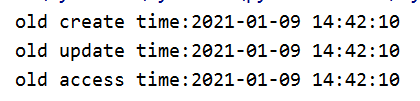
2、更改文件的修改、访问时间(创建时间没查到怎么修改,暂时不记录)
# -*- encoding=utf-8 -*-
import os
import time

def set_file_time(filename, updatetime, access_time):
  # 先传修改时间,再传访问时间
  filename = os.path.abspath(filename)
  new_updatetime = time.mktime(time.strptime(updatetime, '%Y-%m-%d %H:%M:%S'))
  new_access_time = time.mktime(time.strptime(access_time, '%Y-%m-%d %H:%M:%S'))
  os.utime(filename, (new_access_time, new_updatetime))


if __name__ == '__main__':
  set_file_time('E:/a.txt', '2018-01-08 10:50:20', '2019-07-15 04:03:01')

3、放在同一个py方便直接复制使用
# -*- encoding=utf-8 -*-
import os
import time


def get_file_time(filename):
  filename = os.path.abspath(filename)
  # 创建时间
  create_time = time.strftime("%Y-%m-%d %H:%M:%S", time.localtime(os.path.getctime(filename)))
  # 修改时间
  update_time = time.strftime("%Y-%m-%d %H:%M:%S", time.localtime(os.path.getmtime(filename)))
  # 访问时间
  access_time = time.strftime("%Y-%m-%d %H:%M:%S", time.localtime(os.path.getatime(filename)))
  return create_time, update_time, access_time


def set_file_time(filename, updatetime, access_time):
  # 先传修改时间,再传访问时间
  filename = os.path.abspath(filename)
  new_update_time = time.mktime(time.strptime(updatetime, '%Y-%m-%d %H:%M:%S'))
  new_access_time = time.mktime(time.strptime(access_time, '%Y-%m-%d %H:%M:%S'))
  os.utime(filename, (new_access_time, new_update_time))


def debug():
  create_time, update_time, access_time = get_file_time('E:/a.txt')
  set_file_time('E:/a.txt', update_time, access_time)
  get_file_time('E:/a.txt')


if __name__ == '__main__':

  debug()
4、补充修改文件的创建时间
import os
import time

from pywintypes import Time # 可以忽视这个 Time 报错(运行程序还是没问题的)
from win32con import FILE_FLAG_BACKUP_SEMANTICS
from win32con import FILE_SHARE_WRITE
from win32file import CloseHandle
from win32file import CreateFile
from win32file import GENERIC_WRITE
from win32file import OPEN_EXISTING
from win32file import SetFileTime


def modify_file_create_time(filename, create_time_str, update_time_str, access_time_str):
  try:
    format_str = "%Y-%m-%d %H:%M:%S" # 时间格式
    # f = CreateFile(filename, GENERIC_READ | GENERIC_WRITE, 0, None, OPEN_EXISTING, 0, 0)
    f = CreateFile(filename, GENERIC_WRITE, FILE_SHARE_WRITE, None, OPEN_EXISTING,
            FILE_FLAG_BACKUP_SEMANTICS, 0)
    create_time = Time(time.mktime(time.strptime(create_time_str, format_str)))
    update_time = Time(time.mktime(time.strptime(update_time_str, format_str)))
    access_time = Time(time.mktime(time.strptime(access_time_str, format_str)))
    SetFileTime(f, create_time, update_time, access_time)
    CloseHandle(f)
    print('update file time success:{}/{}/{}'.format(create_time_str, update_time_str,
                             access_time_str))
  except Exception as e:
    print('update file time fail:{}'.format(e))


if __name__ == '__main__':
  cTime = "2019-12-13 21:51:02" # 创建时间
  mTime = "2019-02-02 00:01:03" # 修改时间
  aTime = "2019-02-02 00:01:04" # 访问时间
  fName = r"a.txt" # 可以是文件也可以是文件夹
  print(os.path.isdir(fName))
  modify_file_create_time(fName, cTime, mTime, aTime)
以上就是python如何修改文件时间属性的详细内容,更多关于python修改文件时间属性的资料请关注脚本之家其它相关文章!
相关文章
 今天小编就为大家分享一篇python3发送邮件需要经过代理服务器的示例代码,具有很好的参考价值,希望对大家有所帮助。一起跟随小编过来看看吧2019-07-07
 这篇文章主要介绍了python统计列表中元素出现次数的三种方法,文中通过示例代码介绍的非常详细,对大家的学习或者工作具有一定的参考学习价值,需要的朋友们下面跟着小编来一起学习学习吧2024-08-08
Python3中的re.findall()方法及re.compile()
这篇文章主要介绍了Python3中的re.findall()方法及re.compile(),具有很好的参考价值,希望对大家有所帮助。如有错误或未考虑完全的地方,望不吝赐教2022-05-05 下面小编就为大家分享一篇Python3 XML 获取雅虎天气的实现方法,具有很好的参考价值,希望对大家有所帮助。一起跟随小编过来看看吧2018-02-02
 在日常工作中,我们经常遇到需要进行大量重复性任务的情况,这篇文章将介绍如何使用 Python 模拟操作记事本,感兴趣的小伙伴可以了解下2025-02-02
 这篇文章主要介绍了python实现将汉字转换成汉语拼音的库,涉及Python调用word.data字段实现将汉字转换成拼音的功能,非常具有实用价值,需要的朋友可以参考下2015-05-05
Python Web框架Flask信号机制(signals)介绍
这篇文章主要介绍了Python Web框架Flask信号机制(signals)介绍,本文介绍Flask的信号机制,讲述信号的用途,并给出创建信号、订阅信号、发送信号的方法,需要的朋友可以参考下2015-01-01 这篇文章主要介绍了Python中的With语句的使用及原理,文中通过示例代码介绍的非常详细,对大家的学习或者工作具有一定的参考学习价值,需要的朋友们下面随着小编来一起学习学习吧2020-07-07
 在本篇文章里小编给大家整理了一篇关于python用于的方向的相关文章,有需要的阅读下吧。2020-07-07
 这篇文章主要介绍了对Keras自带Loss Function的深入研究,具有很好的参考价值,希望对大家有所帮助。如有错误或未考虑完全的地方,望不吝赐教2021-05-05
最新评论