

Python3+Flask安装使用教程详解
一、Flask安装环境配置
当前我的开发环境是Miniconda3+PyCharm。开发环境其实无所谓,自己使用Python3+Nodepad都可以。安装Flask库:
pip install Flask
二、第一个Flask应用程序
将以下内容保存为helloworld.py:
# 导入Flask类
from flask import Flask
# 实例化,可视为固定格式
app = Flask(__name__)

# route()方法用于设定路由;类似spring路由配置
@app.route('/helloworld')
def hello_world():
 return 'Hello, World!'

if __name__ == '__main__':
 # app.run(host, port, debug, options)
 # 默认值:host="127.0.0.1", port=5000, debug=False
 app.run(host="0.0.0.0", port=5000)
直接运行该文件,然后访问:http://127.0.0.1:5000/helloworld。结果如下图:

三、get和post实现
3.1 创建用到的模板文件
Flask默认到templates目录下查找模板文件,在上边helloworld.py同级目录下创建templates文件夹。
在templates文件夹下创建get.html,写入以下内容:
<!DOCTYPE html>
<html>
<head>
<meta charset="utf-8">
<title>get请求示例</title>
</head>
<body>
 <form action="/deal_request" method="get">
 <input type="text" name="q" />
 <input type="submit" value="搜索" />
 </form>
</body>
</html>
再在templates文件夹下创建post.html,写入以下内容:
<!DOCTYPE html>
<html>
<head>
<meta charset="utf-8">
<title>post请求示例</title>
</head>
<body>
 <form action="/deal_request" method="post">
 <input type="text" name="q" />
 <input type="submit" value="搜索" />
 </form>
</body>
</html>
最后在templates文件夹下创建result.html,写入以下内容:
<!-- Flask 使用Jinja2模板引擎,Jinja2模板引擎源于Django板模所以很多语法和Django是类似的 -->
<h1>{{ result }}</h1>
3.2 编写相关的处理方法
在helloworld.py中添加get_html()、post_html()和deal_request()三个方法,更多说明见注释。当前helloworld.py内容如下:
# 导入Flask类
from flask import Flask
from flask import render_template
from flask import request
# 实例化,可视为固定格式
app = Flask(__name__)

# route()方法用于设定路由;类似spring路由配置
#等价于在方法后写:app.add_url_rule('/', 'helloworld', hello_world)
@app.route('/helloworld')
def hello_world():
 return 'Hello, World!'

# 配置路由,当请求get.html时交由get_html()处理
@app.route('/get.html')
def get_html():
 # 使用render_template()方法重定向到templates文件夹下查找get.html文件
 return render_template('get.html')

# 配置路由,当请求post.html时交由post_html()处理
@app.route('/post.html')
def post_html():
 # 使用render_template()方法重定向到templates文件夹下查找post.html文件
 return render_template('post.html')

# 配置路由,当请求deal_request时交由deal_request()处理
# 默认处理get请求,我们通过methods参数指明也处理post请求
# 当然还可以直接指定methods = ['POST']只处理post请求, 这样下面就不需要if了
@app.route('/deal_request', methods = ['GET', 'POST'])
def deal_request():
 if request.method == "GET":
 # get通过request.args.get("param_name","")形式获取参数值
 get_q = request.args.get("q","")
 return render_template("result.html", result=get_q)
 elif request.method == "POST":
 # post通过request.form["param_name"]形式获取参数值
 post_q = request.form["q"]
 return render_template("result.html", result=post_q)

if __name__ == '__main__':
 # app.run(host, port, debug, options)
 # 默认值:host=127.0.0.1, port=5000, debug=false
 app.run()
3.3 查看运行效果
重新运行helloworld.py。
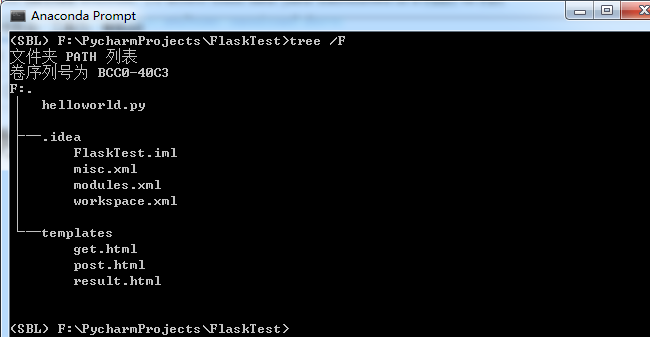
当前目录结构如下(.idea目录不用管):
get.html如下:

get查询结果如下:

post.html如下:

post查询结果如下:

四、restful
所谓restful简单理解就是以json等格式(而非以前的表单格式)发起请求,及以json等格式(而非以前的html)进行响应。
等下我们通过curl模拟rest请求,然后使用jsonify实现rest响应。
4.1 服务端实现代码
# 导入Flask类
from flask import Flask, jsonify
from flask import render_template
from flask import request

# 实例化,可视为固定格式
app = Flask(__name__)

# route()方法用于设定路由;类似spring路由配置
#等价于在方法后写:app.add_url_rule('/', 'helloworld', hello_world)
@app.route('/helloworld')
def hello_world():
 return 'Hello, World!'

# 配置路由,当请求get.html时交由get_html()处理
@app.route('/get.html')
def get_html():
 # 使用render_template()方法重定向到templates文件夹下查找get.html文件
 return render_template('get.html')

# 配置路由,当请求post.html时交由post_html()处理
@app.route('/post.html')
def post_html():
 # 使用render_template()方法重定向到templates文件夹下查找post.html文件
 return render_template('post.html')

# 配置路由,当请求deal_request时交由deal_request()处理
# 默认处理get请求,我们通过methods参数指明也处理post请求
# 当然还可以直接指定methods = ['POST']只处理post请求, 这样下面就不需要if了
@app.route('/deal_request', methods=['GET', 'POST'])
def deal_request():
 if request.method == "GET":
 # get通过request.args.get("param_name","")形式获取参数值
 get_q = request.args.get("q","")
 return render_template("result.html", result=get_q)
 elif request.method == "POST":
 # post通过request.form["param_name"]形式获取参数值
 post_q = request.form["q"]
 return render_template("result.html", result=post_q)

@app.route('/rest_test',methods=['POST'])
def hello_world1():
 """
 通过request.json以字典格式获取post的内容
 通过jsonify实现返回json格式
 """
 post_param = request.json
 result_dict = {
 "result_code": 2000,
 "post_param": post_param
 }
 return jsonify(result_dict)


if __name__ == '__main__':
 # app.run(host, port, debug, options)
 # 默认值:host=127.0.0.1, port=5000, debug=false
 app.run()
4.2 请求模拟
curl -H "Content-Type:application/json" -X POST --data '{"username": "ls","password":"toor"}' http://127.0.0.1:5000/rest_test
4.3 效果截图

五、Flask与Django比较
5.1 Django配置复杂
如果对Django不是很了解,可以参看
Python3+PyCharm+Django+Django REST framework开发教程详解
Python3+Django get/post请求实现教程详解
仅从文章长度看就比这篇长很多,所以Django比Flask复杂(得多)是肯定的。更具体比较如下:
| 比较项 | Django | Flask | 复杂度比较 | 说明 |
| 项目创建 | Django需要用命令创建项目 | Flask直接编写文件就可运行 | Django复杂 | Django需要用命令创建项目是因为要创建出整个项目框架 |
| 路由 | Django使用专门的urls.py文件 | Flask直接使用@app.route() | Django笨重 | Django类似Strut2的配置Flask类似Spring的配置,Flask感觉更好 |
| get和post | request.GET['name']和request.POST["name"] | request.args.get("name","")和request.form["q"] | 差不多 | Flask格式上不统一 |
| restful | 使用django-resful框架 | 使用jsonify | 差不多 | Flask不需要单建一个app,更直观一些 |
| 数据库操作 | django集成了对数据库的操作 | Flask没集成对数据库的操作要另行直连或使用sqlalchemy | 差不多 | django复杂很大程度来源于对数据库的集成。 |
5.2 Flask和Django各自适合使用场景
我们经常会听说这样的一个近乎共识的观点:Django是Python最流行的Web框架但配置比较复杂,Flask是一个轻量级的框架配置比较简单如果项目比较小推荐使用Flask。
进一步来说,Flask的轻量来源其“暂时不用的功能都先不做处理”,Django复杂来源于其“可能用到的功能都先集成”;随着项目规模的扩大最终Django有的东西Flask也都需要有。
所以,如果平时你用python是东用一个库西用一个库,东写一个场景西写一个场景,而不是专门开发web,那么你适合使用Flask,因为这样你的学习成本低及以前的知识都能用上去。
本文主要讲解了Python3+Flask安装使用教程如果想查看更多关于Python3+Flask的知识文章请点击下面相关文章
相关文章
 今天小编就为大家分享一篇python实现七段数码管和倒计时效果,具有很好的参考价值,希望对大家有所帮助。一起跟随小编过来看看吧2019-11-11
 工作中需要开发一个小工具,简单的UI界面可以很好的提高工具的实用性,由此开启了我的第一次GUI开发之旅,这篇文章主要给大家介绍了关于如何利用python写GUI及生成.exe可执行文件的相关资料,需要的朋友可以参考下2021-12-12
 在本篇内容里小编给大家分享的是一篇关于python中__slots__节约内存的具体做法,有需要的朋友们可以跟着学习参考下。2021-07-07
 Matplotlib是一款极其强大的Python数据可视化库,这篇文章中,我们将深入讨论 Matplotlib 的一些高级特性,包括对象导向接口、自定义颜色映射和样式、动态图形等,感兴趣的小伙伴跟着小编一起来探讨吧2023-07-07
 本文将从文件读取、文本预处理到单词频率统计,以及性能优化和数据可视化等方面逐步展开,为你呈现一场深入学习的旅程,让我们一同探索如何用代码揭示文字中的故事,发现其中隐藏的信息,从而更好地理解和利用这个数字化时代的宝藏2024-01-01
 今天小编就为大家分享一篇python 多线程重启方法,具有很好的参考价值,希望对大家有所帮助。一起跟随小编过来看看吧2019-02-02
 在Python中,列表切片是处理列表数据非常强大且灵活的方法,本文将全面探讨Python中列表切片的多种用法,包括提取子列表、复制列表、反转列表等操作,结合丰富的示例代码进行详细讲解2024-01-01
 这篇文章主要介绍了python使用wxPython打开并播放wav文件的方法,涉及Python操作音频文件的相关技巧,需要的朋友可以参考下2015-04-04
 这篇文章主要给大家分享的是5道关于python基础 while循环练习题,无论学习什么语言,练习都是必不可少的,下面文章的练习题挺精湛的,需要的朋友可以参考一下2021-11-11
 今天小编就为大家分享一篇python交换两个变量的值方法,具有很好的参考价值,希望对大家有所帮助。一起跟随小编过来看看吧2019-01-01
最新评论