

matplotlib源码解析标题实现(窗口标题,标题,子图标题不同之间的差异)
在matplotlib中常用的标题主要三种:窗口标题、图像标题和子图标题。
先通过三个案例简要说明这三类标题的实现。
窗口标题、图像标题,子图标题(仅1个子图)
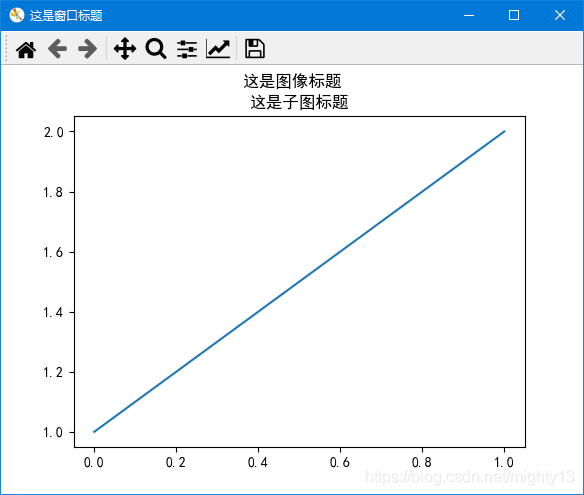
import matplotlib.pyplot as plt

plt.rcParams['font.sans-serif'] = 'SimHei'

fig = plt.figure()
plt.plot([1, 2])
# 设置图像标题
plt.suptitle("这是图像标题")
# 设置子图标题
plt.title("这是子图标题")
# 获取默认窗口标题
current_title = fig.canvas.manager.window.windowTitle()
print("默认窗口:",current_title)
# 设置窗口标题方式一
fig.canvas.set_window_title("这是窗口标题")
# 设置窗口标题方式二
fig.canvas.manager.window.setWindowTitle("这是窗口标题")

plt.show()
窗口标题、图像标题、子图标题(多子图)
使用subplot函数实现子图

import matplotlib.pyplot as plt

plt.rcParams['font.sans-serif'] = 'SimHei'

fig = plt.figure()
plt.subplot(1, 2, 1)
plt.plot([1,2,3,4], [1,4,9,16], "go")
# 设置子图1标题
plt.title("子图1标题")

plt.subplot(122)
plt.plot([1,2,3,4], [1,4,9,16], "r^") # r^ 表示 红色(red)三角
# 设置子图2标题
plt.title("子图2标题")
# 设置图像标题
plt.suptitle("图像标题")
# 设置窗口标题
#fig.canvas.set_window_title("这是窗口标题")
fig.canvas.manager.window.setWindowTitle("这是窗口标题")

plt.show()
使用subplots函数subplots实现子图
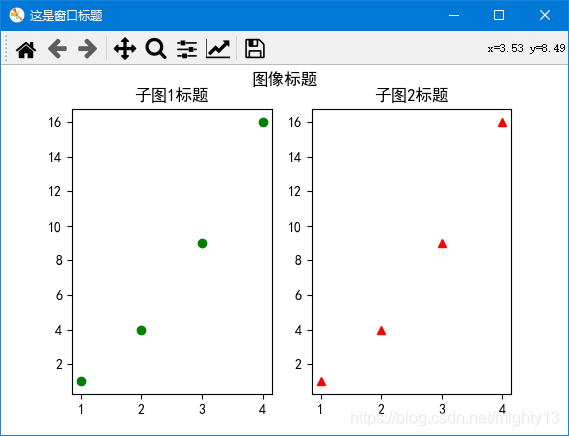
import matplotlib.pyplot as plt

plt.rcParams['font.sans-serif'] = 'SimHei'

fig, ax = plt.subplots(nrows=1, ncols=2, figsize=(6,6))
ax[0].plot([1,2,3,4], [1,4,9,16], "go")
# 设置子图1标题
ax[0].set_title("子图1标题")
ax[1].plot([1,2,3,4], [1,4,9,16], "r^")
# 设置子图2标题
ax[1].set_title("子图2标题")
# 设置图像标题
plt.suptitle("图像标题")
# 设置窗口标题
fig.canvas.manager.window.setWindowTitle("这是窗口标题")

plt.show()
原理分析
通过前面三个案例可知:
窗口标题
设置窗口标题可以用两种方法:
一种是调用figure.canvas对象的set_window_title方法,一种是figure.canvas.manager.window对象的setWindowTitle方法。通过下面源码可知,这两种方法其实是等价的。
因此在日常实现过程中,关键是获取当前图像对象(figure),即案例中的fig。该方法只有一个参数,类型为字符串。
可以通过
通过figure.canvas.manager.window对象的windowTitle方法可以获取窗口标题。
class FigureManagerQT(FigureManagerBase):
  def set_window_title(self, title):
    self.window.setWindowTitle(title)
图像标题
调用plt.suptitle函数即可。根据源码可知,plt.suptitle函数其实是调用了当前figure对象的suptitle方法。
suptitle函数参数
  def suptitle(self, t, **kwargs):
    """
    Add a centered title to the figure.

    Parameters
    ----------
    t : str
      The title text.

    x : float, default 0.5
      The x location of the text in figure coordinates.

    y : float, default 0.98
      The y location of the text in figure coordinates.

    horizontalalignment, ha : {'center', 'left', right'}, default: 'center'
      The horizontal alignment of the text relative to (*x*, *y*).

    verticalalignment, va : {'top', 'center', 'bottom', 'baseline'}, \
default: 'top'
      The vertical alignment of the text relative to (*x*, *y*).

    fontsize, size : default: :rc:`figure.titlesize`
      The font size of the text. See `.Text.set_size` for possible
      values.

    fontweight, weight : default: :rc:`figure.titleweight`
      The font weight of the text. See `.Text.set_weight` for possible
      values.

    Returns
    -------
    text
      The `.Text` instance of the title.

    Other Parameters
    ----------------
    fontproperties : None or dict, optional
      A dict of font properties. If *fontproperties* is given the
      default values for font size and weight are taken from the
      `.FontProperties` defaults. :rc:`figure.titlesize` and
      :rc:`figure.titleweight` are ignored in this case.

    **kwargs
      Additional kwargs are `matplotlib.text.Text` properties.

    Examples
    --------
    >>> fig.suptitle('This is the figure title', fontsize=12)
    """
子图标题
- 使用
subplot函数:在所在子图中,使用plt.title函数。 - 使用
subplots函数:使用子图对象调用set_title方法。 plt.title函数和axes.set_title方法的参数相同。
注意,在使用subplots函数创建子图时,为什么不能使用plt.title函数设置子图标题呢?
根据title函数的源码可知,title函数其实是通过gca()函数获取子图,然后再调用set_title方法设置标题的。根据实验,在使用subplots函数函数创建多个子图时,plt.gca()只能得到最后一个子图的标题,因此,在某些情况下使用plt.title函数可设置最后一个子图的标题。
plt.title函数和axes.set_title方法源码
def title(label, fontdict=None, loc=None, pad=None, *, y=None, **kwargs):
  return gca().set_title(
    label, fontdict=fontdict, loc=loc, pad=pad, y=y, **kwargs)
Axes.set_title(self, label, fontdict=None, loc=None, pad=None, *, y=None, **kwargs):
  """
  Set a title for the axes.

  Set one of the three available axes titles. The available titles
  are positioned above the axes in the center, flush with the left
  edge, and flush with the right edge.

  Parameters
  ----------
  label : str
    Text to use for the title

  fontdict : dict
    A dictionary controlling the appearance of the title text,
    the default *fontdict* is::

      {'fontsize': rcParams['axes.titlesize'],
      'fontweight': rcParams['axes.titleweight'],
      'color': rcParams['axes.titlecolor'],
      'verticalalignment': 'baseline',
      'horizontalalignment': loc}

  loc : {'center', 'left', 'right'}, default: :rc:`axes.titlelocation`
    Which title to set.

  y : float, default: :rc:`axes.titley`
    Vertical axes loation for the title (1.0 is the top). If
    None (the default), y is determined automatically to avoid
    decorators on the axes.

  pad : float, default: :rc:`axes.titlepad`
    The offset of the title from the top of the axes, in points.

  Returns
  -------
  `.Text`
    The matplotlib text instance representing the title

  Other Parameters
  ----------------
  **kwargs : `.Text` properties
    Other keyword arguments are text properties, see `.Text` for a list
    of valid text properties.
  """
plt.gca()实验
import matplotlib.pyplot as plt

plt.rcParams['font.sans-serif'] = 'SimHei'

fig, ax = plt.subplots(nrows=1, ncols=2, figsize=(6,6))
ax[0].plot([1,2,3,4], [1,4,9,16], "go")
ax[1].plot([1,2,3,4], [1,4,9,16], "r^")

print(plt.gca())
print(ax[0],ax[1])
结果为
AxesSubplot(0.547727,0.11;0.352273x0.77)
AxesSubplot(0.125,0.11;0.352273x0.77) AxesSubplot(0.547727,0.11;0.352273x0.77)
到此这篇关于matplotlib源码解析标题实现(窗口标题,标题,子图标题不同之间的差异)的文章就介绍到这了,更多相关matplotlib 标题内容请搜索脚本之家以前的文章或继续浏览下面的相关文章希望大家以后多多支持脚本之家!
相关文章

python出现"IndentationError: unexpected indent"错误解决办法
这篇文章主要介绍了python出现"IndentationError: unexpected indent"错误解决办法的相关资料,希望通过本文能解决遇到这样的问题,需要的朋友可以参考下2017-10-10 正则表达式是一个特殊的字符序列,它能帮助你方便的检查一个字符串是否与某种模式匹配,下面这篇文章主要给大家介绍了关于python正则表达式中匹配次数与贪心问题(+ ?*)的相关资料,需要的朋友可以参考下2022-10-10
 Python是一种简单易学的编程语言,适合初学者入门。本文将介绍Python的安装教程以及快速入门,帮助读者快速上手Python编程。2023-09-09
 这篇文章主要介绍了Python实现的文轩网爬虫,结合完整实例形式分析了Python爬虫爬取文轩网图书信息的相关操作技巧,需要的朋友可以参考下2019-05-05
 本文是Flask框架的学习指南系列文章的第一篇,主要给大家讲述的是开发环境的搭建工作,有需要的小伙伴可以参考下2016-11-11
 这篇文章主要介绍了Python基于递归算法实现的走迷宫问题,结合迷宫问题简单分析了Python递归算法的定义与使用技巧,需要的朋友可以参考下2017-08-08
 Python语言的图片处理使我们常常使用的方面,那么我们该如何实现图片的剪切呢?下面这篇文章主要给大家介绍了关于用python裁剪图片的相关资料,文中通过实例代码介绍的非常详细,需要的朋友可以参考下2022-06-06
 这篇文章主要介绍了Python爬取个人微信朋友信息操作,涉及Python使用itchat包实现微信朋友信息爬取操作相关实现技巧,需要的朋友可以参考下2018-08-08
 上篇文章给大家介绍了python简单实例训练的1-10,这里继续为大家介绍python的一些用法,希望大家每个例子都打出来测试一下2017-11-11
 字符串是 Python 中最常用的数据类型。我们可以使用引号来创建字符串,通过本篇文章给大家分享python字符串关键点相关资料,感兴趣的朋友一起学习吧2015-12-12
最新评论