

matplotlib之多边形选区(PolygonSelector)的使用
多边形选区概述
多边形选区是一种常见的对象选择方式,在一个子图中,单击鼠标左键即构建一个多边形的端点,最后一个端点与第一个端点重合即完成多边形选区,选区即为多个端点构成的多边形。在matplotlib中的多边形选区属于部件(widgets),matplotlib中的部件都是中性(neutral )的,即与具体后端实现无关。
多边形选区具体实现定义为matplotlib.widgets.PolygonSelector类,继承关系为:Widget->AxesWidget->_SelectorWidget->PolygonSelector。
PolygonSelector类的签名为class matplotlib.widgets.PolygonSelector(ax, onselect, useblit=False, lineprops=None, markerprops=None, vertex_select_radius=15)
PolygonSelector类构造函数的参数为:
- ax:多边形选区生效的子图,类型为matplotlib.axes.Axes的实例。
- onselect:多边形选区完成后执行的回调函数,函数签名为def onselect( vertices),vertices数据类型为列表,列表元素格式为(xdata,ydata)元组。
- drawtype:多边形选区的外观,取值范围为{"box", "line", "none"},"box"为多边形框,"line"为多边形选区对角线,"none"无外观,类型为字符串,默认值为"box"。
- lineprops:多边形选区线条的属性,默认值为dict(color='k', linestyle='-', linewidth=2, alpha=0.5)。
- markerprops:多边形选区端点的属性,默认值为dict(marker='o', markersize=7, mec='k', mfc='k', alpha=0.5)。
- vertex_select_radius:多边形端点的选择半径,浮点数,默认值为15,用于端点选择或者多边形闭合。
PolygonSelector类中的state_modifier_keys公有变量 state_modifier_keys定义了操作快捷键,类型为字典。
- “move_all”: 移动已存在的选区,默认为"shift"。
- “clear”:清除现有选区,默认为 "escape",即esc键。
- “move_vertex”:正方形选区,默认为"control"。
PolygonSelector类中的verts特性返回多边形选区中的多有端点,类型为列表,元素为(x,y)元组,即端点的坐标元组。
案例
官方案例,https://matplotlib.org/gallery/widgets/polygon_selector_demo.html
案例说明
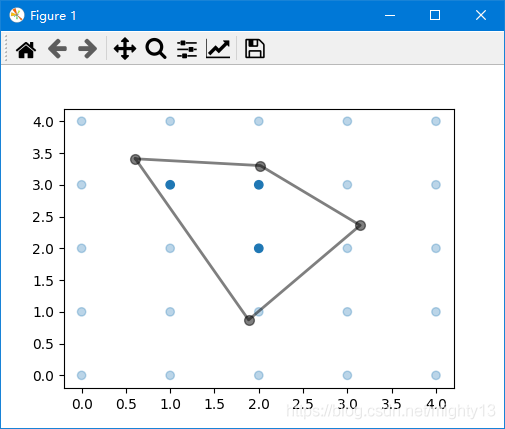
单击鼠标左键创建端点,最终点击初始端点闭合多边形,形成多边形选区。选区外的数据元素颜色变淡,选区内数据颜色保持不变。
按esc键取消选区。按shift键鼠标可以移动多边形选区位置,按ctrl键鼠标可以移动多边形选区某个端点的位置。退出程序时,控制台输出选区内数据元素的坐标。
控制台输出:
Selected points:
[[2.0 2.0]
[1.0 3.0]
[2.0 3.0]]
案例代码
import numpy as np

from matplotlib.widgets import PolygonSelector
from matplotlib.path import Path


class SelectFromCollection:
  """
  Select indices from a matplotlib collection using `PolygonSelector`.

  Selected indices are saved in the `ind` attribute. This tool fades out the
  points that are not part of the selection (i.e., reduces their alpha
  values). If your collection has alpha < 1, this tool will permanently
  alter the alpha values.

  Note that this tool selects collection objects based on their *origins*
  (i.e., `offsets`).

  Parameters
  ----------
  ax : `~matplotlib.axes.Axes`
    Axes to interact with.
  collection : `matplotlib.collections.Collection` subclass
    Collection you want to select from.
  alpha_other : 0 <= float <= 1
    To highlight a selection, this tool sets all selected points to an
    alpha value of 1 and non-selected points to *alpha_other*.
  """

  def __init__(self, ax, collection, alpha_other=0.3):
    self.canvas = ax.figure.canvas
    self.collection = collection
    self.alpha_other = alpha_other

    self.xys = collection.get_offsets()
    self.Npts = len(self.xys)

    # Ensure that we have separate colors for each object
    self.fc = collection.get_facecolors()
    if len(self.fc) == 0:
      raise ValueError('Collection must have a facecolor')
    elif len(self.fc) == 1:
      self.fc = np.tile(self.fc, (self.Npts, 1))

    self.poly = PolygonSelector(ax, self.onselect)
    self.ind = []

  def onselect(self, verts):
    path = Path(verts)
    self.ind = np.nonzero(path.contains_points(self.xys))[0]
    self.fc[:, -1] = self.alpha_other
    self.fc[self.ind, -1] = 1
    self.collection.set_facecolors(self.fc)
    self.canvas.draw_idle()

  def disconnect(self):
    self.poly.disconnect_events()
    self.fc[:, -1] = 1
    self.collection.set_facecolors(self.fc)
    self.canvas.draw_idle()


if __name__ == '__main__':
  import matplotlib.pyplot as plt

  fig, ax = plt.subplots()
  grid_size = 5
  grid_x = np.tile(np.arange(grid_size), grid_size)
  grid_y = np.repeat(np.arange(grid_size), grid_size)
  pts = ax.scatter(grid_x, grid_y)

  selector = SelectFromCollection(ax, pts)

  print("Select points in the figure by enclosing them within a polygon.")
  print("Press the 'esc' key to start a new polygon.")
  print("Try holding the 'shift' key to move all of the vertices.")
  print("Try holding the 'ctrl' key to move a single vertex.")

  plt.show()

  selector.disconnect()

  # After figure is closed print the coordinates of the selected points
  print('\nSelected points:')
  print(selector.xys[selector.ind])
到此这篇关于matplotlib之多边形选区(PolygonSelector)的使用的文章就介绍到这了,更多相关matplotlib 多边形选区内容请搜索脚本之家以前的文章或继续浏览下面的相关文章希望大家以后多多支持脚本之家!
相关文章
 这篇文章主要介绍了python实现list元素按关键字相加减的方法,结合具体实例形式分析了Python针对list元素遍历与运算相关操作技巧,需要的朋友可以参考下2017-06-06
 这篇文章主要介绍了python删除指定类型(或非指定)的文件,以实例形式较为详细的分析了Python删除文件的相关技巧,需要的朋友可以参考下2015-07-07
Python的pytest测试框架中fixture的使用详解
这篇文章主要介绍了pytest中fixture的使用详解,pytest是一个非常成熟的全功能的Python测试框架,能够支持简单的单元测试和复杂的功能测试,还可以用来做selenium/appnium等自动化测试、接口自动化测试,需要的朋友可以参考下2023-07-07 这篇文章主要介绍了tensorflow 分类损失函数使用小记,文中通过示例代码介绍的非常详细,对大家的学习或者工作具有一定的参考学习价值,需要的朋友们下面随着小编来一起学习学习吧2020-02-02
 这篇文章主要为大家介绍了python计算机视觉opencv卡号识别的实现示例详解,有需要的朋友可以借鉴参考下 希望能够有所帮助,祝大家多多进步2021-11-11
 这篇文章主要介绍了python自动化测试之setUp与tearDown实例,其中setUp()方法中进行测试前的初始化工作,并在tearDown()方法中执行测试后的清除工作,setUp()和tearDown()都是TestCase类中定义的方法,需要的朋友可以参考下2014-09-09
 Windows操作系统的事件日志系统记录了数百种不同的事件ID,每个ID对应特定的系统事件,本文介绍如何构建一个基于Web的事件ID查询系统,文章通过代码示例介绍的非常详细,需要的朋友可以参考下2025-04-04
 在本篇内容里小编给大家整理的是关于Python中os模块及用法相关知识点,有兴趣的朋友们可以学习下,希望能给你带来帮助2021-08-08
 今天小编就为大家分享一篇解决python 自动安装缺少模块的问题,具有很好的参考价值,希望对大家有所帮助。一起跟随小编过来看看吧2018-10-10
 读万卷书不如行万里路,只学书上的理论是远远不够的,只有在实战中才能获得能力的提升,本篇文章手把手带你用Python采集糗事百科段子的数据,大家可以在过程中查缺补漏,提升水平2021-10-10
最新评论