

Python安装Bs4及使用方法
安装方法一:
①进入python文件夹执行指令(前提是支持pip指令):
pip3 install Beautifulsoup4
②回车待安装完成,如果出现以下红框中内容,即代表安装成功

③验证是否可以运行成功,运行cmd执行,引用模块import bs4回车未报错,则证明安装完成,可以正常使用了:

安装方法二
(像我们公司这种各种网络限制,使用pip就会出现无法安装,一直循环在retry):
①进入官网下载压缩包:Beautiful Soup官网下载链接
②将压缩包解压至python文件中,进入解压文件后输入指令(前面的python不可缺少):
python setup.py install
③待运行完成后输入python,再输入help('modules')可以查看你当前python拥有的所有模块,如下:

④如上安装完成,同样检查是否可以正常引入bs4,输入:import bs4 回车
安装方法三
(如果是python3伙伴会发现,上面两种方法还是不行,运行help('modules')也找不到bs4模块,此时就需要使用以下方法了):
①同样进行上面第二种方法后,将BeautifulSoup4文件夹中的bs4文件夹拷贝到python安装目录下的lib中
②将python安装目录下的Tools/scripts/2to3.py文件也剪切到python安装目录下的lib中
③cmd中cd到lib目录,然后运行python 2to3.py bs4 -w即可
基本用法:
import bs4
from bs4 import BeautifulSoup

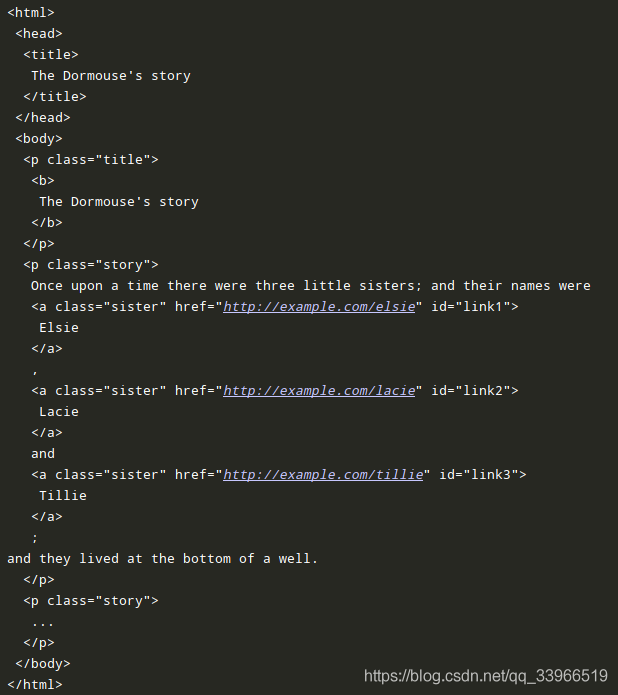
html_doc = """<html><head><title>The Dormouse's story</title></head>
<body>
<p class="title"><b>The Dormouse's story</b></p>

<p class="story">Once upon a time there were three little sisters; and their names were
<a href="http://example.com/elsie" rel="external nofollow"  class="sister" id="link1">Elsie</a>,
<a href="http://example.com/lacie" rel="external nofollow"  class="sister" id="link2">Lacie</a> and
<a href="http://example.com/tillie" rel="external nofollow"  class="sister" id="link3">Tillie</a>;
and they lived at the bottom of a well.</p>

<p class="story">...</p>
"""
创建一个BeautifulSoup 对象
soup = BeautifulSoup(html_doc,“html.parser”)
格式化文档输出
soup.prettify()
获取标题
soup.title.text

获取所有标签属性
soup.a.attrs

判断是否含有某个标签属性
soup.a.has_attr(‘class')

获取标签的子元素
list(soup.p.children)

list(soup.p.children)[0].text

取出所有标签
soup.find_all(‘a')
for a in soup.find_all(‘a'):
print(a.attrs[‘href'])

找寻指定id
soup.find(id=‘link3')

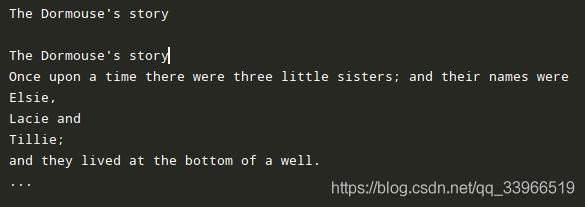
找出所有文字内容
soup.get_text()
到此这篇关于Python安装Bs4及使用方法的文章就介绍到这了,更多相关Python安装Bs4使用内容请搜索脚本之家以前的文章或继续浏览下面的相关文章希望大家以后多多支持脚本之家!
相关文章
 在Python中,如何获取" 3年前的今天"的datetime对象,本文通过实例代码给大家详细讲解,代码简单易懂对大家的学习或工作具有一定的参考借鉴价值,需要的朋友参考下吧2023-01-01
 我们再使用python难免会出现各种各样的报错,下面这篇文章主要给大家介绍了关于Python常见报错解决方案的相关资料,文中通过示例代码介绍的非常详细,需要的朋友可以参考下2022-05-05
numpy库ndarray多维数组的维度变换方法(reshape、resize、swapaxes、flatten)
这篇文章主要介绍了numpy库ndarray多维数组的维度变换方法(reshape、resize、swapaxes、flatten),文中通过示例代码介绍的非常详细,对大家的学习或者工作具有一定的参考学习价值,需要的朋友们下面随着小编来一起学习学习吧2020-04-04 这篇文章主要介绍了Django怎么在admin后台注册数据库表,文中通过示例代码介绍的非常详细,对大家的学习或者工作具有一定的参考学习价值,需要的朋友可以参考下2020-11-11
 shutil可以简单地理解为sh+util ,shell工具的意思。shutil模块是对os模块的补充,主要针对文件的拷贝、删除、移动、压缩和解压操作。本文将利用这一模块实现文件的裁剪、压缩与解压缩,需要的可以参考一下2022-05-05
 每个码农大概都会用自己擅长的语言写出一个斐波那契数列出来,斐波那契数列简单地说,起始两项为0和1,此后的项分别为它的前两项之后。下面这篇文章就给大家详细介绍了python实现斐波那契数列的方法,有需要的朋友们可以参考借鉴,下面来一起看看吧。2017-01-01
 布隆过滤器是一种概率空间高效的数据结构。它与hashmap非常相似,用于检索一个元素是否在一个集合中。这篇文章主要介绍了布隆过滤器的概述及Python实现,需要的朋友可以参考下2019-12-12
 这篇文章主要介绍了python将字符串列表转换为数值列表的几种方法,包括使用map()和float()/int()、列表推导式、pandas库以及numpy库,每种方法都有其适用场景,如小型列表、灵活转换、处理复杂数据集和大规模数据计算等,需要的朋友可以参考下2025-04-04
Python报错TypeError: object of type ‘gener
在Python开发的复杂世界中,报错信息就像神秘的谜题,困扰着开发者和环境配置者,其中,TypeError: object of type ‘generator’ has no len()这个报错,常常在不经意间打乱我们的开发节奏,本文让我们一起深入探究这个报错问题,为Python开发之路扫除障碍2024-10-10 今天小编就为大家分享一篇python抓取网页内容并进行语音播报的方法,具有很好的参考价值,希望对大家有所帮助。一起跟随小编过来看看吧2018-12-12
最新评论