

解决Pytorch中Batch Normalization layer踩过的坑
1. 注意momentum的定义
Pytorch中的BN层的动量平滑和常见的动量法计算方式是相反的,默认的momentum=0.1

BN层里的表达式为:
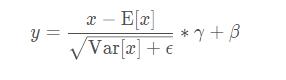
其中γ和β是可以学习的参数。在Pytorch中,BN层的类的参数有:
CLASS torch.nn.BatchNorm2d(num_features, eps=1e-05, momentum=0.1, affine=True, track_running_stats=True)
每个参数具体含义参见文档,需要注意的是,affine定义了BN层的参数γ和β是否是可学习的(不可学习默认是常数1和0).
2. 注意BN层中含有统计数据数值,即均值和方差
track_running_stats – a boolean value that when set to True, this module tracks the running mean and variance, and when set to False, this module does not track such statistics and always uses batch statistics in both training and eval modes. Default: True
在训练过程中model.train(),train过程的BN的统计数值—均值和方差是通过当前batch数据估计的。
并且测试时,model.eval()后,若track_running_stats=True,模型此刻所使用的统计数据是Running status 中的,即通过指数衰减规则,积累到当前的数值。否则依然使用基于当前batch数据的估计值。
3. BN层的统计数据更新
是在每一次训练阶段model.train()后的forward()方法中自动实现的,而不是在梯度计算与反向传播中更新optim.step()中完成
4. 冻结BN及其统计数据
从上面的分析可以看出来,正确的冻结BN的方式是在模型训练时,把BN单独挑出来,重新设置其状态为eval (在model.train()之后覆盖training状态).
解决方案:
You should use apply instead of searching its children, while named_children() doesn't iteratively search submodules.
def set_bn_eval(m):
    classname = m.__class__.__name__
    if classname.find('BatchNorm') != -1:
      m.eval()
model.apply(set_bn_eval)
或者,重写module中的train()方法:
def train(self, mode=True):
        """
        Override the default train() to freeze the BN parameters
        """
        super(MyNet, self).train(mode)
        if self.freeze_bn:
            print("Freezing Mean/Var of BatchNorm2D.")
            if self.freeze_bn_affine:
                print("Freezing Weight/Bias of BatchNorm2D.")
        if self.freeze_bn:
            for m in self.backbone.modules():
                if isinstance(m, nn.BatchNorm2d):
                    m.eval()
                    if self.freeze_bn_affine:
                        m.weight.requires_grad = False
                        m.bias.requires_grad = False
5. Fix/frozen Batch Norm when training may lead to RuntimeError: expected scalar type Half but found Float
解决办法:
import torch
import torch.nn as nn
from torch.nn import init
from torchvision import models
from torch.autograd import Variable
from apex.fp16_utils import *
def fix_bn(m):
    classname = m.__class__.__name__
    if classname.find('BatchNorm') != -1:
        m.eval()
model = models.resnet50(pretrained=True)
model.cuda()
model = network_to_half(model)
model.train()
model.apply(fix_bn) # fix batchnorm
input = Variable(torch.FloatTensor(8, 3, 224, 224).cuda().half())
output = model(input)
output_mean = torch.mean(output)
output_mean.backward()
Please do
def fix_bn(m):
    classname = m.__class__.__name__
    if classname.find('BatchNorm') != -1:
        m.eval().half()
Reason for this is, for regular training it is better (performance-wise) to use cudnn batch norm, which requires its weights to be in fp32, thus batch norm modules are not converted to half in network_to_half. However, cudnn does not support batchnorm backward in the eval mode , which is what you are doing, and to use pytorch implementation for this, weights have to be of the same type as inputs.
补充:深度学习总结:用pytorch做dropout和Batch Normalization时需要注意的地方,用tensorflow做dropout和BN时需要注意的地方
用pytorch做dropout和BN时需要注意的地方
pytorch做dropout:
就是train的时候使用dropout,训练的时候不使用dropout,
pytorch里面是通过net.eval()固定整个网络参数,包括不会更新一些前向的参数,没有dropout,BN参数固定,理论上对所有的validation set都要使用net.eval()
net.train()表示会纳入梯度的计算。
net_dropped = torch.nn.Sequential(
    torch.nn.Linear(1, N_HIDDEN),
    torch.nn.Dropout(0.5),  # drop 50% of the neuron
    torch.nn.ReLU(),
    torch.nn.Linear(N_HIDDEN, N_HIDDEN),
    torch.nn.Dropout(0.5),  # drop 50% of the neuron
    torch.nn.ReLU(),
    torch.nn.Linear(N_HIDDEN, 1),
)
for t in range(500):
    pred_drop = net_dropped(x)
    loss_drop = loss_func(pred_drop, y)
    optimizer_drop.zero_grad()
    loss_drop.backward()
    optimizer_drop.step()
    if t % 10 == 0:
        # change to eval mode in order to fix drop out effect
        net_dropped.eval()  # parameters for dropout differ from train mode
        test_pred_drop = net_dropped(test_x)
        # change back to train mode
        net_dropped.train()
pytorch做Batch Normalization:
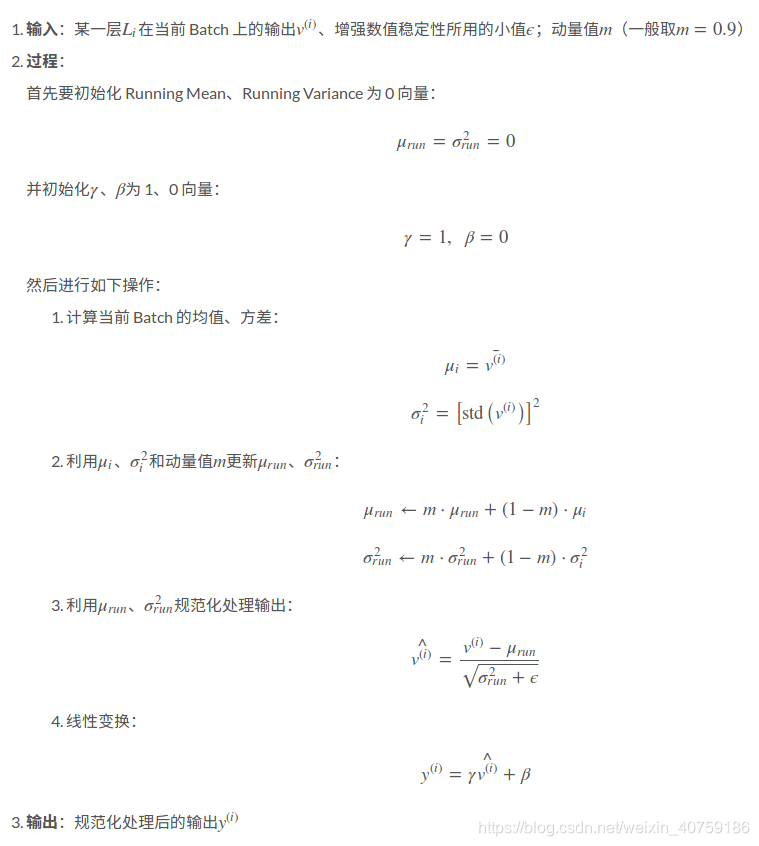
net.eval()固定整个网络参数,固定BN的参数,moving_mean 和moving_var,不懂这个看下图:
            if self.do_bn:
                bn = nn.BatchNorm1d(10, momentum=0.5)
                setattr(self, 'bn%i' % i, bn)   # IMPORTANT set layer to the Module
                self.bns.append(bn)
    for epoch in range(EPOCH):
        print('Epoch: ', epoch)
        for net, l in zip(nets, losses):
            net.eval()              # set eval mode to fix moving_mean and moving_var
            pred, layer_input, pre_act = net(test_x)
            net.train()             # free moving_mean and moving_var
        plot_histogram(*layer_inputs, *pre_acts)
moving_mean 和moving_var
用tensorflow做dropout和BN时需要注意的地方
dropout和BN都有一个training的参数表明到底是train还是test, 表明test那dropout就是不dropout,BN就是固定住了BN的参数;
tf_is_training = tf.placeholder(tf.bool, None)  # to control dropout when training and testing
# dropout net
d1 = tf.layers.dense(tf_x, N_HIDDEN, tf.nn.relu)
d1 = tf.layers.dropout(d1, rate=0.5, training=tf_is_training)   # drop out 50% of inputs
d2 = tf.layers.dense(d1, N_HIDDEN, tf.nn.relu)
d2 = tf.layers.dropout(d2, rate=0.5, training=tf_is_training)   # drop out 50% of inputs
d_out = tf.layers.dense(d2, 1)
for t in range(500):
    sess.run([o_train, d_train], {tf_x: x, tf_y: y, tf_is_training: True})  # train, set is_training=True
    if t % 10 == 0:
        # plotting
        plt.cla()
        o_loss_, d_loss_, o_out_, d_out_ = sess.run(
            [o_loss, d_loss, o_out, d_out], {tf_x: test_x, tf_y: test_y, tf_is_training: False} # test, set is_training=False
        )
# pytorch
    def add_layer(self, x, out_size, ac=None):
        x = tf.layers.dense(x, out_size, kernel_initializer=self.w_init, bias_initializer=B_INIT)
        self.pre_activation.append(x)
        # the momentum plays important rule. the default 0.99 is too high in this case!
        if self.is_bn: x = tf.layers.batch_normalization(x, momentum=0.4, training=tf_is_train)    # when have BN
        out = x if ac is None else ac(x)
        return out
当BN的training的参数为train时,只是表示BN的参数是可变化的,并不是代表BN会自己更新moving_mean 和moving_var,因为这个操作是前向更新的op,在做train之前必须确保moving_mean 和moving_var更新了,更新moving_mean 和moving_var的操作在tf.GraphKeys.UPDATE_OPS
 # !! IMPORTANT !! the moving_mean and moving_variance need to be updated,
        # pass the update_ops with control_dependencies to the train_op
        update_ops = tf.get_collection(tf.GraphKeys.UPDATE_OPS)
        with tf.control_dependencies(update_ops):
            self.train = tf.train.AdamOptimizer(LR).minimize(self.loss)
以上为个人经验,希望能给大家一个参考,也希望大家多多支持脚本之家。
相关文章
 这篇文章主要介绍了Python时间和日期的处理方法总结,文中通过示例代码介绍的非常详细,对大家的学习或者工作具有一定的参考学习价值,需要的朋友们下面随着小编来一起学习学习吧2022-03-03
 在本篇文章中小编给大家分享的是关于解决python中0x80072ee2错误的方法,需要的朋友们可以参考下。2020-07-07
 这篇文章主要介绍了python如何实现质数求和,具有很好的参考价值,希望对大家有所帮助。如有错误或未考虑完全的地方,望不吝赐教2022-05-05
 这篇文章主要介绍了基于Python批量镶嵌拼接遥感影像/栅格数据,使用时直接修改Mosaic_GDAL函数的入参就行了,选择数据存放的路径会自动拼接,命名也会自己设置无需额外修改,需要的朋友可以参考下2023-10-10
 java默认精度是毫秒级别的,生成的时间戳是13位,而python默认是10位的,精度是秒,下面这篇文章主要给大家介绍了关于Python时间戳与日期格式之间相互转化的相关资料,需要的朋友可以参考下2022-08-08
 这篇文章主要介绍了python爬取youtube视频的相关知识,本文给大家介绍的非常详细,对大家的学习或工作具有一定的参考借鉴价值,需要的朋友可以参考下2021-03-03
 今天小编就为大家分享一篇Django使用Mysql数据库已经存在的数据表方法,具有很好的参考价值,希望对大家有所帮助。一起跟随小编过来看看吧2018-05-05
 今天小编就以一个数据分析师的视角来向大家讲述一下年轻人群体对于丁克的态度以及那些丁克家庭他们的想法是怎么样的?他们是否有过后悔当初的决定,需要的朋友可以参考下2021-06-06
 下面小编就为大家分享一篇利用python将pdf输出为txt的实例讲解,具有很好的参考价值,希望对大家有所帮助。一起跟随小编过来看看吧2018-04-04
 这篇文章主要介绍了Python self 参数详解,本文通过实例代码给大家介绍的非常详细,具有一定的参考借鉴价值,需要的朋友可以参考下2019-08-08
最新评论