

python趣味挑战之爬取天气与微博热搜并自动发给微信好友
更新时间:2021年05月31日 15:24:05 作者:gudu12306
忙着毕设与打游戏之余,突然想着写个爬虫练练手,想了想,就写了一个爬虫爬取“中国天气网”与“微博热搜”并定时发送给微信好友,放到服务器上运行了几天算是正常,需要的朋友可以参考下
一、系统环境
1.python 3.8.2
2.webdriver(用于驱动edge)
3.微信电脑版
4.windows10
二、爬取中国天气网
因为中国天气网的网页是动态生成的,所以不能直接爬取到数据,需要先使用webdriver打开网页并渲染完成,然后保存网页源代码,使用beautifulsoup分析数据。爬取的数据包括实时温度、最高温度与最低温度、污染状况、风向和湿度、紫外线状况、穿衣指南八项数据。
def getZZWeatherAndSendMsg():
	HTML1='http://www.weather.com.cn/weather1dn/101190201.shtml'
	driver=webdriver.Edge()
	driver.get(HTML1)
	soup=BeautifulSoup(driver.page_source,'html5lib')

	#获取实时温度
	tem=soup.find('span',class_='temp').string
	#获取最高温度与最低温度
	maxtem=soup.find('span',id='maxTemp').string
	mintem=soup.find('span',id='minTemp').string
	#获取污染状况
	poll=soup.find('a',href='http://www.weather.com.cn/air/?city=101190201').string
	#获取风向和湿度
	win=soup.find('span',id='wind').string
	humidity=soup.find('span',id='humidity').string
	#获取紫外线状况
	sun=soup.find('div',class_='lv').find('em').string
	#获取穿衣指南
	cloth=soup.find('dl',id='cy').find('dd').string

	HTML2='http://www.weather.com.cn/weathern/101190201.shtml'
	driver.get(HTML2)
	soup=BeautifulSoup(driver.page_source,'html5lib')
	#获取天气情况
	wea=soup.find_all('p',class_='weather-info')[1].string
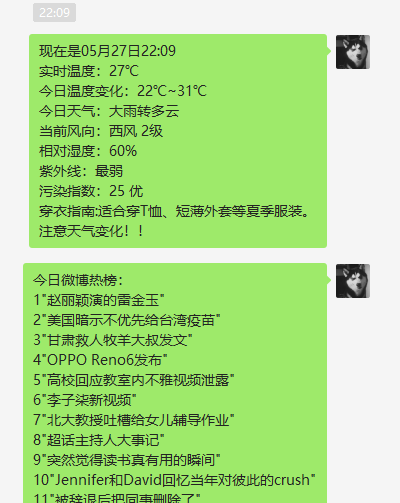
	weatherContent='实时温度:'+tem+'℃'+'\n'+'今日温度变化:'+mintem+'~'+maxtem+'\n'+'今日天气:'+wea+'\n'+'当前风向:'+win+'\n'+'相对湿度:'+humidity+'\n'+'紫外线:'+sun+'\n'+'污染指数:'+poll+'\n'+'穿衣指南:'+cloth+'\n'+'注意天气变化!!'
	driver.quit()
	return weatherContent
三、爬取微博热搜
相比于中国天气网,微博热搜要简单很多,直接request得到数据包,然后使用beautiful解析。解析数据后用for循环便利50次保存文本。
def getWeibo():
	url='https://s.weibo.com/top/summary'
	headers={'User-Agent': 'Mozilla/5.0 (Windows NT 10.0; Win64; x64) AppleWebKit/537.36 (KHTML, like Gecko) Chrome/90.0.4430.72 Safari/537.36 Edg/90.0.818.41'}
	r=requests.get(url,headers=headers)
	r.raise_for_status()
	r.encoding = r.apparent_encoding
	soup = BeautifulSoup(r.text, "html.parser")
	tr=soup.find_all('tr')
	weiboContent='今日微博热榜:'+'\n'
	for i in range(2,52):
		text=tr[i].find('td',class_='td-02').find('a').string
		weiboContent=weiboContent+str(i-1)+'"'+text+'"'+'\n'
	return weiboContent
四、微信自动发送消息
使用win32gui自动化操作发送微信消息,首先使用微信的窗口名找到微信句柄,然后模拟键鼠搜索联系人,打开联系人窗口,发送消息并关闭窗口。同时发送多个联系人时可以直接重复这几步操作
if __name__=="__main__":
	target_a=['06:55','11:55','19:53']
	target_b=['07:00','12:00','19:54']
	name_list=['Squirrel B','Squirrel B']
	while True:
		now=time.strftime("%m月%d日%H:%M",time.localtime())
		print(now)
		if now[-5:] in target_a:
			base_weatherContent=getZZWeatherAndSendMsg()
			weiboContent=getWeibo()
		if now[-5:] in target_b:
			hwnd=win32gui.FindWindow("WeChatMainWndForPC", '微信')
			win32gui.ShowWindow(hwnd,win32con.SW_SHOW)
			win32gui.MoveWindow(hwnd,0,0,1000,700,True)
			time.sleep(1)
			for name in name_list:
				movePos(28,147)
				click()
				#2.移动鼠标到搜索框,单击,输入要搜索的名字
				movePos(148,35)
				click()
				time.sleep(1)
				setText(name)
				ctrlV()
				time.sleep(1)  # 等待联系人搜索成功
				enter()
				time.sleep(1)
				now=time.strftime("%m月%d日%H:%M",time.localtime())
				weatherContent='现在是'+now+'\n'+base_weatherContent
				setText(weatherContent)
				ctrlV()
				time.sleep(1)
				altS()
				time.sleep(1)
				setText(weiboContent)
				ctrlV()
				time.sleep(1)
				altS()
				time.sleep(1)
			win32gui.PostMessage(hwnd, win32con.WM_CLOSE, 0, 0)
		time.sleep(60)
五、源代码
import win32clipboard as w
import win32con
import win32api
import win32gui
import ctypes
import time
import requests
from urllib.request import urlopen
from bs4 import BeautifulSoup
from selenium import webdriver

#把文字放入剪贴板
def setText(aString):
	w.OpenClipboard()
	w.EmptyClipboard()
	w.SetClipboardData(win32con.CF_UNICODETEXT,aString)
	w.CloseClipboard()

#模拟ctrl+V
def ctrlV():
	win32api.keybd_event(17,0,0,0) #ctrl
	win32api.keybd_event(86,0,0,0) #V
	win32api.keybd_event(86,0,win32con.KEYEVENTF_KEYUP,0)#释放按键
	win32api.keybd_event(17,0,win32con.KEYEVENTF_KEYUP,0)

#模拟alt+s
def altS():
	win32api.keybd_event(18,0,0,0)
	win32api.keybd_event(83,0,0,0)
	win32api.keybd_event(83,0,win32con.KEYEVENTF_KEYUP,0)
	win32api.keybd_event(18,0,win32con.KEYEVENTF_KEYUP,0)
# 模拟enter
def enter():
	win32api.keybd_event(13,0,0,0)
	win32api.keybd_event(13,0,win32con.KEYEVENTF_KEYUP,0)
#模拟单击
def click():
	win32api.mouse_event(win32con.MOUSEEVENTF_LEFTDOWN, 0, 0, 0, 0)
	win32api.mouse_event(win32con.MOUSEEVENTF_LEFTUP, 0, 0, 0, 0)
#移动鼠标的位置
def movePos(x,y):
	win32api.SetCursorPos((x,y))

def getZZWeatherAndSendMsg():
	HTML1='http://www.weather.com.cn/weather1dn/101190201.shtml'
	driver=webdriver.Edge()
	driver.get(HTML1)
	soup=BeautifulSoup(driver.page_source,'html5lib')

	#获取实时温度
	tem=soup.find('span',class_='temp').string
	#获取最高温度与最低温度
	maxtem=soup.find('span',id='maxTemp').string
	mintem=soup.find('span',id='minTemp').string
	#获取污染状况
	poll=soup.find('a',href='http://www.weather.com.cn/air/?city=101190201').string
	#获取风向和湿度
	win=soup.find('span',id='wind').string
	humidity=soup.find('span',id='humidity').string
	#获取紫外线状况
	sun=soup.find('div',class_='lv').find('em').string
	#获取穿衣指南
	cloth=soup.find('dl',id='cy').find('dd').string

	HTML2='http://www.weather.com.cn/weathern/101190201.shtml'
	driver.get(HTML2)
	soup=BeautifulSoup(driver.page_source,'html5lib')
	#获取天气情况
	wea=soup.find_all('p',class_='weather-info')[1].string
	weatherContent='实时温度:'+tem+'℃'+'\n'+'今日温度变化:'+mintem+'~'+maxtem+'\n'+'今日天气:'+wea+'\n'+'当前风向:'+win+'\n'+'相对湿度:'+humidity+'\n'+'紫外线:'+sun+'\n'+'污染指数:'+poll+'\n'+'穿衣指南:'+cloth+'\n'+'注意天气变化!!'
	driver.quit()
	return weatherContent

def getWeibo():
	url='https://s.weibo.com/top/summary'
	headers={'User-Agent': 'Mozilla/5.0 (Windows NT 10.0; Win64; x64) AppleWebKit/537.36 (KHTML, like Gecko) Chrome/90.0.4430.72 Safari/537.36 Edg/90.0.818.41'}
	r=requests.get(url,headers=headers)
	r.raise_for_status()
	r.encoding = r.apparent_encoding
	soup = BeautifulSoup(r.text, "html.parser")
	tr=soup.find_all('tr')
	weiboContent='今日微博热榜:'+'\n'
	for i in range(2,52):
		text=tr[i].find('td',class_='td-02').find('a').string
		weiboContent=weiboContent+str(i-1)+'"'+text+'"'+'\n'
	return weiboContent

if __name__=="__main__":
	target_a=['06:55','11:55','19:53']
	target_b=['07:00','12:00','19:54']
	name_list=['Squirrel B','Squirrel B']
	while True:
		now=time.strftime("%m月%d日%H:%M",time.localtime())
		print(now)
		if now[-5:] in target_a:
			base_weatherContent=getZZWeatherAndSendMsg()
			weiboContent=getWeibo()
		if now[-5:] in target_b:
			hwnd=win32gui.FindWindow("WeChatMainWndForPC", '微信')
			win32gui.ShowWindow(hwnd,win32con.SW_SHOW)
			win32gui.MoveWindow(hwnd,0,0,1000,700,True)
			time.sleep(1)
			for name in name_list:
				movePos(28,147)
				click()
				#2.移动鼠标到搜索框,单击,输入要搜索的名字
				movePos(148,35)
				click()
				time.sleep(1)
				setText(name)
				ctrlV()
				time.sleep(1)  # 等待联系人搜索成功
				enter()
				time.sleep(1)
				now=time.strftime("%m月%d日%H:%M",time.localtime())
				weatherContent='现在是'+now+'\n'+base_weatherContent
				setText(weatherContent)
				ctrlV()
				time.sleep(1)
				altS()
				time.sleep(1)
				setText(weiboContent)
				ctrlV()
				time.sleep(1)
				altS()
				time.sleep(1)
			win32gui.PostMessage(hwnd, win32con.WM_CLOSE, 0, 0)
		time.sleep(60)
六、运行效果
七、总结
- 爬取中国天气网数据
- 爬取微博热搜
- 自动发送微信消息
- 打包为exe并写个简单的GUI
- 写的比较简单,不过也够用了,也懒得继续写下去了,希望可以供大家参考.
github地址 https://github.com/gudu12306/auto_for_wechat
到此这篇关于python趣味挑战之爬取天气与微博热搜并自动发给微信好友的文章就介绍到这了,更多相关python爬取天气与微博热搜内容请搜索脚本之家以前的文章或继续浏览下面的相关文章希望大家以后多多支持脚本之家!
相关文章
 这篇文章主要介绍了使用Python防止SQL注入攻击的实现示例,文中通过示例代码介绍的非常详细,对大家的学习或者工作具有一定的参考学习价值,需要的朋友们下面随着小编来一起学习学习吧2020-05-05
 在本篇文章里小编给大家整理了一篇关于python中re.findall函数实例用法相关内容,有兴趣的朋友们可以学习下。2021-09-09
 这篇文章主要介绍了使用Python来开发Markdown脚本扩展的实例分享,文中的示例是用来简单地转换文档结构,主要为了体现一个思路,需要的朋友可以参考下2016-03-03
 今天小编就为大家分享一篇pytorch中nn.Conv1d的用法详解,具有很好的参考价值,希望对大家有所帮助。一起跟随小编过来看看吧2019-12-12
 Python提供了smtplib库,用于发送电子邮件,本文将详细介绍如何使用Python的smtplib库来发送电子邮件,感兴趣的小伙伴可以跟随小编一起学习一下2023-11-11
python之tensorflow手把手实例讲解猫狗识别实现
要说到深度学习图像分类的经典案例之一,那就是猫狗大战了。猫和狗在外观上的差别还是挺明显的,无论是体型、四肢、脸庞和毛发等等, 都是能通过肉眼很容易区分的。那么如何让机器来识别猫和狗呢?网上已经有不少人写过这案例了,我也来尝试下练练手。2021-09-09 以制作一个网站为例,聊一聊小白如何入门Python,具有一定的参考价值,感兴趣的小伙伴们可以参考一下2018-03-03
更改Python的pip install 默认安装依赖路径方法详解
今天小编就为大家分享一篇更改Python的pip install 默认安装依赖路径方法详解,具有很好的参考价值,希望对大家有所帮助。一起跟随小编过来看看吧2018-10-10 最近在用Python做中文自然语言处理。使用的IDE是PyCharm。PyCharm确实是Python开发之首选,但用于科学计算方面,还略有欠缺。为此我尝试过Enthought Canopy,但Canopy感觉把问题搞得复杂化,管理Python扩展也不太方便。直到今天我发现了 Anaconda 。2014-06-06
 这篇文章主要介绍了在Python中marshal对象序列化的相关知识,是Python进阶学习中序列化相关的知识,需要的朋友可以参考下2015-07-07
最新评论