

教你使用TensorFlow2识别验证码
验证码是根据随机字符生成一幅图片,然后在图片中加入干扰象素,用户必须手动填入,防止有人利用机器人自动批量注册、灌水、发垃圾广告等等 。
数据集来源:https://www.kaggle.com/fournierp/captcha-version-2-images
图片是5个字母的单词,可以包含数字。这些图像应用了噪声(模糊和一条线)。它们是200 x 50 PNG。我们的任务是尝试制作光学字符识别算法的模型。
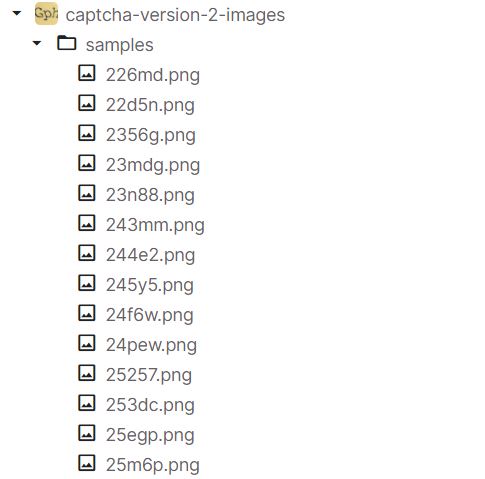
在数据集中存在的验证码png图片,对应的标签就是图片的名字。
import os
import numpy as np
import pandas as pd
import cv2
import matplotlib.pyplot as plt
import seaborn as sns
# imgaug 图片数据增强
import imgaug.augmenters as iaa
import tensorflow as tf
# Conv2D MaxPooling2D Dropout Flatten Dense BN  GAP
from tensorflow.keras.layers import Conv2D, MaxPooling2D, Dropout, Flatten, Dense, Layer, BatchNormalization, GlobalAveragePooling2D
from tensorflow.keras.optimizers import Adam
from tensorflow.keras import Model, Input
from tensorflow.keras.callbacks import EarlyStopping, ReduceLROnPlateau
# 图片处理器
from tensorflow.keras.preprocessing.image import ImageDataGenerator
import plotly.express as px
import plotly.graph_objects as go
import plotly.offline as pyo
pyo.init_notebook_mode()
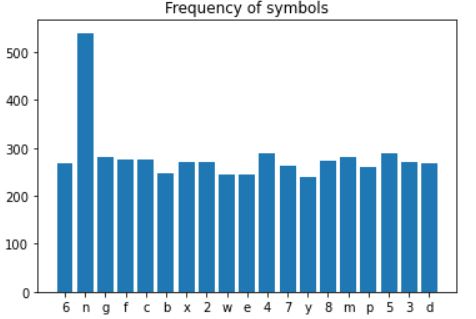
对数据进行一个简单的分析,统计图像中大约出现了什么样的符号。
# 数据路径
DIR = '../input/captcha-version-2-images/samples/samples'
# 存储验证码的标签
captcha_list = []
characters = {}
for captcha in os.listdir(DIR):
    captcha_list.append(captcha)
    # 每张验证码的captcha_code
    captcha_code = captcha.split(".")[0]
    for i in captcha_code:
        # 遍历captcha_code
        characters[i] = characters.get(i, 0) +1
symbols = list(characters.keys())
len_symbols = len(symbols)
print(f'图像中只使用了{len_symbols}符号')

plt.bar(*zip(*characters.items()))
plt.title('Frequency of symbols')
plt.show()
如何提取图像的数据建立X,y??
# 如何提取图像 建立 model  X 的shape  1070 * 50 * 200 * 1
# y的shape 5 * 1070 * 19

for i, captcha in enumerate(captcha_list):
    captcha_code = captcha.split('.')[0]
    # cv2.IMREAD_GRAYSCALE 灰度图
    captcha_cv2 = cv2.imread(os.path.join(DIR, captcha),cv2.IMREAD_GRAYSCALE)
    # 缩放
    captcha_cv2 = captcha_cv2 / 255.0
    # print(captcha_cv2.shape) (50, 200)
    # 将captcha_cv2的(50, 200) 切换成(50, 200, 1)
    captcha_cv2 = np.reshape(captcha_cv2, img_shape)
    # (5,19)
    targs = np.zeros((len_captcha, len_symbols))

    for a, b in enumerate(captcha_code):
        targs[a, symbols.index(b)] = 1
    X[i] = captcha_cv2
    y[:, i] = targs

print("shape of X:", X.shape)
print("shape of y:", y.shape)
输出如下
print("shape of X:", X.shape)
print("shape of y:", y.shape)
通过Numpy中random 随机选择数据,划分训练集和测试集
# 生成随机数
from numpy.random import default_rng

rng = default_rng(seed=1)
test_numbers = rng.choice(1070, size=int(1070*0.3), replace=False)
X_test = X[test_numbers]
X_full = np.delete(X, test_numbers,0)
y_test = y[:,test_numbers]
y_full = np.delete(y, test_numbers,1)

val_numbers = rng.choice(int(1070*0.7), size=int(1070*0.3), replace=False)

X_val = X_full[val_numbers]
X_train = np.delete(X_full, val_numbers,0)
y_val = y_full[:,val_numbers]
y_train = np.delete(y_full, val_numbers,1)
在此验证码数据中,容易出现过拟合的现象,你可能会想到添加更多的新数据、 添加正则项等, 但这里使用数据增强的方法,特别是对于机器视觉的任务,数据增强技术尤为重要。
常用的数据增强操作:imgaug库。imgaug是提供了各种图像增强操作的python库 https://github.com/aleju/imgaug。
imgaug几乎包含了所有主流的数据增强的图像处理操作, 增强方法详见github
# Sequential(C, R)	 尺寸增加了5倍,
# 选取一系列子增强器C作用于每张图片的位置,第二个参数表示是否对每个batch的图片应用不同顺序的Augmenter list     # rotate=(-8, 8)  旋转
# iaa.CropAndPad  截取(crop)或者填充(pad),填充时,被填充区域为黑色。
# px: 想要crop(negative values)的或者pad(positive values)的像素点。
# (top, right, bottom, left)
# 当pad_mode=constant的时候选择填充的值
aug =iaa.Sequential([iaa.CropAndPad(
    px=((0, 10), (0, 35), (0, 10), (0, 35)),
    pad_mode=['edge'],
    pad_cval=1
),iaa.Rotate(rotate=(-8,8))])

X_aug_train = None
y_aug_train = y_train
for i in range(40):
    X_aug = aug(images = X_train)
    if X_aug_train is not None:
        X_aug_train = np.concatenate([X_aug_train, X_aug], axis = 0)
        y_aug_train = np.concatenate([y_aug_train, y_train], axis = 1)
    else:
        X_aug_train = X_aug
让我们看看一些数据增强的训练图像。
fig, ax = plt.subplots(nrows=2, ncols =5, figsize = (16,16))
for i in range(10):
    index = np.random.randint(X_aug_train.shape[0])
    ax[i//5][i%5].imshow(X_aug_train[index],cmap='gray')


这次使用函数式API创建模型,函数式API是创建模型的另一种方式,它具有更多的灵活性,包括创建更为复杂的模型。
需要定义inputs和outputs
#函数式API模型创建
captcha = Input(shape=(50,200,channels))
x = Conv2D(32, (5,5),padding='valid',activation='relu')(captcha)
x = MaxPooling2D((2,2),padding='same')(x)
x = Conv2D(64, (3,3),padding='same',activation='relu')(x)
x = MaxPooling2D((2,2),padding='same')(x)
x = Conv2D(128, (3,3),padding='same',activation='relu')(x)
maxpool = MaxPooling2D((2,2),padding='same')(x)
outputs = []
for i in range(5):
    x = Conv2D(256, (3,3),padding='same',activation='relu')(maxpool)
    x = MaxPooling2D((2,2),padding='same')(x)
    x = Flatten()(x)
    x = Dropout(0.5)(x)
    x = BatchNormalization()(x)
    x = Dense(64, activation='relu')(x)
    x = Dropout(0.5)(x)
    x = BatchNormalization()(x)
    x = Dense(len_symbols , activation='softmax' , name=f'char_{i+1}')(x)
    outputs.append(x)

model = Model(inputs = captcha , outputs=outputs)
# ReduceLROnPlateau更新学习率
reduce_lr = ReduceLROnPlateau(patience =3, factor = 0.5,verbose = 1)
model.compile(loss='categorical_crossentropy', optimizer=Adam(learning_rate=0.0005), metrics=["accuracy"])
# EarlyStopping用于提前停止训练的callbacks。具体地,可以达到当训练集上的loss不在减小
earlystopping = EarlyStopping(monitor ="val_loss",
                             mode ="min", patience = 10,
                              min_delta = 1e-4,
                             restore_best_weights = True)

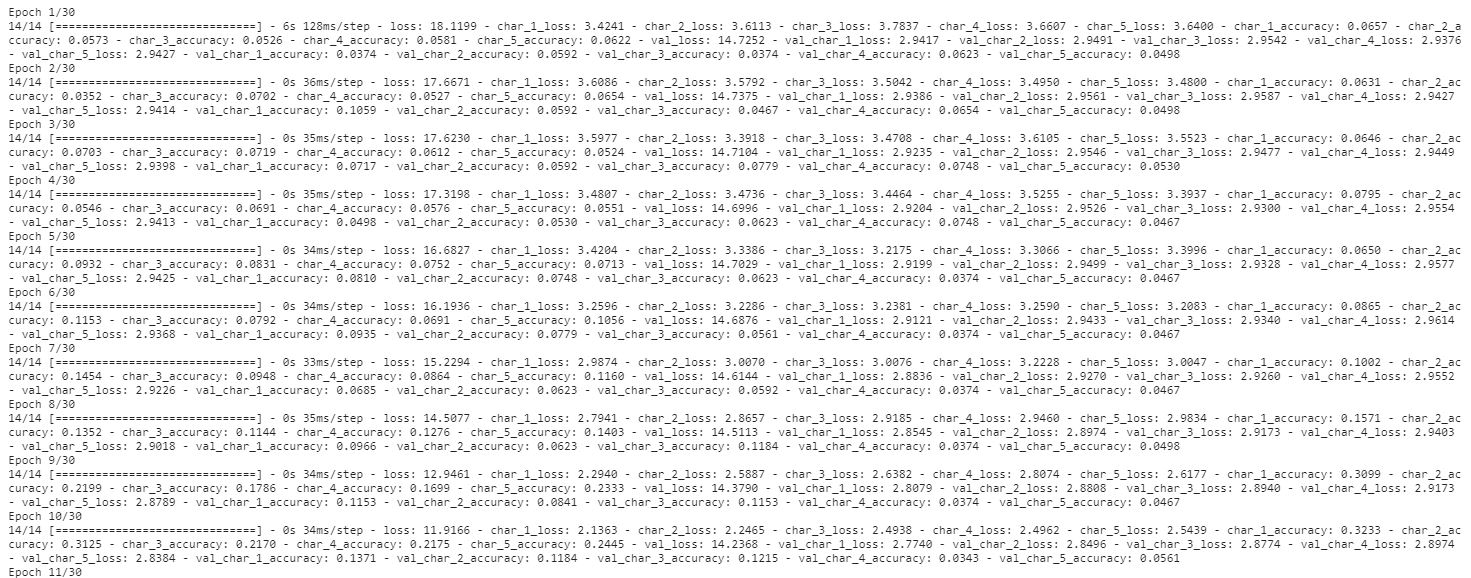
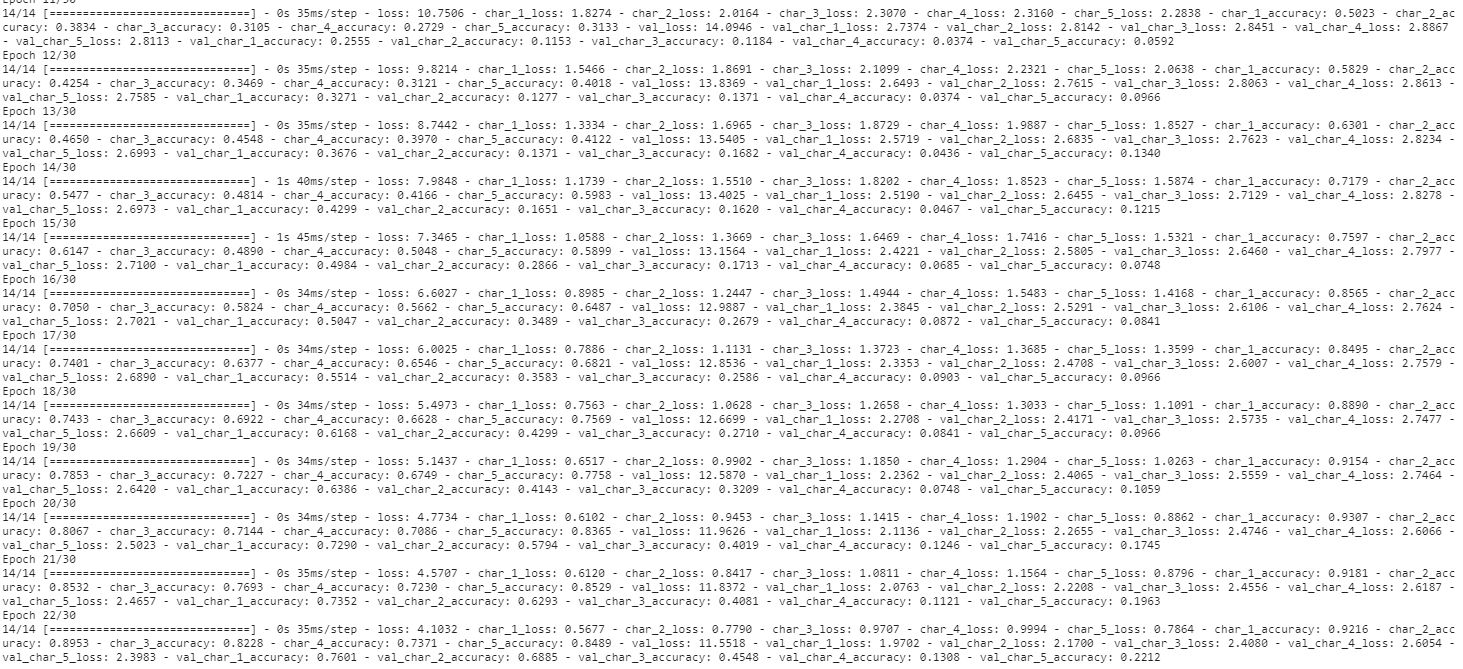
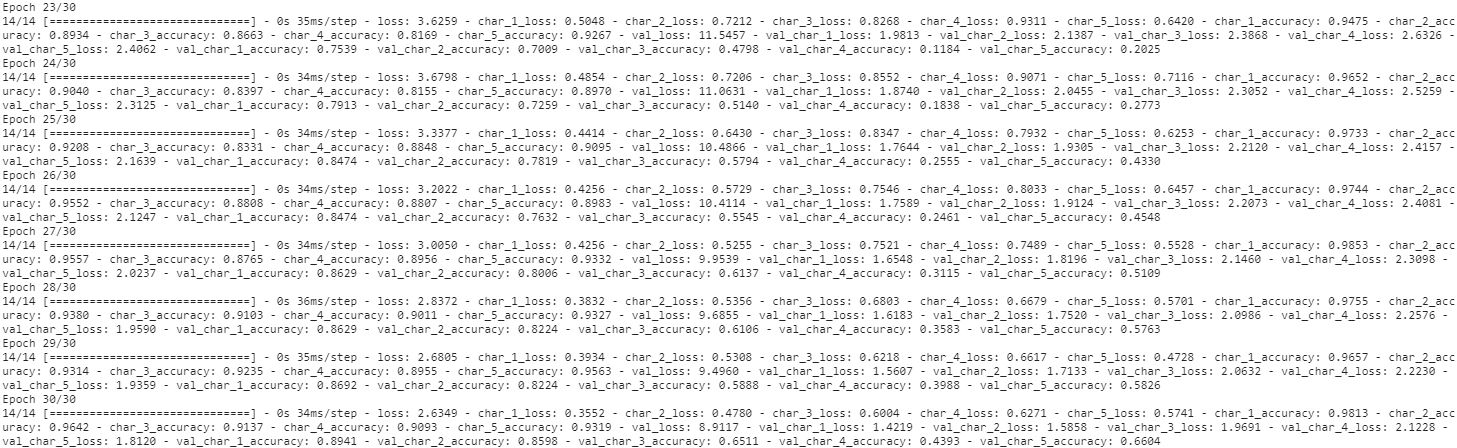
history = model.fit(X_train, [y_train[i] for i in range(5)], batch_size=32, epochs=30, verbose=1, validation_data = (X_val, [y_val[i] for i in range(5)]), callbacks =[earlystopping,reduce_lr])
下面对model进行一个测试和评估。
score = model.evaluate(X_test,[y_test[0], y_test[1], y_test[2], y_test[3], y_test[4]],verbose=1)
metrics = ['loss','char_1_loss', 'char_2_loss', 'char_3_loss', 'char_4_loss', 'char_5_loss', 'char_1_acc', 'char_2_acc', 'char_3_acc', 'char_4_acc', 'char_5_acc']

for i,j in zip(metrics, score):
    print(f'{i}: {j}')
具体输出如下:
11/11 [==============================] - 0s 11ms/step - loss: 0.7246 - char_1_loss: 0.0682 - char_2_loss: 0.1066 - char_3_loss: 0.2730 - char_4_loss: 0.2636 - char_5_loss: 0.0132 - char_1_accuracy: 0.9844 - char_2_accuracy: 0.9657 - char_3_accuracy: 0.9408 - char_4_accuracy: 0.9626 - char_5_accuracy: 0.9938
loss: 0.7246273756027222
char_1_loss: 0.06818050146102905
char_2_loss: 0.10664034634828568
char_3_loss: 0.27299806475639343
char_4_loss: 0.26359987258911133
char_5_loss: 0.013208594173192978
char_1_acc: 0.9844236969947815
char_2_acc: 0.9657320976257324
char_3_acc: 0.940809965133667
char_4_acc: 0.9626168012619019
char_5_acc: 0.9937694668769836
字母1到字母5的精确值都大于
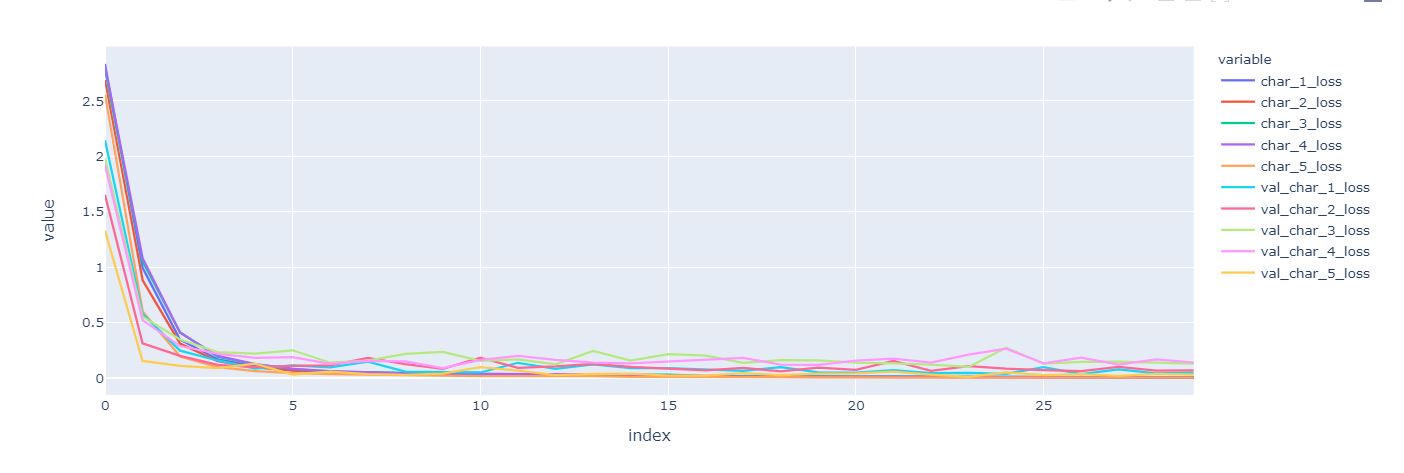
绘制loss和score
metrics_df = pd.DataFrame(history.history)

columns = [col for col in metrics_df.columns if 'loss' in col and len(col)>8]

fig = px.line(metrics_df, y = columns)
fig.show()
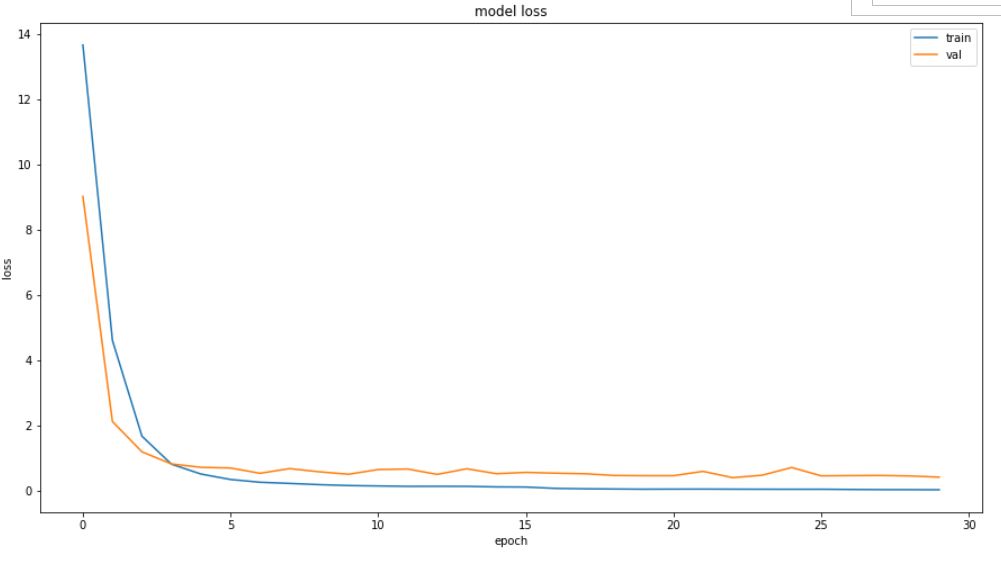
plt.figure(figsize=(15,8))
plt.plot(history.history['loss'])
plt.plot(history.history['val_loss'])
plt.title('model loss')
plt.ylabel('loss')
plt.xlabel('epoch')
plt.legend(['train', 'val'], loc='upper right',prop={'size': 10})
plt.show()
# 预测数据
def predict(captcha):
    captcha = np.reshape(captcha , (1, 50,200,channels))
    result = model.predict(captcha)
    result = np.reshape(result ,(5,len_symbols))
    # 取出最大预测中的输出
    label = ''.join([symbols[np.argmax(i)] for i in result])
    return label

predict(X_test[2])
# 25277
下面预测所有的数据
actual_pred = []

for i in range(X_test.shape[0]):
    actual = ''.join([symbols[i] for i in (np.argmax(y_test[:, i],axis=1))])
    pred =  predict(X_test[i])
    actual_pred.append((actual, pred))
print(actal_pred[:10])
输出如下:
[('n4b4m', 'n4b4m'), ('42nxy', '42nxy'), ('25257', '25277'), ('cewnm', 'cewnm'), ('w46ep', 'w46ep'), ('cdcb3', 'edcb3'), ('8gf7n', '8gf7n'), ('nny5e', 'nny5e'), ('gm2c2', 'gm2c2'), ('g7fmc', 'g7fmc')]
sameCount = 0
diffCount = 0
letterDiff = {i:0 for i in range(5)}
incorrectness = {i:0 for i in range(1,6)}
for real, pred in actual_pred:
    # 预测和输出相同
    if real == pred:
        sameCount += 1
    else:
        # 失败
        diffCount += 1
        # 遍历
        incorrectnessPoint = 0
        for i in range(5):
            if real[i] != pred[i]:
                letterDiff[i] += 1
                incorrectnessPoint += 1
        incorrectness[incorrectnessPoint] += 1


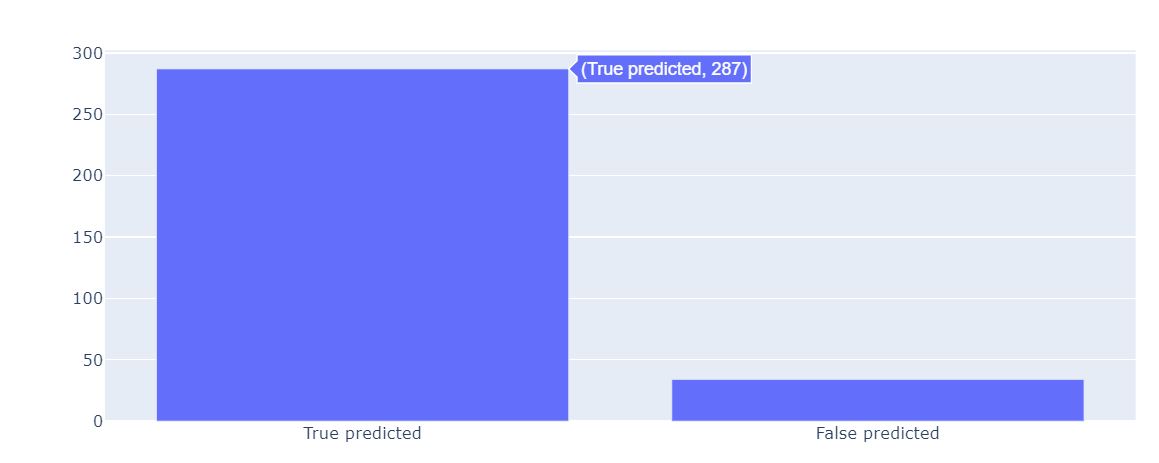
x = ['True predicted', 'False predicted']
y = [sameCount, diffCount]

fig = go.Figure(data=[go.Bar(x = x, y = y)])
fig.show()
在预测数据中,一共有287个数据预测正确。
在这里,我们可以看到出现错误到底是哪一个index。
x1 = ["Character " + str(x) for x in range(1, 6)]

fig = go.Figure(data=[go.Bar(x = x1, y = list(letterDiff.values()))])
fig.show()
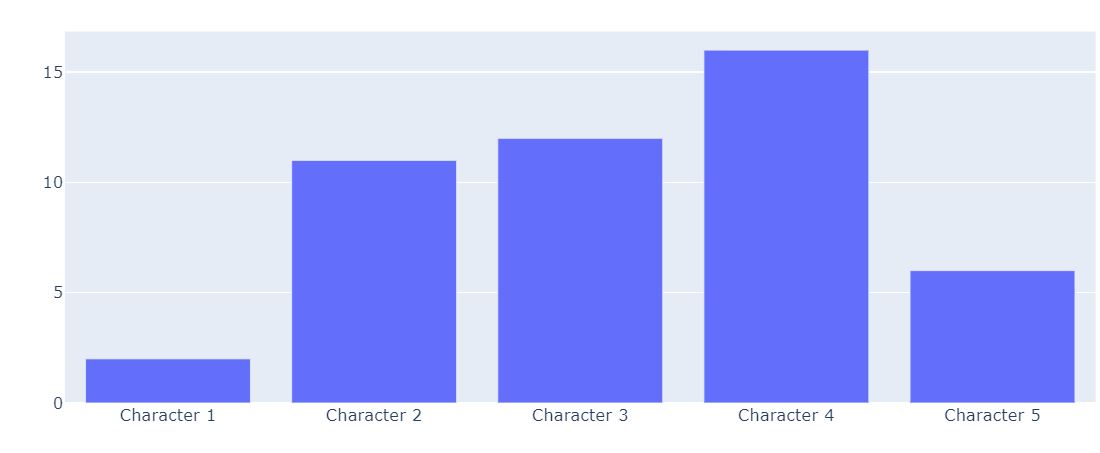
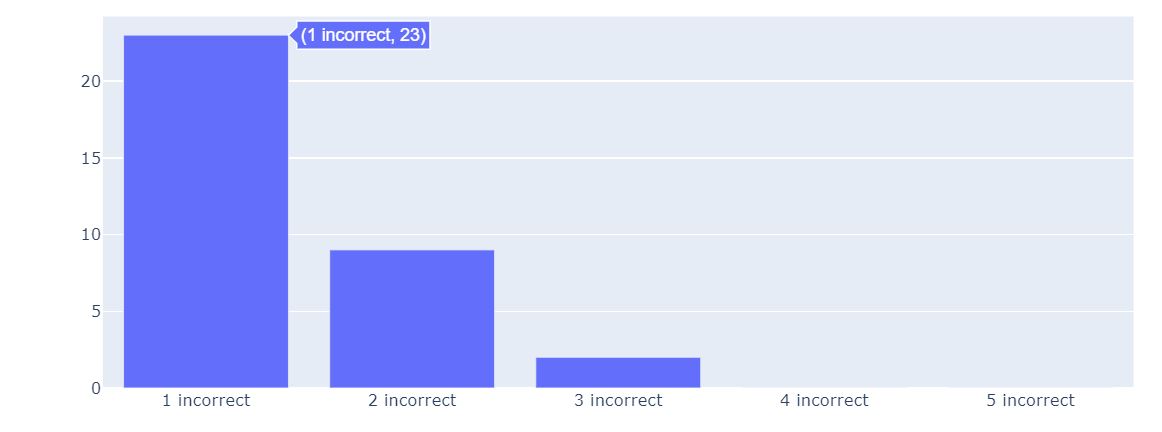
为了计算每个单词的错误数,绘制相关的条形图。
x2 = [str(x) + " incorrect" for x in incorrectness.keys()]
y2 = list(incorrectness.values())

fig = go.Figure(data=[go.Bar(x = x2, y = y2)])
fig.show()
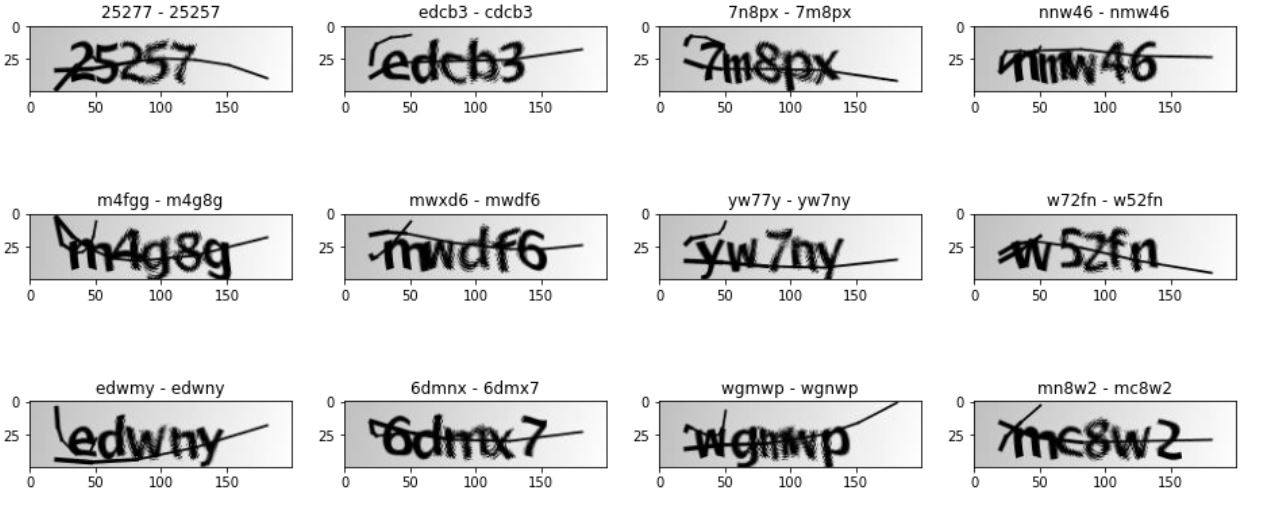
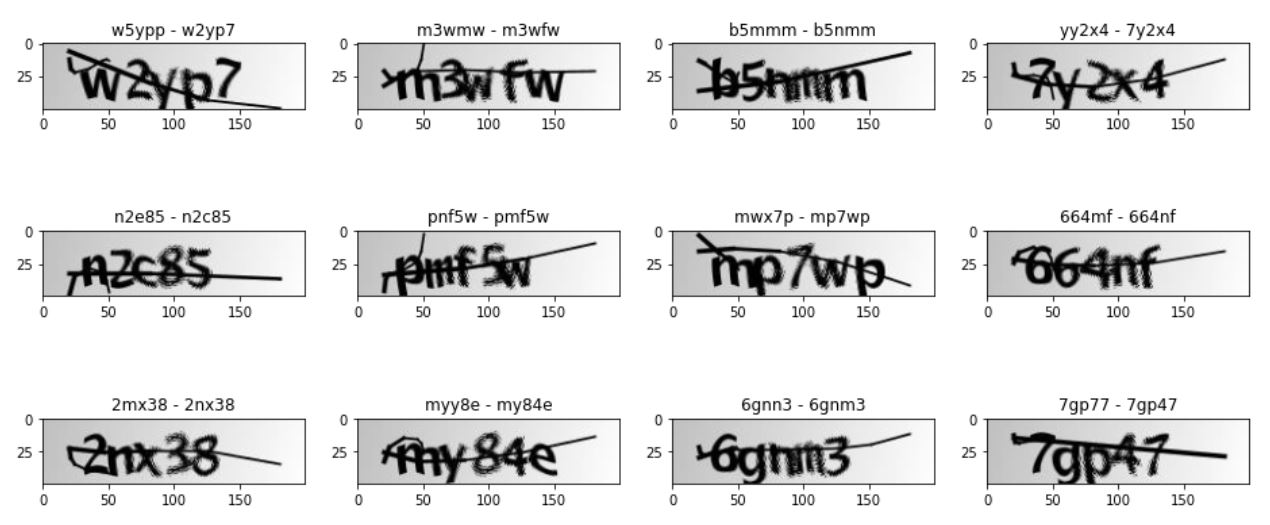
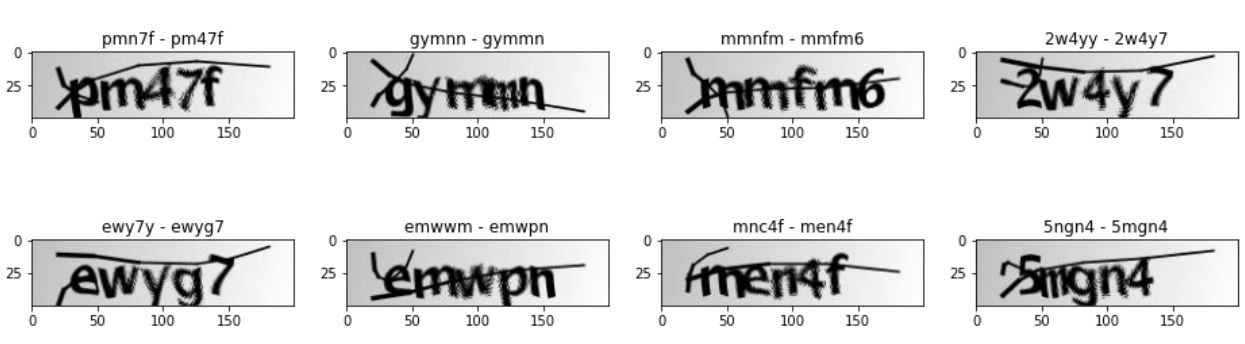
下面绘制错误的验证码图像,并标准正确和错误的区别。
fig, ax = plt.subplots(nrows = 8, ncols=4,figsize = (16,20))
count = 0
for i, (actual , pred) in enumerate(actual_pred):
    if actual != pred:
        img = X_test[i]
        try:
            ax[count//4][count%4].imshow(img, cmap = 'gray')
            ax[count//4][count%4].title.set_text(pred + ' - ' + actual)
            count += 1
        except:
            pass
到此这篇关于教你使用TensorFlow2识别验证码的文章就介绍到这了,更多相关TensorFlow2识别验证码内容请搜索脚本之家以前的文章或继续浏览下面的相关文章希望大家以后多多支持脚本之家!
相关文章
 这篇文章主要介绍了Python数据读写之Python读写CSV文件,文章围绕主题展开详细的内容介绍,具有一定的参考价值,感兴趣的小伙伴可以参考一下2022-06-06
python操作excel的包(openpyxl、xlsxwriter)
这篇文章主要为大家详细介绍了python操作excel的包,具有一定的参考价值,感兴趣的小伙伴们可以参考一下2018-06-06 range函数大多数时常出现在for循环中,在for循环中可做为索引使用,下面这篇文章主要给大家介绍了关于Python中range函数的基本用法,文中通过实例代码介绍的非常详细,需要的朋友可以参考下2022-01-01
 用Python写代码的时候,在想看的地方写个print xx 就能在控制台上显示打印信息,这样子就能知道它是什么了,但是当我需要看大量的地方或者在一个文件中查看的时候,这时候print就不大方便了,所以Python引入了logging模块来记录我想要的信息,需要的朋友可以参考下2021-05-05
 这篇文章主要介绍了Python使用pyenv实现多环境管理,文中通过示例代码介绍的非常详细,对大家的学习或者工作具有一定的参考学习价值,需要的朋友们下面随着小编来一起学习学习吧2021-02-02
 这篇文章主要介绍了Django 解决开发自定义抛出异常的问题,具有很好的参考价值,希望对大家有所帮助。一起跟随小编过来看看吧2020-05-05
解决pandas read_csv 读取中文列标题文件报错的问题
今天小编就为大家分享一篇解决pandas read_csv 读取中文列标题文件报错的问题,具有很好的参考价值,希望对大家有所帮助。一起跟随小编过来看看吧2018-06-06 这篇文章主要介绍了使用PyTorch实现随机搜索策略,文章围绕主题展开详细的内容介绍,具有一定的参考价值,需要的小伙伴可以参考一下2022-07-07
 这篇文章主要介绍了Python类的专用方法,实例分析了__init__、__del__、__repr__等专用方法的应用技巧,需要的朋友可以参考下2015-01-01
 今天小编就为大家分享一篇用Python解决x的n次方问题,具有很好的参考价值,希望对大家有所帮助。一起跟随小编过来看看吧2019-02-02
最新评论