

Python实现随机生成迷宫并自动寻路
更新时间:2021年06月12日 10:34:37 作者:WA的一声哭出来 pnq
最近在学习Python,正好今天在学习随机数,本文实现了Python实现随机生成迷宫并自动寻路,感兴趣的可以了解一下
Python深搜版:
核心在于带随机的深搜(见代码第23到27行,其实也可以用22行代替这几行代码,你可以试着把第24行的数字4改大或者改小,即调整随机程度)
import os
import random
from queue import Queue
import numpy
import colorama
from colorama import Fore, Back, Style
import sys

from bmpEditor import bmp

colorama.init()


# numpy.random.seed(1)
_xy = [0,2,0,-2,0]
size = 31
sys.setrecursionlimit(100000000)

road = set()
def dfs(curr_pos):
	road.add(curr_pos)
	# for i in numpy.random.permutation(4):
	p = [0,1,2,3]
	for i in range(4):
		l = random.randint(0,3)
		r = random.randint(0,3)
		p[l], p[r] = p[r], p[l]
	for i in p:
		next_pos = (curr_pos[0] + _xy[i], curr_pos[1] + _xy[i+1])
		if (0<=next_pos[0]<size and
			0<=next_pos[1]<size and
			next_pos not in road ):

			road.add(((curr_pos[0] + next_pos[0])/2, (curr_pos[1] + next_pos[1])/2))
			dfs(next_pos)

dfs((0,0))

q = Queue()
q.put((0,0))
ans_road = set()
def dfs_getans(curr_pos):
	# print(curr_pos)
	ans_road.add(curr_pos)
	if (size-1, size-1) in ans_road:
		return
	for i in range(4):
		next_pos = (curr_pos[0] + _xy[i]//2, curr_pos[1] + _xy[i+1]//2)
		if (0<=next_pos[0]<size and
			0<=next_pos[1]<size and
			next_pos in road and
			next_pos not in ans_road and
			(size-1, size-1) not in ans_road):

			dfs_getans(next_pos)
	if (size-1, size-1) not in ans_road:
		ans_road.remove(curr_pos)

dfs_getans((0,0))

for i in range(size):
	for j in range(size):
		print((Back.WHITE + ' ') if (i,j) in road else (Back.BLACK + ' '), end=' ')
	print()


wall_width = 2
cell_size = 6
image = bmp((size+3)*cell_size-wall_width, (size+3)*cell_size-wall_width, 0x000000)
for i in range(size+3):
	for j in range(size+3):
		if (i-1, j-1) in road:
			image.paint_rect(i*cell_size, j*cell_size, cell_size*2-wall_width, cell_size*2-wall_width, 0xffffff)

file_name = "%dmaze.bmp"%size
image.save_image(file_name)
os.system(file_name)

for p in ans_road:
	# image.paint_rect(p[0]+1, p[1]+1)
	image.paint_rect((
		p[0]+1)*cell_size + (cell_size - wall_width)//2,
		(p[1]+1)*cell_size + (cell_size - wall_width)//2,
		cell_size, cell_size,
		0xff0000
	)

file_name = "%dans.bmp"%size
image.save_image(file_name)
os.system(file_name)
效果
3131:
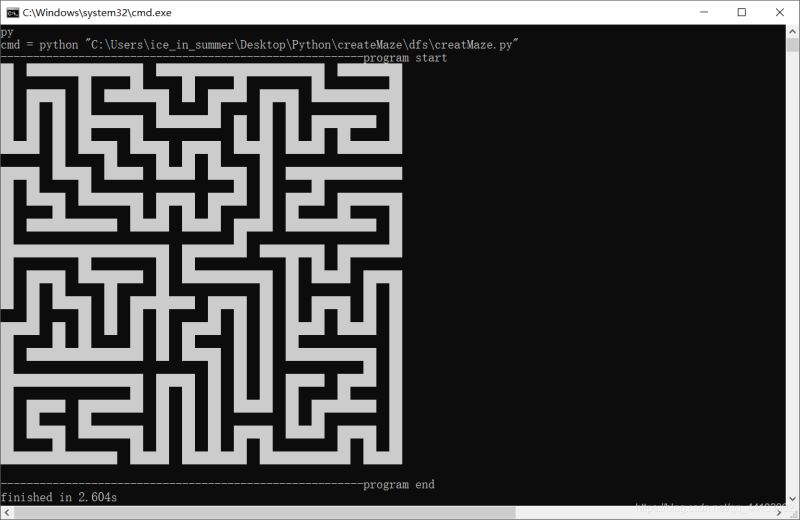

8181:


坐标系有翻转,控制台中的左上角对应图片中的左下角
其中bmpEditor不是官方库,代码地址(文件名为bmpEditor.py,和这以上代码放同一个路径下即可)
Python 广搜版
在队列的基础上把队列中的元素顺序打乱(第24行)
import os
import random
from queue import Queue
import numpy
import colorama
from colorama import Fore, Back, Style
import sys
import random

from bmpEditor import bmp
colorama.init()


numpy.random.seed(1)
_xy = [0,2,0,-2,0]
size = 59
sys.setrecursionlimit(size*size//4+size)

q = []
q.append((0,0))
road = set()
road.add((0,0))
while len(q) != 0:
	random.shuffle(q)
	curr_pos = q.pop()
	# print(curr_pos)
	for i in range(4):
		next_pos = (curr_pos[0] + _xy[i], curr_pos[1] + _xy[i+1])
		if (	0<=next_pos[0]<size and
				0<=next_pos[1]<size and
				next_pos not in road ):
			road.add( ((curr_pos[0] + next_pos[0])//2, (curr_pos[1] + next_pos[1])//2) )
			q.append(next_pos)
			road.add(next_pos)

ans_road = set()
def dfs_getans(curr_pos):
	ans_road.add(curr_pos)
	if (size-1, size-1) in ans_road:
		return
	for i in range(4):
		next_pos = (curr_pos[0] + _xy[i]//2, curr_pos[1] + _xy[i+1]//2)
		if (	0<=next_pos[0]<size and
				0<=next_pos[1]<size and
				next_pos in road and
				next_pos not in ans_road and
				(size-1, size-1) not in ans_road):
			dfs_getans(next_pos)
	if (size-1, size-1) not in ans_road:
		ans_road.remove(curr_pos)

dfs_getans((0,0))
print(len(ans_road))

for i in range(0, size):
	for j in range(0, size):
		print((Back.WHITE + ' ') if (i,j) in road else (Back.BLACK + ' '), end=' ')
	print()
wall_width = 1
cell_size = 5
image = bmp((size+3)*cell_size-wall_width, (size+3)*cell_size-wall_width, 0x000000)
for i in range(size+3):
	for j in range(size+3):
		if (i-1, j-1) in road:
			image.paint_rect(i*cell_size, j*cell_size, cell_size*2-wall_width, cell_size*2-wall_width, 0xffffff)

file_name = "%dmaze.bmp"%size
image.save_image(file_name)
os.system(file_name)

for p in ans_road:
	# image.paint_rect(p[0]+1, p[1]+1)
	image.paint_rect((
		p[0]+1)*cell_size + (cell_size - wall_width)//2,
		(p[1]+1)*cell_size + (cell_size - wall_width)//2,
		cell_size, cell_size,
		0xff0000
	)

file_name = "%dans.bmp"%size
image.save_image(file_name)
os.system(file_name)
效果:


相比深度优先的,这种迷宫会更加“直”一些
lua版:
大体上是深搜,加了一定的随机性使得搜索过程中有一定概率暂时放弃当前路径。见表stop_points,(第7行、第74行及其后面的repeat循环)
local _xy = {0,2,0,-2,0}
local size = 41
local base = size+1
local road = {}

stop_points = {}
function dfs(curr_x, curr_y)
	road[curr_x*base+curr_y] = true
	if math.random(1,10) <= 3 then
		stop_points[curr_x*base+curr_y] = true
		return
	end
	-- os.execute("cls")
	-- print_map()
	local permutation = {1,2,3,4}
	for i=1, 4 do
		local l = math.random(1,4)
		local r = math.random(1,4)
		permutation[l], permutation[r] = permutation[r], permutation[l]
	end

	for i=1, 4 do
		local next_x = curr_x+_xy[permutation[i]]
		local next_y = curr_y+_xy[permutation[i]+1]
		if  next_x>=1 and next_x<=size and
			next_y>=1 and next_y<=size and
			road[next_x*base+next_y] == nil then

			local mid_x = math.floor((curr_x+next_x)/2)
			local mid_y = math.floor((curr_y+next_y)/2)
			road[mid_x*base+mid_y] = true
			dfs(next_x, next_y)
		end
	end
end

local ans_geted = false
local parent = {}
function get_ans(curr_x, curr_y)
	-- print(curr_x, curr_y)
	for i=1, 4 do
		next_x =  (curr_x + math.floor(_xy[i])/2 )
		next_y =  (curr_y + math.floor(_xy[i+1])/2 )
		-- print(next_x, next_y)
		if  next_x >= 1 and next_x <= size and
			next_y >= 1 and next_y <= size and
			road[next_x*base+next_y] and
			parent[next_x*base+next_y]==nil
		then
			parent[next_x*base+next_y] = curr_x*base+curr_y
			get_ans(next_x, next_y)
		end
	end

end

local ans_road = {}
function print_map()
	for i=0, size+1 do
		local line = ""
		for j=0, size+1 do
			if ans_road [i*base+j] then
				line = line..".."
			elseif road[i*base+j]==true then
				line = line.."  "
			else
				line = line.."HH"
			end
		end
		print(line)
	end
end

stop_points[1*base+1] = true

-- create maze
repeat
	local has_point = false
	for v,_ in pairs(stop_points) do
		has_point = true
		stop_points[v] = nil
		dfs(math.floor(v/base), v%base)
		break
	end
	-- print(has_point)
until not has_point


get_ans(1,1)
parent[1*base+1] = nil
print("")
-- for k,v in pairs(parent) do
-- 	print(string.format("[%d,%d]->[%d,%d]", math.floor(k/base), k%base, math.floor(v/base), v%base))
-- end
print("")
local x = size
local y = size
repeat
	-- print(x,y)
	ans_road[x*base+y] = true
	local v = parent[x*base+y]
	x = math.floor(v/base)
	y = v%base
until --[[(x==1 and y== 1)]] not parent[x*base+y]
ans_road[1*base+1] = true

print_map()
效果:
4141:
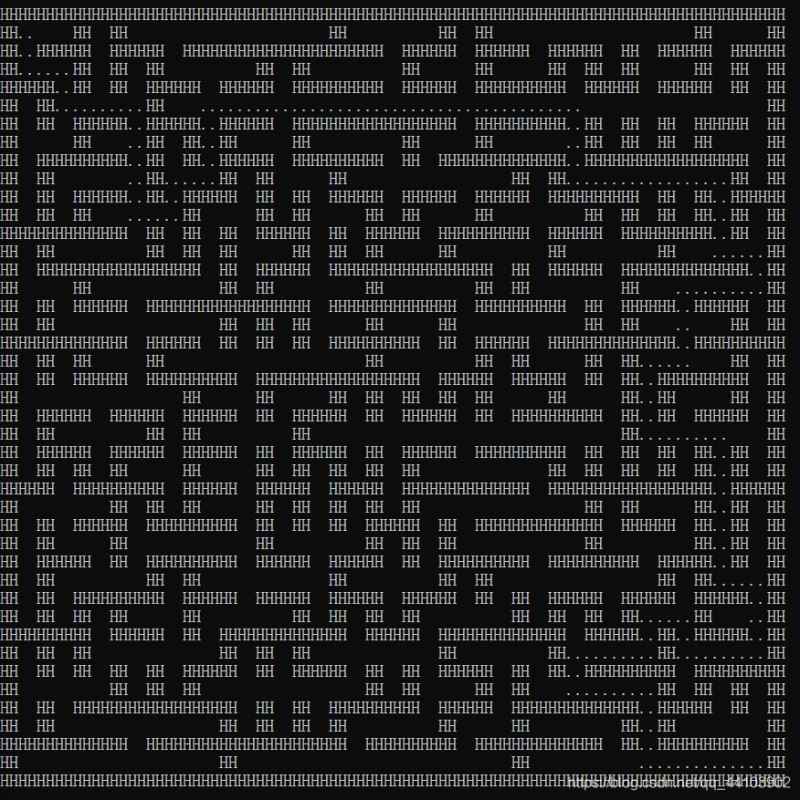
8989

到此这篇关于Python实现随机生成迷宫并自动寻路的文章就介绍到这了,更多相关Python生成迷宫并自动寻路内容请搜索脚本之家以前的文章或继续浏览下面的相关文章希望大家以后多多支持脚本之家!
相关文章
 这篇文章主要给大家介绍了关于Python网络爬虫神器PyQuery的基本使用教程,文中通过示例代码介绍的非常详细,对大家学习使用PyQuery具有一定的参考学习价值,需要的朋友们下面随着小编来一起学习学习吧。2018-02-02
 这篇文章主要介绍了python3 删除所有自定义变量的操作,具有很好的参考价值,希望对大家有所帮助。一起跟随小编过来看看吧2021-04-04
 这篇文章主要介绍了Python实现查找最小的k个数,结合实例形式对比分析了Python常见的两种列表排序、查找相关操作技巧,需要的朋友可以参考下2019-01-01
 这篇文章主要介绍了pytorch如何获得模型的计算量和参数量操作,具有很好的参考价值,希望对大家有所帮助。如有错误或未考虑完全的地方,望不吝赐教2021-05-05
PyTorch详解经典网络种含并行连结的网络GoogLeNet实现流程
今天小编就为大家分享一篇Pytorch实现GoogLeNet的方法,GoogLeNet提出了一个名为“Inception”的深度卷积神经网结构,其目标是将分类、识别ILSVRC14数据集的技术水平提高一个层次。这一结构的主要特征是对网络内部计算资源的利用进行了优化2022-05-05
python格式化字符串的实战教程(使用占位符、format方法)
我们经常会用到%-formatting和str.format()来格式化,下面这篇文章主要给大家介绍了关于python格式化字符串的相关资料,文中通过实例代码介绍的非常详细,需要的朋友可以参考下2022-08-08 这篇文章主要介绍了将matplotlib绘图嵌入pyqt的方法示例,文中通过示例代码介绍的非常详细,对大家的学习或者工作具有一定的参考学习价值,需要的朋友们下面随着小编来一起学习学习吧2020-01-01
 量化交易,作为现代金融市场中的一种先进交易方式,通过运用数学模型、统计方法和计算机算法来指导交易决策,旨在提高交易效率和决策的准确性,本文将详细介绍如何使用Python进行量化交易,包括策略开发、数据处理、回测、风险管理和实盘交易等关键步骤2024-09-09
 这篇文章主要为大家详细介绍了python机器学习实现决策树,文中示例代码介绍的非常详细,具有一定的参考价值,感兴趣的小伙伴们可以参考一下2019-11-11
 这篇文章介绍了Python中的re正则表达式模块,文中通过示例代码介绍的非常详细。对大家的学习或工作具有一定的参考借鉴价值,需要的朋友可以参考下2022-05-05
最新评论