

python实现简易自习室座位预约系统
更新时间:2021年06月30日 09:53:53 作者:slandarer
本文将结合实例代码,介绍python实现简易自习室座位预约系统,文中通过示例代码介绍的非常详细,具有一定的参考价值,感兴趣的小伙伴们可以参考一下
刚学习python不久,如有问题希望能得到指正
0 效果
座位选择框
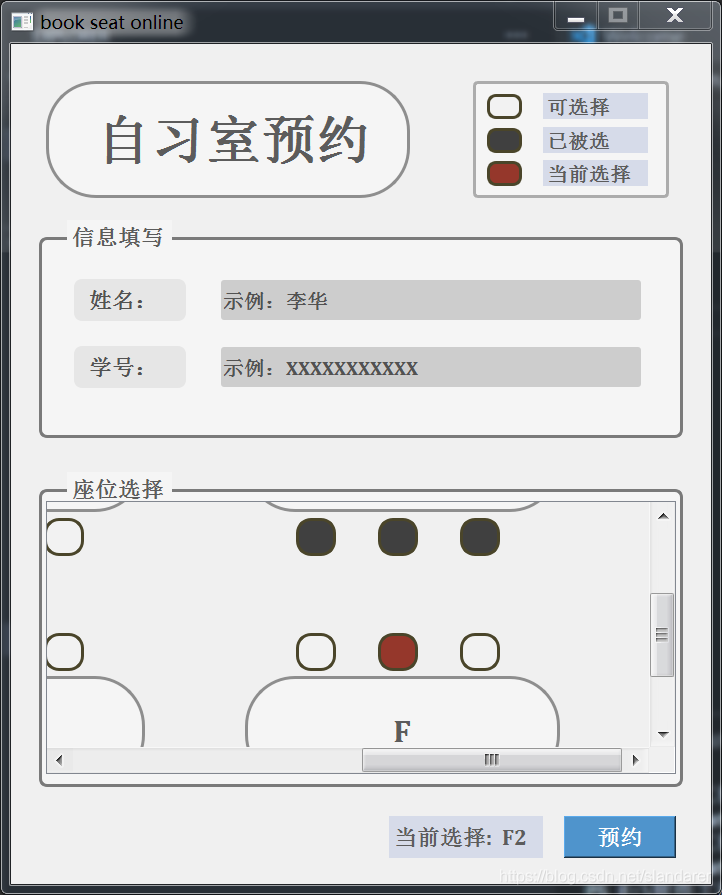
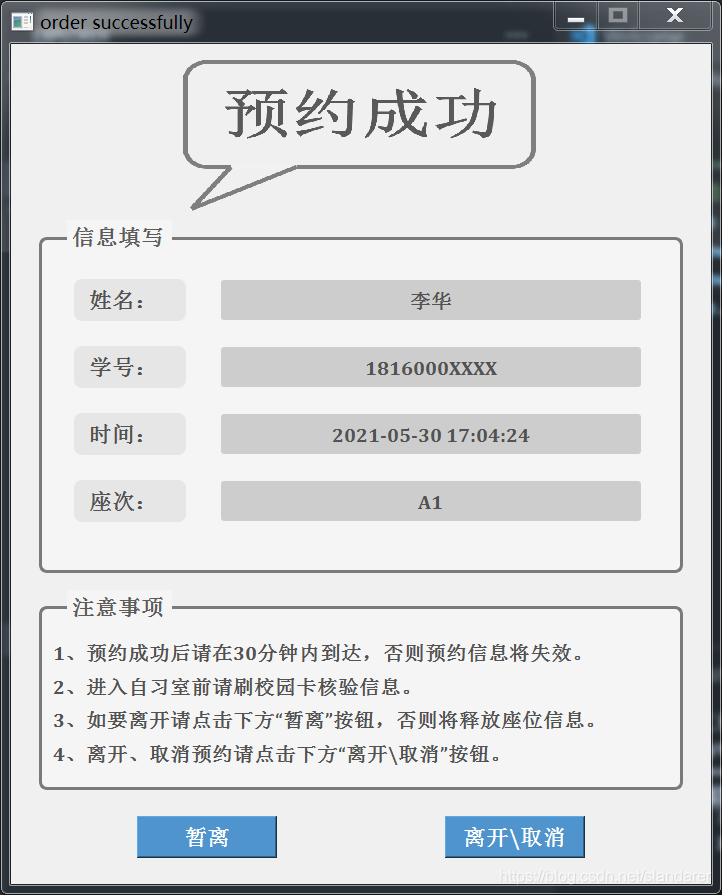
1 关于所需库
Python 环境中需要安装下列 python 包:
- PySide2
- datetime
- json
- argparse
2 关于座位选择框
选择框内桌子数量,大小,样式以及每个椅子位置都是可变的,例如我们可以将桌子颜色和是否圆角改变:
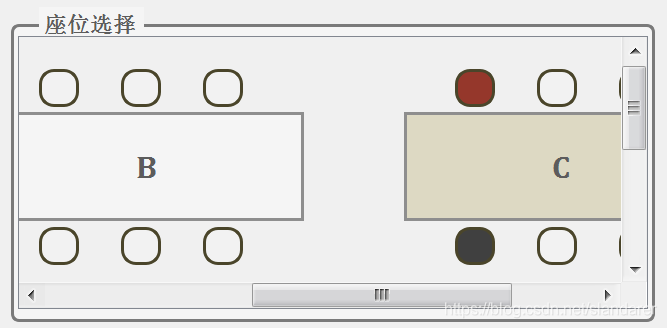
这主要依靠seatInf.json内的信息,展示如下:
{
    "tableNum": 6,
    "tablePos": [
        [0.02,0.15],
        [0.35,0.15],
        [0.68,0.15],
        [0.02,0.65],
        [0.35,0.65],
        [0.68,0.65]
    ],
    "tableSize": [
        [0.25,0.2],
        [0.25,0.2],
        [0.25,0.2],
        [0.25,0.2],
        [0.25,0.2],
        [0.25,0.2]
    ],
    "tableType": [
        0,1,2,0,0,0
    ],
    "tableSS": [
        "QLabel{background: rgb(245,245,245);color:rgb(92,92,92);border-radius:50px;border: 3px solid rgb(142,142,142)}",
        "QLabel{background: rgb(245,245,245);color:rgb(92,92,92);border: 3px solid rgb(142,142,142)}",
        "QLabel{background: rgb(221,217,195);color:rgb(92,92,92);border: 3px solid rgb(142,142,142)}"
    ],
    "tableId": [
        "A","B","C","D","E","F"
    ],
    "chairNum": [
        6,6,6,6,6,6
    ],
    "chairPos": [
        [
            [0.04,-0.08],
            [0.105,-0.08],
            [0.17,-0.08],
            [0.04,0.21],
            [0.105,0.21],
            [0.17,0.21]
        ],
        [
            [0.04,-0.08],
            [0.105,-0.08],
            [0.17,-0.08],
            [0.04,0.21],
            [0.105,0.21],
            [0.17,0.21]
        ],[
            [0.04,-0.08],
            [0.105,-0.08],
            [0.17,-0.08],
            [0.04,0.21],
            [0.105,0.21],
            [0.17,0.21]
        ],[
            [0.04,-0.08],
            [0.105,-0.08],
            [0.17,-0.08],
            [0.04,0.21],
            [0.105,0.21],
            [0.17,0.21]
        ],[
            [0.04,-0.08],
            [0.105,-0.08],
            [0.17,-0.08],
            [0.04,0.21],
            [0.105,0.21],
            [0.17,0.21]
        ],[
            [0.04,-0.08],
            [0.105,-0.08],
            [0.17,-0.08],
            [0.04,0.21],
            [0.105,0.21],
            [0.17,0.21]
        ]
    ],
    "chairSize": [
        0.032,0.07
    ],
    "chairSS_W": "background: rgb(242,242,242);border-radius:15px;border: 3px solid rgb(74,69,42)",
    "chairSS_K": "background: rgb(64,64,64);border-radius:15px;border: 3px solid rgb(74,69,42)",
    "chairSS_R": "background: rgb(149,55,43);border-radius:15px;border: 3px solid rgb(74,69,42)",
    "mapSize": [
        2,2
    ]
}
3 关于申请表和座位被占情况
由于只是为了模拟过程,现申请表以及座位被占情况分别存储在orderList.json和occupied.json中:
3.1 orderList.json:
"[[\"A1\", \"A2\", \"A3\", \"A4\", \"A5\", \"A6\", \"B1\", \"B2\", \"B3\", \"B4\", \"B5\", \"B6\", \"C1\", \"C2\", \"C3\", \"C4\", \"C5\", \"C6\", \"D1\", \"D2\", \"D3\", \"D4\", \"D5\", \"D6\", \"E1\", \"E2\", \"E3\", \"E4\", \"E5\", \"E6\", \"F1\", \"F2\", \"F3\", \"F4\", \"F5\", \"F6\"], [\"\", \"\", \"\", \"\", \"\", \"\", \"\", \"\", \"\", \"\", \"\", \"\", \"\", \"\", \"\", \"1816000XXXX\", \"\", \"\", \"\", \"\", \"\", \"\", \"\", \"\", \"\", \"\", \"\", \"\", \"\", \"\", \"\", \"\", \"\", \"\", \"\", \"\"], [\"\", \"\", \"\", \"\", \"\", \"\", \"\", \"\", \"\", \"\", \"\", \"\", \"\", \"\", \"\", \"temp\", \"\", \"\", \"\", \"\", \"\", \"\", \"\", \"\", \"\", \"\", \"\", \"\", \"\", \"\", \"\", \"\", \"\", \"\", \"\", \"\"]]"
3.2 occupied.json:
"{\"A1\": false, \"A2\": false, \"A3\": false, \"A4\": false, \"A5\": false, \"A6\": false, \"B1\": false, \"B2\": false, \"B3\": false, \"B4\": false, \"B5\": false, \"B6\": false, \"C1\": false, \"C2\": false, \"C3\": false, \"C4\": true, \"C5\": false, \"C6\": false, \"D1\": false, \"D2\": false, \"D3\": false, \"D4\": false, \"D5\": false, \"D6\": false, \"E1\": false, \"E2\": false, \"E3\": false, \"E4\": false, \"E5\": false, \"E6\": false, \"F1\": false, \"F2\": false, \"F3\": false, \"F4\": false, \"F5\": false, \"F6\": false}"
4 关于命令行参数
我们使用命令行代码模拟刷卡过程,同时我们也设置了预约和申请暂离的命令行代码:
4.1 slotCard_in
Python slotCard_in.py -i="XXXXXXXXXXX"
Python slotCard_in.py --student-id="XXXXXXXXXXX"
4.2 slotCard_out
Python slotCard_out.py -i="XXXXXXXXXXX"
Python slotCard_out.py --student-id="XXXXXXXXXXX"
4.3 cmd_order
'''
TEST CODE:
--------------------------------
see Map:
Python cmd_order.py
--------------------------------
order seat:
Python cmd_order.py -i="XXXXXXXXXXX" -n="xxx" -s="A1"

-h   --help         show the help message and exit
-i   --student-id   student id
-n   --student-name student name
-s   --seatPos      seat id
'''
4.4 cmd_leave
'''
TEST CODE:
----------------------------------------------
leave for temp
Python cmd_leave.py -i="XXXXXXXXXXX" -t="temp"
----------------------------------------------
leave
Python cmd_leave.py -i="XXXXXXXXXXX" -t="free"
[or]
Python cmd_leave.py -i="XXXXXXXXXXX"

-h   --help         show the help message and exit
-i   --student-id   student id
-t   --leave-type   temp/free
'''
5 关于命令行输出
5.1 cmd_order 预约
> Python cmd_order.py
[seat]============================
可预约座位:

 ▇ A2 A3 A4 A5 A6
 B1 B2 B3 B4 B5 B6
 C1 C2 C3 C4 C5 C6
 D1 D2 D3 D4 D5 D6
 E1 E2 E3 E4 E5 E6
 F1 F2 F3 F4 F5 F6

> Python cmd_order.py -i="18160000000" -n="xxx" -s="A1"
[book error]========================
座位已被占,请选择其他位置申请

> Python cmd_order.py -i="18160000000" -n="xxx" -s="A100"
[book error]========================
座位编号格式不正确

> Python cmd_order.py -i="18160000000" -n="xxx" -s="A2"
[book]===========================================
2021-05-31 18:04:35
姓名:xxx
学号:18160000000
座次:A2
预约成功!
-------------------------------------------------
注意事项:
1、预约成功后请在30分钟内到达,否则预约信息将失效。
2、进入自习室前请刷校园卡核验信息。
3、如要暂离请cmd运行如下代码:
   Python cmd_leave.py -i='XXXXXXXXXXX' -t='temp'
4、离开、取消预约请cmd运行如下代码:
   Python cmd_leave.py -i='XXXXXXXXXXX' -t='free'

> Python cmd_order.py -i="18160000000" -n="xxx" -s="A3"
[book error]========================
请勿重复预约
5.2 slotCard_in 刷卡进入
> Python slotCard_in.py -i="1816000XXXX"
[in error]==========================
非本校校园卡或已超时

> Python slotCard_in.py -i="18160000000"
[in]================================
预约时间:2021-05-31 18:04:35
校园卡号:18160000000
座次:A2
5.3 cmd_leave 申请离开或暂离
> Python cmd_leave.py -i="1816000XXXX" -t="temp"
[out error]=========================
可能输入了错误的校园卡号

> Python cmd_leave.py -i="18160000000" -t="temp"
[out]===============================
已进行暂离申请

> Python cmd_leave.py -i="18160000000" -t="free"
[out]===============================
已释放位置
5.4 slotCard_out 刷卡离开或暂离
> Python slotCard_out.py -i="18160000000"
[out]===============================
暂离时间:2021-05-31 18:23:09
校园卡号:18160000000
座次:A1

> Python slotCard_out.py -i="1816000XXXX"
[out error]=========================
请更换卡片再次尝试
6 关于界面代码
6.1 orderSystem.py
from PySide2.QtWidgets import QApplication, QWidget,QScrollArea
from PySide2.QtWidgets import QLabel,QPushButton,QLineEdit
from PySide2.QtGui import QIcon,QFont
from PySide2.QtCore import Qt
import sys
sys.path.append("...")
import json
import datetime
from orderDataDisplay import orderDisplay
from InfOperate import occupySeat,order,timeoutDetection,alreadyOreder


class Window_main(QWidget):
    def __init__(self,Width=700,Height=840):
        super().__init__()
        self.setWindowTitle("book seat online")
        timeoutDetection()

        self.Width=Width
        self.Height=Height
        self.selectedId=""
        self.selectedBtn=[]
        self.icoPath="./gallery/icon.ico"

        # 字体标签
        title_qf=QFont()
        title_qf.setPointSize(11)
        title_qf.setBold(True)
        title_qf.setFamily("Cambria")
        main_qf=QFont()
        main_qf.setPointSize(27)
        main_qf.setBold(True)
        main_qf.setFamily("Cambria")
        Inf_qf=QFont()
        Inf_qf.setPointSize(10)
        Inf_qf.setBold(True)
        Inf_qf.setFamily("Cambria")
        table_qf=QFont()
        table_qf.setPointSize(16)
        table_qf.setBold(True)
        table_qf.setFamily("Cambria")
        # ---
        self.QF_part_title=title_qf         # 框标题字体标签
        self.QF_main_title=main_qf          # 主标题字体标签
        self.QF_state_explain=Inf_qf        # 状态标签解释文本字体标签
        self.QF_Inf_title=title_qf          # 信息标题字体标签
        self.QF_Inf_text=Inf_qf             # 信息文本字体标签
        self.QF_table_name=table_qf         # 桌子编号信息标签

        # 样式表
        self.SS_part_frame="QLabel{background: rgb(245,245,245);color:rgb(92,92,92);border-radius:8px;border: 2.5px solid rgb(122,122,122)}"
        self.SS_part_title="QLabel{background: rgb(245,245,245);color:rgb(92,92,92)}"
        self.SS_main_title="QLabel{background: rgb(245,245,245);color:rgb(92,92,92);border-radius:50px;border: 3px solid rgb(142,142,142)}"
        self.SS_state_frame="QLabel{background: rgb(245,245,245);border-radius:5px;border: 3px solid rgb(172,172,172)}"
        self.SS_W="QLabel{background: rgb(242,242,242);border-radius:9px;border: 3px solid rgb(74,69,42)}"
        self.SS_K="QLabel{background: rgb(64,64,64);border-radius:9px;border: 3px solid rgb(74,69,42)}"
        self.SS_R="QLabel{background: rgb(149,55,43);border-radius:9px;border: 3px solid rgb(74,69,42)}"
        self.SS_state_explain="QLabel{background: rgb(214,219,233);color:rgb(92,92,92)}"
        self.SS_Inf_title="QLabel{background: rgb(230,230,230);color:rgb(82,82,82);border-radius:8px}"
        self.SS_text_Line="QLineEdit{border-radius:3px;background: rgb(205,205,205);color:rgb(82,82,82)}"
        self.SS_book_btn="color:rgb(255,255,255);background: rgb(79,148,204)"

        # path=sys.argv[0]
        # path=path[0:path.rfind("/")]
        f=open("./config/seatInf.json","r")
        seatInf=json.load(f)
        f=open("./config/occupied.json","r")
        seatOccupied=json.load(f)
        self.seatInf=seatInf
        self.seatOccupied=json.loads(seatOccupied)

        self.setSize()
        self.setIcon()
        self.partition()
        self.setStateExp()
        self.setInfBox()
        self.setMap()
        self.setBookBtn()
    # ================================================================================================
    # 回调函数部分:
    def selectedPos(self):# 座位选择回调
        btn=self.sender()
        tempSelectedId=btn.property("chairId")
        if not self.seatOccupied[tempSelectedId]:
            if len(self.selectedId)==0:
                self.selectedId=tempSelectedId
                self.selectedBtn=btn
                btn.setStyleSheet(self.seatInf["chairSS_R"])
                self.selectedBox.setText(" 当前选择:  "+tempSelectedId)
            else:
                self.selectedBtn.setStyleSheet(self.seatInf["chairSS_W"])
                self.selectedBtn=btn
                btn.setStyleSheet(self.seatInf["chairSS_R"])
                self.selectedId=tempSelectedId
                self.selectedBox.setText(" 当前选择:  "+tempSelectedId)

    def bookSeat(self):
        if not len(self.selectedId)==0:
            if alreadyOreder(self.InfBox_Id.text()):
                print("================================")
                print("请勿重复预约")
                print(" ")
            else:
                nowDate=datetime.datetime.now()
                nowDateStr=nowDate.strftime('%Y-%m-%d %H:%M:%S')
                print("================================")
                print(nowDateStr)
                print("姓名:"+self.InfBox_Name.text())
                print("学号:"+self.InfBox_Id.text())
                print("座次:"+self.selectedId)
                print(" ")
                # myapp.exit()
                # app = QApplication.instance()
                # if app is None:
                #     app = QApplication(sys.argv)
                self.window_disp= orderDisplay(self.InfBox_Name.text(),
                            self.InfBox_Id.text(),
                            nowDateStr,
                            self.selectedId,700,840)
                self.window_disp.show()
                self.close()

                occupySeat(self.selectedId)
                order(self.InfBox_Id.text(),nowDateStr,self.selectedId)


    # ================================================================================================
    # 框架构造函数部分:
    def setSize(self):# 调整框架大小
        self.setGeometry(80,80,self.Width,self.Height)
        self.setMaximumSize(self.Width,self.Height)
        self.setMinimumSize(self.Width,self.Height)

    def setIcon(self):# 设置图标
        appIcon=QIcon(self.icoPath)
        self.setWindowIcon(appIcon)

    def setStateExp(self):# 绘制状态解释框
        Width=self.Width
        Height=self.Height
        self.part0=QLabel(self)
        self.part0.setGeometry(0.66*Width,0.045*Height,
                               0.28*Width,0.14*Height)
        self.part0.setStyleSheet(self.SS_state_frame)

        # ---Color Bar--------------------------------------------------------------------
        self.CB1=QLabel(self)
        self.CB1.setGeometry(0.68*Width,0.06*Height,0.05*Width,0.03*Height)
        self.CB1.setStyleSheet(self.SS_W)
        self.CB2=QLabel(self)
        self.CB2.setGeometry(0.68*Width,(0.06+0.04)*Height,0.05*Width,0.03*Height)
        self.CB2.setStyleSheet(self.SS_K)
        self.CB3=QLabel(self)
        self.CB3.setGeometry(0.68*Width,(0.06+0.08)*Height,0.05*Width,0.03*Height)
        self.CB3.setStyleSheet(self.SS_R)

        # ---Color Bar 解释文本-------------------------------------------------------------
        self.plaintext1=QLabel(self)
        self.plaintext1.setGeometry(0.76*Width,(0.059)*Height,0.15*Width,0.032*Height)
        self.plaintext1.setStyleSheet(self.SS_state_explain)
        self.plaintext1.setText(" 可选择")
        self.plaintext1.setFont(self.QF_state_explain)
        self.plaintext2=QLabel(self)
        self.plaintext2.setGeometry(0.76*Width,(0.059+0.04)*Height,0.15*Width,0.032*Height)
        self.plaintext2.setStyleSheet(self.SS_state_explain)
        self.plaintext2.setText(" 已被选")
        self.plaintext2.setFont(self.QF_state_explain)
        self.plaintext3=QLabel(self)
        self.plaintext3.setGeometry(0.76*Width,(0.059+0.08)*Height,0.15*Width,0.032*Height)
        self.plaintext3.setStyleSheet(self.SS_state_explain)
        self.plaintext3.setText(" 当前选择")
        self.plaintext3.setFont(self.QF_state_explain)

    def setInfBox(self):
        Width=self.Width
        Height=self.Height
        # ---信息标题------------------------------------------
        self.InfTitle_Name=QLabel(self)
        self.InfTitle_Name.setGeometry(0.09*Width,0.28*Height,
                                       0.16*Width,0.05*Height)
        self.InfTitle_Name.setStyleSheet(self.SS_Inf_title)
        self.InfTitle_Name.setText("   姓名:")
        self.InfTitle_Name.setFont(self.QF_Inf_title)
        # ---
        self.InfTitle_Id=QLabel(self)
        self.InfTitle_Id.setGeometry(0.09*Width,0.36*Height,
                                     0.16*Width,0.05*Height)
        self.InfTitle_Id.setStyleSheet(self.SS_Inf_title)
        self.InfTitle_Id.setText("   学号:")
        self.InfTitle_Id.setFont(self.QF_Inf_title)

        # ---信息文本框------------------------------------------
        self.InfBox_Name=QLineEdit(self)
        self.InfBox_Name.setText("示例:李华")
        self.InfBox_Name.move(0.3*Width,0.281*Height)
        self.InfBox_Name.resize(0.6*Width,0.048*Height)
        self.InfBox_Name.setFont(self.QF_Inf_text)
        self.InfBox_Name.setStyleSheet(self.SS_text_Line)
        #self.InfBox_Name.textChanged.connect(self.colorCheckFunc)

        self.InfBox_Id=QLineEdit(self)
        self.InfBox_Id.setText("示例:XXXXXXXXXXX")
        self.InfBox_Id.move(0.3*Width,0.361*Height)
        self.InfBox_Id.resize(0.6*Width,0.048*Height)
        self.InfBox_Id.setFont(self.QF_Inf_text)
        self.InfBox_Id.setStyleSheet(self.SS_text_Line)
        #self.InfBox_ID.textChanged.connect(self.colorCheckFunc)

    def partition(self):# 绘制框线分布
        Width=self.Width
        Height=self.Height
        # ---标题框---------------------------------------------------
        self.part0=QLabel(self)
        self.part0.setGeometry(0.05*Width,0.045*Height,
                               0.52*Width,0.14*Height)
        self.part0.setStyleSheet(self.SS_main_title)
        self.part0.setAlignment(Qt.AlignCenter)
        self.part0.setText(" 自习室预约")
        self.part0.setFont(self.QF_main_title)
        # self.part0title=QLabel(self)
        # self.part0title.setGeometry(0.098*Width,0.06*Height,
        #                             0.43*Width,0.11*Height)
        # self.part0title.setStyleSheet(self.SS_part_title)
        # self.part0title.setText(" 自习室预约")
        # self.part0title.setFont(self.QF_main_title)

        # ---信息填写框-----------------------------------------------
        self.part1=QLabel(self)
        self.part1.setGeometry(0.04*Width,0.23*Height,
                               0.92*Width,0.24*Height)
        self.part1.setStyleSheet(self.SS_part_frame)
        self.part1title=QLabel(self)
        self.part1title.setGeometry(0.08*Width,0.21*Height,
                                    0.15*Width,0.04*Height)
        self.part1title.setStyleSheet(self.SS_part_title)
        self.part1title.setText(" 信息填写")
        self.part1title.setFont(self.QF_part_title)

        # ---座位选择框------------------------------------------------
        self.part2=QLabel(self)
        self.part2.setGeometry(0.04*Width,0.53*Height,
                               0.92*Width,0.355*Height)
        self.part2.setStyleSheet(self.SS_part_frame)
        self.part1title=QLabel(self)
        self.part1title.setGeometry(0.08*Width,0.51*Height,
                                    0.15*Width,0.04*Height)
        self.part1title.setStyleSheet(self.SS_part_title)
        self.part1title.setText(" 座位选择")
        self.part1title.setFont(self.QF_part_title)
        # ================================================================================================
        # 可滑动区域部分:
    def setMap(self):
        Width=self.Width
        Height=self.Height
        self.map=QScrollArea(self)
        self.map.setGeometry(0.05*Width,0.545*Height,
                             0.9*Width,0.325*Height)
        self.drawMap()
        self.map.setWidget(self.mapContent)


    def drawMap(self):# 绘制座位地图
        self.mapContent=QWidget(self)
        boxWidth=0.9*self.Width
        boxHeight=0.325*self.Height

        seatInf=self.seatInf
        seatOccupied=self.seatOccupied


        mapWidth=boxWidth*seatInf["mapSize"][0]
        mapHeight=boxHeight*seatInf["mapSize"][1]
        tableSize=seatInf["tableSize"]
        tablePos=seatInf["tablePos"]
        chairSize=seatInf["chairSize"]
        chairPos=seatInf["chairPos"]

        self.mapContent.setGeometry(0,0,mapWidth,mapHeight)
        self.mapContent.setMaximumSize(mapWidth,mapHeight)
        self.mapContent.setMinimumSize(mapWidth,mapHeight)

        for i in range(0,seatInf["tableNum"]):
            table=QLabel(self.mapContent)
            table.setGeometry(tablePos[i][0]*mapWidth,tablePos[i][1]*mapHeight,
                              tableSize[i][0]*mapWidth,tableSize[i][1]*mapHeight)
            table.setText(seatInf["tableId"][i])
            table.setFont(self.QF_table_name)
            table.setAlignment(Qt.AlignCenter)
            table.setStyleSheet(seatInf["tableSS"][seatInf["tableType"][i]])
            for j in range(0,seatInf["chairNum"][i]):
                chairBnt=QPushButton(self.mapContent)
                chairBnt.setGeometry((tablePos[i][0]+chairPos[i][j][0])*mapWidth,
                                     (tablePos[i][1]+chairPos[i][j][1])*mapHeight,
                                     chairSize[0]*mapWidth,
                                     chairSize[1]*mapHeight)

                chairId=seatInf["tableId"][i]+str(j+1)
                if seatOccupied[chairId]:
                    chairBnt.setStyleSheet(seatInf["chairSS_K"])
                else:
                    chairBnt.setStyleSheet(seatInf["chairSS_W"])

                chairBnt.setProperty("chairId",chairId)
                chairBnt.clicked.connect(self.selectedPos)

    def setBookBtn(self):
        Width=self.Width
        Height=self.Height
        self.selectedBox=QLabel(self)
        self.selectedBox.setGeometry(0.54*Width,(0.92)*Height,0.22*Width,0.05*Height)
        self.selectedBox.setStyleSheet(self.SS_state_explain)
        self.selectedBox.setText(" 当前选择:")
        self.selectedBox.setFont(self.QF_Inf_title)

        self.bookBtn=QPushButton(self)
        self.bookBtn.setGeometry(0.79*Width,(0.92)*Height,0.16*Width,0.05*Height)
        self.bookBtn.setStyleSheet(self.SS_book_btn)
        self.bookBtn.setText("预约")
        self.bookBtn.setFont(self.QF_Inf_title)
        self.bookBtn.clicked.connect(self.bookSeat)
# ===========================================================================================
# 函数调用:
myapp = QApplication(sys.argv)
window_main = Window_main(700,840)
window_main.show()
sys.exit(myapp.exec_())
6.2 orderDataDisplay.py
from PySide2.QtWidgets import QApplication, QWidget
from PySide2.QtWidgets import QLabel,QPushButton
from PySide2.QtGui import QIcon,QFont,QPixmap
from PySide2.QtCore import Qt
import sys
sys.path.append("...")
import datetime
from InfOperate import freeSeat,setString

class Window_disp(QWidget):
    def __init__(self,studentName,studentId,bookTime,seatId,Width=700,Height=840):
        super().__init__()
        self.setWindowTitle("order successfully")


        self.studentName=studentName
        self.studentId=studentId
        self.bookTime=bookTime
        self.seatId=seatId
        self.Width=Width
        self.Height=Height

        # path=sys.argv[0]
        # path=path[0:path.rfind("/")]
        self.orderSuccTitlePath="./gallery/order_succ_title.png"
        self.icoPath="./gallery/icon.ico"

        # 字体标签
        title_qf=QFont()
        title_qf.setPointSize(11)
        title_qf.setBold(True)
        title_qf.setFamily("Cambria")
        Inf_qf=QFont()
        Inf_qf.setPointSize(10)
        Inf_qf.setBold(True)
        Inf_qf.setFamily("Cambria")
        matters_qf=QFont()
        matters_qf.setPointSize(10.5)
        matters_qf.setBold(True)
        matters_qf.setFamily("Cambria")
        # ---
        self.QF_part_title=title_qf         # 框标题字体标签
        self.QF_Inf_title=title_qf          # 信息标题字体标签
        self.QF_Inf_text=Inf_qf             # 信息文本字体标签
        self.QF_matters=matters_qf          # 注意事项字体标签

        # 样式表
        self.SS_part_frame="QLabel{background: rgb(245,245,245);color:rgb(92,92,92);border-radius:8px;border: 2.5px solid rgb(122,122,122)}"
        self.SS_part_title="QLabel{background: rgb(245,245,245);color:rgb(92,92,92)}"
        self.SS_Inf_title="QLabel{background: rgb(230,230,230);color:rgb(82,82,82);border-radius:8px}"
        self.SS_text_Line="QLabel{border-radius:3px;background: rgb(205,205,205);color:rgb(82,82,82)}"
        self.SS_book_btn="color:rgb(255,255,255);background: rgb(79,148,204)"

        self.setSize()
        self.setIcon()
        self.setTitle()
        self.partition()
        self.InfDisplay()
        self.mattersDisplay()
        self.setBtn()
    # ================================================================================================
    # 回调函数部分:
    def tempLeave(self):
        if self.tleaveBtn.text()=="暂离":
            setString(self.seatId,"temp")
            nowDate=datetime.datetime.now()
            nowDateStr=nowDate.strftime('%Y-%m-%d %H:%M:%S')
            self.InfBox_Time.setText(nowDateStr)
            self.tleaveBtn.setText("暂离中")

    def leave(self):
        freeSeat(self.seatId)
        self.close()


    # ================================================================================================
    # 框架构造函数部分:
    def setSize(self):# 调整框架大小
        self.setGeometry(80,80,self.Width,self.Height)
        self.setMaximumSize(self.Width,self.Height)
        self.setMinimumSize(self.Width,self.Height)

    def setIcon(self):# 设置图标
        appIcon=QIcon(self.icoPath)
        self.setWindowIcon(appIcon)

    def setTitle(self):
        Width=self.Width
        Height=self.Height
        self.Imgbox=QLabel(self)
        self.Imgbox.setGeometry(0.24*Width,0.02*Height,
                                0.52*Width,0.18*Height)
        self.Imgpic=QPixmap(self.orderSuccTitlePath)
        self.Imgpic=self.Imgpic.scaled(0.52*Width,0.18*Height)
        self.Imgbox.setPixmap(self.Imgpic)

    def partition(self):# 绘制框线分布
        Width=self.Width
        Height=self.Height
        # ---信息展示框-----------------------------------------------
        self.part1=QLabel(self)
        self.part1.setGeometry(0.04*Width,0.23*Height,
                               0.92*Width,0.40*Height)
        self.part1.setStyleSheet(self.SS_part_frame)
        self.part1title=QLabel(self)
        self.part1title.setGeometry(0.08*Width,0.21*Height,
                                    0.15*Width,0.04*Height)
        self.part1title.setStyleSheet(self.SS_part_title)
        self.part1title.setText(" 个人信息 ")
        self.part1title.setFont(self.QF_part_title)
        # ---注意事项框-----------------------------------------------
        self.part2=QLabel(self)
        self.part2.setGeometry(0.04*Width,0.67*Height,
                               0.92*Width,0.22*Height)
        self.part2.setStyleSheet(self.SS_part_frame)
        self.part2title=QLabel(self)
        self.part2title.setGeometry(0.08*Width,0.65*Height,
                                    0.15*Width,0.04*Height)
        self.part2title.setStyleSheet(self.SS_part_title)
        self.part2title.setText(" 注意事项")
        self.part2title.setFont(self.QF_part_title)

    def InfDisplay(self):
        Width=self.Width
        Height=self.Height
        # ---信息标题------------------------------------------
        self.InfTitle_Name=QLabel(self)
        self.InfTitle_Name.setGeometry(0.09*Width,0.28*Height,
                                       0.16*Width,0.05*Height)
        self.InfTitle_Name.setStyleSheet(self.SS_Inf_title)
        self.InfTitle_Name.setText("   姓名:")
        self.InfTitle_Name.setFont(self.QF_Inf_title)
        # ---
        self.InfTitle_Id=QLabel(self)
        self.InfTitle_Id.setGeometry(0.09*Width,0.36*Height,
                                     0.16*Width,0.05*Height)
        self.InfTitle_Id.setStyleSheet(self.SS_Inf_title)
        self.InfTitle_Id.setText("   学号:")
        self.InfTitle_Id.setFont(self.QF_Inf_title)
        # ---
        self.InfTitle_Time=QLabel(self)
        self.InfTitle_Time.setGeometry(0.09*Width,0.44*Height,
                                     0.16*Width,0.05*Height)
        self.InfTitle_Time.setStyleSheet(self.SS_Inf_title)
        self.InfTitle_Time.setText("   时间:")
        self.InfTitle_Time.setFont(self.QF_Inf_title)
        # ---
        self.InfTitle_Seat=QLabel(self)
        self.InfTitle_Seat.setGeometry(0.09*Width,0.52*Height,
                                     0.16*Width,0.05*Height)
        self.InfTitle_Seat.setStyleSheet(self.SS_Inf_title)
        self.InfTitle_Seat.setText("   座次:")
        self.InfTitle_Seat.setFont(self.QF_Inf_title)

        # ---信息文本框------------------------------------------
        self.InfBox_Name=QLabel(self)
        self.InfBox_Name.setText(self.studentName)
        self.InfBox_Name.move(0.3*Width,0.281*Height)
        self.InfBox_Name.resize(0.6*Width,0.048*Height)
        self.InfBox_Name.setFont(self.QF_Inf_text)
        self.InfBox_Name.setStyleSheet(self.SS_text_Line)
        self.InfBox_Name.setAlignment(Qt.AlignCenter)
        # ---
        self.InfBox_Id=QLabel(self)
        self.InfBox_Id.setText(self.studentId)
        self.InfBox_Id.move(0.3*Width,0.361*Height)
        self.InfBox_Id.resize(0.6*Width,0.048*Height)
        self.InfBox_Id.setFont(self.QF_Inf_text)
        self.InfBox_Id.setStyleSheet(self.SS_text_Line)
        self.InfBox_Id.setAlignment(Qt.AlignCenter)
        # ---
        self.InfBox_Time=QLabel(self)
        self.InfBox_Time.setText(self.bookTime)
        self.InfBox_Time.move(0.3*Width,0.441*Height)
        self.InfBox_Time.resize(0.6*Width,0.048*Height)
        self.InfBox_Time.setFont(self.QF_Inf_text)
        self.InfBox_Time.setStyleSheet(self.SS_text_Line)
        self.InfBox_Time.setAlignment(Qt.AlignCenter)
        # ---
        self.InfBox_Seat=QLabel(self)
        self.InfBox_Seat.setText(self.seatId)
        self.InfBox_Seat.move(0.3*Width,0.521*Height)
        self.InfBox_Seat.resize(0.6*Width,0.048*Height)
        self.InfBox_Seat.setFont(self.QF_Inf_text)
        self.InfBox_Seat.setStyleSheet(self.SS_text_Line)
        self.InfBox_Seat.setAlignment(Qt.AlignCenter)

    def mattersDisplay(self):
        Width=self.Width
        Height=self.Height
        self.m1=QLabel(self)
        self.m1.setText("1、预约成功后请在30分钟内到达,否则预约信息将失效。")
        self.m1.setGeometry(0.06*Width,0.71*Height,
                            0.87*Width,0.03*Height)
        self.m1.setStyleSheet("QLabel{color:rgb(82,82,82)}")
        self.m1.setFont(self.QF_matters)

        self.m2=QLabel(self)
        self.m2.setText("2、进入自习室前请刷校园卡核验信息。")
        self.m2.setGeometry(0.06*Width,0.75*Height,
                            0.87*Width,0.03*Height)
        self.m2.setStyleSheet("QLabel{color:rgb(82,82,82)}")
        self.m2.setFont(self.QF_matters)

        self.m3=QLabel(self)
        self.m3.setText("3、如要离开请点击下方“暂离”按钮,否则将释放座位信息。")
        self.m3.setGeometry(0.06*Width,0.79*Height,
                            0.87*Width,0.03*Height)
        self.m3.setStyleSheet("QLabel{color:rgb(82,82,82)}")
        self.m3.setFont(self.QF_matters)

        self.m4=QLabel(self)
        self.m4.setText("4、离开、取消预约请点击下方“离开\取消”按钮。")
        self.m4.setGeometry(0.06*Width,0.83*Height,
                            0.87*Width,0.03*Height)
        self.m4.setStyleSheet("QLabel{color:rgb(82,82,82)}")
        self.m4.setFont(self.QF_matters)

    def setBtn(self):
        Width=self.Width
        Height=self.Height
        self.tleaveBtn=QPushButton(self)
        self.tleaveBtn.setGeometry(0.18*Width,(0.92)*Height,0.2*Width,0.05*Height)
        self.tleaveBtn.setStyleSheet(self.SS_book_btn)
        self.tleaveBtn.setText("暂离")
        self.tleaveBtn.setFont(self.QF_Inf_title)
        self.tleaveBtn.clicked.connect(self.tempLeave)

        Width=self.Width
        Height=self.Height
        self.leaveBtn=QPushButton(self)
        self.leaveBtn.setGeometry((1-0.2-0.18)*Width,(0.92)*Height,0.2*Width,0.05*Height)
        self.leaveBtn.setStyleSheet(self.SS_book_btn)
        self.leaveBtn.setText("离开\取消")
        self.leaveBtn.setFont(self.QF_Inf_title)
        self.leaveBtn.clicked.connect(self.leave)

# ===========================================================================================
# 函数调用:
# myapp = QApplication(sys.argv)
# window_disp = Window_disp("李华","1816000XXXX","2021-05-30 17:04:24","A1",700,840)
# window_disp.show()
# myapp.exec_()


def orderDisplay(studentName,studentId,bookTime,seatId,Width=700,Height=840):
    window_disp = Window_disp(studentName,studentId,bookTime,seatId,Width,Height)
    return window_disp
-1 后注
完整代码、json文件、图片素材、md文件下载链接如下,详细描述请阅读README.md文件:more-table_jb51.rar
到此这篇关于python实现简易自习室座位预约系统的文章就介绍到这了,更多相关python自习室座位预约内容请搜索脚本之家以前的文章或继续浏览下面的相关文章希望大家以后多多支持脚本之家!
您可能感兴趣的文章:
相关文章
 今天小编就为大家分享一篇python 函数内部修改外部变量的方法,具有很好的参考价值,希望对大家有所帮助。一起跟随小编过来看看吧2018-12-12
 这篇文章主要介绍了Python自定义简单图轴简单实例,具有一定借鉴价值,需要的朋友可以参考下2018-01-01
opencv+mediapipe实现人脸检测及摄像头实时示例
本文主要介绍了opencv+mediapipe实现人脸检测及摄像头实时,文中通过示例代码介绍的非常详细,具有一定的参考价值,感兴趣的小伙伴们可以参考一下2021-12-12 这篇文章主要介绍了Python Django搭建网站流程图解,文中通过示例代码介绍的非常详细,对大家的学习或者工作具有一定的参考学习价值,需要的朋友可以参考下2020-06-06
 这篇文章主要为大家详细介绍了python实现邮件自动发送,具有一定的参考价值,感兴趣的小伙伴们可以参考一下2019-08-08
 这篇文章主要介绍了Python Pandas数据中对时间的操作,文中通过示例代码介绍的非常详细,对大家的学习或者工作具有一定的参考学习价值,需要的朋友们下面随着小编来一起学习学习吧2019-07-07
 一条撤回的微信消息,就像一个秘密,让你迫切地想去一探究竟。这篇文章就将为大家介绍如何用Python找回撤回的微信信息,感兴趣的可以试一试2022-01-01
tensorflow将图片保存为tfrecord和tfrecord的读取方式
今天小编就为大家分享一篇tensorflow将图片保存为tfrecord和tfrecord的读取方式,具有很好的参考价值,希望对大家有所帮助。一起跟随小编过来看看吧2020-02-02 这篇文章主要介绍了如何使用Python对NetCDF数据做空间相关分析,帮助大家更好的理解和学习使用python,感兴趣的朋友可以了解下2021-04-04
 这篇文章主要介绍了Python调用ctypes使用C函数printf,需要的朋友可以参考下2017-08-08
最新评论