

JS实现五星好评效果
更新时间:2021年09月10日 11:04:39 作者:weixin_51276799
这篇文章主要为大家详细介绍了JS实现五星好评效果,文中示例代码介绍的非常详细,具有一定的参考价值,感兴趣的小伙伴们可以参考一下
用JS实现面向对象方法实现京东的五星好评效果。

鼠标滑过时的显示:
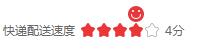
当评价完成后,关闭浏览器重新打开页面,还是上次的评价结果。用cookie实现。
具体实现如下:
import Componenet from "./Component.js";

export default class Stars extends Componenet {

    label;
    STARS_NUM = 5;
    starArr = [];
    score = 0;
    starsCon;
    faceIcon;
    scoreCon;
    index = -1;
    name;

    static STARS_LIST={};   //存储当前页面中所有的五星评价结果,一个商品为一组。用商品的id作为key,用商品评价组成一个数组,作为value。
    date=new Date();

    constructor(_label,_name) {
        super("div");
        this.name=_name;
        this.label = _label;
        Object.assign(this.elem.style, {
            width:"200px",
            height: "16px",
            float: "left",
            marginRight: "20px",
            marginBottom: "10px",
            fontSize: "12px",
            color: "#666",
            lineHeight: "16px",
            userSelect: "none",
            position: "relative",
            top: "20px",
            left: "20px",
        })
        // 解析cookie中存储的评论结果并在创建每个评论时初始化score的值。
        this.initScore();
        // 创建评价标签部分
        this.createLabel();
        // 创建星星部分
        this.createStars();
        // 创建分数部分
        this.createScore();
        // 初始化星星样式。
        this.changeStarStyle(this.score-1);
        // 初始化分数
        this.changeScore(this.score);
        // 添加鼠标滑过点击事件。
        this.starsCon.addEventListener("mouseenter", e => this.mouseHandler(e));
        this.starsCon.addEventListener("mouseleave", e => this.mouseHandler(e));
        this.starsCon.addEventListener("mouseover", e => this.mouseHandler(e));
        this.starsCon.addEventListener("click", e => this.clickHandler(e));
        this.date.setFullYear(2021);
    }
    appendTo(_parent){
        super.appendTo(_parent);
        if(!Stars.STARS_LIST[this.name]) Stars.STARS_LIST[this.name]=[];
        Stars.STARS_LIST[this.name].push(this.label+"="+this.score);
    }
    clickHandler(e){
        if(e.target.constructor!==HTMLLIElement) return
        this.index = this.starArr.indexOf(e.target);
        this.score = this.index+1;
        this.changeStarStyle(this.index);
        this.changeScore(this.index+1);
        // 每次点击都将评论的结果存储到cookie中,以便下次打开页面时读取。STARS_LIST中存储的是label作为key,score作为value的数据。
        this.storageScore();
    }
    storageScore(){
        for(let prop in Stars.STARS_LIST){
            if(prop === this.name){
                Stars.STARS_LIST[prop].forEach((item,index)=>{
                    if(item.includes(this.label)) Stars.STARS_LIST[prop][index] = this.label+"="+this.score;
                });
            }
        }
        document.cookie="comment="+ JSON.stringify(Stars.STARS_LIST)+";expires="+this.date.toUTCString();
    }
    mouseHandler(e) {
        switch (e.type) {
            case "mouseenter":
                this.faceIcon.style.display = "block";
                break;
            case "mouseleave":
                this.faceIcon.style.display = "none";
                this.changeStarStyle(this.index);
                this.changeScore(this.score);
                break;
            case "mouseover":
                let index = this.starArr.indexOf(e.target);
                this.changeStarStyle(index);
                this.changeScore(index + 1);
                this.changeFaceStyle(index);
                break;
        }
    }
    changeStarStyle(_i) {
        for (let n = 0; n < this.starArr.length; n++) {
            if (n <= _i || n < this.score) {
                this.starArr[n].style.backgroundPositionY = "-16px";
            } else {
                this.starArr[n].style.backgroundPositionY = "0px";
            }
        }
    }
    changeFaceStyle(_i) {
        this.faceIcon.style.left = _i * 16 + "px";
        this.faceIcon.style.backgroundPositionX = (_i + 1) * 20 + "px";
    }
    changeScore(_i) {
        this.scoreCon.textContent = _i + "分";
    }
    createLabel() {
        let label = document.createElement("span");
        Object.assign(label.style, {
            float: "left",
            padding: "0 5px",
        })
        label.textContent = this.label;
        this.elem.appendChild(label);
    }
    createStars() {
        this.starsCon = document.createElement("ul");
        Object.assign(this.starsCon.style, {
            margin: 0,
            padding: 0,
            listStyle: "none",
            width: "80px",
            height: "16px",
            float: "left",
            position: "relative",
        })
        for (let i = 0; i < this.STARS_NUM; i++) {
            let li = document.createElement("li");
            Object.assign(li.style, {
                width: "16px",
                height: "16px",
                float: "left",
                backgroundImage: "url(./star_img/commstar.png)",
            })
            this.starArr.push(li);
            this.starsCon.appendChild(li);
        }
        this.faceIcon = document.createElement("div");
        Object.assign(this.faceIcon.style, {
            width: "16px",
            height: "16px",
            backgroundImage: "url(./star_img/face-red.png)",
            backgroundPositionX: "-80px",
            position: "absolute",
            left: "0",
            top: "-16px",
            display: "none",
        })
        this.starsCon.appendChild(this.faceIcon);
        this.elem.appendChild(this.starsCon);
    }
    createScore() {
        this.scoreCon = document.createElement("div");
        Object.assign(this.scoreCon.style, {
            height: "16px",
            width:"20px",
            float: "left",
            padding: "0 5px",
        })
        this.scoreCon.textContent = this.score + "分",
        this.elem.appendChild(this.scoreCon);
    }
    initScore(){
        // 直接读取cookie显示如下
        // comment={"1001":["商品符合度=5","店家服务态度=0","快递配送速度=0","快递员服务=0","快递包装=0"],"1002":["商品符合度=0","店家服务态度=0","快递配送速度=0","快递员服务=0","快递包装=0"]}

        // 解析cookie中存储的评论结果。
        if(!document.cookie.includes("comment=")) return
        let o = JSON.parse(document.cookie.match(/(\{.*?\})/)[1]);
        if(!o) return
        // 解析后的o如下
        // ["商品符合度=1", "店家服务态度=0", "快递配送速度=0", "快递员服务=0", "快递包装=0"]
        for(let prop in o){
            if(this.name===prop){
                this.score=o[prop].reduce((value,item,index)=>{
                    let arr=item.split("=");
                    if(arr[0].includes(this.label)) value=parseInt(arr[1]);
                    return value;
                },0)
            }
        }
    }
}
使用时传入标签,新建实例。
import Stars from './js/Stars.js';
let list=["商品符合度","店家服务态度","快递配送速度","快递员服务","快递包装"];

        // let star = new Stars(list[0]);
        // star.appendTo("body");

        list.forEach(item=>{
            // 传入标签和对应的商品id
            let star = new Stars(item,"1001");
            star.appendTo(".div1");
        })
        list.forEach(item=>{
            let star = new Stars(item,"1002");
            star.appendTo(".div2");
        })
以上就是本文的全部内容,希望对大家的学习有所帮助,也希望大家多多支持脚本之家。
相关文章

基于HTML5上使用iScroll实现下拉刷新,上拉加载更多
本文主要介绍在HTML5中使用iScroll实现下拉刷新,上拉加载更多数据的方法,主要就是写了两个自定义函数pullDownAction和pullUpAction,分别在下拉和上拉的事件中调用他们。2016-05-05 这篇文章主要介绍了JavaScript实现的经典文件树菜单效果,通过JavaScript结合json数组实现文件树菜单的效果,非常简单实用,需要的朋友可以参考下2015-09-09
Javascript Constructor构造器模式与Module模块模式
这篇文章主要介绍了Javascript Constructor构造器模式与Module模块模式,文章围绕主题展开详细的内容介绍,具有一定的参考价值,需要的小伙伴可以参考一下2022-08-08 这篇文章主要介绍了JS组件库AlloyTouch实现图片轮播组件过程解析,文中通过示例代码介绍的非常详细,对大家的学习或者工作具有一定的参考学习价值,需要的朋友可以参考下2020-05-05
 这篇文章主要介绍了bootstrap导航栏、下拉菜单、表单的简单应用实例解析,非常不错,具有参考借鉴价值,需要的朋友参考下吧2017-01-01
 这篇文章主要介绍了js实现仿百度瀑布流的方法,以完整实例形式分析了js仿百度瀑布流的相关样式与实现技巧,具有一定参考借鉴价值,需要的朋友可以参考下2015-02-02
 这篇文章主要介绍了浅谈webpack 自动刷新与解析,小编觉得挺不错的,现在分享给大家,也给大家做个参考。一起跟随小编过来看看吧2018-04-04
 这篇文章主要介绍了JS+CSS实现的拖动分页效果,可实现鼠标拖动页面翻转到上一页或下一页的功能,涉及javascript操作页面元素与css样式的相关技巧,需要的朋友可以参考下2015-05-05
js实现iGoogleDivDrag模块拖动层拖动特效的方法
这篇文章主要介绍了js实现iGoogleDivDrag模块拖动层拖动特效的方法,实例分析了javascript操作拖动层的技巧,需要的朋友可以参考下2015-03-03 本文主要介绍了JavaScript判断当前时间是在某个时间点之前/之后,文中通过示例代码介绍的非常详细,对大家的学习或者工作具有一定的参考学习价值,需要的朋友们下面随着小编来一起学习学习吧2023-07-07
最新评论