

Python获取网络图片和视频的示例代码
更新时间:2022年03月14日 08:39:09 作者:求则得之,舍则失之
Python 是一种多用途语言,广泛用于脚本编写。我们可以编写Python 脚本来自动化日常事务。本文将用Python实现获取Google图片和YouTube视频,需要的可以参考一下
1.网络获取Google图像
1.1 google_images_download
Python 是一种多用途语言,广泛用于脚本编写。我们可以编写 Python 脚本来自动化日常事务。假设我们要下载具有多个搜索查询的谷歌图片。我们可以自动化该过程,而不是手动进行。
如何安装所需的模块:
pip install google_images_download
让我们看看如何编写 Python 脚本以使用 Python google_images_download 模块下载 Google 图像。
# importing google_images_download module
from google_images_download import google_images_download

# creating object
response = google_images_download.googleimagesdownload()

search_queries =
[
'The smartphone also features an in display fingerprint sensor.',
'The pop up selfie camera is placed aligning with the rear cameras.',
'''In terms of storage Vivo V15 Pro could offer
up to 6GB of RAM and 128GB of onboard storage.''',
'The smartphone could be fuelled by a 3 700mAh battery.',
]


def downloadimages(query):
	# keywords is the search query
	# format is the image file format
	# limit is the number of images to be downloaded
	# print urs is to print the image file url
	# size is the image size which can
	# be specified manually ("large, medium, icon")
	# aspect ratio denotes the height width ratio
	# of images to download. ("tall, square, wide, panoramic")
	arguments = {"keywords": query,
				"format": "jpg",
				"limit":4,
				"print_urls":True,
				"size": "medium",
				"aspect_ratio":"panoramic"}
	try:
		response.download(arguments)

	# Handling File NotFound Error
	except FileNotFoundError:
		arguments = {"keywords": query,
					"format": "jpg",
					"limit":4,
					"print_urls":True,
					"size": "medium"}

		# Providing arguments for the searched query
		try:
			# Downloading the photos based
			# on the given arguments
			response.download(arguments)
		except:
			pass

# Driver Code
for query in search_queries:
	downloadimages(query)
	print()
输出
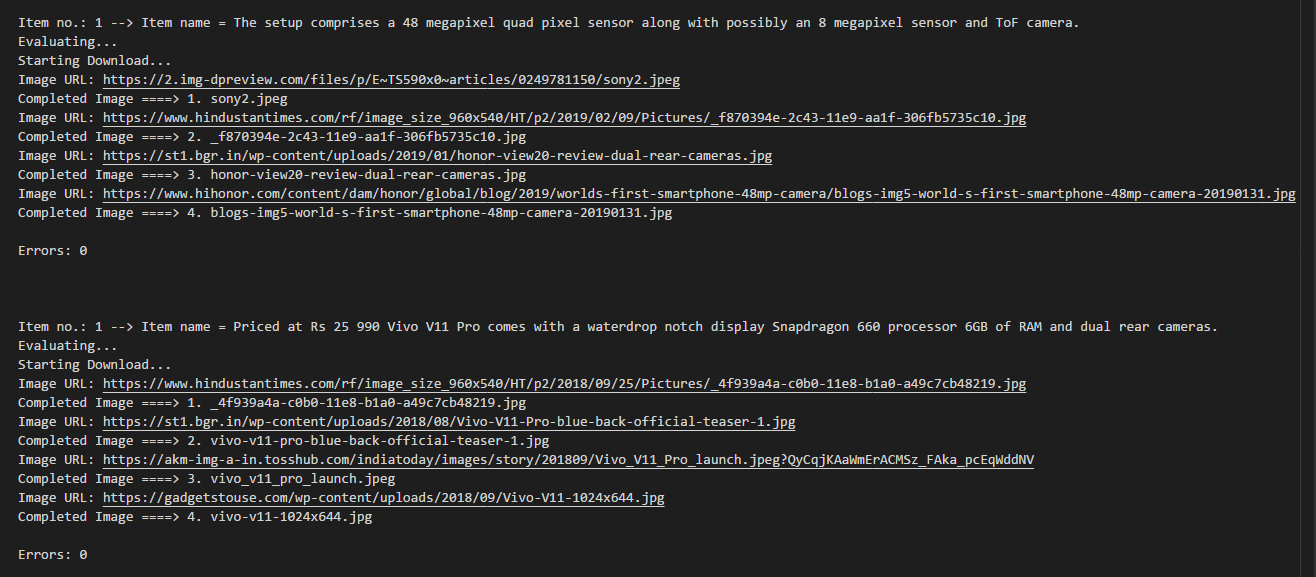
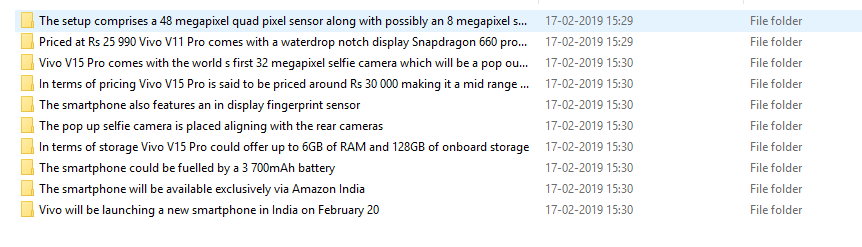
注意:由于下载错误,部分图片无法打开。
1.2 BeautifulSoup
import re
import requests
from bs4 import BeautifulSoup
from urllib.parse import urlparse
import os
f = open("images_flowers.txt", "w")
res=[]
def download_google(url):
    #url = 'https://www.google.com/search?q=flowers&sxsrf=ALeKk00uvzQYZFJo03cukIcMS-pcmmbuRQ:1589501547816&source=lnms&tbm=isch&sa=X&ved=2ahUKEwjEm4LZyrTpAhWjhHIEHewPD1MQ_AUoAXoECBAQAw&biw=1440&bih=740'
    page = requests.get(url).text
    soup = BeautifulSoup(page, 'html.parser')

    for raw_img in soup.find_all('img'):
        link = raw_img.get('src')
        res.append(link)
        if link:
            f.write(link +"\n")


download_google('https://www.google.com/search?q=flowers&sxsrf=ALeKk00uvzQYZFJo03cukIcMS-pcmmbuRQ:1589501547816&source=lnms&tbm=isch&sa=X&ved=2ahUKEwjEm4LZyrTpAhWjhHIEHewPD1MQ_AUoAXoECBAQAw&biw=1440&bih=740')

f.close()
1.3 pyimagesearch
感谢 Adrian Rosebrock 编写此代码并将其公开。
# USAGE
# python download_images.py --urls urls.txt --output images/santa

# import the necessary packages
from imutils import paths
import argparse
import requests
import cv2
import os

# construct the argument parse and parse the arguments
ap = argparse.ArgumentParser()
ap.add_argument("-u", "--urls", required=True,
	help="path to file containing image URLs")
ap.add_argument("-o", "--output", required=True,
	help="path to output directory of images")
args = vars(ap.parse_args())

# grab the list of URLs from the input file, then initialize the
# total number of images downloaded thus far
rows = open(args["urls"]).read().strip().split("\n")
total = 0

# loop the URLs
for url in rows:
	try:
		# try to download the image
		r = requests.get(url, timeout=60)

		# save the image to disk
		p = os.path.sep.join([args["output"], "{}.jpg".format(
			str(total).zfill(8))])
		f = open(p, "wb")
		f.write(r.content)
		f.close()

		# update the counter
		print("[INFO] downloaded: {}".format(p))
		total += 1

	# handle if any exceptions are thrown during the download process
	except:
		print("[INFO] error downloading {}...skipping".format(p))

# loop over the image paths we just downloaded
for imagePath in paths.list_images(args["output"]):
	# initialize if the image should be deleted or not
	delete = False

	# try to load the image
	try:
		image = cv2.imread(imagePath)

		# if the image is `None` then we could not properly load it
		# from disk, so delete it
		if image is None:
			print("None")
			delete = True

	# if OpenCV cannot load the image then the image is likely
	# corrupt so we should delete it
	except:
		print("Except")
		delete = True

	# check to see if the image should be deleted
	if delete:
		print("[INFO] deleting {}".format(imagePath))
		os.remove(imagePath)
2.网络获取Youtube视频
如何安装所需的模块:
pip install pytube3
import cv2
from collections import defaultdict

import matplotlib.pyplot as plt
import numpy as np
import pandas as pd
import warnings
from pytube import YouTube


warnings.filterwarnings('ignore')

video = YouTube('https://www.youtube.com/watch?v=GTkU4qj6v7g')
# print(video.streams.all())
print(video.streams.filter(file_extension = "mp4").all())
# [<Stream: itag="18" mime_type="video/mp4" res="360p" fps="30fps" vcodec="avc1.42001E" acodec="mp4a.40.2" progressive="True" type="video">,
# <Stream: itag="22" mime_type="video/mp4" res="720p" fps="30fps" vcodec="avc1.64001F" acodec="mp4a.40.2" progressive="True" type="video">,
# <Stream: itag="137" mime_type="video/mp4" res="1080p" fps="30fps" vcodec="avc1.64001f" progressive="False" type="video">,
# <Stream: itag="136" mime_type="video/mp4" res="720p" fps="30fps" vcodec="avc1.4d401e" progressive="False" type="video">,
# <Stream: itag="135" mime_type="video/mp4" res="480p" fps="30fps" vcodec="avc1.4d4015" progressive="False" type="video">,
# <Stream: itag="134" mime_type="video/mp4" res="360p" fps="30fps" vcodec="avc1.4d400d" progressive="False" type="video">,
# <Stream: itag="133" mime_type="video/mp4" res="240p" fps="30fps" vcodec="avc1.4d400c" progressive="False" type="video">,
# <Stream: itag="160" mime_type="video/mp4" res="144p" fps="30fps" vcodec="avc1.4d400b" progressive="False" type="video">,
# <Stream: itag="140" mime_type="audio/mp4" abr="128kbps" acodec="mp4a.40.2" progressive="False" type="audio">]

# 为要下载的视频的分辨率使用适当的 itag。如果您需要高分辨率视频下载,
# 请在以下步骤中选择最高分辨率的 itag 进行下载
print(video.streams.get_by_itag(137).download())
# '/Users/sapnasharma/Documents/github/video_clips/Akshay Kumars Fitness Mantras for a Fit India  GOQii Play Exclusive.mp4'
video_path = video.title
print(video_path)
# "Akshay Kumar's Fitness Mantras for a Fit India | GOQii Play Exclusive"

# 视频标题在名称之间添加了一个管道,因此实际名称已损坏。我稍后会修复这个错误,
# 现在我们可以直接粘贴视频的名字来达到我们的目的。
video_path = "Akshay Kumars Fitness Mantras for a Fit India  GOQii Play Exclusive.mp4"
# Video Capture Using OpenCV
cap = cv2.VideoCapture(video_path)

frame_cnt = int(cap.get(cv2.cv2.CAP_PROP_FRAME_COUNT))
fps = cap.get(cv2.CAP_PROP_FPS)

print('Frames in video: ', frame_cnt)
print(f"Frames per sec: {fps}")
# Frames in video:  34249
# Frames per sec: 25.0
# (1)要获取整个视频的帧,请使用下面的代码块。
# Use this for accessing the entire video
index = 1

for x in range(frame_cnt):
    ret, frame = cap.read()
    if not ret:
        break

    # Get frame timestamp
    frame_timestamp = cap.get(cv2.CAP_PROP_POS_MSEC)

    # fetch frame every sec
    if frame_timestamp >= (index * 1000.0): # change the value from 1000 to anyother value if not needed per second
        index = index + 2   # decides the freq. of frames to be saved
        print(f"++ {index}")
        cv2.imwrite(f"images/cv_{index}.png", frame)
    if cv2.waitKey(20) & 0xFF == ord('q'):
        break

cap.release()
cv2.destroyAllWindows()


# (2)要获取特定持续时间之间的帧,请使用以下代码块。
# Use this in case frames are to be fetched within a certain time frame
# frame_timestamp will be calculated as fps*time*1000 and set the starting index accordingly
index = 1560

for x in range(frame_cnt):
    ret, frame = cap.read()

    if not ret:
        break

    # Get frame timestamp
    frame_timestamp = cap.get(cv2.CAP_PROP_POS_MSEC)
    if frame_timestamp >= 1560000.0 and frame_timestamp <= 1800000.0 :
        # fetch frame every sec
        if frame_timestamp >= (index * 1000.0):
            index = index + 4   # decides the freq. of frames to be saved
            print(f"++ {index}")


            cv2.imwrite(f"images/cv_{index}.png", frame)


    if cv2.waitKey(20) & 0xFF == ord('q'):
        break

cap.release()
cv2.destroyAllWindows()
以上就是Python获取网络图片和视频的示例代码的详细内容,更多关于Python获取图片 视频的资料请关注脚本之家其它相关文章!
相关文章

Python中执行JavaScript实现数据抓取的多种方法
JavaScript是一门强大的脚本语言,广泛应用于网页前端开发、构建交互式用户界面以及处理各种客户端端任务,有时可能需要在Python环境中执行JavaScript代码,本文将介绍多种方法,帮助你在Python中执行 JavaScript代码,并提供详尽的示例代码,使你能够轻松掌握这一技能2023-11-11 这篇文章主要介绍了python内置函数,实例分析了Python中返回一个返回值与多个返回值的方法,需要的朋友可以参考下2021-10-10
 文章介绍了作者编写一个URDF格式化插件的初衷,目的是解决sw2urdf导出的URDF文件格式混乱的问题,本文结合实例代码给大家介绍的非常详细,感兴趣的朋友一起看看吧2025-01-01
 当前二维码的应用越来越广泛,包括疫情时期的健康码也是应用二维码的典型案例。本文的目标很明确,就是使用python,实现一张二维码显示更多信息,代码简单实用,感兴趣的可以了解一下2023-02-02
 这篇文章主要介绍了Django Rest framework之权限的实现示例,小编觉得挺不错的,现在分享给大家,也给大家做个参考。一起跟随小编过来看看吧2018-12-12
提高Python生产力的五个Jupyter notebook插件
Jupyter Notebook 因其可用性和实用性而成为数据分析和机器学习模型领域最流行的 IDE,它也是很多数据初学者的首选 IDE。它最具特色的是,拥有丰富的插件、扩展数据处理能力和提升工作效率2021-11-11 在日常办公中,我们经常需要将包含多个Sheet页的Excel文件拆分成多个独立的Excel文件,下面我们就来看看如何使用Python实现批量Excel拆分的功能吧2025-02-02
 这里将为大家来详解Python的Flask框架中的signals信号机制,包括讲述信号的用途,并给出创建信号、订阅信号、发送信号的方法,需要的朋友可以参考下2016-06-06
 在程序开发过程中,代码的运行往往会和我们预期的结果有所差别。于是,我们需要清楚代码运行过程中到底发生了什么?代码哪些模块运行了,哪些模块没有运行?输出的局部变量是什么样的?PySnooper,能够大大减少调试过程中的工作量2021-11-11
Tensorflow tf.nn.depthwise_conv2d如何实现深度卷积的
这篇文章主要介绍了Tensorflow tf.nn.depthwise_conv2d如何实现深度卷积的,文中通过示例代码介绍的非常详细,对大家的学习或者工作具有一定的参考学习价值,需要的朋友们下面随着小编来一起学习学习吧2020-04-04
最新评论