

python 实现图片特效处理
更新时间:2022年04月02日 14:38:42 作者:autofelix
这篇文章主要介绍了python 实现图片特效处理,对于 图片处理,在日常生活中我们常常能够看到的,下面我们就来利用Python来对图片进行特效操作,需要的朋友可以参考一下
前言:
对于 图片处理,在日常生活中我们常常能够看到。
比如发个朋友圈之前,我们需要给自己的照片加个滤镜;在上传头像时候,需要对照片进行裁剪,这些都是图片的处理。
待处理的原图:

一、黑白特效
- 将图片处理后,变为黑白颜色
- 把像素的R,G,B三个通道数值都置为:
r*0.299+g*0.587+b*0.114 - 效果
黑白特效:

代码:
 #!/usr/bin/env python
# encoding: utf-8

import numpy as np
from PIL import Image

class picture:
'''
This is a main Class, the file contains all documents.
One document contains paragraphs that have several sentences
It loads the original file and converts the original file to new content
Then the new content will be saved by this class
'''
def __init__(self):
self.path = 'assets/picture.jpeg'

def hello(self):
'''
This is a welcome speech
:return: self
'''
print('*' * 50)
print(' ' * 20 + '图片转换特效之黑白')
print(' ' * 5 + '作者: autofelix Date: 2022-01-17 13:14')
print('*' * 50)
return self

def run(self):
'''
The program entry
'''
im = self.to_black_white()
im.show()
im.save('assets/black_white.jpeg')

def to_black_white(self):
'''
Picture to black white
'''
im = np.asarray(Image.open(self.path).convert('RGB'))
trans = np.array([[0.299, 0.587, 0.114], [0.299, 0.587, 0.114], [0.299, 0.587, 0.114]]).transpose()
im = np.dot(im, trans)
return Image.fromarray(np.array(im).astype('uint8'))

if __name__ == '__main__':
picture().hello().run()
二、流年特效
- 将图片处理后,变为流年特效
- 把R通道的数值开平方,然后乘以一个参数
- 效果
流年特效:

代码:
#!/usr/bin/env python
# encoding: utf-8

import numpy as np
from PIL import Image

class picture:
'''
This is a main Class, the file contains all documents.
One document contains paragraphs that have several sentences
It loads the original file and converts the original file to new content
Then the new content will be saved by this class
'''
def __init__(self):
self.path = 'assets/picture.jpeg'

def hello(self):
'''
This is a welcome speech
:return: self
'''
print('*' * 50)
print(' ' * 20 + '图片转换特效之流年')
print(' ' * 5 + '作者: autofelix Date: 2022-01-17 13:14')
print('*' * 50)
return self

def run(self):
'''
The program entry
'''
im = self.fleeting()
im.show()
im.save('assets/fleeting.jpeg')

def fleeting(self, params=12):
'''
Picture to fleeting
'''
im = np.asarray(Image.open(self.path).convert('RGB'))
im1 = np.sqrt(im * [1.0, 0.0, 0.0]) * params
im2 = im * [0.0, 1.0, 1.0]
im = im1 + im2
return Image.fromarray(np.array(im).astype('uint8'))

if __name__ == '__main__':
picture().hello().run()
三、旧电影特效
- 将图片处理后,变为旧电影特效
- 把像素的R,G,B三个通道数值,3个通道的分别乘以3个参数后求和,最后把超过255的值置为255
- 效果
旧电影特效:
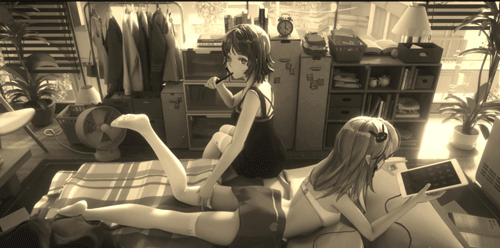
代码:
#!/usr/bin/env python
# encoding: utf-8

import numpy as np
from PIL import Image

class picture:
'''
This is a main Class, the file contains all documents.
One document contains paragraphs that have several sentences
It loads the original file and converts the original file to new content
Then the new content will be saved by this class
'''
def __init__(self):
self.path = 'assets/picture.jpeg'

def hello(self):
'''
This is a welcome speech
:return: self
'''
print('*' * 50)
print(' ' * 20 + '图片转换特效之旧电影')
print(' ' * 5 + '作者: autofelix Date: 2022-01-17 13:14')
print('*' * 50)
return self

def run(self):
'''
The program entry
'''
im = self.old_film()
im.show()
im.save('assets/old_film.jpeg')

def old_film(self):
'''
Picture to old film
'''
im = np.asarray(Image.open(self.path).convert('RGB'))
trans = np.array([[0.393, 0.769, 0.189], [0.349, 0.686, 0.168], [0.272, 0.534, 0.131]]).transpose()
im = np.dot(im, trans).clip(max=255)
return Image.fromarray(np.array(im).astype('uint8'))

if __name__ == '__main__':
picture().hello().run()
四、反色特效
- 将图片处理后,变为反色特效
- 这个最简单了,用255减去每个通道的原来的数值
- 效果
反色特效:

代码:
#!/usr/bin/env python
# encoding: utf-8

import numpy as np
from PIL import Image

class picture:
'''
This is a main Class, the file contains all documents.
One document contains paragraphs that have several sentences
It loads the original file and converts the original file to new content
Then the new content will be saved by this class
'''
def __init__(self):
self.path = 'assets/picture.jpeg'

def hello(self):
'''
This is a welcome speech
:return: self
'''
print('*' * 50)
print(' ' * 20 + '图片转换特效之反色')
print(' ' * 5 + '作者: autofelix Date: 2022-01-17 13:14')
print('*' * 50)
return self

def run(self):
'''
The program entry
'''
im = self.reverse()
im.show()
im.save('assets/reverse.jpeg')

def reverse(self):
'''
Picture to reverse
'''
im = 255 - np.asarray(Image.open(self.path).convert('RGB'))
return Image.fromarray(np.array(im).astype('uint8'))

if __name__ == '__main__':
picture().hello().run()
到此这篇关于python 实现图片特效处理的文章就介绍到这了,更多相关python 图片特效内容请搜索脚本之家以前的文章或继续浏览下面的相关文章希望大家以后多多支持脚本之家!
相关文章
 这篇文章主要介绍了如何使用python socket模块实现简单的文件下载,帮助大家更好的理解和学习python,感兴趣的朋友可以了解下2020-09-09
 xlwt 是一个用于在Python中操作Excel文件的库,它允许用户创建、修改和写入Excel文件,本文主要为大家介绍了xlwt库的一些基本操作,需要的可以参考一下2023-11-11
 这篇文章主要介绍了Python使用lambda表达式对字典排序操作,结合实例形式分析了lambda表达式实现字典按键排序、按值排序、多条件排序相关操作技巧,需要的朋友可以参考下2019-07-07
 下面小编就为大家带来一篇深入理解Python变量与常量。小编觉得挺不错的,现在就分享给大家,也给大家做个参考。一起跟随小编过来看看吧2016-06-06
 这篇文章主要介绍了Python语言描述连续子数组的最大和,具有一定借鉴价值,需要的朋友可以参考下2018-01-01
解决Pycharm下面出现No R interpreter defined的问题
今天小编就为大家分享一篇解决Pycharm下面出现No R interpreter defined的问题,具有很好的参考价值,希望对大家有所帮助。一起跟随小编过来看看吧2018-10-10
scrapy框架携带cookie访问淘宝购物车功能的实现代码
这篇文章主要介绍了scrapy框架携带cookie访问淘宝购物车,本文通过实例代码图文详解给大家介绍的非常详细,对大家的学习或工作具有一定的参考借鉴价值,需要的朋友可以参考下2020-07-07 这篇文章主要为大家介绍了python机器学习逻辑回归随机梯度下降法的详细讲解,有需要的朋友可以借鉴参考下,希望能够有所帮助,祝大家多多进步2021-11-11
 今天小编就为大家分享一篇python3中的md5加密实例,具有很好的参考价值,希望对大家有所帮助。一起跟随小编过来看看吧2018-05-05
 这篇文章主要介绍了如何使用wxPython和XML数据源创建一个具有按钮和Web视图的应用程序窗口,以便轻松管理和访问各种网页链接,感兴趣的可以了解下2023-08-08
最新评论