

python-yml文件读写与xml文件读写
一、python-yml文件读写
使用库 :import yaml
安装:
pip install pyyaml
示例:
文件config2.yml
guard_url : 'https://www.xxxx.com'
app :
  chrome_files : 'C:\Program Files\Google\Chrome\Application\chrome.exe'
networkTime : 30
title : '公司'
读取yml数据
def read_yml(file):
    """读取yml,传入文件路径file"""
    f = open(file,'r',encoding="utf-8")   # 读取文件
    yml_config = yaml.load(f,Loader=yaml.FullLoader)    # Loader为了更加安全
    """Loader的几种加载方式
    BaseLoader - -仅加载最基本的YAML
    SafeLoader - -安全地加载YAML语言的子集。建议用于加载不受信任的输入。
    FullLoader - -加载完整的YAML语言。避免任意代码执行。这是当前(PyYAML5.1)默认加载器调用yaml.load(input)(发出警告后)。
 	UnsafeLoader - -(也称为Loader向后兼容性)原始的Loader代码,可以通过不受信任的数据输入轻松利用。"""
 	return yml_config
打印yml内容
yml_info=read_yml('config.yml')
print(yml_info['guard_url'])
print(yml_info['app'])
print((yml_info['app'])['chrome_files'])

"""
https:xxxx.com
{'chrome_files': 'C:\\Program Files\\Google\\Chrome\\Application\\chrome.exe'}
C:\Program Files\Google\Chrome\Application\chrome.exe
"""
插入到yml数据
def write_yml(file,data):
    # 写入数据:
    with open(file, "a",encoding='utf-8') as f:
        # data数据中有汉字时,加上:encoding='utf-8',allow_unicode=True
        f.write('\n')  # 插入到下一行
        yaml.dump(data, f, encoding='utf-8', allow_unicode=True)

data = {"S_data": {"test1": "hello"}, "Sdata2": {"name": "汉字"}}
write_yml('config2.yml',data=data)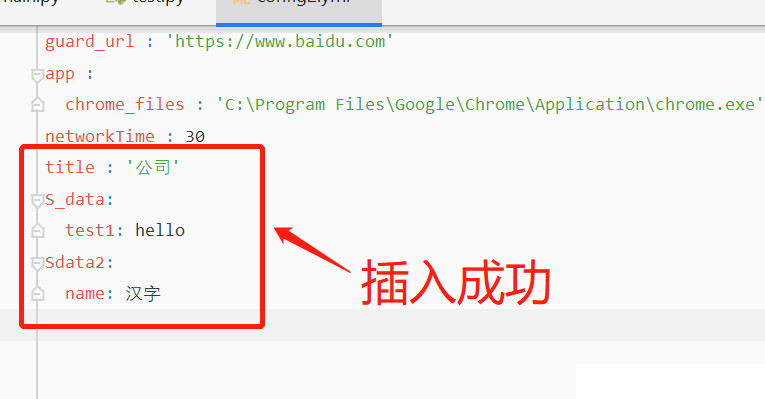
更新yml的数值
逻辑是完整读取然后更新数值后在完整写入。
def read_yml(file):
    """读取yml,传入文件路径file"""
    f = open(file, 'r', encoding="utf-8")  # 读取文件
    yml_config = yaml.load(f, Loader=yaml.FullLoader)  # Loader为了更加安全
    return yml_config
def updata_yaml(file):
	"""更新yml的数值"""
    old_data=read_yml(file) #读取文件数据
    old_data['title']='仔仔大哥哥' #修改读取的数据(
    with open(file, "w", encoding="utf-8") as f:
        yaml.dump(old_data,f,encoding='utf-8', allow_unicode=True)
updata_yaml('config2.yml')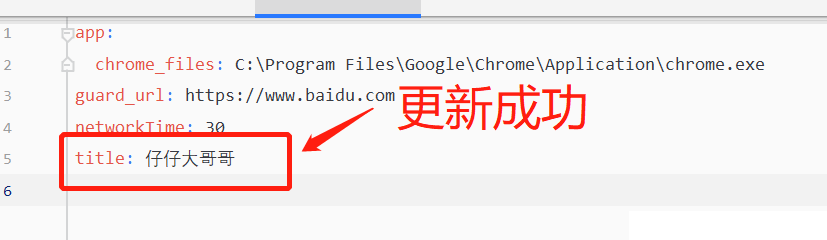
二、python-xml文件读写
使用库 :import xml
安装:系统自带
示例:
如果只是配置文件尽量使用yml来读写,
读取xml文件:
config.xml
<config>
    <id>905594711349653</id>
    <sec>0tn1jeerioj4x6lcugdd8xmzvm6w42tp</sec>
</config>
import xml.dom.minidom
dom = xml.dom.minidom.parse('config.xml')
root = dom.documentElement
def xml(suser):
suser = root.getElementsByTagName(suser)
return suser[0].firstChild.data
id = xml('id') # 进程名
print("打印ID:"+id)
"""
打印ID:905594711349653
"""进阶country_data.xml
<?xml version="1.0"?>
<data>
    <country name="Liechtenstein">
        <rank>1</rank>
        <year>2008</year>
        <gdppc>141100</gdppc>
        <neighbor name="Austria" direction="E"/>
        <neighbor name="Switzerland" direction="W"/>
    </country>
    <country name="Singapore">
        <rank>4</rank>
        <year>2011</year>
        <gdppc>59900</gdppc>
        <neighbor name="Malaysia" direction="N"/>
    </country>
    <country name="Panama">
        <rank>68</rank>
        <year>2011</year>
        <gdppc>13600</gdppc>
        <neighbor name="Costa Rica" direction="W"/>
        <neighbor name="Colombia" direction="E"/>
    </country>
</data>
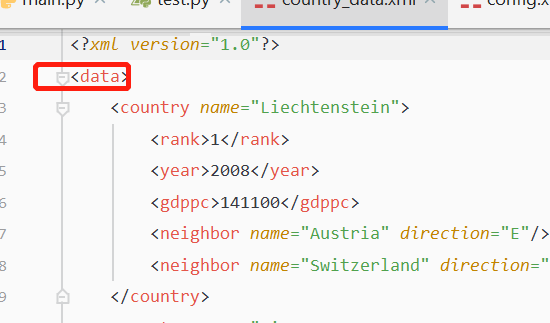
这里产生的 root 是一个 Element 物件,代表 XML 的根节点,每一个 Element 物件都有 tag 与 attrib 两个属性:
import xml.etree.ElementTree as ET

# 从文件加载并解析 XML 数据
tree = ET.parse('country_data.xml')
root = tree.getroot()
print(root.tag)  # 打印根节点名称
print(root.attrib)  # 打印根节点属性
# for 循环可以列出所有的子节点:

# 子节点与属性
for child in root:
    print(child.tag, child.attrib)
"""
data
{} # data 没有属性所以返回空
country {'name': 'Liechtenstein'}
country {'name': 'Singapore'}
country {'name': 'Panama'}
"""
也可以使用索引的方式存取任意的节点,透过 text 属性即可取得节点的内容:
print(root[0][1].text)
"""
2008
"""
可透过 get 直接取得指定的属性值:
# 取得指定的属性值
print(root[0][3].get('name'))
"""
Austria
"""
寻找 XML 节点
iter 可以在指定节点之下,以递回方式搜索所有子节点:
# 搜索所有子节点
for neighbor in root.iter('neighbor'):
    print(neighbor.attrib)
"""
{'name': 'Austria', 'direction': 'E'}
{'name': 'Switzerland', 'direction': 'W'}
{'name': 'Malaysia', 'direction': 'N'}
{'name': 'Costa Rica', 'direction': 'W'}
{'name': 'Colombia', 'direction': 'E'}
"""
findall 与 find 则是只从第一层子节点中搜索(不包含第二层以下),findall 会传回所有结果,而 find 则是只传回第一个找到的节点:
# 只从第一层子节点中搜索,传回所有找到的节点
for country in root.findall('country'):

    # 只从第一层子节点中搜索,传回第一个找到的节点
    rank = country.find('rank').text

    # 取得节点指定属性质
    name = country.get('name')

    print(name, rank)
"""
Liechtenstein 1
Singapore 4
Panama 68
"""
修改 XML 数据
XML 节点的数据可以透过 Element.text 来修改,而属性值则可以使用 Element.set() 来指定,若要将修改的结果写入 XML 文件,则可使用 ElementTree.write():
# 寻找 rank 节点
for rank in root.iter('rank'):
    # 将 rank 的数值加 1
    new_rank = int(rank.text) + 1

    # 设置新的 rank 值
    rank.text = str(new_rank)

    # 增加一个 updated 属性值
    rank.set('updated', 'yes')

# 写入 XML 文件
tree.write('output.xml')
编辑之后的 XML 文件内容会像这样:
<?xml version="1.0"?>
<data>
    <country name="Liechtenstein">
        <rank updated="yes">2</rank>
        <year>2008</year>
        <gdppc>141100</gdppc>
        <neighbor name="Austria" direction="E"/>
        <neighbor name="Switzerland" direction="W"/>
    </country>
    <country name="Singapore">
        <rank updated="yes">5</rank>
        <year>2011</year>
        <gdppc>59900</gdppc>
        <neighbor name="Malaysia" direction="N"/>
    </country>
    <country name="Panama">
        <rank updated="yes">69</rank>
        <year>2011</year>
        <gdppc>13600</gdppc>
        <neighbor name="Costa Rica" direction="W"/>
        <neighbor name="Colombia" direction="E"/>
    </country>
</data>
若要移除 XML 的节点,可以使用 Element.remove():
# 在第一层子节点钟寻找 country 节点
for country in root.findall('country'):
    # 取得 rank 数值
    rank = int(country.find('rank').text)

    # 若 rank 大于 50,则移除此节点
    if rank > 50:
        root.remove(country)

# 写入 XML 文件
tree.write('output.xml')
移除节点之后的 XML 文件内容会像这样:
<?xml version="1.0"?>
<data>
    <country name="Liechtenstein">
        <rank updated="yes">2</rank>
        <year>2008</year>
        <gdppc>141100</gdppc>
        <neighbor name="Austria" direction="E"/>
        <neighbor name="Switzerland" direction="W"/>
    </country>
    <country name="Singapore">
        <rank updated="yes">5</rank>
        <year>2011</year>
        <gdppc>59900</gdppc>
        <neighbor name="Malaysia" direction="N"/>
    </country>
</data>
建立 XML 结构
若要建立一个全新的 XML 结构,可以使用 Element 建立根节点,再以 SubElement() 加入子节点:
# 建立新的 XML 结构
orders = ET.Element('orders')

# 新增节点
order1 = ET.SubElement(orders, 'order')
order1.text = "My Order 1"
order1.set("new", "yes")

# 新增节点
order2 = ET.SubElement(orders, 'order')
order2.text = "My Order 2"
order2.set("new", "no")

# 输出 XML 原始数据
ET.dump(orders)
<orders><order new="yes">My Order 1</order><order new="no">My Order 2</order></orders>
XPath 搜索
XPath 可以让用户在 XML 结构中以较复杂的条件进行搜索,以下是一些常见的范例。
# 顶层节点
root.findall(".")

# 寻找「顶层节点 => country => neighbor」这样结构的节点
root.findall("./country/neighbor")

# 寻找 name 属性为 Singapore,且含有 year 子节点的节点
root.findall(".//year/..[@name='Singapore']")

# 寻找父节点 name 属性为 Singapore 的 year 节点
root.findall(".//*[@name='Singapore']/year")

# 寻找在同一层 neighbor 节点中排在第二位的那一个
root.findall(".//neighbor[2]")
XML 排版
若要对一般的 XML 文件内容进行自动排版,可以使用 lxml 模组的 etree:
import lxml.etree as etree

# 读取 XML 文件
root = etree.parse("country_data.xml")

# 输出排版的 XML 数据
print(etree.tostring(root, pretty_print=True, encoding="unicode"))

# 将排版的 XML 数据写入文件
root.write("pretty_print.xml", encoding="utf-8")
到此这篇关于python-yml文件读写与xml文件读写的文章就介绍到这了,更多相关 python文件读写内容请搜索脚本之家以前的文章或继续浏览下面的相关文章希望大家以后多多支持脚本之家!
相关文章
 这篇文章主要介绍了Python 递归式实现二叉树前序,中序,后序遍历,更多相关资料,需要的小伙伴可以参考下面具体的文章内容2022-03-03
 本文介绍了变量的定义、赋值、使用原则、命名规范、内存管理以及变量的特征,变量是程序中可变化的量,需要先定义后使用,可多次更改值,Python作为弱类型语言,变量无需声明类型即可赋值2024-09-09
Pytorch 和 Tensorflow v1 兼容的环境搭建方法
这篇文章主要介绍了搭建Pytorch 和 Tensorflow v1 兼容的环境,本文是小编经过多次实践得到的环境配置教程,给大家介绍的非常详细,对大家的学习或工作具有一定的参考借鉴价值,需要的朋友可以参考下2022-11-11 这篇文章主要介绍了Python实现进度条的4种方式,本文通过实例代码给大家介绍的非常详细,具有一定的参考借鉴价值,需要的朋友可以参考下2020-01-01
 串口通信是指通过串口进行数据传输的一种通信方式,本文就来介绍一下Python串口通信的接收与发送的实现,具有一定的参考价值,感兴趣的可以了解一下2023-11-11
python中小数点后取2位(四舍五入)及取2位(四舍五不入)的方法
这篇文章主要给大家介绍了python中小数点后取2位(四舍五入)及取2位(四舍五不入)的方法,在Python中取两位小数的方法其实非常简单,需要的朋友可以参考下2023-08-08 蓄水池算法(Reservoir Sampling)是一种用于处理大规模数据流的随机抽样算法,该算法能够在不知道数据流大小的情况下,从数据流中均匀随机地抽取固定大小的样本,本文给大家介绍了一个详细的Python蓄水池算法的实现,包括完整的代码示例,需要的朋友可以参考下2024-11-11
 Python作为时下流行的语言,数据写入Excel是必要的操作,下面这篇文章主要给大家介绍了关于python数据写入Excel文件中的简单实现方法,文中通过实例代码介绍的非常详细,需要的朋友可以参考下2022-04-04
 在本篇文章里小编给大家分享的是一篇关于Python实现的二分查找算法实例讲解内容,需要的朋友们可以学习下。2020-05-05
 这篇文章主要介绍了关于自动化测试框架pytest的Fixture固件,Fixture它其实就是一些函数,会在执行测试方法/测试函数前后加载运行它们,需要的朋友可以参考下2023-03-03
最新评论