

进程状态ps -ef中的e、f含义讲解
更新时间:2022年11月07日 11:17:40 作者:pilaf1990
这篇文章主要介绍了进程状态ps -ef中的e、f含义讲解,通过本文学习我们知道-e和-A都显示有关其他用户进程的信息,包括那些没有控制终端的进程,-f显示用户id,进程id,父进程id,最近CPU使用情况,进程开始时间等等,具体含义及更多命令跟随小编通过本文学习
linux或mac控制台下输入ps -ef | grep 关键字可以查看是否有相应的进程启动信息中包含关键字。如:
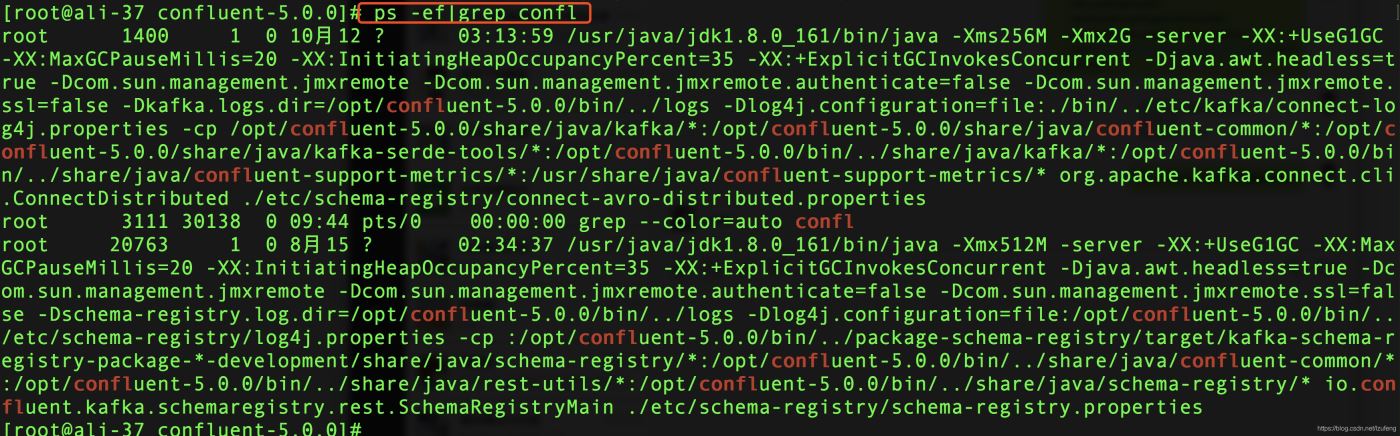
ps的意思是process status,即进程状态。在控制台执行man ps命令可以查看ps命令后面的命令选项的含义如下:
     The options are as follows:

     -A      Display information about other users' processes, including those without controlling ter-
             minals.

     -a      Display information about other users' processes as well as your own.  This will skip any
             processes which do not have a controlling terminal, unless the -x option is also specified.

     -C      Change the way the CPU percentage is calculated by using a ``raw'' CPU calculation that
             ignores ``resident'' time (this normally has no effect).

     -c      Change the ``command'' column output to just contain the executable name, rather than the
             full command line.

     -d      Like -A, but excludes session leaders.

     -E      Display the environment as well.  This does not reflect changes in the environment after
             process launch.

     -e      Identical to -A.

     -f      Display the uid, pid, parent pid, recent CPU usage, process start time, controlling tty,
             elapsed CPU usage, and the associated command.  If the -u option is also used, display the
             user name rather then the numeric uid.  When -o or -O is used to add to the display follow-
             ing -f, the command field is not truncated as severely as it is in other formats.

     -G      Display information about processes which are running with the specified real group IDs.

     -g      Display information about processes with the specified process group leaders.

     -h      Repeat the information header as often as necessary to guarantee one header per page of
             information.

     -j      Print information associated with the following keywords: user, pid, ppid, pgid, sess,
             jobc, state, tt, time, and command.

     -L      List the set of keywords available for the -O and -o options.

     -l      Display information associated with the following keywords: uid, pid, ppid, flags, cpu,
             pri, nice, vsz=SZ, rss, wchan, state=S, paddr=ADDR, tty, time, and command=CMD.

     -M      Print the threads corresponding to each task.

     -m      Sort by memory usage, instead of the combination of controlling terminal and process ID.

     -O      Add the information associated with the space or comma separated list of keywords speci-
             fied, after the process ID, in the default information display.  Keywords may be appended
             with an equals (`=') sign and a string.  This causes the printed header to use the speci-
             fied string instead of the standard header.

     -o      Display information associated with the space or comma separated list of keywords speci-
             fied.  Multiple keywords may also be given in the form of more than one -o option.  Key-
             words may be appended with an equals (`=') sign and a string.  This causes the printed
             header to use the specified string instead of the standard header.  If all keywords have
             empty header texts, no header line is written.

     -p      Display information about processes which match the specified process IDs.

     -r      Sort by current CPU usage, instead of the combination of controlling terminal and process
             ID.

     -S      Change the way the process time is calculated by summing all exited children to their par-
             ent process.

     -T      Display information about processes attached to the device associated with the standard
             input.

     -t      Display information about processes attached to the specified terminal devices.

     -U      Display the processes belonging to the specified real user IDs.

     -u      Display the processes belonging to the specified usernames.

     -v      Display information associated with the following keywords: pid, state, time, sl, re,
             pagein, vsz, rss, lim, tsiz, %cpu, %mem, and command.  The -v option implies the -m option.

     -w      Use 132 columns to display information, instead of the default which is your window size.
             If the -w option is specified more than once, ps will use as many columns as necessary
             without regard for your window size.  When output is not to a terminal, an unlimited number
             of columns are always used.

     -X      When displaying processes matched by other options, skip any processes which do not have a
             controlling terminal.

     -x      When displaying processes matched by other options, include processes which do not have a
             controlling terminal.  This is the opposite of the -X option.  If both -X and -x are speci-
             fied in the same command, then ps will use the one which was specified last.
可见-e和-A的意思是一样的,即显示有关其他用户进程的信息,包括那些没有控制终端的进程。-f显示用户id,进程id,父进程id,最近CPU使用情况,进程开始时间等等。
ps -ef命令含义
工作中,平时都是通过ps -ef 去进行查看系统上的运行的所有进程,是一个特别常用的命令;这里说下该命令的具体含义:
只执行ps命令,默认是显示当前控制台下属于当前用户的进程;

参数 -e 显示运行在系统上的所有进程
参数 -f 扩展显示输出

UID 启动进程的用户
PID 进程的进程号
PPID 父进程进程号
C cpu使用率
STIME 进程启动时的系统时间
TTY 进程启动时终端设备
TIME 运行进程需要的累积CPU时间
CMD 启动程序名称或命令
更多的ps命令可以通过 man ps 或者 ps --help all 来获取
到此这篇关于进程状态ps -ef中的e、f含义讲解的文章就介绍到这了,更多相关ps -ef中e、f含义内容请搜索脚本之家以前的文章或继续浏览下面的相关文章希望大家以后多多支持脚本之家!
您可能感兴趣的文章:
相关文章
 今天小编就为大家分享一篇关于使用shell来发tcp包的方法,小编觉得内容挺不错的,现在分享给大家,具有很好的参考价值,需要的朋友一起跟随小编来看看吧2019-04-04
让Linux下的cron以秒为单位执行shell脚本的3种方法
这篇文章主要介绍了让Linux下的cron以秒为单位执行shell脚本的3种方法,cron默认只支持以分为单位执行Shell脚本的,需要的朋友可以参考下2014-10-10 这篇文章主要给大家总结介绍了关于利用Shell解析处理XML的方法,分别介绍了关于xmlint、xpath和xml2三种工具的使用,文中通过示例代码介绍的非常详细,需要的朋友可以参考借鉴,下面随着小编来一起学习学习吧。2017-10-10
 这篇文章主要介绍了Shell脚本实现的memcached进程监控,实现功能为监控memcached进程是否存在,不存在则启动memcached并重载nginx,需要的朋友可以参考下2014-07-07
 编写一个bash脚本时,需要用户输入一个密码,方可继续后续流程,但是又要保证用户输入的密码不会被别人看到,因此排除了通过参数将密码传入脚本的方案2013-08-08
 今天小编就为大家分享一篇关于Shell中字符串排序的几种方法,小编觉得内容挺不错的,现在分享给大家,具有很好的参考价值,需要的朋友一起跟随小编来看看吧2019-03-03
 这篇文章主要介绍了Linux进程控制详解及实例的相关资料,需要的朋友可以参考下2017-04-04
Linux下is not in the sudoers file的解决
当我们使用sudo命令切换用户的时候可能会遇到提示以下错误:用户名 is not in the sudoers file.本文给大家分享原因分析及解决方案,感兴趣的朋友跟随小编一起看看吧2023-02-02 在使用sed替换时,可以使用正则表达式分组来保留部分匹配内容,下面这篇文章主要给大家介绍了关于sed使用正则表达式进行替换例子以及注意事项的相关资料,需要的朋友可以参考下2024-03-03
 netfilter/iptables(简称为iptables)组成Linux平台下的包过滤防火墙,与大多数的Linux软件一样,这个包过滤防火墙是免费的。本文就来利用iptables实现屏蔽ip地址,需要的可以参考一下2022-10-10
最新评论