

docker搭建es集群实现过程详解
前言
该系列默认开启Nacos 服务,还不会搭建的小伙伴可以参考往期文章~
本节重点是给大家介绍利用docker来搭建Es集群,废话不多说直接开整吧~
什么是es
同样的,在学习之前,先了解一下这玩意到底是个啥?
es这个名词或许大家都听过,它的全称是Elasticsearch,它是一个分布式文档储存中间件,它不会将信息储存为列数据行,而是储存已序列化为 JSON 文档的复杂数据结构。当你在一个集群中有多个节点时,储存的文档分布在整个集群里面,并且立刻可以从任意节点去访问。
当文档被储存时,它将建立索引并且近实时(1s)被搜索。 Elasticsearch 使用一种被称为倒排索引的数据结构,该结构支持快速全文搜索。在倒排索引里列出了所有文档中出现的每一个唯一单词并分别标识了每个单词在哪一个文档中。有时候面试官会问,es为什么这么快?这也是一个小的知识点。
通过上面简单的介绍,我们大体可以知道,它是用来做数据检索的,而且速度特别快。
不知道小伙伴们有没有遇到过这样一个问题,比方说我们在用sql查商品库表的时候,想要通过某个关键词来匹配相应的商品,当数据量很小的时候ok,但是随着商品数据的不断导入,后期的数据量越来越大,而且都是关联着好几张表,这时候我们用sql去查询我们想要的数据的时候,会显得特别吃力,这种是相当危险的操作,因为可能会把整张表锁死,导致我们的系统出现故障,如果其它系统也使用这个库,那么也会受到影响。所以这时候,我们就需要借助es这种中间件来帮我们处理这种需求,系统的性能也会有显著的提升,当然,维护上也会增加一些难度,当然也不是啥都上es的。其实我们也可以使用其它的比如mongo,如何选取,取决于系统架构和实际的业务场景。
使用docker搭建es集群
为了大家快速的体验到es,这里推荐大家使用docker来搭建,因为它比较方便。但是生产中,如果你对docker不是很熟悉,维护会稍微有点麻烦,那么建议你还是到官网去下载具体的安装包,本节默认大家都已经安装好了docker。如果你还不知道docker是啥也没关系,这个后边我会专门给大家讲讲,本节跟着我敲就可以了。
docker的安装非常简单,官网都有具体的平台的安装包,win和mac都有,无脑安装就好了。win11安装可能会遇到wsl的问题,需要开启linux子系统,如果启动错误,直接百度错误就好了,已经有人踩过坑了。
下面,我们进入正题,首先启动好docker,本节带大家安装的是7.6.2的版本,这个版本相对好一些,控制台的功能也都很完善。
执行已下命令获取官方镜像, 打开cmd/mac终端:
# es镜像
docker pull docker.elastic.co/elasticsearch/elasticsearch:7.6.2
# kibana镜像
docker pull docker.elastic.co/kibana/kibana:7.6.2
kibana它是一个可视化的平台,我们查看数据就是通过它,es只是用作数据引擎,市面上也有一些第三方的工具,但是官方的这个已经非常完善了,界面也很美观。
紧接着,进入指定安装目录,比方说当前目录叫es,终端进入这个目录后执行一下命令:
# kibana数据挂载的目录
mkdir data/kibana
# 三个节点数据挂载的目录
mkdir data/node1
mkdir data/node2
mkdir data/node3
这一步主要是创建相关的目录,因为后边docker的数据卷会映射到该目录,这样做的目的是防止容器意外销毁后的数据丢失。这里为什么是三个节点,因为es集群至少需要三个节点,这是跟它的内部机制有关,为了防止脑裂现象,这里就不给大家过多展开了
接下来进入data/kibana目录,新建kibana.yml,这个文件是它的配置文件,后边我们会把它映射到docker容器内部
#
## ** THIS IS AN AUTO-GENERATED FILE **
##
#
#  # Default Kibana configuration for docker target
server.name: kibana
server.host: "0"
elasticsearch.hosts: [ "http://es01:9200","http://es02:9200","http://es03:9200" ]
xpack.monitoring.ui.container.elasticsearch.enabled: true
i18n.locale: zh-CN
elasticsearch.hosts指的是三个es节点,会和这些节点进行通信
进入node1,同样新建配置文件elasticsearch.yml
# ======================== Elasticsearch Configuration =========================
#
# NOTE: Elasticsearch comes with reasonable defaults for most settings.
#       Before you set out to tweak and tune the configuration, make sure you
#       understand what are you trying to accomplish and the consequences.
#
# The primary way of configuring a node is via this file. This template lists
# the most important settings you may want to configure for a production cluster.
#
# Please consult the documentation for further information on configuration options:
# https://www.elastic.co/guide/en/elasticsearch/reference/index.html
#
# ---------------------------------- Cluster -----------------------------------
#
# Use a descriptive name for your cluster:
#
 cluster.name: es-cluster
#
# ------------------------------------ Node ------------------------------------
#
# Use a descriptive name for the node:
#
 node.name: es01
#
# Add custom attributes to the node:
#
#node.attr.rack: r1
#
# ----------------------------------- Paths ------------------------------------
#
# Path to directory where to store the data (separate multiple locations by comma):
#
#path.data: /path/to/data
#
# Path to log files:
#
#path.logs: /path/to/logs
#
# ----------------------------------- Memory -----------------------------------
#
# Lock the memory on startup:
#
#bootstrap.memory_lock: true
#
# Make sure that the heap size is set to about half the memory available
# on the system and that the owner of the process is allowed to use this
# limit.
#
# Elasticsearch performs poorly when the system is swapping the memory.
#
# ---------------------------------- Network -----------------------------------
#
# Set the bind address to a specific IP (IPv4 or IPv6):
#
 network.host: 0.0.0.0
#
# Set a custom port for HTTP:
#
 http.port: 9200
#
# For more information, consult the network module documentation.
#
# --------------------------------- Discovery ----------------------------------
#
# Pass an initial list of hosts to perform discovery when this node is started:
# The default list of hosts is ["127.0.0.1", "[::1]"]
#
 discovery.seed_hosts: ["es01","es02","es03"]
#
# Bootstrap the cluster using an initial set of master-eligible nodes:
#
 cluster.initial_master_nodes: ["es01","es02","es03"]
# bootstrap.memory_lock: true
#
# For more information, consult the discovery and cluster formation module documentation.
#
# ---------------------------------- Gateway -----------------------------------
#
# Block initial recovery after a full cluster restart until N nodes are started:
#
#gateway.recover_after_nodes: 3
#
# For more information, consult the gateway module documentation.
#
# ---------------------------------- Various -----------------------------------
#
# Require explicit names when deleting indices:
#
#action.destructive_requires_name: true
 http.cors.enabled: true
 http.cors.allow-origin: '*'
 http.cors.allow-headers: Authorization,X-Requested-With,Content-Length,Content-Type
 node.master: true
我们把node1作为主节点,也就是老大,node.master: true可以配置。为了使它支持中文分词,我们给它安装一下插件, 到仓库下载指定版本的插件https://github.com/medcl/elasticsearch-analysis-ik/releases,然后我们解压到node1根目录,然后重新命名为ik目录,然后再新建一个Dockerfile用来重构```es````镜像,没错,后边我们就使用我们重构好的镜像,这样就自动安装好了插件
Dockerfile文件内容
FROM docker.elastic.co/elasticsearch/elasticsearch:7.6.2
COPY --chown=elasticsearch:elasticsearch elasticsearch.yml /usr/share/elasticsearch/config/
ADD ik /usr/share/elasticsearch/plugins/ik
ADD ik/config /data/erms/es/node1/ik/config
下面我们进入node2目录,这个目录只需要放配置文件就好了
# ======================== Elasticsearch Configuration =========================
#
# NOTE: Elasticsearch comes with reasonable defaults for most settings.
#       Before you set out to tweak and tune the configuration, make sure you
#       understand what are you trying to accomplish and the consequences.
#
# The primary way of configuring a node is via this file. This template lists
# the most important settings you may want to configure for a production cluster.
#
# Please consult the documentation for further information on configuration options:
# https://www.elastic.co/guide/en/elasticsearch/reference/index.html
#
# ---------------------------------- Cluster -----------------------------------
#
# Use a descriptive name for your cluster:
#
 cluster.name: es-cluster
#
# ------------------------------------ Node ------------------------------------
#
# Use a descriptive name for the node:
#
 node.name: es02
#
# Add custom attributes to the node:
#
#node.attr.rack: r1
#
# ----------------------------------- Paths ------------------------------------
#
# Path to directory where to store the data (separate multiple locations by comma):
#
#path.data: /path/to/data
#
# Path to log files:
#
#path.logs: /path/to/logs
#
# ----------------------------------- Memory -----------------------------------
#
# Lock the memory on startup:
#
#bootstrap.memory_lock: true
#
# Make sure that the heap size is set to about half the memory available
# on the system and that the owner of the process is allowed to use this
# limit.
#
# Elasticsearch performs poorly when the system is swapping the memory.
#
# ---------------------------------- Network -----------------------------------
#
# Set the bind address to a specific IP (IPv4 or IPv6):
#
 network.host: 0.0.0.0
#
# Set a custom port for HTTP:
#
 http.port: 9200
#
# For more information, consult the network module documentation.
#
# --------------------------------- Discovery ----------------------------------
#
# Pass an initial list of hosts to perform discovery when this node is started:
# The default list of hosts is ["127.0.0.1", "[::1]"]
#
 discovery.seed_hosts: ["es01","es02","es03"]
#
# Bootstrap the cluster using an initial set of master-eligible nodes:
#
 cluster.initial_master_nodes: ["es01","es02","es03"]
# bootstrap.memory_lock: true
#
# For more information, consult the discovery and cluster formation module documentation.
#
# ---------------------------------- Gateway -----------------------------------
#
# Block initial recovery after a full cluster restart until N nodes are started:
#
#gateway.recover_after_nodes: 3
#
# For more information, consult the gateway module documentation.
#
# ---------------------------------- Various -----------------------------------
#
# Require explicit names when deleting indices:
#
#action.destructive_requires_name: true
 http.cors.enabled: true
 http.cors.allow-origin: '*'
 http.cors.allow-headers: Authorization,X-Requested-With,Content-Length,Content-Type
 node.data: true
这里我们指定为数据节点node.data: true用来做副本
同样的node3
# ======================== Elasticsearch Configuration =========================
#
# NOTE: Elasticsearch comes with reasonable defaults for most settings.
#       Before you set out to tweak and tune the configuration, make sure you
#       understand what are you trying to accomplish and the consequences.
#
# The primary way of configuring a node is via this file. This template lists
# the most important settings you may want to configure for a production cluster.
#
# Please consult the documentation for further information on configuration options:
# https://www.elastic.co/guide/en/elasticsearch/reference/index.html
#
# ---------------------------------- Cluster -----------------------------------
#
# Use a descriptive name for your cluster:
#
 cluster.name: es-cluster
#
# ------------------------------------ Node ------------------------------------
#
# Use a descriptive name for the node:
#
 node.name: es03
#
# Add custom attributes to the node:
#
#node.attr.rack: r1
#
# ----------------------------------- Paths ------------------------------------
#
# Path to directory where to store the data (separate multiple locations by comma):
#
#path.data: /path/to/data
#
# Path to log files:
#
#path.logs: /path/to/logs
#
# ----------------------------------- Memory -----------------------------------
#
# Lock the memory on startup:
#
#bootstrap.memory_lock: true
#
# Make sure that the heap size is set to about half the memory available
# on the system and that the owner of the process is allowed to use this
# limit.
#
# Elasticsearch performs poorly when the system is swapping the memory.
#
# ---------------------------------- Network -----------------------------------
#
# Set the bind address to a specific IP (IPv4 or IPv6):
#
 network.host: 0.0.0.0
#
# Set a custom port for HTTP:
#
 http.port: 9200
#
# For more information, consult the network module documentation.
#
# --------------------------------- Discovery ----------------------------------
#
# Pass an initial list of hosts to perform discovery when this node is started:
# The default list of hosts is ["127.0.0.1", "[::1]"]
#
 discovery.seed_hosts: ["es01","es02","es03"]
#
# Bootstrap the cluster using an initial set of master-eligible nodes:
#
 cluster.initial_master_nodes: ["es01","es02","es03"]
# bootstrap.memory_lock: true
#
# For more information, consult the discovery and cluster formation module documentation.
#
# ---------------------------------- Gateway -----------------------------------
#
# Block initial recovery after a full cluster restart until N nodes are started:
#
#gateway.recover_after_nodes: 3
#
# For more information, consult the gateway module documentation.
#
# ---------------------------------- Various -----------------------------------
#
# Require explicit names when deleting indices:
#
#action.destructive_requires_name: true
 http.cors.enabled: true
 http.cors.allow-origin: '*'
 http.cors.allow-headers: Authorization,X-Requested-With,Content-Length,Content-Type
 node.data: true
然后我们回到根目录(es),新建一个docker-compose.yaml,我们使用docker-compose来编排我们的容器,默认安装好docker desktop就自动给我们安装好了docker-compose
version: '3'
services:
  es01:
    image: ${image}
    container_name: es01
    environment:
      - discovery.seed_hosts=es02,es03
      - cluster.initial_master_nodes=es01,es02,es03
      - "ES_JAVA_OPTS=-Xms512m -Xmx512m"
    ulimits:
      memlock:
        soft: -1
        hard: -1
    volumes:
      - ./data/node1/data:/usr/share/elasticsearch/data
      - ./data/node1/elasticsearch.yml:/usr/share/elasticsearch/config/elasticsearch.yml
      - ./data/node1/plugins:/usr/share/elasticsearch/plugins
    ports:
      - 9200:9200
    networks:
      - elastic
  es02:
    image: ${image}
    container_name: es02
    environment:
      - discovery.seed_hosts=es01,es03
      - cluster.initial_master_nodes=es01,es02,es03
      - "ES_JAVA_OPTS=-Xms512m -Xmx512m"
    ulimits:
      memlock:
        soft: -1
        hard: -1
    volumes:
      - ./data/node2/data:/usr/share/elasticsearch/data
      - ./data/node2/elasticsearch.yml:/usr/share/elasticsearch/config/elasticsearch.yml
      - ./data/node2/plugins:/usr/share/elasticsearch/plugins
    ports:
      - 9201:9201
    networks:
      - elastic
  es03:
    image: ${image}
    container_name: es03
    environment:
      - discovery.seed_hosts=es01,es02
      - cluster.initial_master_nodes=es01,es02,es03
      - "ES_JAVA_OPTS=-Xms512m -Xmx512m"
    ulimits:
      memlock:
        soft: -1
        hard: -1
    volumes:
      - ./data/node3/data:/usr/share/elasticsearch/data
      - ./data/node3/elasticsearch.yml:/usr/share/elasticsearch/config/elasticsearch.yml
      - ./data/node3/plugins:/usr/share/elasticsearch/plugins
    ports:
      - 9202:9202
    networks:
      - elastic
  kibana:
    image: ${image_kibana}
    container_name: kibana
    depends_on:
      - es01
    environment:
      ELASTICSEARCH_URL: http://es01:9200
      ELASTICSEARCH_HOSTS: http://es01:9200
    volumes:
      - ./data/kibana/kibana.yml:/usr/share/kibana/config/kibana.yml
    networks:
      - elastic
    ports:
      - 5601:5601
networks:
  elastic:
    driver: bridge
这个文件有点长,不懂没关系,跟着配就完了。${image}是一个占位符,所以我们还需要指定环境变量,然后新建一个.env
image=m/es
image_kibana=docker.elastic.co/kibana/kibana:7.6.2
m/es这个是我们重构后的镜像名称,下面我们就来重构镜像
进入data/node1执行
docker build -t m/es .
执行完成后,到根目录执行启动命令:
docker-compose up -d
如果你想看实时日志,把-d去掉,这个是后台运行,初次启动,可能要花费一些时间。
启动成功后,我们可以访问一些es1的节点localhost:9200,可以查看节点的信息,如果显示正常,说明已经搭建成功了,下面我们直接进入kibana控制台
http://localhost:5601/,初次进入会让你设置控制台的密码
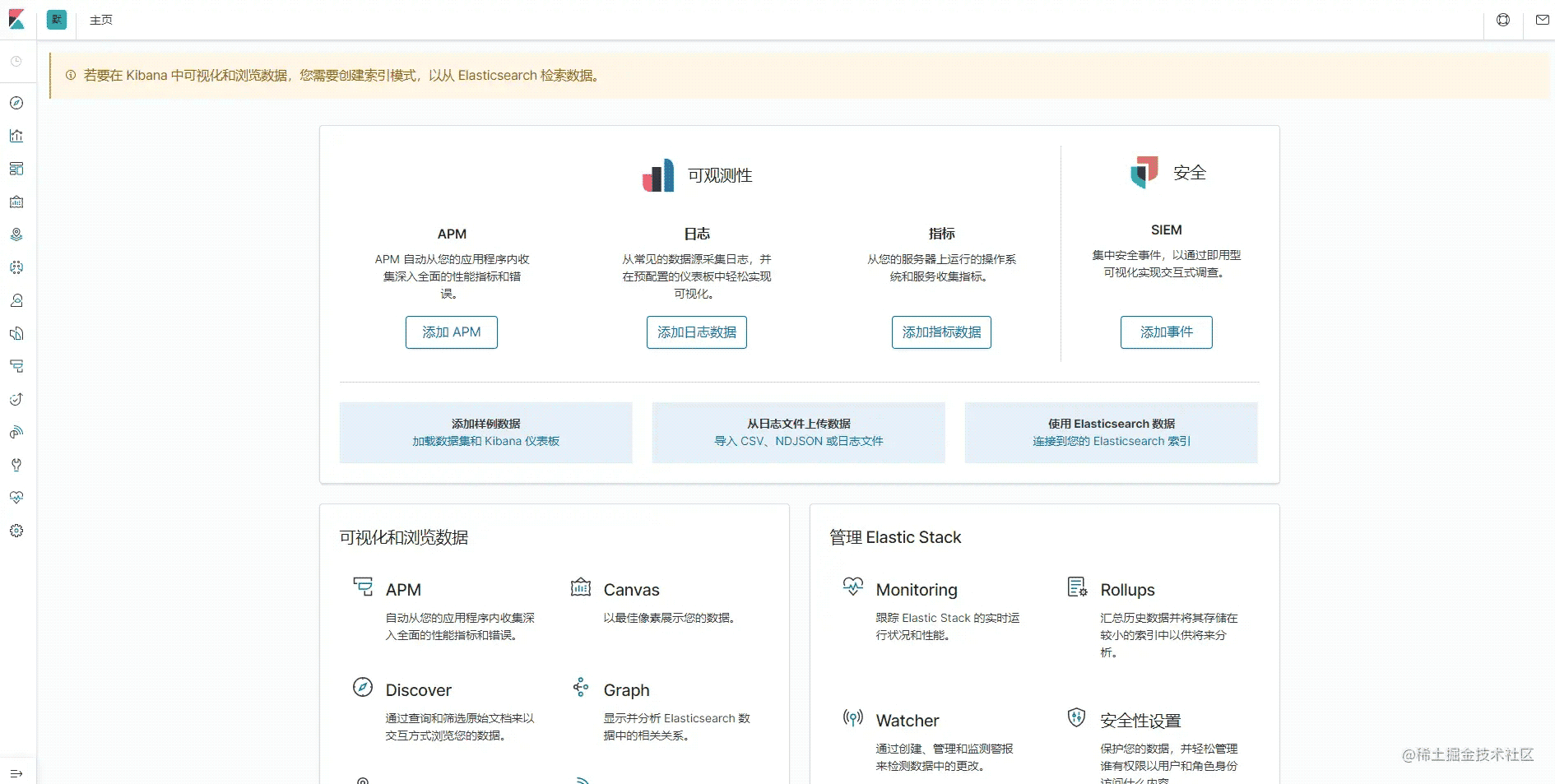
我们进入控制台,执行一下,有如下输出,至此我们就搭建成功了

如果你想卸载它们,执行docker-compose down就可以了,毕竟这几个家伙特别的吃资源。这里提醒一下大家,如果想尝试到服务器安装,建议新开一个机器,不要直接在生产环境里安装,因为挺吃硬件资源的,会容易出问题
以上就是docker搭建es集群实现过程详解的详细内容,更多关于docker搭建es集群的资料请关注脚本之家其它相关文章!
相关文章
 这篇文章主要介绍了docker cp 拷贝文件 和 进入容器的操作,具有很好的参考价值,希望对大家有所帮助。一起跟随小编过来看看吧2021-03-03
 这篇文章主要介绍了docker build镜像时,无法访问网络问题,具有很好的参考价值,希望对大家有所帮助,如有错误或未考虑完全的地方,望不吝赐教2024-08-08
 本篇文章主要介绍了Docker 数据卷管理,小编觉得挺不错的,现在分享给大家,也给大家做个参考。一起跟随小编过来看看吧2017-07-07
Docker+keepalived+nginx实现主从热备的方法示例
这篇文章主要介绍了Docker+keepalived+nginx实现主从热备的方法示例,文中通过示例代码介绍的非常详细,对大家的学习或者工作具有一定的参考学习价值,需要的朋友们下面随着小编来一起学习学习吧2019-11-11 以前对docker中的namespace了解甚少,今天在网上查阅相关文章,发现这篇还不错,介绍了namespace资源隔离以及进行namespace api操作的四种方式等内容,这里分享给大家,供参考。2017-10-10
 本文解决了由于网络问题导致的Docker拉取中央仓库镜像超时的问题,通过从其他镜像仓库拉取镜像文件来解决这一问题,感兴趣的可以了解一下2025-03-03
docker安装elasticsearch和kibana的方法步骤
这篇文章主要介绍了docker安装elasticsearch和kibana的方法步骤,文中通过示例代码介绍的非常详细,对大家的学习或者工作具有一定的参考学习价值,需要的朋友们下面随着小编来一起学习学习吧2020-06-06 这篇文章主要介绍了ubuntu如何查看docker容器占用的磁盘空间问题,具有很好的参考价值,希望对大家有所帮助。如有错误或未考虑完全的地方,望不吝赐教2023-05-05
Docker遇到Intellij IDEA,Java开发提升了十倍生产力
这篇文章主要介绍了Docker遇到Intellij IDEA,Java开发提升了十倍生产力,本文给大家介绍的非常详细,对大家的学习或工作具有一定的参考借鉴价值,需要的朋友可以参考下2020-10-10 本文主要介绍了docker中配置hosts的方法实现,文中通过示例代码介绍的非常详细,对大家的学习或者工作具有一定的参考学习价值,需要的朋友们下面随着小编来一起学习学习吧2023-04-04
最新评论