

js模仿windows桌面图标排列算法具体实现(附图)
更新时间:2013年06月16日 16:02:12 作者:
需要引入Jquery,如果需要全部功能,请引入jquery-ui和jquery-ui.css,具体实现步骤如下,感兴趣的朋友可以参考下哈
注:需要引入Jquery
如果需要全部功能,请引入jquery-ui和jquery-ui.css
截图:
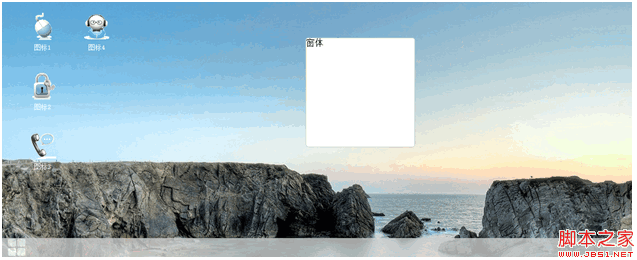
js代码:
$(function() {
//菜单列表
var menu_list=$(".menu-list");
//工作区
var working=$(".working");
working.click(function() {
menu_list.hide();
$(".content-menu").hide("slow");
});
//菜单图标单击
$(".menu").bind("click",function() {
menu_list.show();
});
arrange();
$(window).resize(function() {
arrange();
});
//屏蔽右键菜单
$(document).contextmenu(function() {
return false;
});
//点击工作区的时候 显示右键菜单
$(".working").contextmenu(function(event) {
var x=event.clientX;
var y=event.clientY;
var menu=$(".content-menu");
//判断坐标
var width=document.body.clientWidth;
var height=document.body.clientHeight;
x=(x+menu.width())>=width?width-menu.width():x;
y=(y+menu.height())>=height-40?height-menu.height():y;
//alert("可视高度:"+height+",鼠标高度:"+y);
menu.css("top",y);
menu.css("left",x);
menu.show();
});
//content-menu
$(".content-menu ul li").click(function() {
var text=$(this).text();
switch (text) {
case "刷新":
document.location.reload();
break;
case "退出登录":
if(confirm("是否要退出登录?")){
}
break;
default:
break;
}
$(".content-menu").hide();
});
});
//排列图标部分
function arrange(){
var ul=$(".icons");
var working=$(".working");
//位置坐标
var position={x:0,y:0,bottom:110,width:50,height:50,parent:{height:0,width:0},padding:{top:10,left:10,right:0,bottom:10}};
position.parent.height=working.height()-40;
position.parent.width=working.width();
ul.find("li").each(function(index) {
$(this).css("top",position.y+"px");
$(this).css("left",position.x+"px");
position.height=$(this).height();
position.width=$(this).width();
position.y=position.y+position.height+position.padding.bottom+position.padding.bottom;
if(position.y>=position.parent.height-position.bottom){
position.y=0;
position.x=position.x+position.width+position.padding.left;
}
});
}
html代码:
<!DOCTYPE HTML PUBLIC "-//IETF//DTD LEVEL1//EN">
<html>
<head>
<title>index.html</title>
<meta http-equiv="keywords" content="keyword1,keyword2,keyword3">
<meta http-equiv="description" content="this is my page">
<meta http-equiv="content-type" content="text/html; charset=GBK">
<link rel="stylesheet" type="text/css" href="css/window.css">
<link rel="stylesheet" type="text/css" href="css/jquery-ui.css">
<script language="JavaScript" src="js/jquery-1.10.0.js"></script>
<script language="JavaScript" src="js/jquery-ui.js"></script>
<script language="JavaScript" src="js/window.js"></script>
</head>
<body>
<div class="working">
<ul class="icons">
<script>
for (var i = 1; i <= 4; i++) {
var html = "";
html += '<li>';
html += '<img src="images/'+i+'.gif">';
html += '<div class="text">图标'+i+'</div>';
html += '</li>';
document.write(html);
}
</script>
</ul>
</div>
<div class="taskbar">
<div class="menu-list">
<ul>
<li></li>
</ul>
</div>
<div class="menu">
<div class="menu-icon">
<ul><li></li><li></li><li></li><li></li></ul>
</div>
<a href="javascript:;"></a>
</div>
</div>
<div class="window" title="窗体">窗体</div>
<div class="content-menu">
<ul>
<li><a href="javascript:;">刷新</a></li>
<li><a href="javascript:;">设置</a></li>
<hr/>
<li><a href="javascript:;">帮助</a></li>
<hr/>
<li><a href="javascript:;">关于</a></li>
<hr/>
<li><a href="javascript:;">系统设置</a></li>
<li><a href="javascript:;">退出登录</a></li>
</ul>
</div>
<script>
$(".icons li").mousemove(function(){
$(this).addClass("icons-move");
});
$(".icons li").mouseout(function(){
$(this).removeClass("icons-move");
});
$(".icons li").mousedown(function(){
$(".icons li").removeClass("icons-focus");
$(this).addClass("icons-focus");
//改变当前的索引
$(".icons li").css("z-index",0);
$(this).css("z-index",1);
});
$(".icons li").dblclick(function(){
alert("double click");
});
//按键事件
$(document).keyup(function(event){
var UP=38;
var DOWM=40;
var ENTER=13;
var elem=$(".icons-focus");
if(elem.html()=="undefined")return;
if (event.keyCode == UP) {
$(".icons li").removeClass("icons-focus");
elem.prev().addClass("icons-focus");
}
if(event.keyCode==DOWM){
$(".icons li").removeClass("icons-focus");
elem.next().addClass("icons-focus");
}
//回车打开选中的图标
if(event.keyCode==ENTER){
var open=$(".icons-focus");
alert("ok enevt is enter");
}
});
//图标拖拽
$(".icons li").draggable();
//注册resize事件
$(".window").draggable({containment: 'parent'});
$(".window").resizable({containment: 'parent'});
</script>
</body>
</html>
CSS代码:
@CHARSET "UTF-8";
body, html {
overflow: hidden;
height: 100%;
width: 100%;
margin: 0px;
padding: 0px;
}
.working {
height: 100%;
width: 100%;
background-image: url("../images/untitled.png");
background-repeat: no-repeat;
background-color: rgb(235, 236, 238);
padding: 20px;
}
.working ul {
height: 100%;
position: relative;
}
.working ul li {
position: absolute;
display: block;
width: 90px;
height: 90px;
text-align: center;
margin: 0px 10px 10px 10px;
float: left;
border: inherit 1px inherit;
overflow: hidden;
cursor: pointer;
}
.taskbar {
position: absolute;
height: 35px;
line-height: 35px;
width: 100%;
bottom: 0px;
background-color: #CCC;
z-index: 999;
filter: alpha(opacity = 80);
opacity: 0.8;
padding: 0px 10px;
}
.menu {
display: block;
width: 50px;
height: 30px;
float: left;
}
.menu-list {
position: absolute;
left: 0px;
bottom: 35px;
width: 350px;
height: 500px;
border: #CCC 1px solid;
background-color: white;
filter: alpha(opacity = 90);
opacity: 0.9;
border-radius: 5px;
display: none;
}
ul {
margin: 0px;
padding: 0px;
}
.menu-icon {
cursor: pointer;
}
.menu-icon ul li {
display: block;
width: 15px;
height: 15px;
float: left;
margin: 1px;
background-color: white;
border-radius: 3px;
}
.menu-icon:hover li {
background-color: red;
}
.icons li img {
max-height: 70px;
max-width: 90px;
}
.text {
position: static;
height: 20px;
line-height: 20px;
width: 100%;
margin: 0px;
font-size: 12px;
font-family: 微软雅黑;
color: white;
}
.icons-move {
border: rgb(161, 194, 219) 1px solid;
background-color: rgb(194, 208, 226);
filter: alpha(opacity = 60);
opacity: 0.6;
border-radius: 3px;
}
.icons-focus {
border: rgb(161, 194, 219) 1px solid;
background-color: rgb(194, 208, 226);
filter: alpha(opacity = 100);
opacity: 1;
border-radius: 3px;
}
.window {
height: 200px;
width: 200px;
border: #CCC 1px solid;
background-color: white;
border-radius: 5px;
position: absolute;
top: 0px;
z-index: 10;
}
/*
* 右键菜单
*/
.content-menu {
position: absolute;
width: 150px;
height: auto;
background-color: rgb(255, 255, 255);
border: #CCC 1px solid;
display: none;
border-radius:5px;
z-index:999;
}
.content-menu ul {
margin: 0px;
padding: 0px;
}
.content-menu ul li {
list-style: none;
line-height: 30px;
height: 30px;
margin: 3px 0px;
padding:0px;
font-size: 13px;
}
.content-menu ul li a{
text-decoration:none;
display:block;
font-family: 微软雅黑;
padding:0px 5px;
width:140px;
height:100%;
color: #333;
outline:none;
}
.content-menu ul li a:hover {
background-color: #DDD;
}
.content-menu ul hr {
margin: 1px 0px;
height: 0px;
border: 0px;
border-bottom: #CCC 1px solid;
}
如果需要全部功能,请引入jquery-ui和jquery-ui.css
截图:
js代码:
复制代码 代码如下:
$(function() {
//菜单列表
var menu_list=$(".menu-list");
//工作区
var working=$(".working");
working.click(function() {
menu_list.hide();
$(".content-menu").hide("slow");
});
//菜单图标单击
$(".menu").bind("click",function() {
menu_list.show();
});
arrange();
$(window).resize(function() {
arrange();
});
//屏蔽右键菜单
$(document).contextmenu(function() {
return false;
});
//点击工作区的时候 显示右键菜单
$(".working").contextmenu(function(event) {
var x=event.clientX;
var y=event.clientY;
var menu=$(".content-menu");
//判断坐标
var width=document.body.clientWidth;
var height=document.body.clientHeight;
x=(x+menu.width())>=width?width-menu.width():x;
y=(y+menu.height())>=height-40?height-menu.height():y;
//alert("可视高度:"+height+",鼠标高度:"+y);
menu.css("top",y);
menu.css("left",x);
menu.show();
});
//content-menu
$(".content-menu ul li").click(function() {
var text=$(this).text();
switch (text) {
case "刷新":
document.location.reload();
break;
case "退出登录":
if(confirm("是否要退出登录?")){
}
break;
default:
break;
}
$(".content-menu").hide();
});
});
//排列图标部分
function arrange(){
var ul=$(".icons");
var working=$(".working");
//位置坐标
var position={x:0,y:0,bottom:110,width:50,height:50,parent:{height:0,width:0},padding:{top:10,left:10,right:0,bottom:10}};
position.parent.height=working.height()-40;
position.parent.width=working.width();
ul.find("li").each(function(index) {
$(this).css("top",position.y+"px");
$(this).css("left",position.x+"px");
position.height=$(this).height();
position.width=$(this).width();
position.y=position.y+position.height+position.padding.bottom+position.padding.bottom;
if(position.y>=position.parent.height-position.bottom){
position.y=0;
position.x=position.x+position.width+position.padding.left;
}
});
}
html代码:
复制代码 代码如下:
<!DOCTYPE HTML PUBLIC "-//IETF//DTD LEVEL1//EN">
<html>
<head>
<title>index.html</title>
<meta http-equiv="keywords" content="keyword1,keyword2,keyword3">
<meta http-equiv="description" content="this is my page">
<meta http-equiv="content-type" content="text/html; charset=GBK">
<link rel="stylesheet" type="text/css" href="css/window.css">
<link rel="stylesheet" type="text/css" href="css/jquery-ui.css">
<script language="JavaScript" src="js/jquery-1.10.0.js"></script>
<script language="JavaScript" src="js/jquery-ui.js"></script>
<script language="JavaScript" src="js/window.js"></script>
</head>
<body>
<div class="working">
<ul class="icons">
<script>
for (var i = 1; i <= 4; i++) {
var html = "";
html += '<li>';
html += '<img src="images/'+i+'.gif">';
html += '<div class="text">图标'+i+'</div>';
html += '</li>';
document.write(html);
}
</script>
</ul>
</div>
<div class="taskbar">
<div class="menu-list">
<ul>
<li></li>
</ul>
</div>
<div class="menu">
<div class="menu-icon">
<ul><li></li><li></li><li></li><li></li></ul>
</div>
<a href="javascript:;"></a>
</div>
</div>
<div class="window" title="窗体">窗体</div>
<div class="content-menu">
<ul>
<li><a href="javascript:;">刷新</a></li>
<li><a href="javascript:;">设置</a></li>
<hr/>
<li><a href="javascript:;">帮助</a></li>
<hr/>
<li><a href="javascript:;">关于</a></li>
<hr/>
<li><a href="javascript:;">系统设置</a></li>
<li><a href="javascript:;">退出登录</a></li>
</ul>
</div>
<script>
$(".icons li").mousemove(function(){
$(this).addClass("icons-move");
});
$(".icons li").mouseout(function(){
$(this).removeClass("icons-move");
});
$(".icons li").mousedown(function(){
$(".icons li").removeClass("icons-focus");
$(this).addClass("icons-focus");
//改变当前的索引
$(".icons li").css("z-index",0);
$(this).css("z-index",1);
});
$(".icons li").dblclick(function(){
alert("double click");
});
//按键事件
$(document).keyup(function(event){
var UP=38;
var DOWM=40;
var ENTER=13;
var elem=$(".icons-focus");
if(elem.html()=="undefined")return;
if (event.keyCode == UP) {
$(".icons li").removeClass("icons-focus");
elem.prev().addClass("icons-focus");
}
if(event.keyCode==DOWM){
$(".icons li").removeClass("icons-focus");
elem.next().addClass("icons-focus");
}
//回车打开选中的图标
if(event.keyCode==ENTER){
var open=$(".icons-focus");
alert("ok enevt is enter");
}
});
//图标拖拽
$(".icons li").draggable();
//注册resize事件
$(".window").draggable({containment: 'parent'});
$(".window").resizable({containment: 'parent'});
</script>
</body>
</html>
CSS代码:
复制代码 代码如下:
@CHARSET "UTF-8";
body, html {
overflow: hidden;
height: 100%;
width: 100%;
margin: 0px;
padding: 0px;
}
.working {
height: 100%;
width: 100%;
background-image: url("../images/untitled.png");
background-repeat: no-repeat;
background-color: rgb(235, 236, 238);
padding: 20px;
}
.working ul {
height: 100%;
position: relative;
}
.working ul li {
position: absolute;
display: block;
width: 90px;
height: 90px;
text-align: center;
margin: 0px 10px 10px 10px;
float: left;
border: inherit 1px inherit;
overflow: hidden;
cursor: pointer;
}
.taskbar {
position: absolute;
height: 35px;
line-height: 35px;
width: 100%;
bottom: 0px;
background-color: #CCC;
z-index: 999;
filter: alpha(opacity = 80);
opacity: 0.8;
padding: 0px 10px;
}
.menu {
display: block;
width: 50px;
height: 30px;
float: left;
}
.menu-list {
position: absolute;
left: 0px;
bottom: 35px;
width: 350px;
height: 500px;
border: #CCC 1px solid;
background-color: white;
filter: alpha(opacity = 90);
opacity: 0.9;
border-radius: 5px;
display: none;
}
ul {
margin: 0px;
padding: 0px;
}
.menu-icon {
cursor: pointer;
}
.menu-icon ul li {
display: block;
width: 15px;
height: 15px;
float: left;
margin: 1px;
background-color: white;
border-radius: 3px;
}
.menu-icon:hover li {
background-color: red;
}
.icons li img {
max-height: 70px;
max-width: 90px;
}
.text {
position: static;
height: 20px;
line-height: 20px;
width: 100%;
margin: 0px;
font-size: 12px;
font-family: 微软雅黑;
color: white;
}
.icons-move {
border: rgb(161, 194, 219) 1px solid;
background-color: rgb(194, 208, 226);
filter: alpha(opacity = 60);
opacity: 0.6;
border-radius: 3px;
}
.icons-focus {
border: rgb(161, 194, 219) 1px solid;
background-color: rgb(194, 208, 226);
filter: alpha(opacity = 100);
opacity: 1;
border-radius: 3px;
}
.window {
height: 200px;
width: 200px;
border: #CCC 1px solid;
background-color: white;
border-radius: 5px;
position: absolute;
top: 0px;
z-index: 10;
}
/*
* 右键菜单
*/
.content-menu {
position: absolute;
width: 150px;
height: auto;
background-color: rgb(255, 255, 255);
border: #CCC 1px solid;
display: none;
border-radius:5px;
z-index:999;
}
.content-menu ul {
margin: 0px;
padding: 0px;
}
.content-menu ul li {
list-style: none;
line-height: 30px;
height: 30px;
margin: 3px 0px;
padding:0px;
font-size: 13px;
}
.content-menu ul li a{
text-decoration:none;
display:block;
font-family: 微软雅黑;
padding:0px 5px;
width:140px;
height:100%;
color: #333;
outline:none;
}
.content-menu ul li a:hover {
background-color: #DDD;
}
.content-menu ul hr {
margin: 1px 0px;
height: 0px;
border: 0px;
border-bottom: #CCC 1px solid;
}
相关文章

javascript中的offsetWidth、clientWidth、innerWidth及相关属性方法
这篇文章主要介绍了javascript中的offsetWidth、clientWidth、innerWidth及相关属性方法,文中通过示例代码介绍的非常详细,对大家的学习或者工作具有一定的参考学习价值,需要的朋友们下面随着小编来一起学习学习吧2020-05-05 这里给大家分享一个JavaScript实现的根据汉字可以自动转换简拼代码,有需要的朋友可以参考一下,并非本人原创来自网络。2016-09-09
JavaScript通过HTML的class来获取HTML元素的方法总结
除了getElementsByClassName()函数,我们可以自己动手编写程式来通过class获取元素,接下来我们整理了一下JavaScript通过HTML的class来获取HTML元素的方法总结,需要的朋友可以参考下2016-05-05 在我们做业务开发的漫长岁月里,会多次跟时间打交道,相信大多数小伙伴对日期格式化也并不陌生,本文简单记录了JavaScript实现日期格式化的过程,以及一些拓展,希望对大家有所帮助2023-05-05
 矢量图形最大的优点是无论放大、缩小或旋转等不会失真。在地图中存在着大量的应用,是地图数据中非常重要的组成部分,这篇文章主要介绍了OpenLayers 3加载矢量地图源的相关资料,需要的朋友可以参考下2021-12-12
 MVC是一种常见的软件架构模式,MVC模式的目的是将应用程序的数据、用户界面和控制逻辑分离,提高代码的可维护性,可拓展性和可重用性。本文就来用用JS模拟实现一个简单的MVC吧2023-04-04
 现在越来越多的项目都在使用可视化的功能,那么使用echarts实现是一种不错的选择,下面这篇文章主要给大家介绍了关于小程序中使用echarts的方法,本文介绍的方法应该是全网最详细教程,需要的朋友可以参考下2023-06-06
bootstrap-table+treegrid实现树形表格
这篇文章主要为大家详细介绍了bootstrap-table+treegrid实现树形表格,文中示例代码介绍的非常详细,具有一定的参考价值,感兴趣的小伙伴们可以参考一下2019-07-07 本代码从file域获取本地图片url并将本地图片显示到浏览器上,具体实现如下,感兴趣的朋友可以参考下,希望对大家有所帮助2013-08-08
 这篇文章主要给大家介绍了关于JavaScript中垃圾回收与内存泄漏的相关资料,文中通过示例代码介绍的非常详细,对大家学习或者使用JavaScript具有一定的参考学习价值,需要的朋友们下面来一起学习学习吧2019-05-05
最新评论