

Rsync ERROR: auth failed on module解决方法
更新时间:2013年09月16日 15:43:07 作者:
今天在两台服务器同步备份在用户权限上纠结了很多,主要关于这个问题网上的配置方法不一,源自rsync版本不一致,这里简单总结下,方便需要的朋友
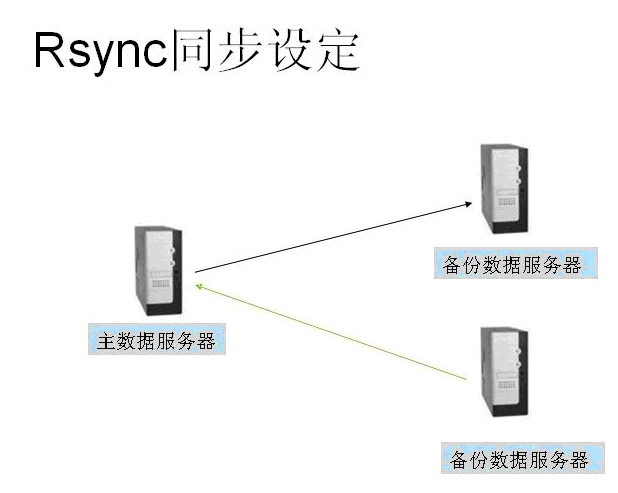
示意图:
Rsync 版本
[root@mail video]# rsync –version
rsync version 3.0.6 protocol version 30
Copyright (C) 1996-2009 by Andrew Tridgell, Wayne Davison, and others.
Web site: rsync.samba.org
Capabilities:
64-bit files, 64-bit inums, 64-bit timestamps, 64-bit long ints,
socketpairs, hardlinks, symlinks, IPv6, batchfiles, inplace,
append, ACLs, xattrs, iconv, no symtimes
rsync comes with ABSOLUTELY NO WARRANTY. This is free software, and you
are welcome to redistribute it under certain conditions. See the GNU
General Public Licence for details.
服务器同步任务需求
服务器A与服务器B同步备份,这里只说明服务器A同步到服务器B,服务器B还原到服务器A。
考虑安全因素,使用普通用户进行同步。
使用cronjob,定时同步。
错误提示
错误发生在rsync 3.0.6版本,64位 CentOS5.5 系统。
首页这篇文章主要解决的错误是以下:
@ERROR: auth failed on module ***
rsync error: error starting client-server protocol (code 5) at main.c(1503) [receiver=3.0.6]
*** 是你/etc/rsyncd.conf 中配置的模块,我这里用
password file must not be other-accessible
continuing without password file
Password:
@ERROR: auth failed on module ***
rsync error: error starting client-server protocol (code 5) at main.c(1503) [receiver=3.0.6]
uid = nobody
gid = nobody
max connections = 4
read only = true
#hosts allow = 202.207.177.180
hosts allow = *
transfer logging = true
log format = %h %o %f %l %b
log file = /var/log/rsyncd.log
slp refresh = 300
log file = /var/log/rsyncd.log
pid file = /var/run/rsyncd.pid
lock file = /var/run/rsyncd.lock
[root@mail video]# ps -ef | grep rsync
root 27284 1 0 10:26 ? 00:00:00 rsync –daemon –config=/etc/rsyncd.conf
root 30516 29986 0 18:35 pts/3 00:00:00 grep rsync
[root@mail video]# kill -9 27284
[root@mail video]# rsync –daemon –config=/etc/rsyncd.conf
一般错误都会发生在服务器B,注意这部分的讲解!
通过CentOS yum install rsync,安装rsync服务。
在rsync安装之后,运行以下指令同步备份:
地址rsync://lixiphp@203.171.237.245/test,lixiphp为服务器A用户,203.171.237.245服务器A IP地址或者域名 test为服务器A配置模块
密码存放在/home/admin/admin_backups/password.rsync,这里存放位置,可自由安排。
password.rsync内容格式为: password
设置权限为只读:
解决错误
用户密码错误
@ERROR: auth failed on module test
rsync error: error starting client-server protocol (code 5) at main.c(1503) [receiver=3.0.6]
检查服务器A存储密码文件和服务器B密码文件。
服务器A密码文件 /etc/rsyncd.secrets 格式为: username:password
服务器B密码文件 password.rsync 格式为:password
文件权限错误
password file must not be other-accessible
continuing without password file
Password:
@ERROR: auth failed on module ***
rsync error: error starting client-server protocol (code 5) at main.c(1503) [receiver=3.0.6]
检查服务器A存储密码文件和服务器B密码文件。
服务器A密码文件 /etc/rsyncd.secrets 权限为600: chmod 600 /etc/rsyncd.secrets
服务器B密码文件 password.rsync 权限为600:chmod 600 password.rsync
定时任务
内容如下:
#/bin/sh
rsync -vzrtopg –progress –delete –password-file=/home/admin/admin_backups/password.rsync rsync://lixiphp@203.171.237.245/test /home/admin/admin_backups/test
添加定时任务:
添加以下内容:
每个一分钟从服务器A同步到服务器B!
服务器B向下备份到服务器A
请确保服务器A同步用户lixiphp,对模块test所在目录有读、写、执行的权限。
Rsync 版本
[root@mail video]# rsync –version
rsync version 3.0.6 protocol version 30
Copyright (C) 1996-2009 by Andrew Tridgell, Wayne Davison, and others.
Web site: rsync.samba.org
Capabilities:
64-bit files, 64-bit inums, 64-bit timestamps, 64-bit long ints,
socketpairs, hardlinks, symlinks, IPv6, batchfiles, inplace,
append, ACLs, xattrs, iconv, no symtimes
rsync comes with ABSOLUTELY NO WARRANTY. This is free software, and you
are welcome to redistribute it under certain conditions. See the GNU
General Public Licence for details.
服务器同步任务需求
服务器A与服务器B同步备份,这里只说明服务器A同步到服务器B,服务器B还原到服务器A。
考虑安全因素,使用普通用户进行同步。
使用cronjob,定时同步。
错误提示
错误发生在rsync 3.0.6版本,64位 CentOS5.5 系统。
首页这篇文章主要解决的错误是以下:
复制代码 代码如下:
@ERROR: auth failed on module ***
rsync error: error starting client-server protocol (code 5) at main.c(1503) [receiver=3.0.6]
*** 是你/etc/rsyncd.conf 中配置的模块,我这里用
复制代码 代码如下:
password file must not be other-accessible
continuing without password file
Password:
@ERROR: auth failed on module ***
rsync error: error starting client-server protocol (code 5) at main.c(1503) [receiver=3.0.6]
Rsync 配置
#vi /etc/rsyncd.conf
复制代码 代码如下:
uid = nobody
gid = nobody
max connections = 4
read only = true
#hosts allow = 202.207.177.180
hosts allow = *
transfer logging = true
log format = %h %o %f %l %b
log file = /var/log/rsyncd.log
slp refresh = 300
log file = /var/log/rsyncd.log
pid file = /var/run/rsyncd.pid
lock file = /var/run/rsyncd.lock
[web]
path = /home/admin/public_html
comment = Mirror to Hk server
read only = true
list = false
auth users = lixiphp
[test]
path = /home/admin/domains/test
read only = false
auth users = lixiphp
secrets file = /etc/rsyncd.secrets
配置普通用户密码
复制代码 代码如下:
[root@mail video]# vi /etc/rsyncd.secrets
格式为: username:password
复制代码 代码如下:
rsync_user:rsyncofpass
设置权限为只读:
复制代码 代码如下:
chmod 600 /etc/rsyncd.secrets
首次启动rsync
复制代码 代码如下:
rsync –daemon –config=/etc/rsyncd.conf
如果提示
复制代码 代码如下:
failed to create pid file /var/run/rsyncd.pid: File exists
使用指令
rm -rf /var/run/rsyncd.pid
重启已经在运行的rsync
复制代码 代码如下:
[root@mail video]# ps -ef | grep rsync
root 27284 1 0 10:26 ? 00:00:00 rsync –daemon –config=/etc/rsyncd.conf
root 30516 29986 0 18:35 pts/3 00:00:00 grep rsync
[root@mail video]# kill -9 27284
[root@mail video]# rsync –daemon –config=/etc/rsyncd.conf
这样服务器A配置成功!
服务器B配置一般错误都会发生在服务器B,注意这部分的讲解!
通过CentOS yum install rsync,安装rsync服务。
在rsync安装之后,运行以下指令同步备份:
复制代码 代码如下:
rsync -vzrtopg –progress –delete –password-file=/home/admin/admin_backups/password.rsync rsync://lixiphp@203.171.237.245/test /home/admin/admin_backups/test
地址rsync://lixiphp@203.171.237.245/test,lixiphp为服务器A用户,203.171.237.245服务器A IP地址或者域名 test为服务器A配置模块
密码存放在/home/admin/admin_backups/password.rsync,这里存放位置,可自由安排。
password.rsync内容格式为: password
复制代码 代码如下:
rsyncofpass
设置权限为只读:
复制代码 代码如下:
chmod 600 /home/admin/admin_backups/password.rsync
解决错误
用户密码错误
复制代码 代码如下:
@ERROR: auth failed on module test
rsync error: error starting client-server protocol (code 5) at main.c(1503) [receiver=3.0.6]
检查服务器A存储密码文件和服务器B密码文件。
服务器A密码文件 /etc/rsyncd.secrets 格式为: username:password
服务器B密码文件 password.rsync 格式为:password
文件权限错误
复制代码 代码如下:
password file must not be other-accessible
continuing without password file
Password:
@ERROR: auth failed on module ***
rsync error: error starting client-server protocol (code 5) at main.c(1503) [receiver=3.0.6]
检查服务器A存储密码文件和服务器B密码文件。
服务器A密码文件 /etc/rsyncd.secrets 权限为600: chmod 600 /etc/rsyncd.secrets
服务器B密码文件 password.rsync 权限为600:chmod 600 password.rsync
定时任务
复制代码 代码如下:
[root@hk admin_backups]# vi backup.sh
内容如下:
复制代码 代码如下:
#/bin/sh
rsync -vzrtopg –progress –delete –password-file=/home/admin/admin_backups/password.rsync rsync://lixiphp@203.171.237.245/test /home/admin/admin_backups/test
添加定时任务:
复制代码 代码如下:
[root@hk admin_backups]# crontab –e
添加以下内容:
复制代码 代码如下:
*/1 * * * * /home/admin/admin_backups/backup.sh > /dev/null 2>&1
每个一分钟从服务器A同步到服务器B!
服务器B向下备份到服务器A
复制代码 代码如下:
rsync -vzrtopg –progress –delete –password-file=/home/admin/admin_backups/password.rsync /home/admin/admin_backups/test rsync://lixiphp@203.171.237.245/test
请确保服务器A同步用户lixiphp,对模块test所在目录有读、写、执行的权限。
您可能感兴趣的文章:
- python错误:AttributeError: ''module'' object has no attribute ''setdefaultencoding''问题的解决方法
- Python安装Imaging报错:The _imaging C module is not installed问题解决方法
- angularjs指令中的compile与link函数详解
- angularjs中的单元测试实例
- AngularJS入门教程之学习环境搭建
- ANGULARJS中用NG-BIND指令实现单向绑定的例子
- AngularJS中取消对HTML片段转义的方法例子
- angularjs 处理多个异步请求方法汇总
- angularJS中$apply()方法详解
- AngularJS语法详解(续)
- AngularJS实现表单验证
- jQuery和AngularJS的区别浅析
- AngularJS中的模块详解
- AngularJS内置指令
- AngularJs根据访问的页面动态加载Controller的解决方案
- angularJS 中input示例分享
- AngularJS表单编辑提交功能实例
- 对比分析AngularJS中的$http.post与jQuery.post的区别
- Angularjs制作简单的路由功能demo
- AngularJS的内置过滤器详解
- AngularJS学习笔记之基本指令(init、repeat)
- AngularJS Module方法详解
相关文章

解决FileZilla_Server:425 Can''t open data connection 问题详解
在腾讯云服务器上安装FileZilla Server时出现425 Can't open data connection客户端无法获取目录列表的问题,下面就是解决这个问题的方法2018-10-10
LVS(Linux Virtual Server)Linux 虚拟服务器介绍及配置(负载均衡系统)
LVS(Linux Virtual Server) 是Unix-like系统中的一个虚拟服务器,是国内贡献给开源组织的一个最优秀的项目之一2012-05-05 这篇文章主要为大家介绍了Fluentd搭建日志收集服务,有需要的朋友可以借鉴参考下,希望能够有所帮助,祝大家多多进步,早日升职加薪2022-09-09
 很多人对GIT GUI客户端是非常不屑一顾的,但我非常喜欢GUI的方便快捷,也不用记忆冗杂的命令,本文简单的介绍了几种免费的Windows下的GIT客户端,方便大家使用2014-09-09
 今天在配置服务器同步额时候,需要排除一些不经常更新或文件夹内容过多的,提高同步效率,经过测试通过rsync的exclude-from就可以实现2013-07-07
 这篇文章主要介绍了Nexus私服的搭建原理及教程解析,文中通过示例代码介绍的非常详细,对大家的学习或者工作具有一定的参考学习价值,需要的朋友可以参考下2020-07-07
startssl申请SSL证书 并且配置 iis 启用https协议
这篇文章主要介绍了startssl申请SSL证书 并且配置 iis 启用https协议,需要的朋友可以参考下2017-03-03
Vestacp整合WHMCS实现自动销售开通虚拟主机服务教程
这篇文章主要为大家详细介绍了Vestacp整合WHMCS实现自动销售开通虚拟主机服务教程,具有一定的参考价值,感兴趣的小伙伴们可以参考一下2017-07-07
Red Hat 8.0 使用yum报错的解决方法:This system&nbs
红帽使用yum源时提示报错,因为yum源需要付费注册,解决方法包括查看已安装的yum包,删除所有yum包并检查,查看系统版本及内核信息,下载适合的新的镜像源,配置依赖源,备份原始repo文件并下载阿里云的repo文件,清除原始配置并使其生效,感兴趣的朋友一起看看吧2024-11-11 这篇文章主要为大家介绍了超越Nginx的Web服务器caddy优雅用法详解,有需要的朋友可以借鉴参考下,希望能够有所帮助,祝大家多多进步,早日升职加薪2022-06-06
最新评论