

.NET 日志系统设计思路及实现代码
日志很明显是帮助大家定位到问题的一个很重要的手段,本来是想直接使用的NLog 来做系统的日志工具,哎伤不起,一变态非要说这个有很多不可控制的因素,这里我给大家讲一下我是怎么实现日志模块的,欢迎拍砖
总体架构图
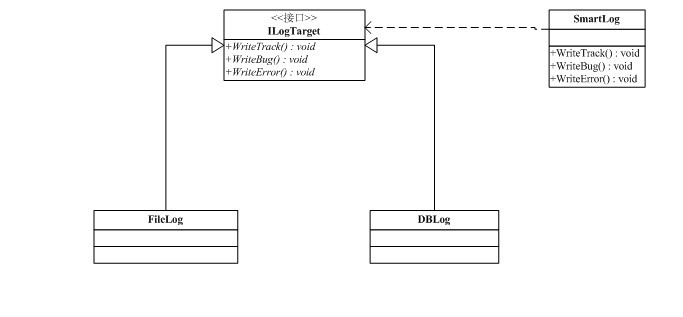
• 在这里我把日子的等级分为 跟踪,BUG 和错误 3种 定义枚举如下
/// <summary>
/// 日志等级
/// </summary>
public enum Loglevel
{
Track=1,
Bug,
Error
}
• 这里考虑日志的模块的可扩展性 (这里支持 数据库 和文件 2种方式) 这里使用适配器模式来完成本模块。 这里给大家来年终福利。贴点代码
定义一个接口ILogTarget
public interface ILogTarget
{
/// <summary>
/// 写入追踪信息
/// </summary>
/// <param name="LogContent"></param>
void WriteTrack(string LogContent);
/// <summary>
/// 写入BUG信息
/// </summary>
/// <param name="LogContent"></param>
void WriteBug(string LogContent);
/// <summary>
/// 写入错误信息
/// </summary>
/// <param name="LogContent"></param>
void WriteError(string LogContent);
}
• FileLog ,和DBLog 2个类实现上面的接口 这里不贴上具体的现实
/// <summary>
/// 文件日志实现类
/// </summary>
public class FileLog : ILogTarget
{
public void WriteTrack(string LogContent)
{
throw new NotImplementedException();
}
public void WriteBug(string LogContent)
{
throw new NotImplementedException();
}
public void WriteError(string LogContent)
{
throw new NotImplementedException();
}
}
public class DBLog : ILogTarget
{
public void WriteTrack(string LogContent)
{
throw new NotImplementedException();
}
public void WriteBug(string LogContent)
{
throw new NotImplementedException();
}
public void WriteError(string LogContent)
{
throw new NotImplementedException();
}
}
public class SmartLog
{
private ILogTarget _adaptee;
public SmartLog(ILogTarget tragent)
{
this._adaptee = tragent;
}
public void WriteTrack(string LogContent)
{
_adaptee.WriteTrack(LogContent);
}
public void WriteBug(string LogContent)
{
_adaptee.WriteBug(LogContent);
}
public void WriteError(string LogContent)
{
_adaptee.WriteError(LogContent);
}
}
• 调用方式
SmartLog log =new SmartLog (new FileLog());
log.WriteTrack("Hello word");
相关文章
 直接分析盗链原理:看下面用httpwatch截获的http发送的数据2008-11-11
 个人认为,提供params关键字以实现方法形参个数可变是C#语法的一大优点。在方法形参列表中,数组类型的参数前加params关键字,通常可以在调用方法时代码更加精练2012-01-01
 本文介绍WPF应用程序实现在屏幕上显示一行或多行文字通知。它没有标题栏和最大化最小化等按钮,可以有半透明背景以使文字的显示更清晰,鼠标点击后提示消失。2013-07-07
 ASP.NET Core 是一个由微软创建的,用于构建 web 应用、API、微服务 的 web 框架。通过本文的学习就能快速的入门ASP.NET Core,对大家的学习或者工作具有一定的参考学习价值,需要的朋友们下面随着小编来一起学习学习吧2019-04-04
asp.net core中Cookie和Session的实现示例
ASP.NET Core用户会话管理主要通过Cookie和Session实现,本文主要介绍了asp.net core中Cookie和Session的实现示例,具有一定的参考价值,感兴趣的可以了解一下2025-01-01
在ASP.NET Core5.0中访问HttpContext的方法步骤
这篇文章主要介绍了在ASP.NET Core5.0中访问HttpContext的方法步骤,文中通过示例代码介绍的非常详细,对大家的学习或者工作具有一定的参考学习价值,需要的朋友们下面随着小编来一起学习学习吧2020-11-11 这篇文章主要介绍了asp.net图片文件的上传与删除方法,简单分析了jpg格式图片的上传与文件删除技巧,具有一定参考借鉴价值,需要的朋友可以参考下2016-05-05
 这篇文章主要介绍了asp.net使用npoi读取excel模板并导出下载的示例,大家参考使用吧2014-01-01
asp.net 模拟提交有文件上传的表单(通过http模拟上传文件)
通过HTTP模拟GET或POST请求,提交数据到服务端获取响应,比较常见些;但如上传文件到服务端,使用html form当然简单了,而因环境所限有时需要使用模拟方法去提交有附件(文件上传)的表单。2010-02-02
asp.net TemplateField模板中的Bind方法和Eval方法
在TemplateField模板中为了能够有限制的或者取出数据库中某列的值时,可以用Bind和Eval方法来实现。以下是Bind方法的格式,Eval的格式也是和Bind一样的。 Bind("列的名称","显示的格式文")2009-06-06
最新评论