

XCOPY的高级使用:指定日期并且用EXCLUDE排除指定文件
更新时间:2014年04月12日 23:20:23 作者:
这篇文章主要介绍了通过dos下的XCOPY命令实现复制指定日期并且用EXCLUDE排除指定文件的代码,需要的朋友可以参考下
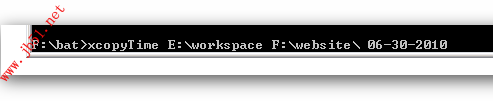
1.cmd到xcopyTime.bat所在目录,执行命令xcopyTime sourceFolder DestinationFolder dateTime
2.EXCLUDE.txt是排除的对象,不复制其中罗列的文件或文件夹
例子:
F:\bat>xcopyTime E:\workspace F:\website\ 06-30-2010
EXCLUDE.txt内容,在下面的线里面
------------------------------
.classpath
.class
.log
------------------------------
@echo off
rem xcopy2.BAT transfers all files in all subdirectories of
rem the source drive or directory (%1) to the destination
rem drive or directory (%2)
rem lastModifyTime (%3)
xcopy %1 %2 /s /d:%3 /exclude:EXCLUDE.txt /y
if errorlevel 4 goto lowmemory
if errorlevel 2 goto abort
if errorlevel 0 goto exit
:lowmemory
echo Insufficient memory to copy files or
echo invalid drive or command-line syntax.
goto exit
:abort
echo You pressed CTRL+C to end the copy operation.
goto exit
:exit
==================================================================
.classpath
.class
.log
2.EXCLUDE.txt是排除的对象,不复制其中罗列的文件或文件夹
例子:
F:\bat>xcopyTime E:\workspace F:\website\ 06-30-2010
EXCLUDE.txt内容,在下面的线里面
------------------------------
.classpath
.class
.log
------------------------------
复制代码 代码如下:
@echo off
rem xcopy2.BAT transfers all files in all subdirectories of
rem the source drive or directory (%1) to the destination
rem drive or directory (%2)
rem lastModifyTime (%3)
xcopy %1 %2 /s /d:%3 /exclude:EXCLUDE.txt /y
if errorlevel 4 goto lowmemory
if errorlevel 2 goto abort
if errorlevel 0 goto exit
:lowmemory
echo Insufficient memory to copy files or
echo invalid drive or command-line syntax.
goto exit
:abort
echo You pressed CTRL+C to end the copy operation.
goto exit
:exit
==================================================================
.classpath
.class
.log
相关文章
 关于shell命令的定向输出 2>&1...2007-03-03
Windows下bat批处理脚本使用telnet批量检测远程端口小记
这篇文章主要介绍了Windows下bat批处理脚本使用telnet批量检测远程端口小记,需要的朋友可以参考下2015-09-09
Chkntfs 显示或指定在启动计算机时计划的自动系统检查是否在 FAT、FAT32 或者 NTFS 卷上运行。
Chkntfs 显示或指定在启动计算机时计划的自动系统检查是否在 FAT、FAT32 或者 NTFS 卷上运行。...2007-09-09 我发现几乎所有用过批处理脚本的小伙伴都会遇到中文乱码这个问题,我也遇到过好几次,今天通过本文给大家分享bat批处理脚本控制台输出中文乱码问题及解决方法,感兴趣的朋友跟随小编一起看看吧2023-07-07
批处理BAT替换与截取字符串的用法t1=%a:~3%是什么意思
在bat编写中,我们经常越到t1=%a:~3%之类的代码,这里简单介绍下用法,需要的朋友可以参考下2013-05-05 开始→运行(cmd)命令大全...2006-11-11
 用批处理实现dns的批量溢出代码2008-05-05
 Ver、Vol、Ctty命令的使用教程...2007-03-03
 这篇文章主要介绍了使用forfiles命令批量删除N天前文件,因为最近备份的文件都是保存一个月的就可以了,所以就需要删除30天以前的文件,服务器上软件不太信任,用bat挺方便的,需要的朋友可以参考下2016-11-11
 shutdown 命令是一个强大的工具,允许你通过命令行快速完成关机、重启或注销操作,本文将为你详细解析 shutdown 命令的使用方法,并提供常见应用场景和注意事项,帮助你轻松掌控远程管理任务2025-01-01
最新评论