

MVC4制作网站教程第二章 用户登陆2.2
更新时间:2016年08月16日 15:07:23 作者:洞庭夕照
这篇文章主要为大家详细介绍了MVC4制作网站教程,用户登陆功能的实现代码,具有一定的参考价值,感兴趣的小伙伴们可以参考一下
一用户
1.1用户注册
1.2用户登陆
首先在Models里添加用户登陆模型类UserLogin,该类只要用用户名,密码和验证码三个字段。
/// <summary>
 /// 用户登陆模型
 /// </summary>
 public class UserLogin
 {
 /// <summary>
 /// 用户名
 /// </summary>
 [Display(Name = "用户名", Description = "4-20个字符。")]
 [Required(ErrorMessage = "×")]
 [StringLength(20, MinimumLength = 4, ErrorMessage = "×")]
 public string UserName { get; set; }
 /// <summary>
 /// 密码
 /// </summary>
 [Display(Name = "密码", Description = "6-20个字符。")]
 [Required(ErrorMessage = "×")]
 [StringLength(20, MinimumLength = 6, ErrorMessage = "×")]
 [DataType(DataType.Password)]
 public string Password { get; set; }
 /// <summary>
 /// 验证码
 /// </summary>
 [Display(Name = "验证码", Description = "请输入图片中的验证码。")]
 [Required(ErrorMessage = "×")]
 [StringLength(6, MinimumLength = 6, ErrorMessage = "×")]
 public string VerificationCode { get; set; }

 }
在UserController里添加Login action; 代码看如下:
public ActionResult Login()
 {
  return View();
 }
 [HttpPost]
 public ActionResult Login(UserLogin login)
 {
  return View();
 }
使用Cookie保存登陆账号,密码等信息,修改public ActionResult Login(UserLogin login)。修改完成代码如下:
[HttpPost]
 public ActionResult Login(UserLogin login)
 {
  //验证验证码
  if (Session["VerificationCode"] == null || Session["VerificationCode"].ToString() == "")
  {
  Error _e = new Error { Title = "验证码不存在", Details = "在用户注册时,服务器端的验证码为空,或向服务器提交的验证码为空", Cause = "<li>你注册时在注册页面停留的时间过久页已经超时</li><li>您绕开客户端验证向服务器提交数据</li>", Solution = "返回<a href='" + Url.Action("Register", "User") + "'>注册</a>页面,刷新后重新注册" };
  return RedirectToAction("Error", "Prompt", _e);
  }
  else if (Session["VerificationCode"].ToString() != login.VerificationCode.ToUpper())
  {
  ModelState.AddModelError("VerificationCode", "×");
  return View();
  }
  //验证账号密码
  userRsy = new UserRepository();
  if (userRsy.Authentication(login.UserName, Common.Text.Sha256(login.Password)) == 0)
  {
  HttpCookie _cookie = new HttpCookie("User");
  _cookie.Values.Add("UserName", login.UserName);
  _cookie.Values.Add("Password", Common.Text.Sha256(login.Password));
  Response.Cookies.Add(_cookie);
  return RedirectToAction("Default","User");
  }
  else
  {
  ModelState.AddModelError("Message", "登陆失败!");
  return View();
  }

 }
在public ActionResult Login() 上右键添加强类型视图
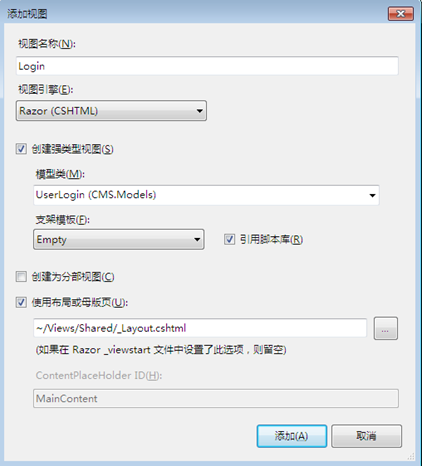
完成后代的Login.cshtml
@model CMS.Models.UserLogin

@{
 ViewBag.Title = "用户登陆";
 Layout = "~/Views/Shared/_Layout.cshtml";
}

<div class="banner">
 <img src="~/Skins/Default/Images/banner.jpg" />
</div>


@using (Html.BeginForm())
{
 @Html.ValidationSummary(true)

 <div class="form">
 <dl>
  <dt>用户登陆</dt>
  <dd>
  <div class="label">@Html.LabelFor(model => model.UserName):</div>
  <div class="ctrl">@Html.EditorFor(model => model.UserName)
   @Html.ValidationMessageFor(model => model.UserName)
   @Html.DisplayDescriptionFor(model => model.UserName)
  </div>
  </dd>
  <dd>
  <div class="label">@Html.LabelFor(model => model.Password):</div>
  <div class="ctrl">@Html.PasswordFor(model => model.Password)
   @Html.ValidationMessageFor(model => model.Password)
   @Html.DisplayDescriptionFor(model => model.Password)
  </div>
  </dd>
  <dd>
  <div class="label">验证码:</div>
  <div class="ctrl">
   @Html.TextBoxFor(model => model.VerificationCode)
   @Html.ValidationMessageFor(model => model.VerificationCode)
   <img id="verificationcode" alt="" src="@Url.Action("VerificationCode", "User")" />
   <a id="trydifferent" style="cursor: pointer">换一张</a>
  </div>
  </dd>
  <dd>
  <div class="label"></div>
  <div class="ctrl">
   <input type="submit" value="登陆" />@Html.ValidationMessage("Message");
  </div>
  </dd>
 </dl>
 <div class="clear"></div>
 </div>
}

<script type="text/javascript">
 $("#trydifferent").click(function () {
 $("#verificationcode").attr("src", "/User/VerificationCode?" + new Date());
 })

</script>
@section Scripts {
 @Scripts.Render("~/bundles/jqueryval")
}
浏览器中查看一下登陆页面

点下登陆测试一下。OK登陆成功
验证用户是否已经登陆,这块和权限验证一起从AuthorizeAttribute继承个自定义验证类
在项目里添加Extensions文件夹,添加一个类UserAuthorizeAttribute 继承自AuthorizeAttribute,重写AuthorizeCore方法用来实现用户是否已经登陆的验证,权限验证在写权限功能时在补充
using Ninesky.Repository;

namespace System.Web.Mvc
{
 /// <summary>
 /// 用户权限验证
 /// </summary>
 public class UserAuthorizeAttribute :AuthorizeAttribute
 {
 /// <summary>
 /// 核心【验证用户是否登陆】
 /// </summary>
 /// <param name="httpContext"></param>
 /// <returns></returns>
 protected override bool AuthorizeCore(HttpContextBase httpContext)
 {
  //检查Cookies["User"]是否存在
  if (httpContext.Request.Cookies["User"] == null) return false;
  //验证用户名密码是否正确
  HttpCookie _cookie = httpContext.Request.Cookies["User"];
  string _userName = _cookie["UserName"];
  string _password = _cookie["Password"];
  httpContext.Response.Write("用户名:"+_userName);
  if (_userName == "" || _password == "") return false;
  UserRepository _userRsy = new UserRepository();
  if (_userRsy.Authentication(_userName, _password) == 0) return true;
  else return false;
 }
 }
}
以后只要在需要登陆后才能操作的Action或Controller上加[UserAuthorize]就可实现验证是否已经登录了。
退出功能,在UserController添加Logout Action
/// <summary>
 /// 退出系统
 /// </summary>
 /// <returns></returns>
 public ActionResult Logout()
 {
  if (Request.Cookies["User"] != null)
  {
  HttpCookie _cookie = Request.Cookies["User"];
  _cookie.Expires = DateTime.Now.AddHours(-1);
  Response.Cookies.Add(_cookie);
  }
  Notice _n = new Notice { Title = "成功退出", Details = "您已经成功退出!", DwellTime = 5, NavigationName="网站首页", NavigationUrl = Url.Action("Index", "Home") };
  return RedirectToAction("Notice", "Prompt", _n);
 }
以上就是本文的全部内容,希望对大家的学习有所帮助,也希望大家多多支持脚本之家。
相关文章
 这篇文章介绍了.Net Core日志记录之第三方框架Serilog,文中通过示例代码介绍的非常详细。对大家的学习或工作具有一定的参考借鉴价值,需要的朋友可以参考下2022-06-06
 MQTTnet是一个高性能的.NET开源库,专为物联网中的MQTT协议开发设计,它提供了完整的客户端和服务器功能,本文将全面介绍 MQTTnet 的核心功能、显著优势及其广泛的应用场景,帮助我们更好地利用工具提升物联网项目的效率与可靠性,感兴趣的朋友一起看看吧2024-09-09
 这篇文章主要为大家详细介绍了asp.net的异步加载,文中示例代码介绍的非常详细,具有一定的参考价值,感兴趣的小伙伴们可以参考一下2016-08-08
 这篇文章介绍了ASP.NET Core配置文件获取和设置的方法,文中通过示例代码介绍的非常详细。对大家的学习或工作具有一定的参考借鉴价值,需要的朋友可以参考下2022-04-04
 编者按:2008年8月4日,StackOverflow 网友 Bert F 发帖提问:哪本最具影响力的书,是每个程序员都应该读的2013-04-04
 RichTextBox 显示图片和word的代码,需要的朋友可以参考一下2013-02-02
 接下来将介绍dhtmlxGrid 添加行号首先设置属性(设置gridView属性:gridView1 .IndicatorWidth=30)/再添加事件等等感兴趣的你可以参考下2013-03-03
 这篇文章主要介绍了Remoting和Webservice的详细介绍及区别的相关资料,需要的朋友可以参考下2016-11-11
 昨天尝试学着PETSHOP的分层思想,写了个.NET下的登陆例子,不过比PETSHOP要精简很多,采用access数据库,方便学习。希望对大家有帮助。2008-12-12
asp.net JavaScript插件 JavaScript Function Outliner
一个JavaScript Function Outliner插件 第四版本 支持内嵌javascript,且可以对javascript进行压缩2008-07-07
最新评论