

Print.Js网页打印标签详细代码示例
更新时间:2025年06月28日 08:54:13 作者:许多宝滴IT
Print.js一个小的javascript库,可帮助您从网络上打印,这篇文章主要介绍了Print.Js网页打印标签的相关资料,文中通过代码介绍的非常详细,需要的朋友可以参考下
1、功能背景需求
后台读取数据,预览页面再打印出小标签,涉及打印机设置纸张大小,与代码编写兼容等等
2、打印机设置纸张大小:
按照下图顺序设置需要打印的纸张大小,例如50mm*50mm
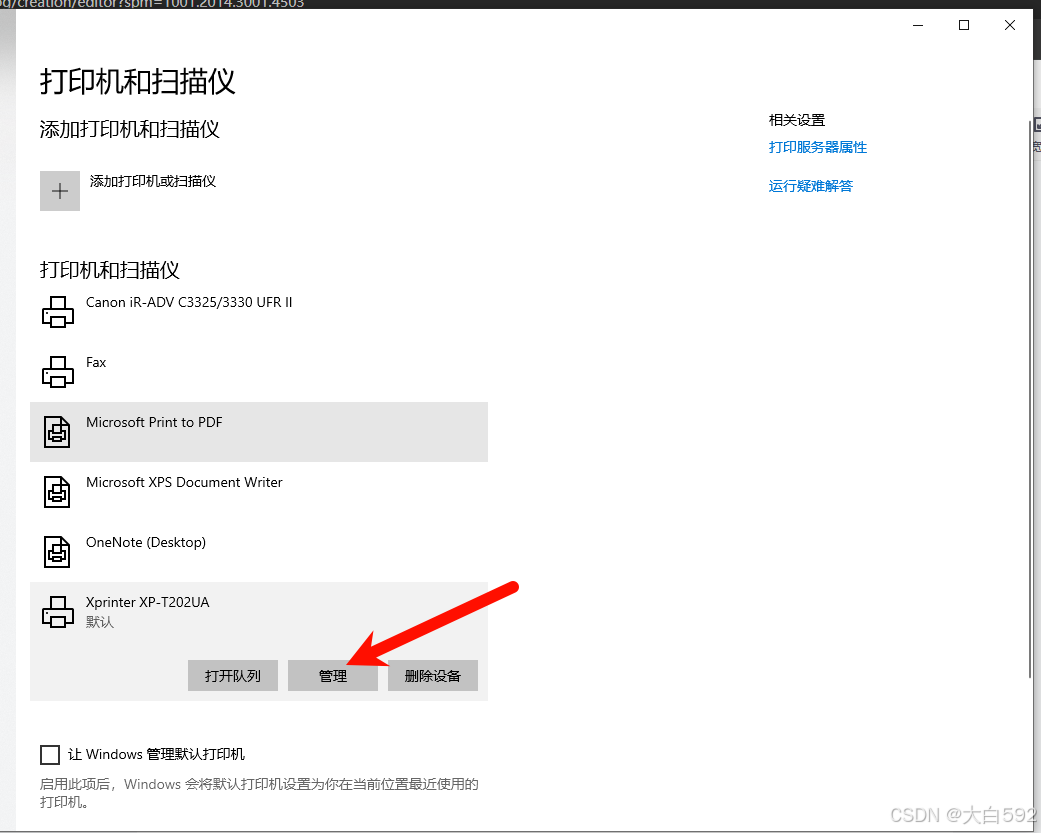
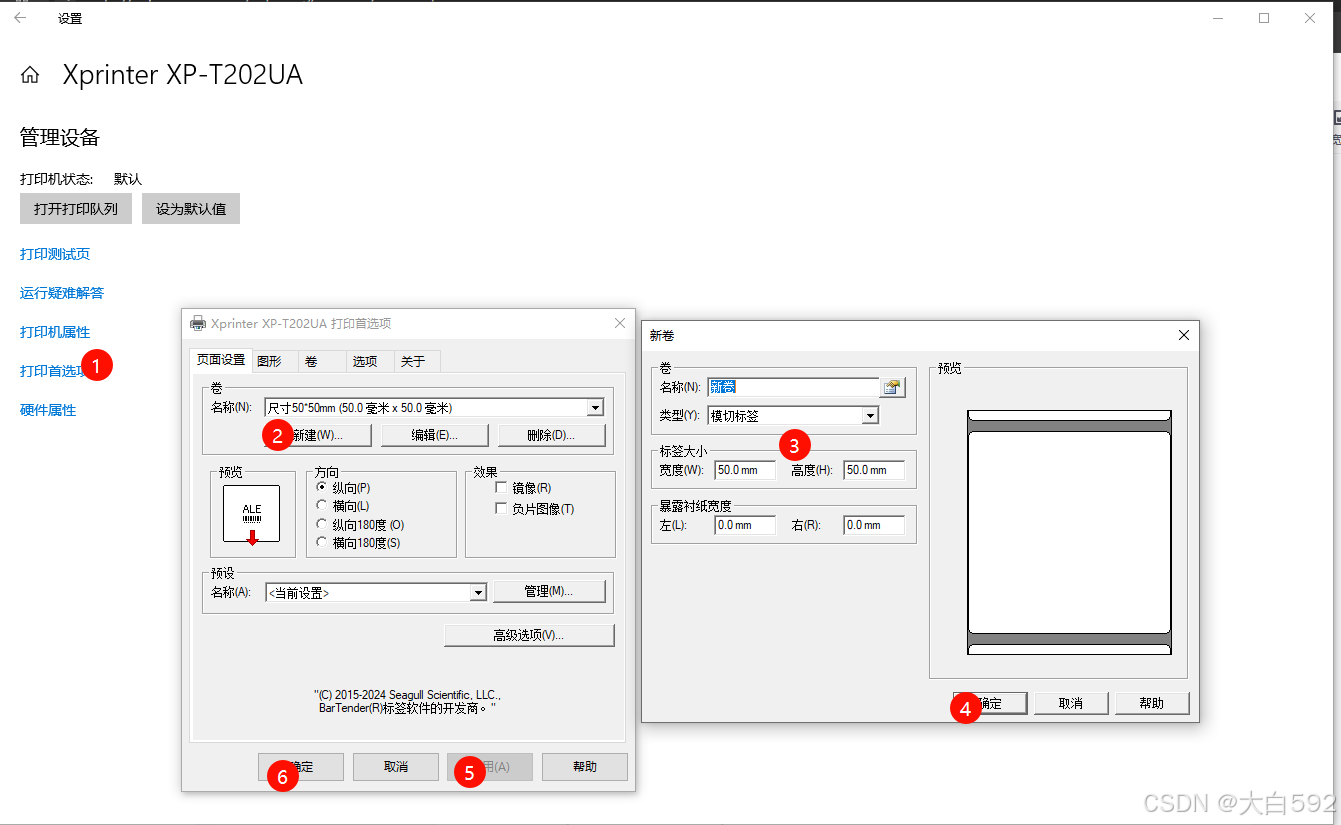
不知道,问产品打印的纸张大小是多少,再去设置!
3、相关代码(PrintJS)
代码页面要准备一个预览页面,PrintJS打印时要绑定ID去打印。
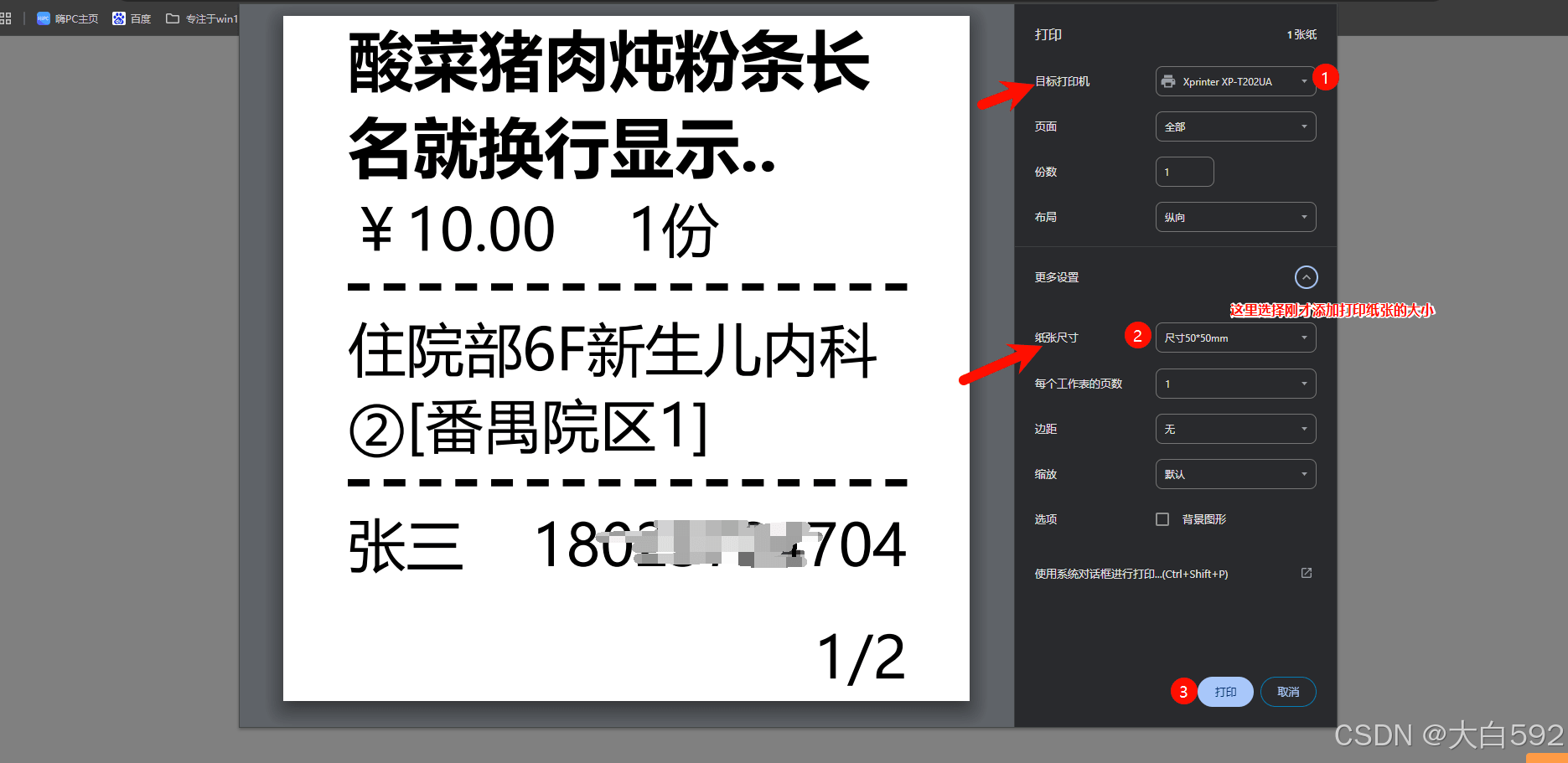
3.1预览打印效果图:
3.2相关代码:
<template>
  <!-- 网页打印小票预览页 -->
  <div class="tick">
    <div class="tick-bg">
      <div id="print-tick">
        <div class="tick-bg-content" v-for="(item, index) in 1" :key="index">
          <div class="header">
            <b class="header-title">酸菜猪肉炖粉条长名就换行显示..</b>
            <div class="header-price">
              <span>¥10.00</span>
              <span class="header-price-num">1份</span>
            </div>
          </div>
          <div class="body-address">住院部6F新生儿内科②[番禺院区1]</div>
          <div class="footer">
            <div class="footer-flex">
              <span class="userName">张三</span>
              <span>1802****704</span>
            </div>
            <div class="footer-page">{{ index+1 }}/2</div>
          </div>
        </div>
      </div>

      <el-button class="w-80 ps-origin-btn" size="mini" @click="convertToImageAndPrint">打印</el-button>
    </div>
  </div>
</template>

<script>
import print from 'print-js'

export default {
  created() {
    this.type = this.$route.query.type
    this.printList = JSON.parse(localStorage.printList)
    console.log('this.printList', this.printList)
  },
  data() {
    return {
      type: 'takeaway',
      printList: []
    }
  },
  methods: {
    // 确认打印
    convertToImageAndPrint() {
      print({
        printable: 'print-tick',
        type: 'html',
        scanStyles: false,
        // style: '@media print { body { margin: 0; padding: 0;}  .print-tick { margin: 0 auto; width: 100%;} }',
        css: 'data:text/css,' + encodeURIComponent(this.rechargeStyle())
      })
    },
    // 打印样式
    rechargeStyle() {
      return `
        @page {
          width: 100%;
          margin: 0 !important;
          padding: 0 !important;
          box-sizing: border-box !important;
        }
        *, body {
          width: 100% !important;
          margin: 0 !important;
          padding: 0 !important;
          box-sizing: border-box !important;
          font-size: 16px !important;
        }
        #print-tick .tick-bg-content{
          padding: 0 18px !important;
        }
        #print-tick .header {
          width: 100% !important;
          padding-bottom: 5px !important;
          margin-bottom: 5px !important;
          border-bottom: 2px dashed #000 !important;
        }
        #print-tick .header .header-title{
          font-weight: bold !important;
          font-size: 18px !important;
          display: -webkit-box !important;
          display: -moz-box !important;
          overflow: hidden !important;
          line-clamp: 2 !important;
          -webkit-box-orient: vertical !important;
          -webkit-line-clamp: 2 !important;
          -moz-box-orient: vertical !important;
          -moz-line-clamp: 2 !important;
        }
        #print-tick .header .header-price{
          display: flex !important;
        }
        #print-tick .header-price .header-price-num{
          display: inline-block;
          padding-left: 10px;
        }
        #print-tick .body-address{
          width: 100% !important;
          margin-bottom: 5px !important;
          display: -webkit-box !important;
          display: -moz-box !important;
          overflow: hidden !important;
          line-clamp: 2 !important;
          -webkit-box-orient: vertical !important;
          -webkit-line-clamp: 2 !important;
          -moz-box-orient: vertical !important;
          -moz-line-clamp: 2 !important;
        }
        #print-tick .footer{
          padding-top: 5px !important;
          border-top: 2px dashed #000 !important;
        }
        #print-tick .footer .footer-flex{
          width: 100% !important;
          display: flex !important;
          justify-content: space-between !important;
          align-items: center !important;
        }
        #print-tick .footer .footer-page{
          display: flex !important;
          justify-content: end !important;
          padding-top: 10px !important;
        }

        @-moz-document url-prefix() {
          *, body {
            letter-spacing: -1px !important;
            width: 100% !important;
            margin: 0 !important;
            padding: 0 !important;
            box-sizing: border-box !important;
            font-size: 16px !important;
          }
          #print-tick .tick-bg-content {
            padding:0 0 0 30px !important;
          }
          #print-tick .header .header-price{
            display: flex !important;
            margin-top: 10px !important;
          }
        }
      `
    }
  }
}
</script>

<style lang="scss" scoped>
.tick {
  &-bg {
    background-color: grey;
    min-height: 100vh;
    width: 100%;
    padding: 20px;
    display: flex;
    flex-direction: column;
    align-items: center;
    #print-tick {
      font-size: 12px;
      line-height: 16px;
      font-weight: 500;
      .tick-bg-content {
        padding: 20px;
        margin: 0 auto;
        width: 290px;
        display: flex;
        flex-direction: column;
        justify-content: space-between;
        align-items: center;
        background-color: #fff;
        margin-bottom: 20px;
        .header {
          width: 100%;
          padding-bottom: 10px;
          margin-bottom: 10px;
          border-bottom: 2px dashed #dddddd;
          .header-title {
            display: -webkit-box !important;
            display: -moz-box !important;
            overflow: hidden !important;
            line-clamp: 2 !important;
            -webkit-box-orient: vertical !important;
            -webkit-line-clamp: 2 !important;
            -moz-box-orient: vertical !important;
            -moz-line-clamp: 2 !important;
          }
          .header-price {
            // margin-top: 10px;
            // transform: translate(100%, 0);
            // width: 50%;
            // display: flex;
            // justify-content: space-between;
            // align-items: center;
          .header-price-num{
              margin-top: 10px;
              display: inline-block;
              padding-left: 50px;
            }
          }
        }
        .body-address {
          width: 100%;
          margin-bottom: 10px;
          display: -webkit-box !important;
          -webkit-box-orient: vertical !important;
          -webkit-line-clamp: 2 !important;
          line-clamp: 2 !important;
          overflow: hidden !important;
        }
        .footer {
          width: 100%;
          border-top: 2px dashed #ddd;
          padding-top: 10px !important;
          .footer-flex {
            display: flex;
            justify-content: space-between;
            align-items: center;
          }
          .footer-page {
            padding-top: 10px;
            display: flex;
            justify-content: end;
            align-items: center;
          }
        }
      }
    }
  }
}
</style>
以上关键点在于print()打印的方法,可能要注意的是打印时的样式调整,每个浏览器要处理下样式兼容问题,火狐比较特殊点,也做了打印时的样式特殊处理如下:
@-moz-document url-prefix() {
          *, body {
            letter-spacing: -1px !important;
            width: 100% !important;
            margin: 0 !important;
            padding: 0 !important;
            box-sizing: border-box !important;
            font-size: 16px !important;
          }
          #print-tick .tick-bg-content {
            padding:0 0 0 30px !important;
          }
          #print-tick .header .header-price{
            display: flex !important;
            margin-top: 10px !important;
          }
        }
3.3点击打印时,会弹出:
4、总结:
网页打印其实就是设置好打印设备,调试好机器,代码方面写一个预览页面,用插件PrintJs就好,其他有问题再慢慢调试就行。
到此这篇关于Print.Js网页打印标签的文章就介绍到这了,更多相关PrintJs网页打印标签内容请搜索脚本之家以前的文章或继续浏览下面的相关文章希望大家以后多多支持脚本之家!
相关文章
 本文主要分享了js实现省市区三级联动菜单效果的示例代码。具有很好的参考价值,下面跟着小编一起来看下吧2017-02-02
 select没有只读属性,所以需要在select外面包含一个span,通过js来改变,需要的朋友可以参考下2014-04-04
 下面小编就为大家带来一篇使用原生js+canvas实现模拟心电图的实例。小编觉得挺不错的,现在就分享给大家,也给大家做个参考。一起跟随小编过来看看吧2017-09-09
 本文给大家介绍如何判断用户是否是用微信浏览器的实例代码,根据关键字 MicroMessenger 来判断是否是微信内置的浏览器,感兴趣的朋友可以参考下实现代码2016-06-06
 这篇文章主要介绍了Javascript call及apply应用场景及实例,文中通过示例代码介绍的非常详细,对大家的学习或者工作具有一定的参考学习价值,需要的朋友可以参考下2020-08-08
Bootstrap Table 双击、单击行获取该行及全表内容
这篇文章主要介绍了Bootstrap Table 双击、单击行获取该行内容及获取全表的内容,本文通过实例代码给大家介绍的非常详细,具有一定的参考借鉴价值,需要的朋友可以参考下2018-08-08 这篇文章主要为大家详细介绍了JavaScript实现商品评价五星好评,文中示例代码介绍的非常详细,具有一定的参考价值,感兴趣的小伙伴们可以参考一下2020-11-11
 这篇文章主要介绍了前端解决大规模并发请求问题的多种方法,包括按需加载、分页与无限滚动、缓存机制、减少HTTP请求、使用CDN、前端限流、异步加载、预加载、优化资源大小、代码分割以及服务器端渲染或静态站点生成,需要的朋友可以参考下2024-11-11
 在现代前端开发中,监控体系是保障用户体验和系统稳定性的关键基础设施,本文将深入探讨前端监控的三大核心维度,即性能监控,错误监控和行为监控,感兴趣的小伙伴可以了解下2026-04-04
Base64(二进制)图片编码解析及在各种浏览器的兼容性处理
这篇文章主要介绍了Base64(二进制)图片编码解析及在各种浏览器的兼容性处理,需要的朋友可以参考下2017-02-02
最新评论