

TypeScript通过命令行方式使用编译配置
更新时间:2026年06月07日 09:35:37 作者:听海边涛声
本文主要介绍了TypeScript通过命令行方式使用编译配置,文中通过示例代码介绍的非常详细,对大家的学习或者工作具有一定的参考学习价值,需要的朋友们下面随着小编来一起学习学习吧
除了使用tsconfig.json配置文件进行编译配置外,还可以通过命令行来使用。例如:
tsc hello.ts --target es6 --moduleResolution nodenext -module NodeNext
注意:
1)tsc后带有输入文件时(例如tsc hello.ts),将忽略tsconfig.json文件中的配置。此时启用默认配置。如果要修改,就要通过类似--moduleResolution nodenext这样的形式来指定。
2)tsc后不带输入文件时时(例如tsc),才会启用tsconfig.json文件。
推荐使用tsconfig.json配置文件。因为TS的配置非常多,都通过命令行的方式来指定,那太繁琐了,看起来也不清晰。
例如:

指定编译参数进行编译:

编译生成的js文件:

作为对比,如果不指定编译参数,直接运行tsc hello.ts命令,生成的js文件:
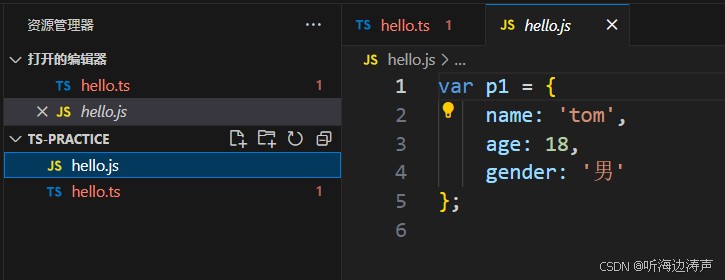
通过运行 tsc --init命令,自动生成一个tsconfig.json文件:
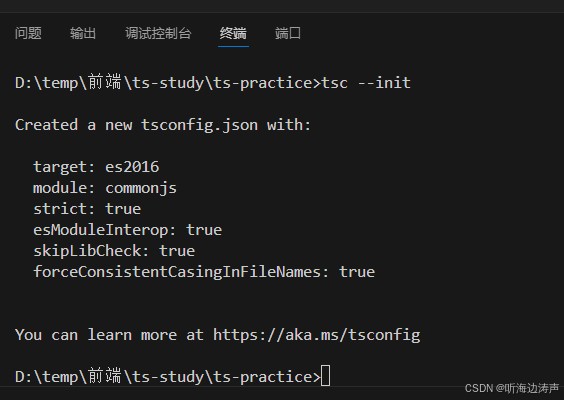

自动生成的tsconfig.json文件的全部内容:
{
  "compilerOptions": {
    /* Visit https://aka.ms/tsconfig to read more about this file */
    /* Projects */
    // "incremental": true,                              /* Save .tsbuildinfo files to allow for incremental compilation of projects. */
    // "composite": true,                                /* Enable constraints that allow a TypeScript project to be used with project references. */
    // "tsBuildInfoFile": "./.tsbuildinfo",              /* Specify the path to .tsbuildinfo incremental compilation file. */
    // "disableSourceOfProjectReferenceRedirect": true,  /* Disable preferring source files instead of declaration files when referencing composite projects. */
    // "disableSolutionSearching": true,                 /* Opt a project out of multi-project reference checking when editing. */
    // "disableReferencedProjectLoad": true,             /* Reduce the number of projects loaded automatically by TypeScript. */
    /* Language and Environment */
    "target": "es2016",                                  /* Set the JavaScript language version for emitted JavaScript and include compatible library declarations. */
    // "lib": [],                                        /* Specify a set of bundled library declaration files that describe the target runtime environment. */
    // "jsx": "preserve",                                /* Specify what JSX code is generated. */
    // "experimentalDecorators": true,                   /* Enable experimental support for legacy experimental decorators. */
    // "emitDecoratorMetadata": true,                    /* Emit design-type metadata for decorated declarations in source files. */
    // "jsxFactory": "",                                 /* Specify the JSX factory function used when targeting React JSX emit, e.g. 'React.createElement' or 'h'. */
    // "jsxFragmentFactory": "",                         /* Specify the JSX Fragment reference used for fragments when targeting React JSX emit e.g. 'React.Fragment' or 'Fragment'. */
    // "jsxImportSource": "",                            /* Specify module specifier used to import the JSX factory functions when using 'jsx: react-jsx*'. */
    // "reactNamespace": "",                             /* Specify the object invoked for 'createElement'. This only applies when targeting 'react' JSX emit. */
    // "noLib": true,                                    /* Disable including any library files, including the default lib.d.ts. */
    // "useDefineForClassFields": true,                  /* Emit ECMAScript-standard-compliant class fields. */
    // "moduleDetection": "auto",                        /* Control what method is used to detect module-format JS files. */
    /* Modules */
    "module": "commonjs",                                /* Specify what module code is generated. */
    // "rootDir": "./",                                  /* Specify the root folder within your source files. */
    // "moduleResolution": "node10",                     /* Specify how TypeScript looks up a file from a given module specifier. */
    // "baseUrl": "./",                                  /* Specify the base directory to resolve non-relative module names. */
    // "paths": {},                                      /* Specify a set of entries that re-map imports to additional lookup locations. */
    // "rootDirs": [],                                   /* Allow multiple folders to be treated as one when resolving modules. */
    // "typeRoots": [],                                  /* Specify multiple folders that act like './node_modules/@types'. */
    // "types": [],                                      /* Specify type package names to be included without being referenced in a source file. */
    // "allowUmdGlobalAccess": true,                     /* Allow accessing UMD globals from modules. */
    // "moduleSuffixes": [],                             /* List of file name suffixes to search when resolving a module. */
    // "allowImportingTsExtensions": true,               /* Allow imports to include TypeScript file extensions. Requires '--moduleResolution bundler' and either '--noEmit' or '--emitDeclarationOnly' to be set. */
    // "resolvePackageJsonExports": true,                /* Use the package.json 'exports' field when resolving package imports. */
    // "resolvePackageJsonImports": true,                /* Use the package.json 'imports' field when resolving imports. */
    // "customConditions": [],                           /* Conditions to set in addition to the resolver-specific defaults when resolving imports. */
    // "resolveJsonModule": true,                        /* Enable importing .json files. */
    // "allowArbitraryExtensions": true,                 /* Enable importing files with any extension, provided a declaration file is present. */
    // "noResolve": true,                                /* Disallow 'import's, 'require's or '<reference>'s from expanding the number of files TypeScript should add to a project. */
    /* JavaScript Support */
    // "allowJs": true,                                  /* Allow JavaScript files to be a part of your program. Use the 'checkJS' option to get errors from these files. */
    // "checkJs": true,                                  /* Enable error reporting in type-checked JavaScript files. */
    // "maxNodeModuleJsDepth": 1,                        /* Specify the maximum folder depth used for checking JavaScript files from 'node_modules'. Only applicable with 'allowJs'. */
    /* Emit */
    // "declaration": true,                              /* Generate .d.ts files from TypeScript and JavaScript files in your project. */
    // "declarationMap": true,                           /* Create sourcemaps for d.ts files. */
    // "emitDeclarationOnly": true,                      /* Only output d.ts files and not JavaScript files. */
    // "sourceMap": true,                                /* Create source map files for emitted JavaScript files. */
    // "inlineSourceMap": true,                          /* Include sourcemap files inside the emitted JavaScript. */
    // "outFile": "./",                                  /* Specify a file that bundles all outputs into one JavaScript file. If 'declaration' is true, also designates a file that bundles all .d.ts output. */
    // "outDir": "./",                                   /* Specify an output folder for all emitted files. */
    // "removeComments": true,                           /* Disable emitting comments. */
    // "noEmit": true,                                   /* Disable emitting files from a compilation. */
    // "importHelpers": true,                            /* Allow importing helper functions from tslib once per project, instead of including them per-file. */
    // "downlevelIteration": true,                       /* Emit more compliant, but verbose and less performant JavaScript for iteration. */
    // "sourceRoot": "",                                 /* Specify the root path for debuggers to find the reference source code. */
    // "mapRoot": "",                                    /* Specify the location where debugger should locate map files instead of generated locations. */
    // "inlineSources": true,                            /* Include source code in the sourcemaps inside the emitted JavaScript. */
    // "emitBOM": true,                                  /* Emit a UTF-8 Byte Order Mark (BOM) in the beginning of output files. */
    // "newLine": "crlf",                                /* Set the newline character for emitting files. */
    // "stripInternal": true,                            /* Disable emitting declarations that have '@internal' in their JSDoc comments. */
    // "noEmitHelpers": true,                            /* Disable generating custom helper functions like '__extends' in compiled output. */
    // "noEmitOnError": true,                            /* Disable emitting files if any type checking errors are reported. */
    // "preserveConstEnums": true,                       /* Disable erasing 'const enum' declarations in generated code. */
    // "declarationDir": "./",                           /* Specify the output directory for generated declaration files. */
    /* Interop Constraints */
    // "isolatedModules": true,                          /* Ensure that each file can be safely transpiled without relying on other imports. */
    // "verbatimModuleSyntax": true,                     /* Do not transform or elide any imports or exports not marked as type-only, ensuring they are written in the output file's format based on the 'module' setting. */
    // "isolatedDeclarations": true,                     /* Require sufficient annotation on exports so other tools can trivially generate declaration files. */
    // "allowSyntheticDefaultImports": true,             /* Allow 'import x from y' when a module doesn't have a default export. */
    "esModuleInterop": true,                             /* Emit additional JavaScript to ease support for importing CommonJS modules. This enables 'allowSyntheticDefaultImports' for type compatibility. */
    // "preserveSymlinks": true,                         /* Disable resolving symlinks to their realpath. This correlates to the same flag in node. */
    "forceConsistentCasingInFileNames": true,            /* Ensure that casing is correct in imports. */
    /* Type Checking */
    "strict": true,                                      /* Enable all strict type-checking options. */
    // "noImplicitAny": true,                            /* Enable error reporting for expressions and declarations with an implied 'any' type. */
    // "strictNullChecks": true,                         /* When type checking, take into account 'null' and 'undefined'. */
    // "strictFunctionTypes": true,                      /* When assigning functions, check to ensure parameters and the return values are subtype-compatible. */
    // "strictBindCallApply": true,                      /* Check that the arguments for 'bind', 'call', and 'apply' methods match the original function. */
    // "strictPropertyInitialization": true,             /* Check for class properties that are declared but not set in the constructor. */
    // "noImplicitThis": true,                           /* Enable error reporting when 'this' is given the type 'any'. */
    // "useUnknownInCatchVariables": true,               /* Default catch clause variables as 'unknown' instead of 'any'. */
    // "alwaysStrict": true,                             /* Ensure 'use strict' is always emitted. */
    // "noUnusedLocals": true,                           /* Enable error reporting when local variables aren't read. */
    // "noUnusedParameters": true,                       /* Raise an error when a function parameter isn't read. */
    // "exactOptionalPropertyTypes": true,               /* Interpret optional property types as written, rather than adding 'undefined'. */
    // "noImplicitReturns": true,                        /* Enable error reporting for codepaths that do not explicitly return in a function. */
    // "noFallthroughCasesInSwitch": true,               /* Enable error reporting for fallthrough cases in switch statements. */
    // "noUncheckedIndexedAccess": true,                 /* Add 'undefined' to a type when accessed using an index. */
    // "noImplicitOverride": true,                       /* Ensure overriding members in derived classes are marked with an override modifier. */
    // "noPropertyAccessFromIndexSignature": true,       /* Enforces using indexed accessors for keys declared using an indexed type. */
    // "allowUnusedLabels": true,                        /* Disable error reporting for unused labels. */
    // "allowUnreachableCode": true,                     /* Disable error reporting for unreachable code. */
    /* Completeness */
    // "skipDefaultLibCheck": true,                      /* Skip type checking .d.ts files that are included with TypeScript. */
    "skipLibCheck": true                                 /* Skip type checking all .d.ts files. */
  }
}
有了tsconfig.json文件,直接运行tsc命令:
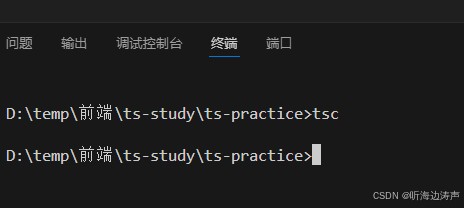
编译生成的js文件:
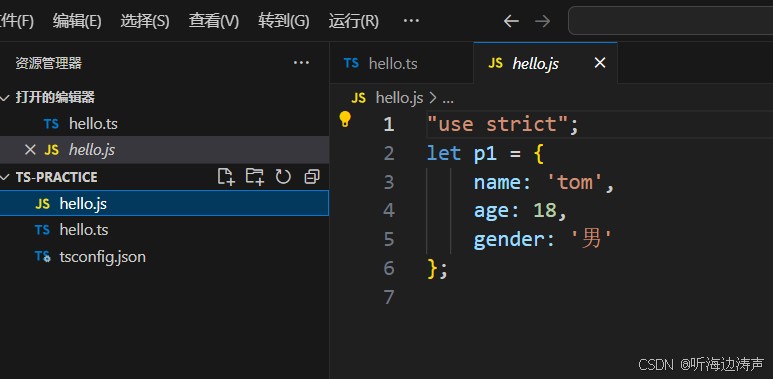
而运行tsc hello.ts命令,并不会启用tsconfig.json中的配置,生成的js文件:
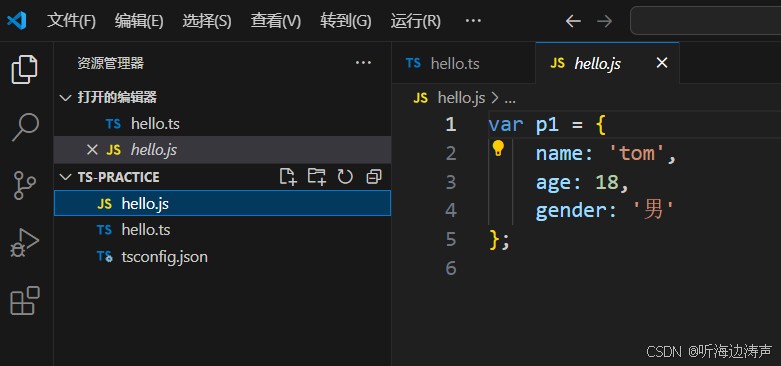
到此这篇关于TypeScript通过命令行方式使用编译配置的文章就介绍到这了,更多相关TypeScript命令行使用编译配置内容请搜索脚本之家以前的文章或继续浏览下面的相关文章希望大家以后多多支持脚本之家!
相关文章
 这篇文章主要介绍了JS函数节流和函数防抖问题分析,非常不错,具有参考借鉴价值,需要的朋友可以参考下2017-12-12
 这篇文章主要介绍了js控制div弹出层实现方法,可实现点击链接弹出div浮动层,且背景色变暗的效果,是一款非常实用的特效源码,需要的朋友可以参考下2015-05-05
 这篇文章主要给大家介绍了关于微信小程序如何监听全局变量的相关资料,文中通过示例代码介绍的非常详细,对大家的学习或者工作具有一定的参考学习价值,需要的朋友们下面随着小编来一起学习学习吧2021-04-04
 这篇文章主要介绍了js如何实现浏览器打印功能,文中示例代码非常详细,帮助大家更好的理解和学习,感兴趣的朋友可以了解下2020-07-07
 这篇文章主要介绍了原生js实现autocomplete插件的相关资料,需要的朋友可以参考下2016-04-04
 在一个项目中需要进行日期的格式化,后台传到前端是时间的整数(Date.getTime),当后台数据返回字符串时,发现转换日期时在ie下变成NaN,但是真的是这样吗?接下来我们慢慢分析2012-10-10
 window对象的alert和confirm标准方法在不同浏览器的显示效果不太相同,有个相同点是都不是很美观。本文对此解决方法进行介绍:使用js和css分别仿照它们,提供另一套函数,使在不同浏览器的有着相同的体验效果。下面就跟小编一起来看下吧2016-12-12
 网上还没用发现有人对命名函数表达式进去重复深入的讨论,正因为如此,网上出现了各种各样的误解,本文将从原理和实践两个方面来探讨JavaScript关于命名函数表达式的优缺点2012-01-01
 选择表情插入文本域的时候,显示的是类似[哈哈]这样的字符串,下面是把表情字符串转换为图片表情的一种方法2014-04-04
 相对于ES5,ES6的对象字面量得到了很大程度的增强,下面这篇文章主要给大家介绍了关于ES6学习教程之对象字面量的相关资料,文中通过示例代码介绍的非常详细,需要的朋友可以参考借鉴,下面随着小编来一起学习学习吧。2017-10-10
最新评论