

Golang自定义开发Prometheus exporter详解
1.介绍
Exporter是基于Prometheus实施的监控系统中重要的组成部分,承担数据指标的采集工作,官方的exporter列表中已经包含了常见的绝大多数的系统指标监控,比如用于机器性能监控的node_exporter, 用于网络设备监控的snmp_exporter等等。这些已有的exporter对于监控来说,仅仅需要很少的配置工作就能提供完善的数据指标采集。
prometheus四种类型的指标Counter 计数,Gauge 观测类,Histogram 直方,Summary 摘要 用golang语言如何构造这4种类型对应的指标,二是搞清楚修改指标值的场景和方式。
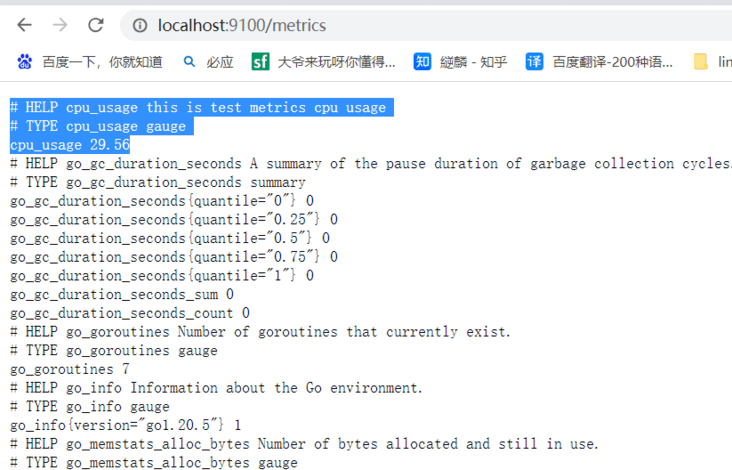
不带label的基本例子
package main

import (
    "github.com/prometheus/client_golang/prometheus"
    "github.com/prometheus/client_golang/prometheus/promhttp"
    "net/http"
)

func main() {
    // 定义指标
    cpuUsage := prometheus.NewGauge(prometheus.GaugeOpts{
        Name:        "cpu_usage",                              // 指标名称
        Help:        "this is test metrics cpu usage",         // 帮助信息

    })
    // 给指标设置值
    cpuUsage.Set(29.56)
    // 注册指标
    prometheus.MustRegister(cpuUsage)
    // 暴露指标
    http.Handle("/metrics", promhttp.Handler())
    http.ListenAndServe("localhost:9100", nil)
}
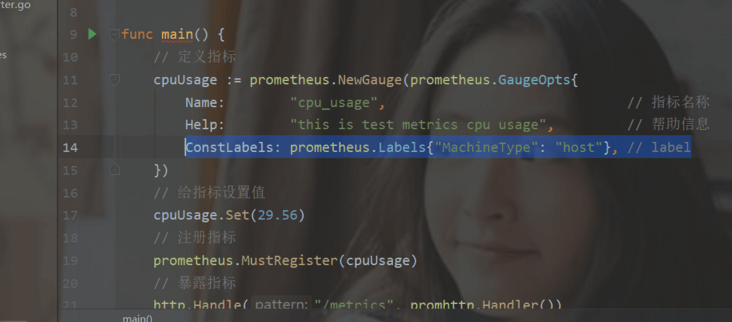
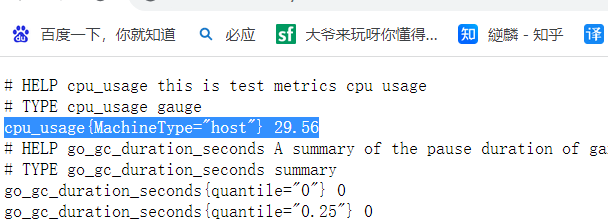
带有固定label指标的例子
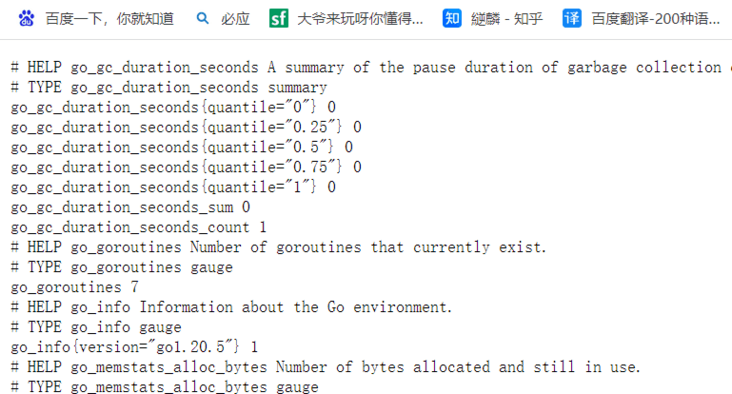
带有非固定label指标的例子
package main

import (
    "github.com/prometheus/client_golang/prometheus"
    "github.com/prometheus/client_golang/prometheus/promhttp"
    "net/http"
)

func main() {
    //定义带有不固定label的指标
    mtu := prometheus.NewGaugeVec(prometheus.GaugeOpts{
        Name: "interface_mtu",
        Help: "网卡接口MTU",
    }, []string{"interface", "Machinetype"})

    // 给指标设置值
    mtu.WithLabelValues("lo", "host").Set(1500)
    mtu.WithLabelValues("ens32", "host").Set(1500)
    mtu.WithLabelValues("eth0", "host").Set(1500)

    // 注册指标
    prometheus.MustRegister(mtu)

    // 暴露指标
    http.Handle("/metrics", promhttp.Handler())
    http.ListenAndServe("localhost:9100", nil)
}
2. Counter指标类型
不带label的基本例子
package main

import (
    "github.com/prometheus/client_golang/prometheus"
    "github.com/prometheus/client_golang/prometheus/promhttp"
    "net/http"
)

func main() {
    // 定义指标
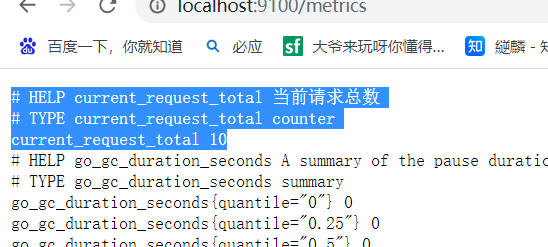
    reqTotal := prometheus.NewCounter(prometheus.CounterOpts{
        Name: "current_request_total",
        Help: "当前请求总数",
    })
    // 注册指标
    prometheus.MustRegister(reqTotal)

    // 设置值
    reqTotal.Add(10)

    // 暴露指标
    http.Handle("/metrics", promhttp.Handler())
    http.ListenAndServe("localhost:9100", nil)
}
带有固定label指标的例子
package main

import (
    "github.com/prometheus/client_golang/prometheus"
    "github.com/prometheus/client_golang/prometheus/promhttp"
    "net/http"
)

func main() {
    // 定义指标
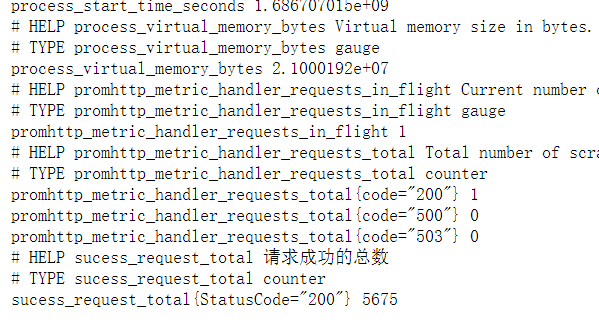
    suceReqTotal := prometheus.NewCounter(prometheus.CounterOpts{
        Name:        "sucess_request_total",
        Help:        "请求成功的总数",
        ConstLabels: prometheus.Labels{"StatusCode": "200"},
    })
    // 注册指标
    prometheus.MustRegister(suceReqTotal)

    // 设置值
    suceReqTotal.Add(5675)

    // 暴露指标
    http.Handle("/metrics", promhttp.Handler())
    http.ListenAndServe("localhost:9100", nil)
}
带有非固定label指标的例子
package main

import (
    "github.com/prometheus/client_golang/prometheus"
    "github.com/prometheus/client_golang/prometheus/promhttp"
    "net/http"
)

func main() {
    // 定义指标
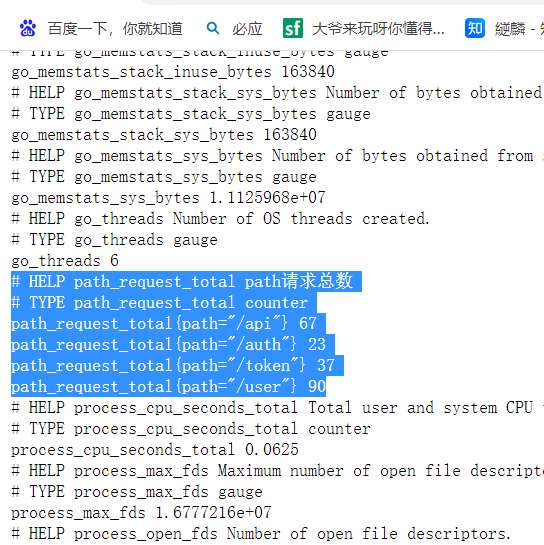
    pathReqTotal := prometheus.NewCounterVec(prometheus.CounterOpts{
        Name: "path_request_total",
        Help: "path请求总数",
    }, []string{"path"})
    // 注册指标
    prometheus.MustRegister(pathReqTotal)

    // 设置值
    pathReqTotal.WithLabelValues("/token").Add(37)
    pathReqTotal.WithLabelValues("/auth").Add(23)
    pathReqTotal.WithLabelValues("/user").Add(90)
    pathReqTotal.WithLabelValues("/api").Add(67)
    // 暴露指标
    http.Handle("/metrics", promhttp.Handler())
    http.ListenAndServe("localhost:9100", nil)
}
3. Histogram指标类型
不带label的基本例子
package main

import (
    "github.com/prometheus/client_golang/prometheus"
    "github.com/prometheus/client_golang/prometheus/promhttp"
    "net/http"
)

func main() {
    // 定义指标
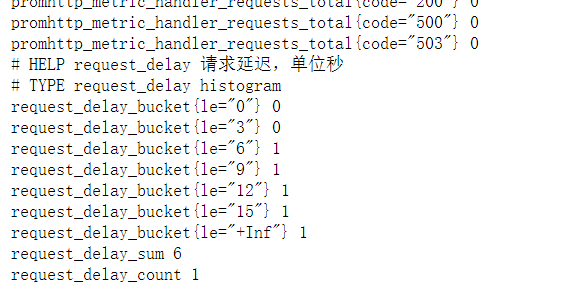
    reqDelay := prometheus.NewHistogram(prometheus.HistogramOpts{
        Name:    "request_delay",
        Help:    "请求延迟,单位秒",
        Buckets: prometheus.LinearBuckets(0, 3, 6), // 调用LinearBuckets生成区间,从0开始,宽度3,共6个Bucket
    })

    // 注册指标
    prometheus.MustRegister(reqDelay)

    // 设置值
    reqDelay.Observe(6)

    // 暴露指标
    http.Handle("/metrics", promhttp.Handler())
    http.ListenAndServe("localhost:9100", nil)
}
带固定label的例子
package main

import (
    "github.com/prometheus/client_golang/prometheus"
    "github.com/prometheus/client_golang/prometheus/promhttp"
    "net/http"
)

func main() {
    // 定义指标
    reqDelay := prometheus.NewHistogram(prometheus.HistogramOpts{
        Name:        "request_delay",
        Help:        "请求延迟,单位秒",
        Buckets:     prometheus.LinearBuckets(0, 3, 6), // 调用LinearBuckets生成区间,从0开始,宽度3,共6个Bucket
        ConstLabels: prometheus.Labels{"path": "/api"},
    })

    // 注册指标
    prometheus.MustRegister(reqDelay)

    // 设置值
    reqDelay.Observe(6)
    // 暴露指标
    http.Handle("/metrics", promhttp.Handler())
    http.ListenAndServe("localhost:9100", nil)
}
带有非固定label的例子
package main

import (
    "github.com/prometheus/client_golang/prometheus"
    "github.com/prometheus/client_golang/prometheus/promhttp"
    "net/http"
)

func main() {
    // 定义指标
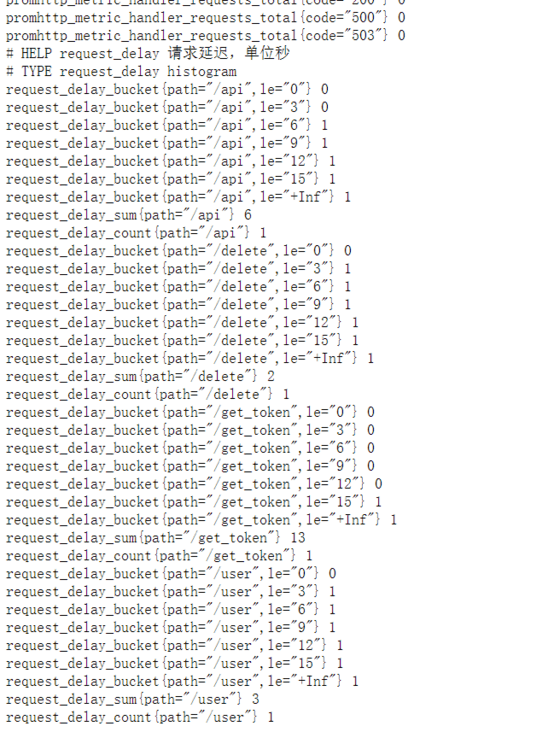
    reqDelay := prometheus.NewHistogramVec(prometheus.HistogramOpts{
        Name:    "request_delay",
        Help:    "请求延迟,单位秒",
        Buckets: prometheus.LinearBuckets(0, 3, 6), // 调用LinearBuckets生成区间,从0开始,宽度3,共6个Bucket
    }, []string{"path"})

    // 注册指标
    prometheus.MustRegister(reqDelay)

    // 设置值
    reqDelay.WithLabelValues("/api").Observe(6)
    reqDelay.WithLabelValues("/user").Observe(3)
    reqDelay.WithLabelValues("/delete").Observe(2)
    reqDelay.WithLabelValues("/get_token").Observe(13)
    // 暴露指标
    http.Handle("/metrics", promhttp.Handler())
    http.ListenAndServe("localhost:9100", nil)
}
4.Summary指标类型
不带label的例子
package main

import (
    "github.com/prometheus/client_golang/prometheus"
    "github.com/prometheus/client_golang/prometheus/promhttp"
    "net/http"
)

func main() {
    // 定义指标
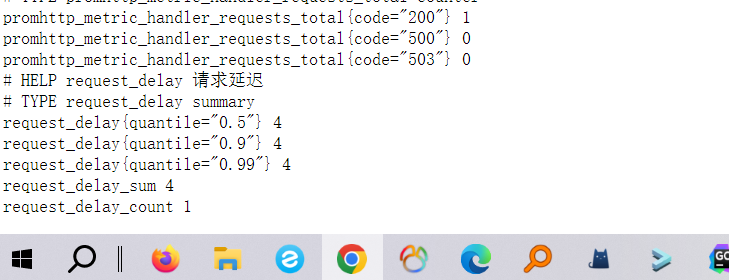
    reqDelay := prometheus.NewSummary(prometheus.SummaryOpts{
        Name:       "request_delay",
        Help:       "请求延迟",
        Objectives: map[float64]float64{0.5: 0.05, 0.90: 0.01, 0.99: 0.001}, // 百分比:精度
    })

    // 注册指标
    prometheus.MustRegister(reqDelay)

    // 设置值
    reqDelay.Observe(4)
    // 暴露指标
    http.Handle("/metrics", promhttp.Handler())
    http.ListenAndServe("localhost:9100", nil)
}
带有固定label的例子
package main

import (
    "github.com/prometheus/client_golang/prometheus"
    "github.com/prometheus/client_golang/prometheus/promhttp"
    "net/http"
)

func main() {
    // 定义指标
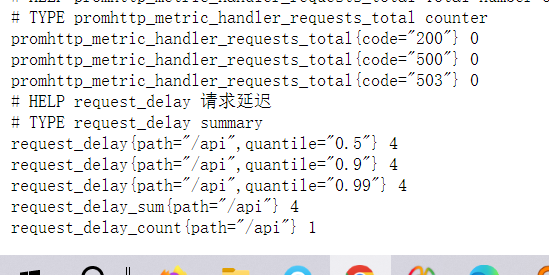
    reqDelay := prometheus.NewSummary(prometheus.SummaryOpts{
        Name:        "request_delay",
        Help:        "请求延迟",
        Objectives:  map[float64]float64{0.5: 0.05, 0.90: 0.01, 0.99: 0.001}, // 百分比:精度
        ConstLabels: prometheus.Labels{"path": "/api"},
    })

    // 注册指标
    prometheus.MustRegister(reqDelay)

    // 设置值
    reqDelay.Observe(4)
    // 暴露指标
    http.Handle("/metrics", promhttp.Handler())
    http.ListenAndServe("localhost:9100", nil)
}
带有非固定label的例子
package main

import (
    "github.com/prometheus/client_golang/prometheus"
    "github.com/prometheus/client_golang/prometheus/promhttp"
    "net/http"
)

func main() {
    // 定义指标
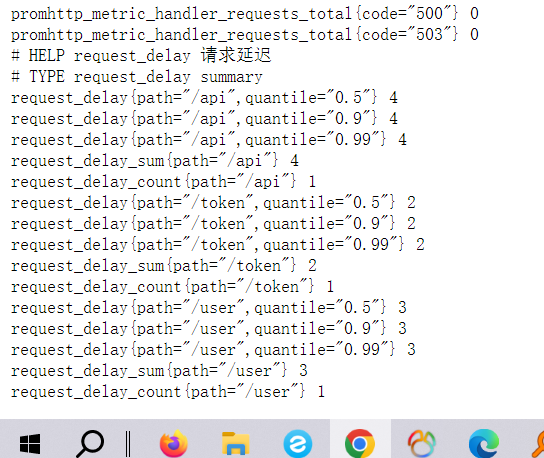
    reqDelay := prometheus.NewSummaryVec(prometheus.SummaryOpts{
        Name:       "request_delay",
        Help:       "请求延迟",
        Objectives: map[float64]float64{0.5: 0.05, 0.90: 0.01, 0.99: 0.001}, // 百分比:精度
    }, []string{"path"})

    // 注册指标
    prometheus.MustRegister(reqDelay)

    // 设置值
    reqDelay.WithLabelValues("/api").Observe(4)
    reqDelay.WithLabelValues("/token").Observe(2)
    reqDelay.WithLabelValues("/user").Observe(3)
    // 暴露指标
    http.Handle("/metrics", promhttp.Handler())
    http.ListenAndServe("localhost:9100", nil)
}
5. 值的修改
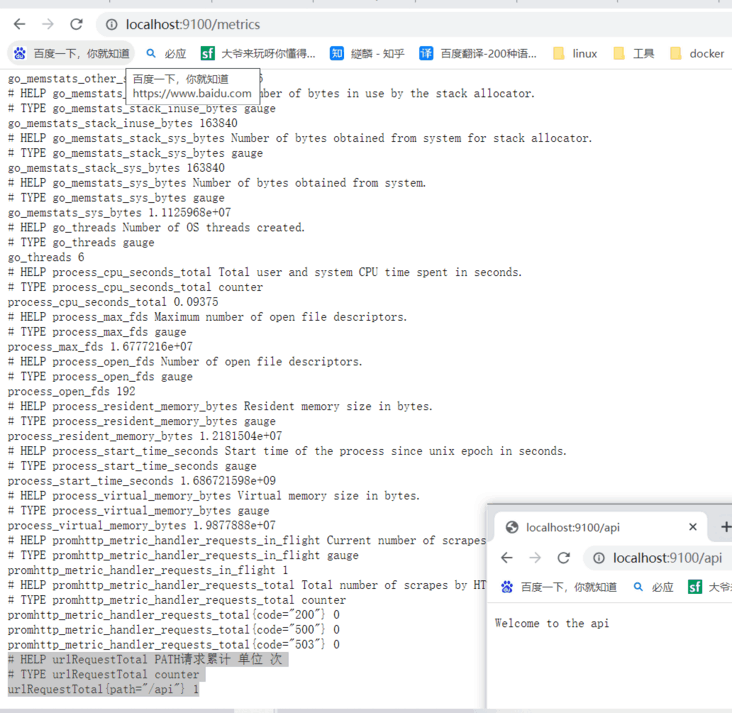
5.1 基于事件的触发来修改值,比如每访问1次/api就增1
基于事件的触发对指标的值进行修改,通常大多数是来自业务方面的指标需求,如自研的应用需要暴露相关指标给promethus进行监控、展示,那么指标采集的代码(指标定义、设置值)就要嵌入到自研应用代码里了。
package main

import (
    "fmt"
    "github.com/prometheus/client_golang/prometheus"
    "github.com/prometheus/client_golang/prometheus/promhttp"
    "net/http"
)

func main() {
    urlRequestTotal := prometheus.NewCounterVec(prometheus.CounterOpts{
        Name: "urlRequestTotal",
        Help: "PATH请求累计 单位 次",
    }, []string{"path"})

    http.HandleFunc("/api", func(w http.ResponseWriter, r *http.Request) {
        urlRequestTotal.WithLabelValues(r.URL.Path).Inc() // 使用Inc函数进行增1
        fmt.Fprintf(w, "Welcome to the api")
    })

    prometheus.MustRegister(urlRequestTotal)
    http.Handle("/metrics", promhttp.Handler())
    http.ListenAndServe("localhost:9100", nil)
}
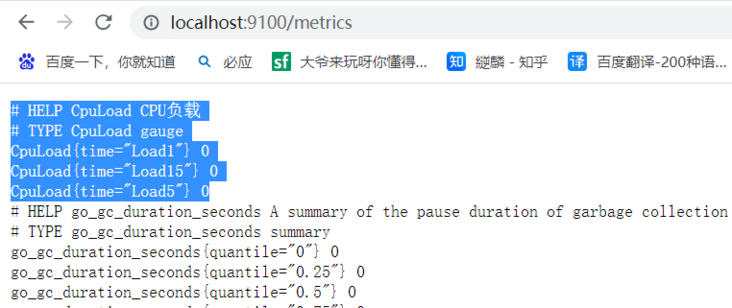
基于时间周期的触发来修改值,比如下面的示例中,是每间隔1秒获取cpu负载指标
基于时间周期的触发,可以是多少秒、分、时、日、月、周。
package main

import (
    "github.com/prometheus/client_golang/prometheus"
    "github.com/prometheus/client_golang/prometheus/promhttp"
    "github.com/shirou/gopsutil/load"
    "net/http"
    "time"
)

func main() {
    cpuUsage := prometheus.NewGaugeVec(prometheus.GaugeOpts{
        Name: "CpuLoad",
        Help: "CPU负载",
    }, []string{"time"})

    // 开启一个子协程执行该匿名函数内的逻辑来给指标设置值,且每秒获取一次
    go func() {
        for range time.Tick(time.Second) {
            info, _ := load.Avg()
            cpuUsage.WithLabelValues("Load1").Set(float64(info.Load1))
            cpuUsage.WithLabelValues("Load5").Set(float64(info.Load5))
            cpuUsage.WithLabelValues("Load15").Set(float64(info.Load15))
        }
    }()

    prometheus.MustRegister(cpuUsage)
    http.Handle("/metrics", promhttp.Handler())
    http.ListenAndServe("localhost:9100", nil)
}
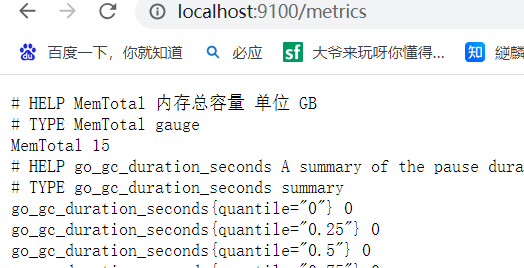
基于每访问一次获取指标的URI才修改值,比如每次访问/metrics才去修改某些指标的值
下面的这个示例是,每访问一次/metrics就获取一次内存总容量
package main

import (
    "fmt"
    "github.com/prometheus/client_golang/prometheus"
    "github.com/prometheus/client_golang/prometheus/promhttp"

    "github.com/shirou/gopsutil/mem"
    "net/http"
)

func main() {
    MemTotal := prometheus.NewGaugeFunc(prometheus.GaugeOpts{
        Name: "MemTotal",
        Help: "内存总容量 单位 GB",
    }, func() float64 {
        fmt.Println("call MemTotal ...")
        info, _ := mem.VirtualMemory()
        return float64(info.Total / 1024 / 1024 / 1024)
    })
    prometheus.MustRegister(MemTotal)
    http.Handle("/metrics", promhttp.Handler())
    http.ListenAndServe("localhost:9100", nil)
}
到此这篇关于Golang自定义开发Prometheus exporter详解的文章就介绍到这了,更多相关Golang Prometheus exporter内容请搜索脚本之家以前的文章或继续浏览下面的相关文章希望大家以后多多支持脚本之家!
相关文章

Go外部依赖包从vendor,$GOPATH和$GOPATH/pkg/mod查找顺序
这篇文章主要介绍了Go外部依赖包vendor,$GOPATH和$GOPATH/pkg/mod下查找顺序,具有很好的参考价值,希望对大家有所帮助。一起跟随小编过来看看吧2020-12-12 这篇文章主要给大家介绍了关于golang如何实现mapreduce单进程版本的相关资料,文中通过示例代码介绍的非常详细,对大家的学习或者工作具有一定的参考学习价值,需要的朋友们下面随着小编来一起学习学习吧。2018-01-01
 这篇文章主要介绍了golang将切片或数组根据某个字段进行分组操作,具有很好的参考价值,希望对大家有所帮助。一起跟随小编过来看看吧2020-12-12
 Base62 编码是一种在字符编码中使用62个字符的编码方式,在计算机科学中,,Go语言是一种静态类型、编译型语言,它由Google开发并开源,本文给大家介绍了Go语言实现Base62编码的三种方式以及对比分析,需要的朋友可以参考下2025-05-05
 Go官方提供了database包,database包下有sql/driver。该包用来定义操作数据库的接口,这保证了无论使用哪种数据库,操作方式都是相同的。本文就来和大家聊聊Go语言如何操作MYSQL实现CRUD,希望对大家有所帮助2023-02-02
 最近在工作中使用golang编程,今天的文章给大家分享一下Go语言死锁与goroutine泄露问题,具有一定的参考价值,感兴趣的小伙伴们可以参考一下2021-07-07
 近来关于对Golang的讨论有很多,七牛的几个大牛们也断定Go语言在未来将会快速发展,并且很可能会取代Java成为互联网时代最受欢迎的编程语言。本文将带你了解它不同于其他语言的九个特性2021-09-09
 这篇文章主要介绍了Golang 语言高效使用字符串的方法,本文通过实例代码给大家介绍的非常详细,对大家的学习或工作具有一定的参考借鉴价值,需要的朋友可以参考下2021-04-04
 这篇文章主要介绍了Go语言hello world实例,本文先是给出了hello world的代码实例,然后对一些知识点和技巧做了解释,需要的朋友可以参考下2014-10-10
Go语言reflect.TypeOf()和reflect.Type通过反射获取类型信息
这篇文章主要介绍了Go语言reflect.TypeOf()和reflect.Type通过反射获取类型信息,文中通过示例代码介绍的非常详细,对大家的学习或者工作具有一定的参考学习价值,需要的朋友们下面随着小编来一起学习学习吧2021-04-04
最新评论