

PowerShell 实现 conda 懒加载的问题及解决方案
更新时间:2025年05月17日 15:07:16 作者:zhang-hui
本文展示了如何实现conda的懒加载,默认不加载conda环境,只有在用户执行conda命令时才加载,本文给大家分享解决方案,感兴趣的朋友一起看看吧
问题
执行命令conda init powershell会在 profile.ps1中添加conda初始化的命令。
即使用户不需要用到conda,也会初始化conda环境,拖慢PowerShell的启动速度。
解决方案
本文展示了如何实现conda的懒加载,默认不加载conda环境,只有在用户执行conda命令时才加载。
(1) Path环境变量添加conda路径
- 添加conda3的本地路径:D:\code\miniconda3
- 添加conda3的脚本路径:D:\code\miniconda3\Scripts
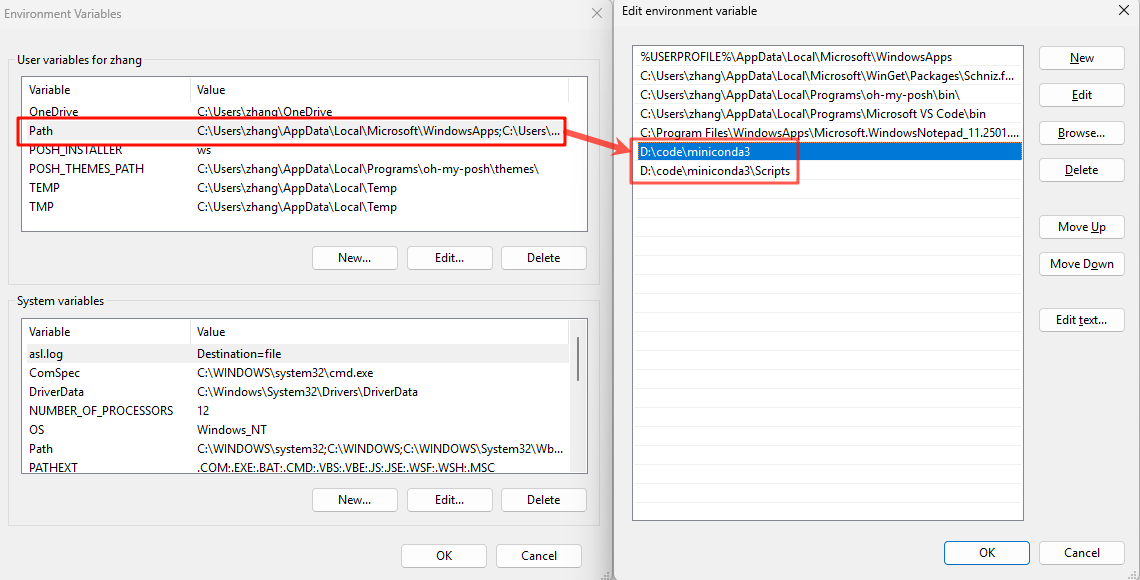
(2) 注销conda初始化命令
- 进入文件夹:C:\Users<user_name>\Documents\WindowsPowerShell
- 编辑
profile.ps1文件,注释或删除conda初始化代码
#region conda initialize
# !! Contents within this block are managed by 'conda init' !!
# If (Test-Path "D:\code\miniconda3\Scripts\conda.exe") {
#    (& "D:\code\miniconda3\Scripts\conda.exe" "shell.powershell" "hook") | Out-String | ?{$_} | Invoke-Expression
# }
#endregion
(3) 封装conda命令,实现懒加载
- 进入文件夹:C:\Users<user_name>\Documents\WindowsPowerShell
- 编辑
Microsoft.PowerShell_profile.ps1文件,添加代码。
function Load-Conda {
    If (Test-Path "D:\code\miniconda3\Scripts\conda.exe") {
        (& "D:\code\miniconda3\Scripts\conda.exe" "shell.powershell" "hook") | Out-String | ?{$_} | Invoke-Expression
    }
    conda @args
}
Set-Alias conda Load-Conda
到此这篇关于PowerShell 实现 conda 懒加载的文章就介绍到这了,更多相关PowerShell 实现 conda 懒加载内容请搜索脚本之家以前的文章或继续浏览下面的相关文章希望大家以后多多支持脚本之家!
您可能感兴趣的文章:
相关文章
 这篇文章主要介绍了使用Powershell捕获脚本内部的异常的小技巧,需要的朋友可以参考下2014-10-10
PowerShell查看本机文件关联程序和默认打开程序的方法
这篇文章主要介绍了PowerShell查看本机文件关联程序和默认打开程序的方法,本文给出了查看方法,同时给出了一份读取结果,需要的朋友可以参考下2015-06-06 这篇文章主要介绍了PowerShell中的变量基础知识介绍,本文的知识点是需要牢记的,需要的朋友可以参考下2014-08-08
Win8系统中使用PowerShell安装APPX应用命令介绍
这篇文章主要介绍了Win8系统中使用PowerShell安装APPX应用命令介绍,本文例子相应简单了些,大家可以在参考文章中使用相应命令查询具体用法,需要的朋友可以参考下2014-08-08 这篇文章主要介绍了PowerShell数组的一些操作技巧,比如赋值、排序、截取、计算个数等,需要的朋友可以参考下2014-08-08
 这篇文章主要介绍了PowerShell复制命令行历史命令方法,本文直接给出实现代码,需要的朋友可以参考下2015-03-03
 这篇文章主要介绍了使用PowerShell获取当前主机内存使用量和总量的方法,需要的朋友可以参考下2015-07-07
 这篇文章主要介绍了使用Powershell获取对象可变的特征的小技巧,有需要的朋友可以参考下2014-10-10
PowerShell中调用.NET对象的静态方法、静态属性和类方法、类属性例子
这篇文章主要介绍了PowerShell中调用.NET对象的静态方法、静态属性和类方法、类属性例子,即PowerShell中如何使用.NET对象的一些方法,需要的朋友可以参考下2014-08-08 这篇文章主要介绍了PowerShell设置文件只读、隐藏属性的方法,包括系统、存档和无内容索引属性都有介绍,需要的朋友可以参考下2014-08-08
最新评论