

goZero微服务开发小结
更新时间:2026年04月03日 10:16:18 作者:水痕01
本文主要介绍了使用go-zero搭建微服务环境的方法,文中通过示例代码介绍的非常详细,对大家的学习或者工作具有一定的参考学习价值,需要的朋友们下面随着小编来一起学习学习吧
一、go-zero微服务环境安装
1、go-zero脚手架的安装
go install github.com/zeromicro/go-zero/tools/goctl@latest
2、etcd的安装根据自己电脑操作系统下载对应的版本,具体的使用自己查阅文章
二、创建一个user-rpc服务
1、定义user.proto文件
syntax = "proto3";

package user;
option go_package="./user";


service User {
  rpc FindById(FindByIdReq) returns (FindByIdResp);
}

message FindByIdReq{
  int64 id = 1;
}

message FindByIdResp {
  int64 id = 1;
  string username = 2;
}
2、使用命令生成对应的项目文件
goctl rpc protoc ./user.proto --go_out=. --go-grpc_out=. --zrpc_out=./
goctl rpc protoc ./user.proto --go_out=./types --go-grpc_out=./types --zrpc_out=. --style goZero -m
3、安装对应的依赖包
go mod tidy
4、运行user服务
go run user.go
5、在etcd中查看服务是否已经注册成功
etcdctl get --prefix user.rpc
6、模拟业务代码返回数据
func (l *FindByIdLogic) FindById(in *user.FindByIdReq) (*user.FindByIdResp, error) {
	return &user.FindByIdResp{
		Id:       in.Id,
		Username: "哈哈哈",
	}, nil
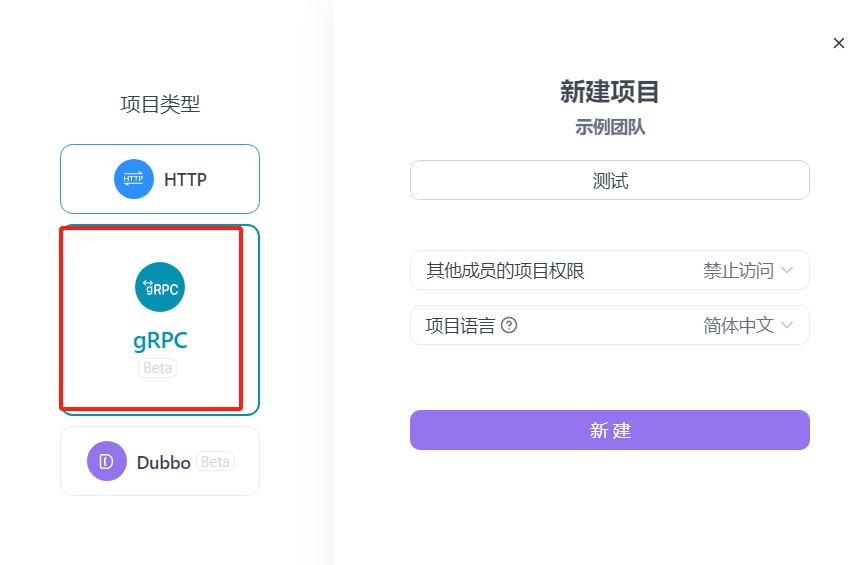
}7、使用apifox可以直接调用rpc的服务,引入文件
三、在提供restful api接口端调用rpc服务返回数据给前端
1、创建一个user-api的项目
2、创建描述文件
syntax = "v1"

type GetUserReq {
    Id int64 `path:"id"` // 主键id
}

type GetUserResp {
    Id int64 `json:"id"`              // 用户id
    Username string `json:"username"` // 用户名
}
@server(
    prefix: api/v1/user
    group: user
)
service user-api {
    @doc "根据用户id获取用户新"
    @handler GetUserByIdApi
    get /:id (GetUserReq) returns (GetUserResp)
}
3、使用脚本生成对应的项目文件
goctl api go -api *.api -dir . --style=gozero
4、在user-api的配置文件中引入rpc服务的配置
Name: user-api
Host: 0.0.0.0
Port: 8888
UserRpc:
  Etcd:
    Hosts:
      - 127.0.0.1:2379
Key: user.rpc5、在apps/user-api/internal/config/config.go创建服务的配置
type Config struct {
	rest.RestConf
	UserRpc zrpc.RpcClientConf
}
6、在apps/user-api/internal/svc/servicecontext.go依赖注入rpc服务
type ServiceContext struct {
	Config  config.Config
	UserRpc userclient.User
}
func NewServiceContext(c config.Config) *ServiceContext {
	return &ServiceContext{
		Config:  c,
		UserRpc: userclient.NewUser(zrpc.MustNewClient(c.UserRpc)),
	}
}
7、模拟实现业务代码
func (l *GetUserByIdApiLogic) GetUserByIdApi(req *types.GetUserReq) (resp *types.GetUserResp, err error) {
	// 模拟业务开发
	findByIdResp, err := l.svcCtx.UserRpc.FindById(l.ctx, &user.FindByIdReq{
		Id: req.Id,
	})
	if err != nil {
		return &types.GetUserResp{}, errors.New("查询失败")
	}
	return &types.GetUserResp{
		Id:       findByIdResp.Id,
		Username: findByIdResp.Username,
	}, nil
}
8、直接浏览模拟请求http://localhost:8888/api/v1/user/1
四、实际项目中可能是多个微服务的引入
1、在go-zero项目的svc文件夹下创建一个rpcClient.go的文件
type RpcClient struct {
	config      config.Config
  // 服务1
	systemRpc   zrpc.Client
	systemMutex sync.Mutex
	// 服务2
	usersMutex sync.Mutex
	usersRpc   zrpc.Client
}
func NewRpcClient(c config.Config) *RpcClient {
	return &RpcClient{
		config: c,
	}
}
func (r *RpcClient) GetSystemRpc() system.ConfigServiceClient {
	r.systemMutex.Lock()
	defer r.systemMutex.Unlock()
	if r.systemRpc == nil {
		systemRpc, err := zrpc.NewClient(r.config.SystemRpc)
		if err != nil {
			logx.Errorf("new system rpc failed: %+v", err)
			return nil
		}
		r.systemRpc = systemRpc
	}
	return system.NewConfigServiceClient(r.systemRpc.Conn())
}
func (r *RpcClient) GetUsersRpc() users.UsersClient {
	r.usersMutex.Lock()
	defer r.usersMutex.Unlock()
	if r.usersRpc == nil {
		usersRpc, err := zrpc.NewClient(r.config.UsersRpc)
		if err != nil {
			logx.Errorf("new user rpc failed: %+v", err)
			return nil
		}
		r.usersRpc = usersRpc
	}
	return users.NewUsersClient(r.usersRpc.Conn())
}2、在serviceContext.go文件中注入上面的rpcClient.go
type ServiceContext struct {
	Config    config.Config
	RpcClient *RpcClient
}
func NewServiceContext(c config.Config) *ServiceContext {
	rpcClient := NewRpcClient(c)
	if rpcClient == nil {
		logx.Errorf("new rpc client failed")
		panic(0)
	}
	return &ServiceContext{
		Config:    c,
		RpcClient: rpcClient,
	}
}3、正常使用user服务的方法
到此这篇关于goZero微服务开发小结的文章就介绍到这了,更多相关goZero微服务内容请搜索脚本之家以前的文章或继续浏览下面的相关文章希望大家以后多多支持脚本之家!
相关文章
 无论是在Go语言还是其他编程语言中,匿名函数都扮演着重要的角色,本文将详细介绍Go语言中匿名函数的概念和使用方法,感兴趣的小伙伴可以跟随小编一起学习一下2023-06-06
Go语言同步与异步执行多个任务封装详解(Runner和RunnerAsync)
这篇文章主要给大家介绍了关于Go语言同步与异步执行多个任务封装(Runner和RunnerAsync)的相关资料,文中通过示例代码介绍的非常详细,对大家的学习或者工作具有一定的参考学习价值,需要的朋友们下面随着小编来一起学习学习吧。2018-01-01 本文主要介绍了golang常见接口限流算法的实现,包含固定窗口、滑动窗口、漏桶和令牌桶,具有一定的参考价值,感兴趣的可以了解一下2025-03-03
 fasthttp 是一个使用 Go 语言开发的 HTTP 包,主打高性能,针对 HTTP 请求响应流程中的 hot path 代码进行了优化,下面我们就来介绍go语言fasthttp使用实例小结,感兴趣的朋友跟随小编一起看看吧2024-03-03
 本文将介绍如何使用VSCode搭建Go语言开发环境,Go语言是一种简洁高效的编程语言,而VSCode是一款轻量级的集成开发环境,二者的结合可以提供良好的开发体验,2023-08-08
 go现在的更新速度是非常的快啊,用着用着网上的教程就不配套了,下面这篇文章主要给大家介绍了关于快速升级Go版本的相关资料,文中介绍的方法几分钟就搞定了,需要的朋友可以参考下2024-05-05
Go Excelize API源码解读GetSheetViewOptions与SetPageLayo
这篇文章主要为大家介绍了Go Excelize API源码解读GetSheetViewOptions与SetPageLayout方法示例,有需要的朋友可以借鉴参考下,希望能够有所帮助,祝大家多多进步,早日升职加薪2022-08-08 Golang语言 strings标准库包主要涉及字符串的基本操作,下面我们来详细分析下吧2018-10-10
 本文主要介绍了goland 断点调试显示“变量不可用”的问题解决,文中通过示例代码介绍的非常详细,对大家的学习或者工作具有一定的参考学习价值,需要的朋友们下面随着小编来一起学习学习吧2025-11-11
 go-redsync是go语言实现分布式锁的常用工具,但官方文档是的入门示例并不是一个可以直接用于生产环境的版本,本文提供一个可以用于生产环境的使用示例,感兴趣的可以了解一下2025-10-10
最新评论