

Go语言中Http响应的实现
更新时间:2026年07月07日 09:24:38 作者:H_拾忆
本文主要介绍了Go语言中Http响应的实现,文中通过示例代码介绍的非常详细,对大家的学习或者工作具有一定的参考学习价值,需要的朋友们下面随着小编来一起学习学习吧
在Gin框架中可以使用gin.Context对象的String() JSON() XML() HTML() FILE()等方法生成Http响应.
1.字符串响应请求:
func response() {
	request := gin.Default()
	request.GET("/stringResponse", func(context *gin.Context) {
		context.String(http.StatusOK, "hello string response")
	})
}
通过string方法发送了200状态码和字符串给客户端.
2.动态字符串响应:
func response() {

	response := "动态响应"
	request := gin.Default()
	request.GET("/stringResponse", func(context *gin.Context) {
		context.String(http.StatusOK, "hello %s", response)
	})
}
响应字符串包含了response的值.实现了动态内容输出.
3.HTML方式响应:
package main

import (
	"github.com/gin-gonic/gin"
	"net/http"
	"strings"
)

func main() {
	request := gin.Default()
	request.GET("/hi_html", func(c *gin.Context) {
		htmlContent := "<h1>Hi,this an html response</h1>"
		c.Data(http.StatusOK, "text/html; charset=utf-8", []byte(htmlContent))
	})

	request.Run()

}
执行结果:

4.json格式响应请求:
package main

import (
	"github.com/gin-gonic/gin"
	"net/http"
	"strings"
)

func main() {
	request := gin.Default()
	request.GET("/hi_json", func(c *gin.Context) {
		jsonData := gin.H{
			"message": "hello world",
			"status":  200,
		}
		c.JSON(http.StatusOK, jsonData)
	})

	request.Run()

}
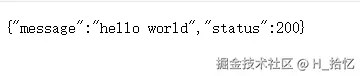
执行结果:
5.Go结构体Json响应:
package main

import (
	"github.com/gin-gonic/gin"
	"net/http"
	"strings"
)

func main() {
	request := gin.Default()
	request.GET("/hi_json", func(c *gin.Context) {
		jsonData := JsonData{
			Message: "Hello World!",
			Status:  200,
		}
		c.JSON(http.StatusOK, jsonData)
	})

	request.Run()

}

type JsonData struct {
	Message string `json:"message"`
	Status  int    `json:"status"`
}
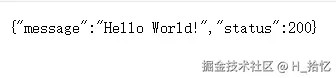
执行结果:
6.XML格式响应:
package main

import (
	"github.com/gin-gonic/gin"
	"net/http"
	"strings"
)

func main() {
	request := gin.Default()
	request.GET("/hi_xml", func(c *gin.Context) {
		xmlData := gin.H{
			"message": "hello xml",
			"status":  200,
		}
		c.XML(http.StatusOK, xmlData)
	})

	request.Run()

}
执行结果:
7.结构体定义XML响应:
package main

import (
	"github.com/gin-gonic/gin"
	"net/http"
	"strings"
)

func main() {
	request := gin.Default()
	request.GET("/hi_xml", func(c *gin.Context) {
		xmlData := JsonData{
			Message: "Hello World!",
			Status:  200,
		}
		c.XML(http.StatusOK, xmlData)
	})

	request.Run()

}
8.设置Http响应头:
gin.Context对象的Header方法用于设置单个响应头.该方法接收两个参数,响应头名称和对应的值:
package main

import (
	"github.com/gin-gonic/gin"
	"net/http"
	"strings"
)

func main() {
	request := gin.Default()
	request.GET("/hi_header", func(c *gin.Context) {
		c.Header("X-Custom-Header", "this is a custom header")
		c.String(http.StatusOK, "this is a custom header")
	})
	request.Run()
}
9.设置多个响应头:
可以通过多次调用Header方法来设置多个响应头.
package main

import (
	"github.com/gin-gonic/gin"
	"net/http"
	"strings"
)

func main() {
	request := gin.Default()
	request.GET("/hi_header", func(c *gin.Context) {
		c.Header("X-Custom-Header-One", "this is a custom header")
		c.Header("X-Custom-Header-Two", "this is a custom header")
		c.Header("X-Custom-Header-Three", "this is a custom header")
		c.String(http.StatusOK, "this is a custom header")
	})
	request.Run()
}
10.重定向设置响应头:
在执行重定向之前,使用gin.Context对象的Header方法设置响应头,然后使用Redirect进行重定向.
package main

import (
	"github.com/gin-gonic/gin"
	"net/http"
	"strings"
)

func main() {
	request := gin.Default()
	request.GET("/hi_header", func(c *gin.Context) {
		c.Header("Content-Type", "text/html; charset=utf-8")
		c.Redirect(http.StatusTemporaryRedirect, "http://www.google.com")
	})
	request.Run()
}
到此这篇关于Go语言中Http响应的实现的文章就介绍到这了,更多相关Go语言Http响应内容请搜索脚本之家以前的文章或继续浏览下面的相关文章希望大家以后多多支持脚本之家!
您可能感兴趣的文章:
相关文章
 习惯与函数式编程语言的开发者,会认为for循环和if判断语句是冗长的代码,通过使用map和filter处理集合元素让代码更可读。本文介绍Go闭包实现集合转换和过滤功能2023-01-01
 这篇文章主要介绍了go语言编程之美自定义二进制文件实用指南2023-12-12
golang中的io.ReadCloser与ioutil.NopCloser使用
这篇文章主要介绍了golang中的io.ReadCloser与ioutil.NopCloser使用方式,具有很好的参考价值,希望对大家有所帮助,如有错误或未考虑完全的地方,望不吝赐教2024-03-03 这篇文章主要为大家介绍了一款实用的命令行工具glow,这个CLI工具可以在命令行读取Markdown,这对于码农来说非常友好,使用起来也非常舒爽2022-07-07
 这篇文章主要介绍了Golang实现http文件上传小功能的案例,具有很好的参考价值,希望对大家有所帮助。一起跟随小编过来看看吧2021-05-05
 本文主要介绍了Go interface{} 转切片类型的实现方法,文中通过示例代码介绍的非常详细,具有一定的参考价值,感兴趣的小伙伴们可以参考一下2022-02-02
 这篇文章主要为大家介绍了Go语言生成PDF文件的实例探究,有需要的朋友可以借鉴参考下,希望能够有所帮助,祝大家多多进步,早日升职加薪2024-01-01
 哈希表是常见的数据结构,有的语言会将哈希称作字典或者映射,在Go中,哈希就是常见的数据类型map,本文就来聊聊Golang中map的相关知识吧2023-04-04
 这篇文章主要介绍了goLand Delve版本太老的问题及解决方案,具有很好的参考价值,希望对大家有所帮助,如有错误或未考虑完全的地方,望不吝赐教2023-09-09
 本篇文章主要介绍了Go Web框架gin的入门教程,小编觉得挺不错的,现在分享给大家,也给大家做个参考。一起跟随小编过来看看吧2018-05-05
最新评论