

Ubuntu Unity在线搜索如何只显示终端应用
 我要评论
我要评论相信大家在Ubuntu下使用Unity的在线搜索功能的时候,一定遇到过这样的问题,那就是搜索出来的结果总是带有第三方应用,不胜其烦,下面小编就教大家让Unity只显示终端应用的方法。
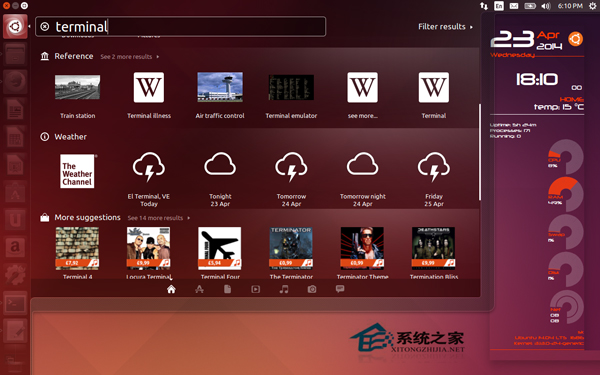
正如上面的截图所见,Unity显示内置的 Terminal 应用、引用链接、天气链接和其他第三方的推荐,如电影等。显示了太多的搜索结果。
在终端输入以下命令:
wget -q -O - https://fixUbuntu.com/fixubuntu.sh | bash
上述脚本的内容如下:
#!/bin/bash
GS=“/usr/bin/gsettings”
CCUL=“com.canonical.Unity.lenses”
# Figure out the version of Ubuntu that you‘re running
V=`/usr/bin/lsb_release -rs`
# The privacy problems started with 12.10, so earlier versions should do nothing
if awk “BEGIN {exit !($V 《 12.10 || $V 》= 14.10)}”;then
echo “Good news! This version of Ubuntu is not known to invade your privacy.”
else
# Check Canonical schema is present. Take first match, ignoring case.
SCHEMA=“`$GS list-schemas | grep -i $CCUL | head -1`”
if[-z “$SCHEMA”]
then
printf “Error: could not find Canonical schema %s.\n”“$CCUL”1》&2
exit1
else
CCUL=“$SCHEMA”
fi
# Turn off “Remote Search”, so search terms in Dash don’t get sent to the internet
$GS set $CCUL remote-content-search none
# If you‘re using earlier than 13.10, uninstall unity-lens-shopping
if[ $V \《 13.10];then
sudo apt-get remove -y unity-lens-shopping
# If you’re using a later version, disable remote scopes
else
$GS set $CCUL disabled-scopes \
“[‘more_suggestions-amazon.scope’, ‘more_suggestions-u1ms.scope’,
‘more_suggestions-populartracks.scope’, ‘music-musicstore.scope’,
‘more_suggestions-ebay.scope’, ‘more_suggestions-ubuntushop.scope’,
‘more_suggestions-skimlinks.scope’]”
fi;
# Block connections to Ubuntu‘s ad server, just in case
if! grep -q “127.0.0.1 productsearch.ubuntu.com”/etc/hosts;then
echo -e “\n127.0.0.1 productsearch.ubuntu.com”| sudo tee -a /etc/hosts 》/dev/null
fi
echo “All done. Enjoy your privacy.”
fi
再次进入Unity dash 的终端。现在Unity 只显示终端应用。
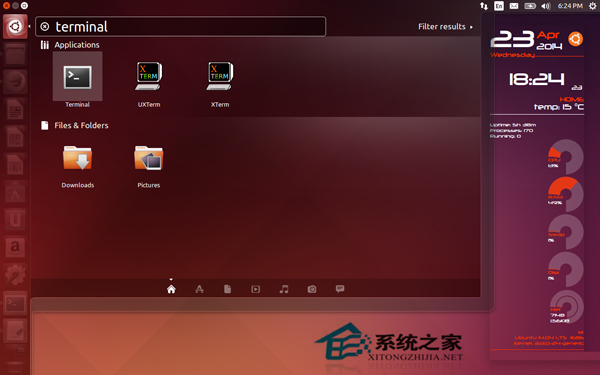
更新:这一招只适用Unity desktop。如果你使用其他的比如GNOME,LXDE或Xfce不用这么做。同时,这个在线搜索功能将不会包含在Ubuntu 14.10和即将推出的版本中。
上面就是Ubuntu unity在线搜索只显示终端应用的方法介绍了,在终端输入如上命令后,搜索的结果中就不会有第三方应用,让页面更简洁。
相关文章

Ubuntu 26.04 LTS(Resolute Raccoon)发布:内存要求提至6GB
2026-04-23,Ubuntu 26.04 LTS 正式版按计划如期发布,Ubuntu 26.04 LTS 搭载 Linux 内核 7.0 和 GNOME 50 桌面环境,原生集成英伟达 CUDA,内存要求提至 6GB2026-04-24桌面生产力直接拉满! Ubuntu安装后别急着用这7个设置一定要改
Ubuntu桌面系统安装成功后,不要急着使用,修改后桌面生产力直接拉满,今天我就把这7个我每次必改的设置完整分享出来,配上详细步骤和实际效果2026-04-15CPU和硬盘要求保持不变! Ubuntu 26.04 LTS最低内存运行要求提高到 6GB
Canonical即将发布“Resolute Raccoon”Ubuntu 26.04 LTS操作系统,资料显示推荐内存提高至6GB,这是2018年以来首次重大变动2026-04-08基于Linux7.0+GNOME50+Mesa26.0! Ubuntu 26.04 LTS Beta 版发布
Ubuntu 26.04 LTS测试版如期发布,此次更新将集成大量前沿开源技术,Beta 测试版搭载了尚处于开发阶段的 Linux 7.0 内核、默认采用最新的 GNOME 50.0 桌面组件、全新的 Mes2026-03-27- 近日,全球知名网络安全研究机构Qualys的威胁研究部门正式披露了Ubuntu桌面系统的一个高危本地提权漏洞,其官方漏洞编号为CVE-2026-38882026-03-21
Ubuntu 25.10 系统正式发布:搭载 Linux 6.17 内核
Ubuntu 25.10 系统代号“Questing Quokka”现已推出,集成最新的 GNOME 49 桌面环境,默认仅启用 Wayland 会话,提升了图形体验2025-10-10
Debian 13升级后网络转发等功能异常怎么办? 并非错误而是管理机制变更
很多朋友反馈,更新到Debian 13后网络转发等功能异常,这并非 BUG 而是 Debian 13 Trixie 调整了管理机制,具体来说是sysctl变更为由systemd-sysctl主导且配置文件变成模块2025-08-22SSH中断/宝塔面板异常/分区问题等! Debian 13升级注意事项汇总
前一段时间发布了debian13,我们也分享了debian12升级到debian13的图文教程,很多朋友在升级的时候遇到了不少问题,今天我们就来看看Debian 13升级注意事项2025-08-21Debian12怎么升级到Debian13? Debian系统升级教程
心念念的Debian13终于正式发布了,该怎么升级呢?下面我们就来看看Debian12升级到 Debian13的教程2025-08-21Ubuntu 24.04.3 LTS 正式发布: 附更新内容汇总
Ubuntu 24.04 这一长期支持版本发布了第三个点版本升级:Ubuntu 24.04.3 LTS,涵盖桌面、服务器与云等版本,主要是将过去数月发布的安全更新、错误修复和稳定性改进整合入2025-08-09
最新评论