

webstorm配置eslint一键格式化代码的方法详解
1、安装eslint插件:npm install --save-dev eslint-config-vue eslint-plugin-vue
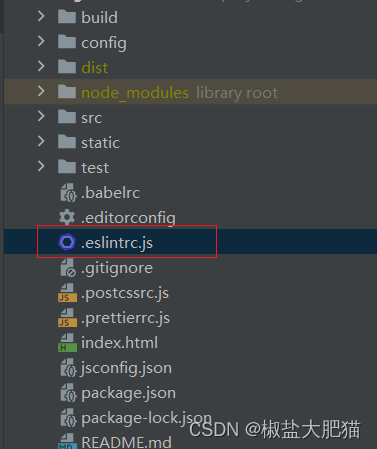
2、创建eslintrc.js文件,添加相关代码规范(根据自己喜好进行调整)
module.exports = {
  root: true,
  parserOptions: {
    parser: 'babel-eslint',
    sourceType: 'module'
  },
  env: {
    browser: true,
    node: true,
    es6: true
  },
  extends: ['plugin:vue/recommended', 'eslint:recommended'],

  // add your custom rules here
  // it is base on https://github.com/vuejs/eslint-config-vue
  rules: {
    'vue/attribute-hyphenation': 'off',
    'vue/no-mutating-props': 'off',
    'vue/require-prop-types': 'off',
    'vue/html-self-closing': [
      'error',
      {
        html: {
          void: 'any',
          normal: 'any',
          component: 'always'
        },
        svg: 'always',
        math: 'always'
      }
    ],
    'vue/max-attributes-per-line': [
      2,
      {
        singleline: 2,
        multiline: {
          max: 2,
          allowFirstLine: false
        }
      }
    ],
    'vue/singleline-html-element-content-newline': 'off',
    'vue/multiline-html-element-content-newline': 'error',
    'vue/name-property-casing': ['error', 'PascalCase'],
    'vue/no-v-html': 'off',
    'accessor-pairs': 2,
    'arrow-spacing': [
      2,
      {
        before: true,
        after: true
      }
    ],
    'block-spacing': [2, 'always'],
    'brace-style': [
      2,
      '1tbs',
      {
        allowSingleLine: true
      }
    ],
    camelcase: [
      0,
      {
        properties: 'always'
      }
    ],
    'comma-dangle': [2, 'never'],
    'comma-spacing': [
      2,
      {
        before: false,
        after: true
      }
    ],
    'comma-style': [2, 'last'],
    'constructor-super': 2,
    curly: [2, 'multi-line'],
    'dot-location': [2, 'property'],
    'eol-last': 2,
    eqeqeq: 'off',
    'generator-star-spacing': [
      2,
      {
        before: true,
        after: true
      }
    ],
    'handle-callback-err': [2, '^(err|error)$'],
    indent: [
      2,
      2,
      {
        SwitchCase: 1
      }
    ],
    'jsx-quotes': [2, 'prefer-single'],
    'key-spacing': [
      2,
      {
        beforeColon: false,
        afterColon: true
      }
    ],
    'keyword-spacing': [
      2,
      {
        before: true,
        after: true
      }
    ],
    'new-cap': [
      2,
      {
        newIsCap: true,
        capIsNew: false
      }
    ],
    'new-parens': 2,
    'no-array-constructor': 2,
    'no-caller': 2,
    'no-case-declarations': 'off',
    'no-console': 'off',
    'no-class-assign': 2,
    'no-cond-assign': 2,
    'no-const-assign': 2,
    'no-control-regex': 0,
    'no-delete-var': 2,
    'no-dupe-args': 2,
    'no-dupe-class-members': 2,
    'no-dupe-keys': 2,
    'no-duplicate-case': 2,
    'no-empty-character-class': 2,
    'no-empty-pattern': 2,
    'no-eval': 2,
    'no-ex-assign': 2,
    'no-extend-native': 2,
    'no-extra-bind': 2,
    'no-extra-boolean-cast': 2,
    'no-extra-parens': [2, 'functions'],
    'no-fallthrough': 2,
    'no-floating-decimal': 2,
    'no-func-assign': 2,
    'no-implied-eval': 2,
    'no-inner-declarations': [2, 'functions'],
    'no-invalid-regexp': 2,
    'no-irregular-whitespace': 2,
    'no-iterator': 2,
    'no-label-var': 2,
    'no-labels': [
      2,
      {
        allowLoop: false,
        allowSwitch: false
      }
    ],
    'no-lone-blocks': 2,
    'no-mixed-spaces-and-tabs': 2,
    'no-multi-spaces': 2,
    'no-multi-str': 2,
    'no-multiple-empty-lines': [
      2,
      {
        max: 1
      }
    ],
    'no-native-reassign': 2,
    'no-negated-in-lhs': 2,
    'no-new-object': 2,
    'no-new-require': 2,
    'no-new-symbol': 2,
    'no-new-wrappers': 2,
    'no-obj-calls': 2,
    'no-octal': 2,
    'no-octal-escape': 2,
    'no-path-concat': 2,
    'no-proto': 2,
    'no-redeclare': 2,
    'no-regex-spaces': 2,
    'no-return-assign': [2, 'except-parens'],
    'no-self-assign': 2,
    'no-self-compare': 2,
    'no-sequences': 2,
    'no-shadow-restricted-names': 2,
    'no-spaced-func': 2,
    'no-sparse-arrays': 2,
    'no-this-before-super': 2,
    'no-throw-literal': 2,
    'no-trailing-spaces': 2,
    'no-undef': 2,
    'no-undef-init': 2,
    'no-unexpected-multiline': 2,
    'no-unmodified-loop-condition': 2,
    'no-unneeded-ternary': [
      2,
      {
        defaultAssignment: false
      }
    ],
    'no-unreachable': 2,
    'no-unsafe-finally': 2,
    'no-unused-vars': [
      1,
      {
        vars: 'all',
        args: 'none'
      }
    ],
    'no-useless-call': 2,
    'no-useless-computed-key': 2,
    'no-useless-constructor': 2,
    'no-useless-escape': 0,
    'no-whitespace-before-property': 2,
    'no-with': 2,
    'one-var': [
      2,
      {
        initialized: 'never'
      }
    ],
    'operator-linebreak': [
      2,
      'after',
      {
        overrides: {
          '?': 'before',
          ':': 'before'
        }
      }
    ],
    'padded-blocks': [2, 'never'],
    quotes: [
      2,
      'single',
      {
        avoidEscape: true,
        allowTemplateLiterals: true
      }
    ],
    semi: [2, 'never'],
    'semi-spacing': [
      2,
      {
        before: false,
        after: true
      }
    ],
    'space-before-blocks': [2, 'always'],
    'space-before-function-paren': [0, 'never'],
    'space-in-parens': [2, 'never'],
    'space-infix-ops': 2,
    'space-unary-ops': [
      2,
      {
        words: true,
        nonwords: false
      }
    ],
    'spaced-comment': [
      2,
      'always',
      {
        markers: ['global', 'globals', 'eslint', 'eslint-disable', '*package', '!', ',']
      }
    ],
    'template-curly-spacing': [2, 'never'],
    'use-isnan': 2,
    'valid-typeof': 2,
    'wrap-iife': [2, 'any'],
    'yield-star-spacing': [2, 'both'],
    yoda: [2, 'never'],
    'prefer-const': 2,
    'no-debugger': 0,
    'object-curly-spacing': [
      2,
      'always',
      {
        objectsInObjects: false
      }
    ],
    'array-bracket-spacing': [2, 'never']
  }
}
3、webstorm进行快捷键设置

4、这样在页面使用Alt + S,即可一键格式化代码了
附:处理低版本webStorm右键没有Fix Eslint Problems的问题
webstorm的版本过低,配置了eslint后,右键.vue文件却不会出现Fix Eslint Problems选项,如果我们希望自动修复.vue文件中的js代码,只能在命令行里操作,并且需要为eslint命令指定文件所在目录以及文件名,或者cd到文件所在目录执行,如eslint --fix ‘src/pages/home.vue’;每次要修复时,都要这样写,显然不能接受。
那么我们需要自定义代码修复工具:
(一)配置Webstorm的Tools
打开settings -> Tools -> External Tools,点击添加按钮,做下图的配置:
ProjectFileDir 指工程所在目录。
2.FilePathRelativeToProjectRoot 指文件相对于工程所在的路径。

配置完成后,右键点击 .js或者 .vue文件就会出现 External Tools -> eslint fix的选项,点击该选项,就完成了.vue文件的自动修复操作,同时在控制台会打印存在问题的代码位置及描述:

总结
到此这篇关于webstorm配置eslint一键格式化代码的文章就介绍到这了,更多相关webstorm配置eslint格式化代码内容请搜索脚本之家以前的文章或继续浏览下面的相关文章希望大家以后多多支持脚本之家!
相关文章
 大数据可视化是进行各种大数据分析解决的最重要组成部分之一。这篇文章主要介绍了4个最受欢迎的大数据可视化工具,需要的朋友可以参考下2019-06-06
 这篇文章主要为大家介绍了混淆矩阵Confusion Matrix分析的翻译,有需要的朋友可以借鉴参考下,希望能够有所帮助,祝大家多多进步,早日升职加薪2022-06-06
 这篇文章主要介绍了WPF滑块控件(Slider)的自定义样式的相关知识,本文给大家介绍的非常详细,具有一定的参考借鉴价值 ,需要的朋友可以参考下2019-08-08
 这篇文章主要介绍了grafana安装及使用教程详解,本文给大家介绍的非常详细,对大家的学习或工作具有一定的参考借鉴价值,需要的朋友可以参考下2021-01-01
 这篇文章主要介绍了Vim配置的相关资料,包括通用配置,常用插件配置,设置插件的方法,本文给大家讲解的非常详细,需要的朋友可以参考2024-01-01
 DDoS攻击通过多主机发起海量请求,导致服务器过载,影响服务,攻击方式包括僵尸网络、漏洞利用等,分为SYN flood、ACK flood、UDP flood、反射放大、空连接、CC攻击等,防御手段有云原生、CDN安全、DDOS高防、硬件防护、运营商流量压制2025-05-05
 Postman是google开发的一款功能强大的网页调试与发送网页HTTP请求,本文主要介绍了如何使用postman,具有一定的参考价值,感兴趣的可以了解一下2022-01-01
 这篇文章主要为大家介绍了SVN与Git版本控制的优缺点差异全面分析,有需要的朋友可以借鉴参考下,希望能够有所帮助,祝大家多多进步,早日升职加薪2022-04-04
MobaXterm连接服务器如何在关闭会话的情况下依然执行程序(最新推荐)
这篇文章主要介绍了MobaXterm连接服务器如何在关闭会话的情况下依然执行程序,本文给大家介绍的非常详细,对大家的学习或工作具有一定的参考借鉴价值,需要的朋友可以参考下2023-06-06 这篇文章主要介绍了8种类型极品程序员,不知你属于哪一种?本文总结归纳了8种程类型的程序员,总结的非常精辟,来看看你是属于哪一种吧~2014-09-09
最新评论